

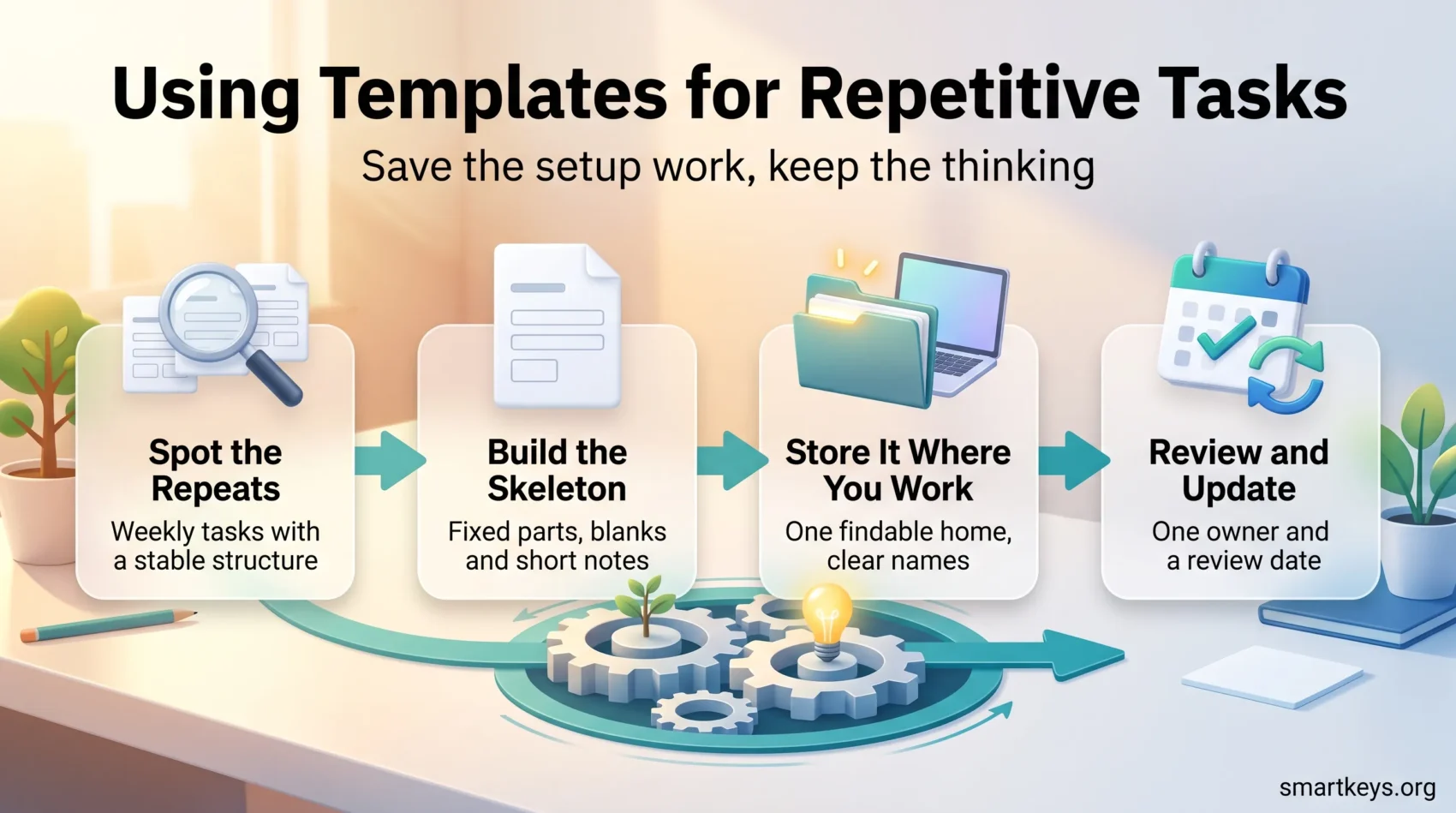
A template is a pre-built starting point: a document, message, checklist or project plan that already contains the structure you would otherwise rebuild from scratch every time. You fill in what is specific to the situation and leave the rest alone. That is the whole idea, and it is why templates remain one of the cheapest productivity upgrades available to a small team.
The problem they solve is real. In its Anatomy of Work Index 2021, Asana surveyed more than 13,000 knowledge workers and found they spent roughly 60% of the day on “work about work”: chasing approvals, hunting for files, rewriting the same status update, reformatting a report for the hundredth time. Templates do not fix all of that. They remove one specific slice: the part where you rebuild a known structure by hand.
This guide covers how to spot the tasks worth templating, which types deliver value first, where to build them, and how to keep them from rotting.
Key Takeaways
- A template is a reusable starting structure, not a finished document. It saves the setup work, not the thinking.
- Template the tasks that are frequent, repetitive and have a stable structure. Everything else is not worth the effort.
- Consistent formats cut errors and make review faster, because readers know where to look.
- Templates reduce small decisions, which protects mental energy for work that actually needs judgement.
- Every template needs an owner and a review date, or it quietly goes stale and people stop trusting it.
- AI drafting tools now generate a usable first version quickly, which makes building a template library far less tedious than it used to be.
What a Template Actually Is
Most people already use templates without calling them that. The email you copy from your sent folder and edit is one. So is the folder structure you duplicate for every new client. Making it official just means storing that structure somewhere findable, naming it, and agreeing that it is the starting point.
A template usually contains three things: the fixed parts that never change (headings, legal wording, brand elements), the variable parts you fill in each time (names, dates, figures), and short instructions telling the next person what belongs where.
That last part is what separates a template from a copied file. Without it, a colleague opens your template, cannot tell which parts are meant to be edited, and starts over.
A template is not automation. Automation removes a step entirely: software creates the invoice or sends the reminder without you. A template still needs a human, it just gives that human a running start. The two work well together: many teams begin with a template, notice they fill it in the same way every time, and then automate the repetitive part.
Why Templates Save More Than Typing Time
The time saving is the obvious benefit, and usually the smallest one.
Fewer errors. A fixed structure acts as a checklist. If your client proposal template has a section for payment terms, nobody sends a proposal without payment terms. This is the same principle behind using checklists for routine work: the structure remembers so you do not have to.
Faster review. When every status report follows the same layout, a manager reading ten of them knows exactly where the risks section sits. Reviewing becomes scanning instead of reading.
Less decision load. Choosing a font, a heading order and an opening line are trivial decisions individually. Made forty times a day they add up. Working from a template removes that friction and helps with reducing decision fatigue, leaving more capacity for the calls that genuinely need your judgement.
Faster onboarding. A new hire who receives a template library learns how the team works by reading it. The templates encode the expected standard, which is why they pair naturally with structured onboarding for new team members.
Consistency people notice. Clients form an impression from formatting long before they read the content. Uniform documents look deliberate.
One trade-off is worth naming. Templates make output predictable, and predictable can slide into generic. A proposal that reads like a form letter wins nothing. Keep the structure fixed and the substance custom: template the skeleton, write the argument fresh.
How to Find the Tasks Worth Templating
Not every repeated task deserves a template. Building and maintaining one costs time, so it only pays back above a certain frequency. A rough filter: template it if you do it at least weekly, if it follows a recognisable structure, and if getting it wrong has a cost.
Here is a practical way to build the list.
- Track a normal week. Write down what you actually produce, not what you planned to produce. Running a proper time audit for a week gives you the raw material.
- Mark the repeats. Highlight anything that appeared more than twice. Weekly reports, onboarding emails, client updates, meeting agendas and expense summaries usually show up first.
- Check the structure. Open your last three versions of each repeat. If they are 70% identical, that is a template waiting to happen. If every version differs, leave it alone.
- Estimate the payback. Multiply the minutes each instance takes by how often it happens. A twenty minute task done weekly is worth roughly seventeen hours a year, which justifies an hour of template building. A twenty minute task done twice a year does not.
- Ask the team. People rebuild things you never see. Colleagues will name repeats you have gone blind to.
The widely cited McKinsey estimate that about 60% of occupations could have 30% or more of their activities automated dates from 2015, and it describes automation potential rather than templates. Treat it as a signal that ordinary jobs contain a lot of routine structure, not as a promise about your week. Your own audit is the number that matters.
The Template Types Most Teams Need First
If you are starting from nothing, build in this order. These four cover most repeat work in a small team.
Email and Message Templates
Recurring replies are the fastest win: high volume, stable structure. Introductions, follow-ups, scheduling, invoicing questions, polite declines. Store them where you write, not in a separate document, or you will not use them. Most mail clients support snippets or canned responses, and a dedicated text expansion tool works across every application. If you run a support or client inbox, a set of pre-written email replies for customer FAQs pays for itself within days.
Keep the tone human. A template that reads like it was generated is worse than a slower, personal reply.
Document and Reporting Templates
Status reports, project briefs, proposals, invoices and post-project reviews all benefit from a fixed skeleton. Build one per document type, define which sections are mandatory, and add a one-line note under each heading explaining what belongs there.
Reporting templates have a second advantage: because the layout never moves, you can compare this month against last month at a glance. If your reporting also feeds a shared view of the numbers, a simple productivity dashboard keeps the summary in one place.
Project and Task Templates
Any project you run more than once should exist as a duplicable project: the task list, the dependencies, the owners and the typical durations, ready to clone. Client onboarding, product launches, hiring rounds and event planning are the usual candidates.
Project management tools handle this natively. In Asana, Trello, ClickUp, Monday.com and Jira you can save a board or project as a template and clone it in seconds. If your team works in a card-based system, a reusable kanban board layout does the same job at an individual level. Pair the template with clear ownership so cloned tasks land with a named person, which makes delegating work far less ambiguous.
Meeting Templates
An agenda template and a notes template together fix most of what is wrong with recurring meetings. The agenda forces a purpose and a time box before the invite goes out. The notes structure separates decisions from discussion, so whoever missed it catches up in a minute. A standard meeting notes format is one of the highest-leverage templates a team can adopt, and AI transcription now handles much of the capture, as covered in this guide to AI meeting note workflows.
Templates for Planning Your Time
Planning is itself repetitive, which makes it an obvious candidate. Three formats cover most needs.
A weekly plan template lists your priorities for the week, the commitments already in the calendar, and the slots left for real work. Reusing the same layout every Friday turns weekly planning into a ten minute routine rather than a blank-page problem.
A daily plan template pairs a short task list with the time blocks you intend to protect. If you already practise time blocking, a saved calendar layout with your standard focus blocks, admin slot and buffer time saves you rebuilding the week every Monday.
A task capture template keeps your list consistent: what the task is, who it belongs to, when it is due, and what “done” means. Vague entries are the main reason to-do lists stop working.
One caution. Planning templates with fifteen minute granularity look impressive and rarely survive contact with a real day. Start coarse. Half-day blocks are easier to keep than a schedule that breaks by ten in the morning.
Where to Build and Store Templates
The best place for a template is inside the tool where the work happens. A brilliant proposal template stored in a folder nobody opens will be ignored.
Documents: Google Docs and Microsoft Word both offer template galleries and let you save your own. In Google Workspace, organisation templates appear directly in the template gallery for everyone on the domain.
Workspaces and wikis: Notion, Confluence and Coda are built around duplicable pages and databases, which suits a central template library.
Project management: Asana, ClickUp, Trello, Monday.com and Jira all support saving projects, boards and recurring task lists as templates.
Design and presentations: Canva, Figma and PowerPoint templates protect brand consistency when non-designers have to produce something.
Scheduling: Booking tools remove the back-and-forth of finding a slot, which is templating applied to your calendar. See this overview of automated scheduling.
Two storage rules matter more than the tool you pick. First, one findable home. A single folder, wiki space or gallery that everyone knows about beats templates scattered across five apps. Second, obvious names. “Client Proposal v2 FINAL” tells nobody anything; “Proposal: fixed-fee project” tells them exactly when to use it.
What AI Changes About Templates
AI has shifted the effort curve. Writing assistants inside Google Workspace, Microsoft 365, Notion and the major project tools will now produce a first draft of a document structure from a short instruction, so the tedious part of building a library has largely gone. Where you once put aside an afternoon to draft ten templates, you can generate rough versions in minutes and spend your time editing them.
What has not changed is the need for review. A generated template reflects a generic pattern, not your company’s obligations, tone or process. Someone still has to check that the contract clause is the one you actually use.
Two practical habits help. Use AI to produce the skeleton, then edit it yourself before anyone else sees it. And keep your approved templates as the reference the AI works from, rather than regenerating from scratch each time, so the output stays consistent with how your team already works. Where a template is filled in the same way every time, that step is usually a candidate for a proper digital workflow instead.
Keeping Templates Useful Over Time
The most common failure is not a bad template. It is a good template that nobody updated.
Give every template an owner. One named person is responsible for it. Shared ownership means nobody owns it.
Set a review date. Twice a year is enough for most documents. Anything touching prices, legal terms or compliance needs checking more often.
Version deliberately. Keep one current version visible and archive the rest. Multiple live versions guarantee somebody picks the wrong one.
Write the instructions inside the template. A short italic note under each section, deleted before sending, is more effective than a separate guide nobody reads.
Collect friction. If people edit the same section every single time, the template is wrong. Ask what they always change, then change it.
Templates work best as part of a documented way of working. If your team already maintains standard operating procedures, templates are the artefacts those procedures point to.
Mistakes That Make Templates Fail
- Templating too much. A library of eighty templates is harder to navigate than no library at all. Start with five that get used daily.
- Over-engineering. Conditional fields, colour rules and nested sections raise the barrier to using the thing. Simple templates get used.
- Hiding them. If a template takes more than ten seconds to find, people rebuild from memory.
- Sending the skeleton. Placeholder text reaching a client is the classic embarrassment. Make placeholders visually obvious, in brackets or highlighted.
- Treating templates as a substitute for judgement. The structure is handled. What to say is not.
- Skipping the batch. Templates pair well with grouping similar tasks together. Filling in six of the same document in one sitting is far faster than six separate context switches.
Conclusion
Templates are not a productivity system. They are a small, unglamorous fix for one specific problem: rebuilding a known structure by hand, over and over.
Start narrow. Pick the two or three things you produce every week, save the structure once, store it where you already work, and put a review date on it. That is enough to notice the difference within a fortnight. Expand only when a new repeat proves itself, and let the unused ones quietly disappear. A small, current, trusted library beats a large abandoned one, and the time you get back goes where it belongs: on the work that actually needs you, which is easier to spot once you prioritise deliberately.
Found this useful?
Make SmartKeys a preferred source on Google, and our articles will surface more often in your Top Stories, AI Overviews, and AI Mode.
Add as Preferred Source




