Your task list keeps growing, but you cannot tell which items are actually moving. A personal Kanban board fixes that by making your work visible. It is a simple grid of columns, usually “To Do”, “Doing” and “Done”, with one card for each task. You move a card from left to right as the work progresses.
The method comes from car manufacturing, but the personal version needs no software, training or team. Paper and sticky notes are enough to start. What makes it work is not the board. It is the rule that only a few cards may sit in “Doing” at once.
Key Takeaways
- A personal Kanban board shows your workload as cards moving through columns.
- Personal Kanban has two rules: make your work visible, and limit how much you do at once.
- Three columns are enough to start. Add more only when a real gap appears.
- A work in progress limit of one to three tasks is the part that changes your day.
- Physical boards suit one desk. Digital boards suit people who move between devices.
- Separate boards for work and personal life keep each one readable.
- The board only helps if you look at it. A short daily and weekly review keeps it honest.
What a Kanban Board Actually Is
Kanban is a Japanese word meaning signboard or card. Toyota built the original system on its factory floors, borrowing the idea from American supermarkets that restock a shelf only when customers empty it. Rather than pushing parts down the line on a fixed schedule, each stage pulled work from the one before it when it had room. Toyota’s own company history records that kanban ran at all of its plants by 1963.
Personal Kanban applies that pull logic to one person’s workload. Jim Benson and Tonianne DeMaria Barry set out the method in their 2011 book Personal Kanban: Mapping Work, Navigating Life. They reduced it to two rules: visualise your work, and limit your work in progress. Work in progress, usually shortened to WIP, means the tasks you have started but not finished.
Everything else is optional. Columns, colours and tools are decoration on top of those two rules.
Why a Board Beats a Plain List
A written list tells you what exists. A board tells you where each item stands.
On a list, a task you started three weeks ago and one you thought of this morning look identical. On a board, the first has been sitting in “Doing” long enough that you cannot ignore it. Stalled work becomes visible without anyone chasing it. A well kept to-do list gives you the same clarity at the start of the work; a board gives it to you in the middle.
The second difference is the cap on started work. A list has no ceiling, so it quietly invites you to open six things at once. Switching between them is not free. In a 2001 study published in the Journal of Experimental Psychology: Human Perception and Performance, Joshua Rubinstein, Jeffrey Evans and David Meyer showed that people lose time re-orienting whenever they change tasks, and that the loss grows as tasks get more complex. Our articles on task switching and focus and on the cost of task switching look at how large that cost really is.
A WIP limit turns that finding into a rule. If only three cards may sit in “Doing”, starting a fourth forces you to finish or park something first. You make that decision once, on the board, instead of twenty times a day in your head.
How to Build Your First Board
You can have a working board in about fifteen minutes. Do it in four steps and resist the urge to design something clever on the first attempt.
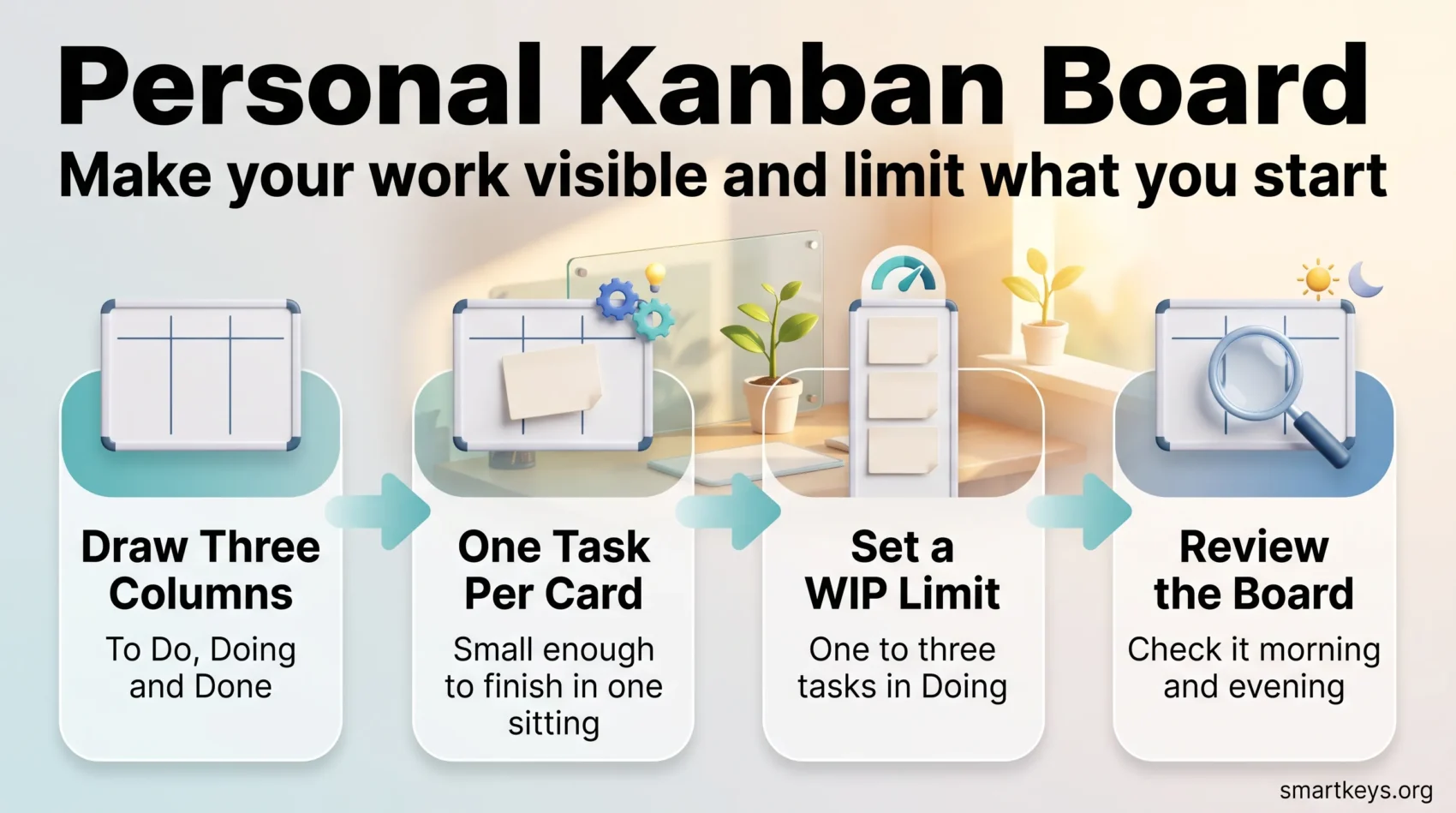
Step 1: Draw Three Columns
Label them “To Do”, “Doing” and “Done”. That is your whole workflow for now. Use a whiteboard, a window, a sheet of A3 paper or a free digital board. The surface matters far less than being able to see it from where you sit.
Step 2: Write One Task Per Card
Empty your head onto sticky notes, one task per note. Keep each card small enough to finish in a single sitting. “Rewrite the client proposal” is too big. “Draft the pricing section” is the right size. A vague card is usually an oversized one, and our guide to breaking large goals into smaller steps covers how to split it.
Put every card in “To Do” at first, including work you have already started. Seeing the real total is the point.
Step 3: Set a WIP Limit
Write a number at the top of the “Doing” column. For most people one to three is right. Anything higher and the limit stops biting.
Then respect it. If the column is full and you want to start something new, you have two honest options: finish a card, or move one back to “To Do” and admit it is not in progress. Both beat pretending you are working on five things.
Step 4: Review the Board
Check the board twice a day, when you start and before you stop. Ask one question: which card am I pulling next? A longer weekly review is where you clear “Done”, reorder what is left and notice cards that have not moved for a fortnight.
Choosing Columns That Match Your Work
Three columns cover most people. Add another only when the same problem keeps appearing. Two extras earn their place. A “Waiting” column holds work that is genuinely blocked by someone else, such as a reply you need before you can carry on. Without it, blocked cards clog “Doing” and make your limit meaningless. A “Today” column sits between “To Do” and “Doing” and holds the handful of cards you have committed to for the day.
A “Backlog” column on the far left holds everything you might do eventually. That keeps “To Do” down to work that is genuinely next, which makes the board far less intimidating. If you handle several distinct types of work, horizontal rows called swimlanes can separate them, for example one lane for clients and one for admin. Use them sparingly.
Deciding what belongs in “To Do” at all is a separate skill. If your board fills faster than you can empty it, the problem is upstream, and a prioritization framework such as the Eisenhower Matrix will help more than another column.
Physical or Digital: Picking Your Tools
A physical board wins on friction. Nothing loads, nothing syncs, nothing pings you. It stays in your field of view all day, which is most of its value. The catch is obvious: it exists in one room only.
Digital boards win on portability, search, reminders and attachments. Trello is the most common starting point for personal use. Its free plan allows up to ten boards per Workspace, unlimited cards and 250 automation runs a month, which is more than one person usually needs. Paid tiers start at $5 per user per month billed annually, with Premium at $10. Todoist is list first but offers a board view; its free Beginner plan is capped at five personal projects and three filter views.
Notion, Asana, ClickUp and Jira all have Kanban views too. Our overview of productivity apps compares them, and a separate guide covers Trello Power-Ups if you want to extend a board you already use.
Two practical notes. Prices and plan limits change often, so check the vendor’s page before you commit. And no tool can enforce a WIP limit you do not believe in. Plenty of people run an excellent board on paper and an abandoned one in an app.
Habits That Keep the Board Useful
Most abandoned boards fail for the same three reasons. These habits prevent them.
Keep cards small. A card that takes a week never visibly moves, so the board stops feeling alive. Work you can finish in a sitting gives you the steady progress that keeps the habit going, which is the logic behind micro-goals.
Use separate boards for separate lives. One board holding your quarterly report, your dentist appointment and a side project becomes noise. Split them, and you stop scanning past irrelevant cards.
Colour code sparingly. Two or three colours with clear meanings help you find things at a glance. Six colours you cannot remember are just decoration, as our guide to colour coding for organization explains.
Pair the board with your calendar. The board says what to do next, not when. Many people pull a card and then protect a slot for it using time blocking or a Pomodoro interval. Grouping similar cards and doing them together, a habit known as batch processing, works well for small admin tasks.
Clear “Done” every week. Photograph it if you like the record, then wipe it. A full “Done” column is satisfying for a day and clutter after that.
Where Personal Kanban Falls Short
Kanban is a flow method, not a planning method. It shows what is moving and what is stuck. It does not tell you what deserves attention in the first place, and it has no sense of deadlines. Cards with hard dates still need a calendar.
It is also weak for long, single-block work. If your week is one large piece of writing or analysis, a board with three cards tells you very little, and deep work practices will help more than a better column layout.
Finally, the board can become the work. Rearranging cards feels productive and is not, which is a familiar shape of procrastination. If you groom the board more than you pull from it, simplify it.
None of this makes the method a poor choice. It makes it one tool inside a wider approach to task management, alongside how you prioritize and how you handle several projects at once.
Who Gets the Most From It
The method suits people whose work arrives from several directions and rarely finishes in one sitting. A freelancer juggling four clients, a team lead fielding requests from three departments, a student running assignments with different deadlines: all of them gain from seeing everything in one place. It also helps anyone who suspects they start more than they finish, which is why it appeals to people trying to break a multitasking habit.
It is less useful if your work is repetitive and already scheduled. Then a board adds ceremony without adding clarity. The broader case for working visually is covered in our piece on visual thinking and productivity.
Getting Started This Week
Draw three columns. Write your open tasks on cards. Cap “Doing” at three. Check the board morning and evening for five working days, then decide whether it earned its place. If it changes what you finish, keep it and refine the columns later. If not, you have lost fifteen minutes and a few sticky notes.
Found this useful?
Make SmartKeys a preferred source on Google, and our articles will surface more often in your Top Stories, AI Overviews, and AI Mode.
Add as Preferred Source