

Managing several projects at once is the normal condition of professional work, not an emergency. Yet the habits that make a single project run well, deep focus and one clear priority, break when four projects compete for the same hours. Multiple Projects Productivity is less about working faster than about deciding, repeatedly, what does not get done today.
The scale is easy to underestimate. In the 2023 survey run by Rebel’s Guide to Project Management, 55% of respondents reported leading between two and five projects at once, a share that had barely moved since the same survey in 2020. Running several workstreams is the default, so the structure you use matters more than raw effort.
This guide covers the tactics that hold up in practice: limiting work in progress, prioritizing when everything looks urgent, protecting focus blocks, delegating early, and keeping one honest view of your commitments.
Key Takeaways
- Limiting how many projects are active at once matters more than optimizing any single one.
- A single list across all projects beats separate lists you have to reconcile in your head.
- Urgency and importance are different axes, and only one of them is worth planning around.
- Scheduled office hours protect focus better than trying to be permanently available.
- Delegation is a planning decision, not a rescue move once you are already overloaded.
- A weekly review of every commitment keeps the workload honest.
Understanding the Challenges of Multi-Project Management
Running projects in parallel creates problems that do not exist on a single one. Deadlines that are individually reasonable become collectively impossible, the same specialist is needed in two places at once, and progress looks fine on every status report while nothing ships.
The Impact of Conflicting Priorities
When several projects each claim to be the top priority, none of them is. The loudest stakeholder wins the week and quiet but strategically important work slides, because urgency arrives with a name attached and a deadline you can point to.
The fix is not willpower. It is an explicit ranking someone with authority has agreed to, plus a limit on how many projects sit in the active column. Work in progress limits, borrowed from Kanban, are the most effective control: fewer things started at once means each one finishes sooner. Our guide to prioritizing what actually matters covers how to make that call.
Resource Allocation Difficulties
The second recurring problem is people. Skilled contributors are usually shared, and their availability, not the plan, sets the real schedule. Two projects that each assume half of the same engineer will both slip.
Make the sharing visible in one view that shows who is committed to what and for how long, whether that lives in a project tool, a sheet or a wall chart. Keeping one version of the truth matters more than the tool. Once you can see someone is booked at 140%, the conversation shifts from chasing status to renegotiating scope or dates.

Importance of Effective Task Prioritization
Prioritizing across projects is harder than inside one, because the tasks are not comparable. A one hour task that unblocks three colleagues usually outranks a four hour task that only advances your own deliverable.
Urgent vs. Important Tasks
Urgent tasks demand attention now. Important tasks move a project toward the outcome it exists to deliver. The two overlap less often than your inbox suggests. Sorting work along both axes, as the Eisenhower Matrix does, is useful mainly because it forces you to name the tasks that are urgent and unimportant, which is where most multi-project time disappears.
Run the sort quickly, then act: do first, schedule, delegate, delete. The value is in the deleting. Our comparison of the main prioritization frameworks covers MoSCoW, RICE and Cost of Delay, including where each one fails.
MoSCoW Prioritization Method
MoSCoW sorts scope into Must have, Should have, Could have and Won’t have this time. It works well across projects because it applies per delivery rather than per task, answering the question every stakeholder asks: what am I getting this release?
The Won’t have category does the real work: naming what is explicitly out of scope removes more pressure than reordering the Must haves. Rerun the sort whenever a new project lands, rather than quietly absorbing it.
Creating a Dynamic To-Do List
Across several projects, the common failure is not a bad list. It is several lists: one tool per client, a notebook for anything urgent, your memory for the rest. Reconciling them costs attention daily.
How to Structure Your List
Keep one capture point and one daily list. Projects become a tag or a section, not a separate system.
- One inbox where everything lands, regardless of which project it belongs to.
- Sections or tags per project, so you can filter without maintaining parallel lists.
- A short daily shortlist, pulled from the master list, with a realistic number of items.
- Explicit deadlines only where a real date exists, so urgency keeps its meaning.
Methods like the 1-3-5 rule help because they cap the daily list rather than letting it grow. Our guide to building to-do lists that hold up covers the capture step in detail.
Modifying Your List As You Go
A multi-project list goes stale faster, because any project can change at any time. Build in a rhythm:
- Reassess the ranking when a new project or scope change arrives, not a week later.
- Break large deliverables into steps small enough to finish in one sitting.
- Close out finished work so the list reflects reality rather than intentions.
A structured weekly review makes this stick. Without it the list drifts and you start trusting your memory, which is what fails first under load.
Implementing Time Management Strategies
Once priorities are set, the constraint is attention rather than hours. Multi-project work fragments the day, so the job is rebuilding stretches long enough to make real progress.
Time Blocking for Enhanced Focus
Time blocking turns an intention into a calendar commitment others can see. For multiple projects, the useful refinement is to block by project rather than by task. Give one project a two hour block instead of scattering six of its tasks across the day, and you load context once instead of six times.
That cost is real: research published in Harvard Business Review found workers toggle between applications roughly 1,200 times a day, spending close to four hours a week reorienting after each switch. Our guide to time blocking covers how to build the first blocked week.
The Pomodoro Technique Explained
The Pomodoro Technique breaks work into focused intervals, classically 25 minutes, separated by short breaks. Its value in a multi-project week is the commitment: for one interval, you work on one project and nothing else.
Treat 25 minutes as a starting point: deep analytical work often needs 50 to 90 minute intervals, while a morning of small tasks across four projects may suit shorter ones. Our guide to the Pomodoro Technique covers the work it suits badly, and it pairs well with the longer sessions in our overview of deep work.
Maximizing Output with Time-Boxing Techniques
Time-boxing fixes the time and lets the scope flex: instead of working until a task is perfect, you decide in advance how much time it deserves. Across several projects, this stops one deliverable consuming a week three others needed.
What is Time-Boxing?
A time box is a hard limit agreed before the work starts. When it closes, you review what exists and decide whether to ship it, extend it deliberately, or drop it. The discipline is making that a conscious decision rather than a default overrun. It also counters Parkinson’s Law, the observation that work expands to fill the time available. A fuller treatment sits in our time-boxing playbook.
Setting Achievable Deadlines
Deadlines across projects are usually optimistic for a predictable reason: each estimate is made in isolation, ignoring the other projects competing for the same hours. Estimate the work, then estimate the calendar time separately, and leave slack. A schedule with no buffer transmits every small delay straight into the next project. Our note on the planning fallacy explains why individual estimates run so reliably short.
Utilizing Productivity Tools for Project Management
Tools do not create capacity, but the right one removes the reconciliation work multiple projects generate. The requirement is a single view across all your projects, not a better view inside one.
Must-Have Applications
Most established platforms handle multi-project portfolios; they differ in how much structure they impose and what they cost per seat.
- Trello: a lightweight board for a small number of projects and almost no setup. See our Trello and Jira comparison.
- Asana: strong on task assignment, dependencies and portfolio views. Covered in our Asana review.
- Monday.com: customizable boards and workload views, for when resource allocation is the bottleneck. Compared in our Monday.com and Notion comparison.
- ClickUp: broad feature coverage in one platform, for teams consolidating tools. See our ClickUp and Asana comparison.
- Smartsheet: a spreadsheet-style interface for teams already working in grids. Covered in our Smartsheet review.
If you are choosing from scratch, our roundup of productivity apps worth using is a broader starting point. Most vendors now bill AI features separately from the base seat price, so check what a plan actually includes.
Leveraging Communication Tools
Chat platforms such as Slack and Microsoft Teams centralize discussion, but also generate the interruptions multi-project work can least afford. Set norms explicitly: which channel carries which project, what deserves a mention, what can wait. Our Slack and Microsoft Teams comparison covers the practical differences.
Written, asynchronous updates scale better than another status call: five people read one update in their own time instead of attending a meeting. The same logic drives silent meetings, where reading and written comment replace most of the talking.

Effective Delegation Techniques
Delegation is the only way to raise capacity without raising hours, and it is usually attempted too late. Handing over work when you are already behind produces rushed briefings and poor results.
How to Identify Delegate Opportunities
Look for tasks that are repeatable, well defined, or a development opportunity for someone else. Keep the work that needs your judgment or your relationships.
- Align the task with the person’s professional goals, not just your free capacity.
- Check it against their workload across all their projects, not only yours.
- Provide the context and source material, so they are not reverse engineering the brief.
- Say explicitly which decisions they own and which come back to you.
Documented procedures make this easier to repeat. Our guides to delegating effectively and writing standard operating procedures cover both halves.
Ensuring Clear Communication Throughout
Most delegation failures are briefing failures: clear in your head, ambiguous on arrival. Support the handover with:
- A defined outcome and a real deadline, not just a description of the activity.
- An agreed check-in point, so problems surface before the deadline rather than at it.
- Enough authority to make small decisions without waiting for you.
A short regular one to one covers this better than ad hoc messages scattered across three projects.
Scheduling Time for Interruptions
Interruptions are not an anomaly to eliminate; they are a constant to schedule. Microsoft’s 2025 Work Trend Index analysis of aggregated Microsoft 365 signals found employees are interrupted every two minutes during core working hours, roughly 275 times a day, by meetings, emails or chats. With several projects running, each contributes its share.
The Importance of “Office Hours”
Publishing set office hours gives colleagues a predictable route to you, which is what makes it acceptable to be unavailable the rest of the time. It works when it is reliable: if people know Tuesday at 14:00 always exists, they stop trying to catch you between meetings. Keep the windows short and place them where your focus is weakest, usually after lunch.
Creating an Email-Free Time Window
Batching messages instead of reading them continuously costs nothing. Pick two or three fixed times to process email and chat, close both in between, and protect your first two hours. Then turn off the notifications that pull you back. Our guides to batching email and managing work notifications cover the settings that matter.
Improving Productivity with Multiple Projects
Two further capabilities separate people who cope from people who are quietly drowning: they keep learning, and they absorb scope changes without treating each as a crisis.
Continuous Skill Development
The skills that matter most here are unglamorous: estimating, negotiating scope, running a short meeting, writing a brief someone can act on without a follow-up call. These improve with practice far more than with another tool. Protect a small, regular slot for learning and treat it as a project with a deadline, not as something for a quiet week that never arrives.
Adapting to Changes in Project Scope
Scope change is normal; absorbing it silently is what causes damage. When a project grows, something else has to move: the date, the budget, the quality bar, or another project’s allocation. Making that trade explicit when the change arrives is the difference between a managed portfolio and a set of overdue commitments. Keep a short written record of what changed and who agreed.
Maintaining Team Collaboration and Communication
When people work across several projects, coordination overhead grows faster than headcount, so communication norms matter more here than on a single team.
Advantages of Team Collaboration Tools
Shared boards, channels and documents keep work visible without a meeting.
- Fewer misunderstandings: written decisions can be checked later; verbal ones get remembered differently.
- Less status chasing: if the board is current, nobody needs to ask where things stand.
- Access across time zones: asynchronous working lets contributors join without overlapping hours.
Regular Check-Ins and Meetings
Check-ins work when they are short, predictable and purposeful.
- Alignment: a shared view of priorities stops two projects pulling the same person in opposite directions.
- Early warning: problems raised in a routine check-in are cheaper than problems found at a deadline.
- Trust: consistent contact makes it easier for people to flag bad news early.
Cancel the ones that have become pure status reporting. That content belongs in a written update.
Multiple Projects Productivity: A Comprehensive Approach
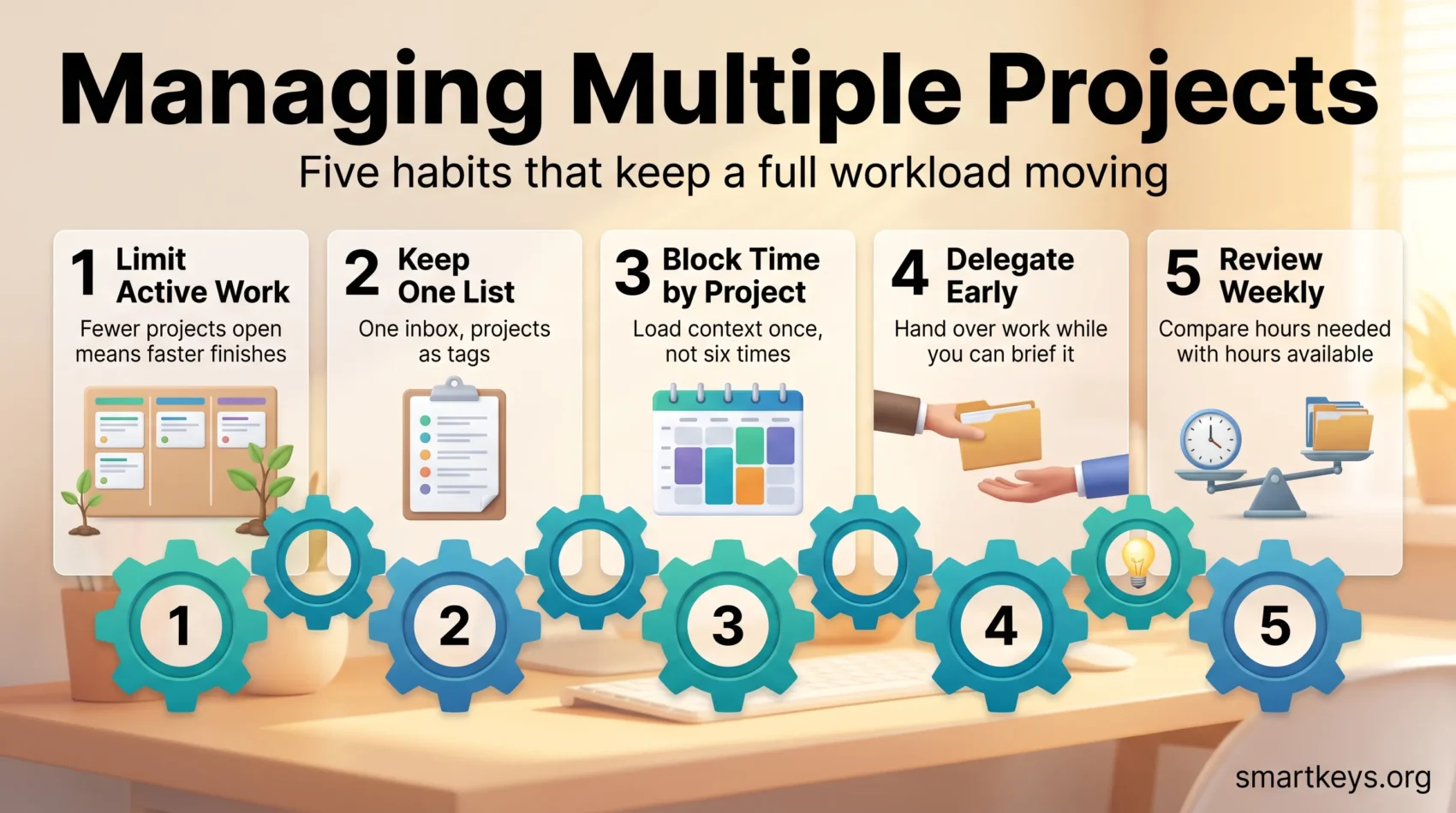
Individually each tactic helps a little. Together they form a system: limit what is active, rank what remains, block time by project, delegate deliberately, and review the whole set weekly.
Balancing Workloads Across Different Projects
Balance starts with an honest inventory. List every project you are committed to, estimate the hours each needs per week, and compare the total against the hours you actually have after meetings and interruptions. Most overload is visible at this step and invisible everywhere else. When the total exceeds capacity, the options are finite: stop, delay, delegate or cut scope. Choosing consciously between those four is the job. Our guide to breaking large goals into smaller steps helps when the answer is to stage work rather than drop it.
Integration of Project Management Methods
Agile, Scrum and Kanban were designed for single-team delivery, but two of their ideas transfer directly to personal multi-project work: the work in progress limit, which caps the number of projects in the active column, and the short review cycle, which means looking at the whole portfolio on a fixed rhythm rather than reacting to whichever project escalated most recently.
You do not need a full framework. A visible board, a limit on active items and a weekly review carry most of the value, as long as the system tells you the truth about your commitments.
Conclusion
Managing multiple projects well is mostly a sequence of deliberate refusals: fewer active projects, fewer daily tasks, fewer meetings that could have been written down, fewer commitments accepted without checking what they displace.
The mechanics are straightforward. Keep one list, rank it honestly, block time by project rather than by task, delegate before you are underwater, and review every commitment weekly.
None of this makes the workload smaller. It makes it visible, and a visible workload is one you can negotiate, stage or share. That is what turns a permanently full week into a set of projects that actually finish.
Found this useful?
Make SmartKeys a preferred source on Google, and our articles will surface more often in your Top Stories, AI Overviews, and AI Mode.
Add as Preferred SourceFAQ
What are the key strategies for managing multiple projects effectively?
Limit how many projects are active at once, then keep a single list across all of them rather than one per project. Rank the work by importance rather than by whoever asked most recently, using a framework such as the Eisenhower Matrix or MoSCoW. Block time by project instead of by task, so you load context once rather than repeatedly. Delegate repeatable, well defined work early, while there is still time to brief it properly. Then review every commitment weekly, comparing the hours required against the hours you have.
How many projects can one person realistically manage at once?
There is no universal number, but the 2023 survey by Rebel’s Guide to Project Management found 55% of project managers running between two and five projects at a time, matching their 2020 result. The practical limit depends on how much of each project needs your direct attention rather than oversight. A useful test: estimate the weekly hours each project genuinely requires and add them up. If the total exceeds the focused hours left after meetings and interruptions, you are running too many, whatever the number looks like on paper.
Should I keep one task system for all projects or one per project?
One system, with projects as tags or sections. Separate systems force you to reconcile them mentally every time you decide what to work on, and that reconciliation is where tasks quietly go missing. Keep one capture point where everything lands, filter by project when you need a project view, and pull a short daily shortlist from it. The exception is a client who requires their own tool: keep your list as the master and treat theirs as somewhere you publish status.
How important is delegation in multi-project management?
It is the only way to add capacity without adding hours, which makes it central rather than optional. The common mistake is delegating late, once you are already behind, because a rushed briefing produces work you then have to redo. Decide what to hand over while you are still planning: repeatable tasks, well defined deliverables, and work that develops someone else’s skills. Give the person the outcome, a real deadline, the source material and a clear statement of which decisions they own.
What tools can enhance my project management capabilities?
The requirement is a single view across all projects, not a better view inside one. Trello suits a small number of projects with minimal setup, Asana handles dependencies and portfolio views, Monday.com is strong where resource allocation is the bottleneck, ClickUp consolidates several tools into one platform, and Smartsheet fits teams that already think in grids. Slack and Microsoft Teams centralize discussion but also generate interruptions, so agree norms about what warrants a mention. Check pricing carefully: most vendors now bill AI features separately.
How can I handle interruptions while working on multiple projects?
Schedule them rather than trying to eliminate them. Microsoft’s 2025 Work Trend Index analysis found employees are interrupted every two minutes during core working hours, around 275 times a day, by meetings, emails and chats. Publishing reliable office hours gives colleagues a predictable route to you, which is what makes it reasonable to be unavailable the rest of the time. Process email and chat at two or three fixed points instead of continuously, and protect your first two hours for focused work.
What should I consider when balancing workloads across projects?
Start with an inventory rather than a feeling. List every project, estimate the hours each needs per week, and compare the total against the focused hours actually available once meetings and interruptions are counted. Then look at people: shared specialists, not the plan, usually set the real schedule, so make it visible when someone is committed at more than 100%. When the total exceeds capacity, the options are finite: stop, delay, delegate or cut scope, and record who agreed.





