You can take real control of your day by giving each task a fixed block of time. The block limits how long you work on something, which keeps your attention on the work that actually matters.
Timeboxing means you decide in advance how many minutes a task gets, start a timer, and stop to review when the time is up. That last step is what separates it from simply planning your day: the clock, not your sense of “nearly finished”, ends the session.
The method works for one person and for a whole team. It fits daily task lists, project work and meetings. In this guide you will learn how to size a timebox, put it in your calendar, and use the review at the end to get better at estimating.
Expect three things from it: clearer priorities, less procrastination, and a schedule you can actually follow.
Key Takeaways
- Give each important task a fixed amount of time so it cannot quietly expand.
- Use a timer and a short review at the end of every block to measure real progress.
- Apply the method to meetings, projects and daily work for consistent results.
- Timeboxing counters Parkinson’s Law, the tendency for work to stretch to fill the time you give it.
- Teams gain alignment when everyone follows the same simple time rules.
What timeboxing is and why it works
A timebox is a fixed window of working time with a defined goal attached to it. You choose the length before you start, you work on one thing, and you stop when the timer ends.
Limiting the time forces two useful decisions. First, you have to say what “done” means before you begin, because you cannot judge the result otherwise. Second, you have to cut scope when the clock runs short, which is exactly the decision most people avoid.
A simple example: instead of “work on the quarterly report”, you set “draft the summary section, 45 minutes”. At minute 45 you look at what exists. Maybe it is rough, but it exists, and you now know whether the next block needs 30 minutes or two hours.
Parkinson’s Law in plain terms
Parkinson’s Law says work expands to fill the time available for it. The phrase comes from a 1955 essay in The Economist by the historian C. Northcote Parkinson. It opens with an elderly lady who spends an entire day sending one postcard to her niece: finding the card, hunting for her glasses, looking up the address, writing the note and deciding whether to take an umbrella to the postbox. Give yourself a full afternoon for a one-page memo and the memo will somehow take the afternoon. A fixed duration creates the pressure that an open-ended slot removes, so you trim the work down to what matters. Our guide to Parkinson’s Law covers where the idea came from and where it breaks down.
There is a related trap worth naming. Most people underestimate how long their own work will take, a pattern researchers call the planning fallacy. Timeboxing does not cure it, but the end-of-block review gives you real data to correct with.
Where the method comes from
Timeboxing is standard practice in agile software development, where teams work in short, fixed-length cycles instead of open-ended project phases. Scrum, the most widely used of these frameworks, puts a maximum duration on every meeting it defines. The idea spread from there into general productivity advice, because the underlying logic holds for any work that tends to sprawl.
- You set a time limit for a task, then stop and inspect what you produced.
- Bounded sessions make it harder to stall on a decision, because the clock eventually decides.
- The same logic transfers from software teams to everyday tasks and meetings.
Timeboxing vs. time blocking: the difference that matters
These two methods are often used interchangeably, and they are not the same thing. Reserving hours on a calendar solves a different problem than capping how long you spend.
When to reserve time and when to cap it
Time blocking means putting a block on your calendar to guarantee the work has a slot at all. Use it for recurring commitments, deep work and team sessions that must happen. Our guide to the time blocking method walks through building a blocked weekly schedule from scratch.
Timeboxing limits how long you will work on a task and ends with a review. Use it when your problem is not finding time but stopping: endless polishing, rewriting the same paragraph, or researching long past the point of usefulness.
Three examples from a normal week
- Block two hours for a project briefing so the whole team can attend. That is time blocking.
- Give yourself 30 minutes to clear the inbox, then stop whatever is left. That is timeboxing.
- Reserve a two-hour planning slot, then run three 40-minute timeboxes inside it. That is both.
The practical answer is usually to combine them. Reserve the space so the work can happen, then cap the individual tasks inside it so the space does not disappear into one of them.
The benefits of timeboxing
Giving each task an end point changes how the day feels, not just how it looks on paper.
It reduces perfectionism. A fixed window turns a vague chore into a concrete goal with a deadline attached. When the timer ends, the work goes out at whatever quality it reached, which is usually good enough and occasionally a relief. If over-polishing shows up in everything you do, our guide to overcoming perfectionism tackles the habit itself.
Fewer switches between tasks
Every time you jump from one task to another, part of your attention stays behind on the first one. That is why interrupted work takes longer and produces more errors than the same work done in one pass. We cover the evidence in detail in our guides to multitasking and productivity and task switching.
One task per timebox is the whole rule. It is a simple commitment, and it is the main reason people report calmer days after a week of trying the method.
A schedule your team can read
When your timeboxes sit on a shared calendar, colleagues can see when you are heads-down and when you are reachable. That visibility stops a lot of interruptions before they happen and makes a team-wide focus time policy much easier to enforce.
- Finish in set minutes so progress is visible the same day.
- Stop polishing when the box ends and hand the time to the next priority.
- Publish your availability so your team can plan around your focus blocks.
Timeboxing also helps with the opposite problem: tasks you never start. A short box with a small goal is easier to begin than an open-ended one, and our guide on using timeboxing to stop procrastinating shows how to set up that first session for work you keep avoiding.
How to use timeboxing: a step-by-step guide
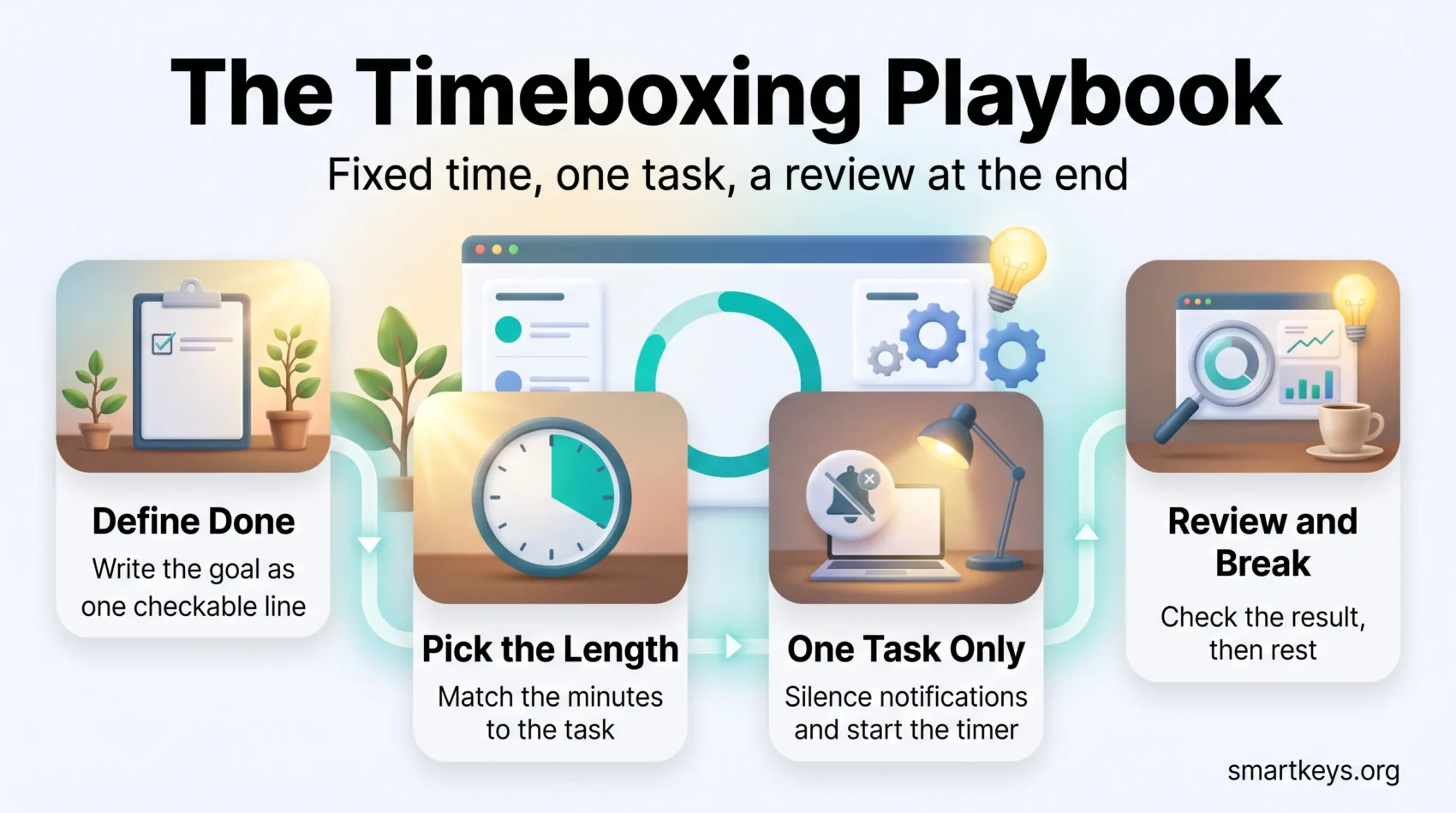
Start with one task, not a whole system. Pick something you habitually overwork, and write the goal as a sentence you could check off. “Draft three client replies in 30 minutes” works. “Do emails” does not.
1. Choose the task and define done
Good candidates are tasks you avoid, tasks you over-polish, and tasks whose length keeps surprising you. Write down what finished looks like before the timer starts. If you cannot describe it in one line, the task is still too big and needs splitting first.
2. Choose the length
Match the length to the complexity, not to how important the task feels. Short slots for admin, longer ones for work that needs a run-up. If you are not sure, guess low. A block that ends early teaches you something; a block that drags teaches you nothing.
3. Work without interruptions
Start a visible timer, close your chat app and put the phone out of reach. If notifications are the main problem, a website blocker and clear rules about when you reply to chat will do more for you than willpower. Split big projects into sequential boxes: research, outline, draft.
4. Review, then take a break
- Check whether you hit the goal you wrote down.
- Adjust the length or the scope of the next block accordingly.
- If the task is unfinished, write down the exact next step. An open task tends to keep pulling at your attention, and a note of where to resume makes it easier to let go during the break.
- Take a real break before the next box. Short breaks are part of the method, not a reward for finishing it.
Tip: keep a one-line log of estimate versus actual. After two weeks it becomes the most useful planning tool you own.
Hard timebox vs. soft timebox
Not every task deserves a hard stop. Choosing the right kind of constraint is what keeps the method from feeling like a straitjacket.
When a hard stop helps
Hard timeboxes end when the clock hits zero, finished or not. Use them for meetings, routine admin and anything where over-polishing is the real risk. A hard stop is also the only thing that reliably keeps a recurring meeting from growing.
When a flexible limit works better
Soft timeboxes are suggested wrap-up points. Use them for early research, concept work and problem solving, where stopping at exactly the wrong moment costs more than the extra 15 minutes.
- Use hard boxes when protecting other commitments matters most.
- Use soft boxes for exploratory work, and set a hard outer limit anyway.
- Agree as a team which activities get which kind, so nobody has to guess.
Practical rule: write down which type each recurring activity gets, and end every block with the same quick check. That protects quality without letting the schedule drift.
How long should a timebox be?
Pick a length that fits the job. Short bursts for small jobs, longer stretches for work that needs momentum.
Typical ranges
Quick work (30-60 minutes) suits email, triage, expense reports and brainstorming. Write the goal in terms of output, not effort, so you do not drift into polishing. Email works well as two fixed windows, one early and one late in the day, instead of a tab that stays open; our guide to email batching explains how to set them up.
Focused sessions (60-120 minutes) suit writing, coding, analysis and design. If you need more than two hours, split the work into several boxes with breaks between them rather than one long stretch.
One caveat: sustained concentration fades over a long session, and it fades sooner when you are tired. Plan the break before you feel you need it, because by then the quality has usually already dropped.
Short sprints with the Pomodoro technique
The Pomodoro technique is timeboxing with a fixed recipe: 25 minutes of work, then a 5-minute break, with a longer break after four rounds. It is a good starting point if choosing a length is the part that stalls you.
- Use 25-minute sprints when you need momentum on something you are avoiding.
- Mix short and long blocks across the day so your best hours go to your hardest work.
- Give a team default durations, then let people adjust as they learn their own numbers.
Staying focused inside the box
A timebox only helps if you actually stay in it. A short, identical routine before every session tells your brain the session has started.
Silence the interruptions and make the time visible
Turn off notifications and close the chat window before the timer starts, not after the first ping. Then use a visible timer so you are not checking the clock yourself. A visual timer shows remaining time as a shrinking shape, which is easier to read at a glance than digits. If you prefer software, our roundup of focus tools compares the main options and what they cost.
Match tasks to your energy
Do your hardest work when you are sharpest. Most people have a two to three hour window in the day when demanding work is noticeably easier. Put creative and analytical tasks there, and give routine chores your low-energy hours. Protecting that window is the core idea behind deep work.
- Put your boxes on a shared calendar so colleagues can see when you are unavailable.
- Pick one timer and stick with it, so starting costs no decisions.
- Note what pulled you off track, then set a mini-goal for the next block before you stand up.
Timeboxing in agile teams
In software teams, fixed-duration events give the week a predictable shape. Scrum is the clearest example: every event it defines has a maximum length written into the framework.
According to the 2020 Scrum Guide, for a one-month sprint, Sprint Planning is limited to a maximum of eight hours, the Sprint Review to four hours, and the Sprint Retrospective to three hours. The Daily Scrum, the short stand-up where developers sync on the day ahead, is a 15-minute event. Shorter sprints usually get proportionally shorter events.
Those are ceilings, not targets. A two-week sprint rarely needs eight hours of planning, and most teams settle well below the limit once they have run a few.
Agreeing what tasks typically take
Teams that timebox well share a rough sense of how long common tasks take. You get there by recording estimates and actuals for a few weeks, then adjusting. A time audit is the fastest way to collect that baseline if you have never measured it.
Keeping it visible
Put the events and the focus blocks on a shared calendar and board. Visibility is what turns individual habits into a team rhythm, and it surfaces scheduling conflicts before they cost anyone a morning.
- Standardise meeting and sprint lengths so nobody negotiates them weekly.
- Use limits to stop overruns from pushing work into the next cycle.
- Adjust the durations based on what actually happened, not what was planned.
If the shared calendar itself has become the bottleneck, our guide to calendar management covers how to keep it readable for a whole team.
Running better meetings with timeboxed agendas
Meetings are where timeboxing pays off fastest, because the cost of an overrun is multiplied by everyone in the room.
Put minutes next to every agenda item
Write the number of minutes beside each line of the agenda and mark it hard or soft. Hard items stop at zero. Soft items may run a little over if the discussion is genuinely unfinished. Share the agenda in the invite with any pre-reads attached, so people arrive ready instead of reading in the first ten minutes.
Agree the signals in advance
Pick one cue for wrapping up: a chime, a raised hand, a message in the chat. Agreeing it beforehand removes the awkwardness of interrupting a colleague. The same logic applies to one-on-ones: a 30-minute slot with two or three agreed topics stays useful far longer than an open-ended chat, and our guide to one-on-one meetings goes deeper on structure. In mixed remote and in-room meetings timing matters even more, and our guide to hybrid meeting etiquette covers how to give both groups the same chance to speak.
- Assign minutes per item so every topic gets a fair share.
- Reserve the last few minutes for decisions and owners, always.
- Track which items overrun, then fix the agenda rather than the people.
Tip: if the same meeting overruns every week, the problem is the format, not the timing. A meeting audit will tell you whether it should be shorter, smaller or cancelled.
Common pitfalls and how to fix them
Treat your schedule as an experiment. Test one change, keep simple notes, and adjust. Rigid rules imported wholesale from someone else’s routine tend to collapse in the first busy week.
Iterate instead of enforcing
Change the plan when the evidence says to. When you blow through a block, write down what pulled you off and make the next one longer or narrower. Chronically underestimating is normal and fixable; treating it as a discipline failure is neither.
Give yourself a choice
People resist rules that feel imposed, including their own. Framing matters: “I get to work this way” holds up better than “I have to”. On a team, let people adjust durations for their own roles rather than mandating one number for everyone.
Start small
Begin with one afternoon, or one box a day. Run a short weekly review to adjust lengths and ordering. Scale up only what has already worked for a couple of weeks. Beware the opposite failure too: spending more time designing the system than doing the work is its own productivity trap.
- Treat the schedule as a draft you revise, not a contract you break.
- Write distractions down so the same one does not cost you twice.
- Tell the team these limits are guardrails, not performance targets.
Tools that make timeboxing stick
The right setup is small: somewhere to reserve the time, something to count it, and something to record what happened.
Calendar, timer, tracker
Use a shared calendar to reserve focus blocks and broadcast availability. A block other people can see is the one most likely to survive the week.
Pick one timer and use it every time, so starting a block costs no thought. Then add a tracker to compare estimates with actuals. Toggl Track and Clockify are common choices; Clockify also combines time tracking with a built-in Pomodoro timer, and task managers such as Asana can hold the plan alongside the work. Any tool that records start and stop times will do the job; our roundup of productivity apps compares the current plans and prices.
Fitting it to your task list
A plain to-do list says what to do but not when or for how long, so the hardest items tend to slide to tomorrow. Giving each item a box turns the list into a plan. Use a simple daily template: your top three tasks, a planned length beside each, and a line for the actual result. That is enough structure to improve your estimates without turning planning into a second job. Deciding which three tasks make the list is its own skill, and our guide to prioritisation goes deeper on that.
- Reserve blocks on a shared calendar so other people respect them.
- Use one timer, consistently, to keep the minutes honest.
- Compare estimates with actuals so next week’s plan is better than this week’s.
- Log the outcome after each block and schedule the break before you need it.
Conclusion
Timeboxing turns intentions into commitments your calendar can hold.
The method is small: fix the duration, name the goal, work on one thing, review what happened. That last step is what makes it compound. After a few weeks you know how long your own work actually takes, which quietly improves every plan you make afterwards.
Start with one task tomorrow. Give it a length, set a timer, and see what you have when it ends. Resize the box if it did not fit, keep the weekly review short, and put your hardest work in your best hours. None of it requires new software, and all of it gets easier with practice.
Found this useful?
Make SmartKeys a preferred source on Google, and our articles will surface more often in your Top Stories, AI Overviews, and AI Mode.
Add as Preferred Source