Choosing a CRM is one of the few software decisions a small sales team feels every single day. This comparison puts Freshworks CRM, now sold as Freshsales, next to Pipedrive and looks at what each one costs in 2026, what the plans actually include, and which kind of team each suits. Both vendors repriced and repackaged their plans recently, so a lot of the advice still circulating online is out of date. Everything below is checked against the vendors’ current pricing pages.
Key Takeaways
- Freshworks CRM is now marketed as Freshsales. Its published plans are Growth at $9, Pro at $39 and Enterprise at $59 per user per month on annual billing.
- Pipedrive replaced its old five-plan lineup in 2025. The current plans are Lite at $14, Growth at $39, Premium at $59 and Ultimate at $79 per seat per month on annual billing.
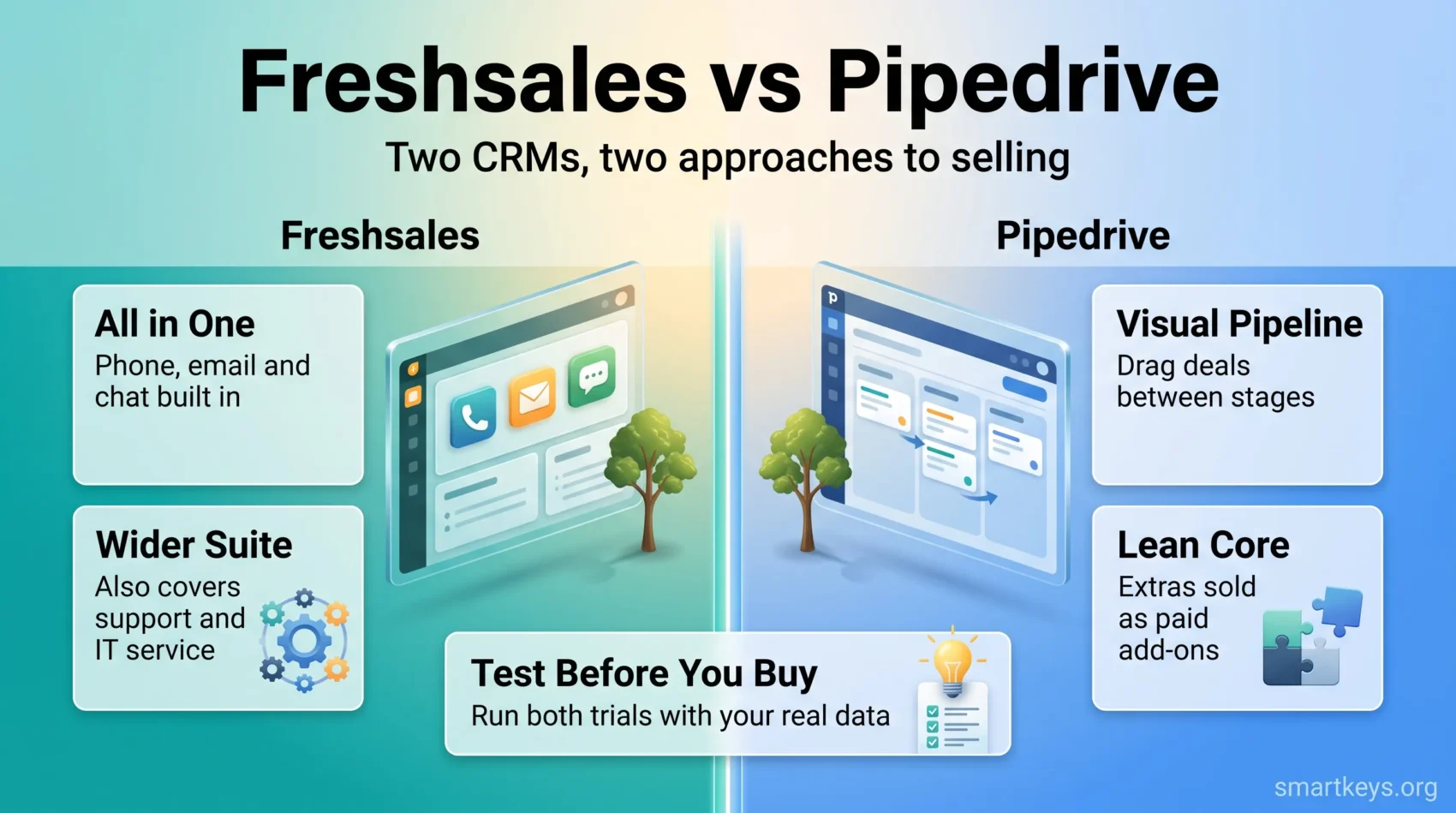
- Freshsales bundles email, phone and chat into the CRM itself. Pipedrive keeps the core lean and sells outreach, documents and web tracking as paid add-ons.
- Pipedrive’s entry tier is the cheaper way into a full-featured pipeline. Freshsales is cheaper at the bottom but jumps sharply between Growth and Pro.
- Freshsales offers a 21-day trial, Pipedrive a 14-day trial. Neither one needs a credit card to start.
- Pipedrive is a sales tool first. Freshsales sits inside a wider Freshworks suite that also covers support and IT service management.
What Each Product Is in 2026
The names matter here, because both have moved. What used to be sold as Freshworks CRM (and before that Freshsales, and briefly Freshworks CRM Suite) is now simply Freshsales, positioned by Freshworks as an AI-powered sales CRM. The old marketing site still redirects to it, so you will see both names in search results.
Pipedrive has kept its name but rebuilt its packaging. In 2025 it retired Essential, Advanced, Professional, Power and Enterprise and replaced them with four plans: Lite, Growth, Premium and Ultimate. According to Pipedrive’s own knowledge base, Essential maps to Lite, Advanced to Growth, Professional and Power both fold into Premium, and Enterprise becomes Ultimate.
That single change invalidates most published comparisons of these two tools, including the earlier version of this page. If a review quotes a Pipedrive “Professional” price, it predates the change. The same applies to Freshsales guides that still mention Sprout, Blossom, Garden, Estate or Forest, plan names Freshworks stopped using years ago.
Pricing Compared
Price is usually the first filter, so start there. Both vendors publish per-seat pricing and discount annual billing.
Freshsales Pricing
Freshworks lists three paid tiers on its CRM pricing page, all quoted on annual billing:
- Growth: $9 per user per month, aimed at startups and small businesses.
- Pro: $39 per user per month, aimed at growing and mid-sized teams.
- Enterprise: $59 per user per month.
Freshworks advertises a 20% saving for paying annually rather than monthly, so monthly billing lands meaningfully higher. Two add-ons sit across all tiers: branded documents, and the Freddy AI Agent, which is billed by session rather than by seat. A 21-day trial is available without a credit card.
The shape of that ladder matters more than the headline number. Growth at $9 is genuinely cheap, but the jump to Pro is more than four times the price. Teams tend to outgrow Growth quickly once they want serious automation or reporting, and the second tier is where the real cost sits.
Pipedrive Pricing
Pipedrive publishes four plans, again on annual billing:
- Lite: $14 per seat per month.
- Growth: $39 per seat per month.
- Premium: $59 per seat per month.
- Ultimate: $79 per seat per month.
On top of the seat price, Pipedrive sells several add-ons that are billed separately per company: LeadBooster from $32.50, Smart Docs from $32.50, Web Visitors from $41, Projects from $16 and Campaigns from $13.33. Every plan comes with a 14-day trial.
Those add-ons are the part people miss when they budget. A three-person team on Growth pays $117 a month for seats, but adding LeadBooster and Smart Docs pushes the real bill past $180. If you plan to use chatbots, prospecting or e-signature documents, price the add-ons in from the start rather than discovering them in month two.
Which One Actually Costs Less
At the entry level Freshsales wins on paper: $9 against $14. Move one tier up and they converge exactly, with both Pro and Growth at $39. At the top, Freshsales Enterprise at $59 undercuts Pipedrive Ultimate at $79, though the two tiers are not trying to do the same job.
The honest answer is that neither is decisively cheaper. What separates them is what arrives in the box. Freshsales includes built-in phone and chat at tiers where Pipedrive expects you to buy an add-on or bolt on a separate tool. If you would otherwise pay for a dialer or a chat widget, Freshsales absorbs that cost. If you already run those channels elsewhere, you are paying for capability you will not touch. The same trade-off shows up across the wider market, as our overview of current CRM trends explains.
Feature Comparison
Pipeline and Customization
Pipedrive was built around a visual pipeline and it still shows. Deals are cards you drag between stages, and the pipeline view is the default rather than a report you have to open. Custom fields and multiple pipelines are available from the entry tier upward, which is unusual at this price point.
Freshsales offers the same core objects (contacts, accounts, deals) with a more conventional CRM layout, plus contact lifecycle stages that map onto marketing handoffs. Its deeper customization, including advanced workflows and custom modules, is gated behind Pro and Enterprise. For a two-person team on Growth that gating bites quickly.
Communication and Outreach
This is the clearest difference between the two. Freshsales ships with a built-in phone, email and chat, so a rep can call a contact from the record without a third-party dialer. Pipedrive handles email natively and syncs with Gmail and Outlook, but calling, chatbots and web forms live in the LeadBooster add-on.
If your team runs high outbound volume, factor in your data source too, since neither CRM supplies contact data. Tools like Lusha, ZoomInfo and Clay fill that gap and connect to both platforms.
AI Features
Both vendors have shipped AI, and both now meter it. Freshworks sells Freddy AI Agent as a session-priced add-on rather than including it flat with a seat. Pipedrive builds an AI sales assistant into the product that surfaces suggestions and summarises deal activity.
Treat AI features as a tiebreaker, not a deciding factor. The pattern across the category, covered in our piece on AI in SaaS, is that adoption has been near universal while measurable returns remain rare. Consumption pricing also makes the bill harder to predict, which matters more to a five-person team than to an enterprise.
Reporting and Forecasting
Both platforms cover pipeline reports, activity tracking and revenue forecasting, and both put the better dashboards on higher tiers. Pipedrive’s reporting is oriented around deal flow and conversion between stages. Freshsales leans on its wider Freshworks data model, which helps if you also run support in the same suite. If forecasting accuracy is your main concern, the input data usually matters more than the tool, a point we cover in our guide to RevOps and business forecasting.
Usability and Onboarding
Both are aimed at teams without a CRM administrator, and both are quick to set up compared with enterprise platforms. Pipedrive’s advantage is conceptual simplicity: the pipeline is the product, and a new rep understands it in minutes. That is the same quality we noted in our full Pipedrive CRM review.
Freshsales presents more surface area on day one because it covers more ground. That is a strength for teams who want phone, chat and email in one place, and a cost for teams who only want a pipeline. Adoption is the real risk with either tool: a CRM that reps avoid produces worse data than a spreadsheet they actually update.
Integrations and Mobile
Both vendors run app marketplaces covering the usual categories: email, calendar, accounting, support, e-signature and automation. Freshworks’ marketplace spans the whole Freshworks suite, not just the CRM, so the raw app count flatters Freshsales in comparisons. Pipedrive’s marketplace is smaller but sales-focused.
Rather than comparing totals, check the three or four tools you actually depend on. If something is missing, both connect to general automation platforms; our Workato vs Zapier comparison covers the trade-offs there. Both also ship iOS and Android apps with offline access to records, which matters for field sales more than for inside sales.
Support and Training
Freshworks provides a documentation hub, live chat and onboarding material, with support hours widening on higher tiers. Pipedrive offers email support on every plan, a large knowledge base, webinars and on-demand courses, with faster channels reserved for upper tiers.
Two questions are worth asking before you sign. First, is support included at the tier you are actually buying, or only at the one above it? Second, is there a migration path from whatever you use now? Both vendors offer import tools, but a messy migration is the most common reason a CRM rollout stalls.
Which One Fits Your Team
Pick Pipedrive if selling is the job and you want the lightest tool that does it well. It suits teams that already have email and calling sorted, want a pipeline everyone understands, and are comfortable buying add-ons only when a specific need appears. If you are weighing it against other options in its class, our Pipedrive vs Insightly comparison covers the nearest alternative.
Pick Freshsales if you want communication channels built in and expect to add support or IT service management from the same vendor later. The Growth tier is a genuinely cheap starting point, provided you understand that the step to Pro is steep. Our Freshworks CRM vs Salesforce comparison is the better read if you are also considering an enterprise platform.
Neither is the right answer if you need heavy customization, complex territory management or deep platform extensibility. That is Salesforce territory, or HubSpot if you want marketing and sales in one system. For very small teams, a lighter option such as Salesflare or Folk may be enough.
Conclusion
Freshsales and Pipedrive solve the same problem from opposite directions. Freshsales bundles more into each seat and asks you to accept a steeper ladder. Pipedrive keeps the core narrow, prices the entry tier low and sells the rest separately.
Run both trials with real data before deciding. Import a hundred of your own contacts, build your actual pipeline stages, and have the reps who will use it daily do the testing. Twenty-one days with Freshsales and fourteen with Pipedrive is enough to see which one your team opens without being asked, and that is the only benchmark that predicts whether a CRM survives its first quarter. Whichever you choose, remember that employee and customer records carry obligations, as our overview of data privacy at work sets out, and that AI features inside these tools now fall under the transparency duties described in our EU AI Act compliance guide.
Found this useful?
Make SmartKeys a preferred source on Google, and our articles will surface more often in your Top Stories, AI Overviews, and AI Mode.
Add as Preferred Source