You spend too much of your day living in the inbox. Every new message pulls you out of whatever you were doing, and by Friday you feel busy without feeling productive. Email batching is the fix: instead of reacting to mail all day, you open it at set times and close it again. It is one part of a broader system for managing an overloaded email inbox, focused on a single question: when and how often you should check.
Microsoft’s 2025 Work Trend Index found that the average worker using Microsoft 365 is interrupted every two minutes by a meeting, email, or notification, and receives 117 emails on a normal weekday. Nobody does focused work in two-minute slices.
This guide covers what batching is, what the research supports, how to set up your first check-in windows, and how to keep colleagues and customers happy while you do it. It applies the logic of task batching for better time management to the queue that interrupts you most.
Key Takeaways
- Email batching means scheduled checks. You read and reply in two or three fixed windows instead of all day.
- A workable starting point is two 30-minute windows, for example 10 a.m. and 2 p.m., with notifications off in between.
- Published research links less frequent checking to lower daily stress, not to a specific productivity percentage.
- The method needs an escape hatch: VIP senders, urgent keywords, and a teammate who can act while you are heads down.
- It fits roles with response times measured in hours. It does not fit front-line support bound by tight service level agreements.
Why your inbox steals focus
An open inbox is not neutral background. It is a queue anyone can add to, and every addition arrives with a demand for your attention.
The cost is not the reading. It is the switch. When you leave a task and come back, you have to rebuild the context you had in your head: which file you were in, what you had decided, what came next. Researchers call this a switching cost, and you pay it even when the interruption takes ten seconds.
The scale of the switching has changed. Gloria Mark, a researcher at the University of California, Irvine, has tracked how long office workers stay on one screen before switching. In 2004 the average was about two and a half minutes. By the late 2010s it had fallen to roughly 47 seconds, a finding she sets out in her book Attention Span. Our guide to building your attention span covers what helps.
Three things go wrong when the inbox stays open:
- Other people set your agenda. Your day follows the order messages arrived in, not your priorities.
- You pay the switch repeatedly. Checking 40 times means rebuilding context 40 times. The reading is cheap; the restart is not.
- You never get a long block. Hard work needs the uninterrupted stretches described in our guide to deep work.
One myth is worth clearing up: handling email while doing something else is not multitasking. It is rapid switching, and it slows both jobs down. Our piece on the science behind multitasking goes through the evidence.
What email batching actually is
Email batching means you process messages in scheduled blocks rather than continuously. You decide in advance when the inbox is open. Outside those blocks it stays closed, notifications stay off, and the work in front of you gets your full attention.
The idea comes from grouping similar tasks. A baker does not heat the oven once per loaf. Setting up your attention for a type of work is expensive, so you do a run of it while you are set up.
Where the idea came from
Tim Ferriss popularised the approach in The 4-Hour Workweek. He checked mail at fixed times, used an autoresponder to tell senders when to expect a reply, and gave his team authority to settle small customer issues up to an agreed limit without asking him. That last part matters more than the schedule: batching only works if someone else can act on what cannot wait.
What the research supports
Be careful with numbers quoted about email. Many circulate without a study behind them.
One controlled study does exist. Kostadin Kushlev and Elizabeth Dunn published Checking email less frequently reduces stress in Computers in Human Behavior in 2015. Participants spent one week checking email only three times a day and one week checking as often as they liked. In the limited week they reported lower daily stress. The effect was on stress, not on measured output, and the sample was small and student-heavy. Treat it as good evidence that fewer checks feel better, not as proof that batching makes you finish more work.
Where it fits and where it does not
- Good fit: roles judged on finished work, where a reply within a few hours is normal. Analysts, engineers, writers, managers, consultants.
- Poor fit: front-line support or sales roles under a service level agreement, meaning a contractual promise to reply within a set time, often 15 or 30 minutes.
- Partial fit: most other jobs. Batch the general inbox and leave one narrow channel open for urgent items.
The trade-offs
Batching trades speed of response for blocks of attention.
The obvious gain is long stretches of focus. The quieter one is decision quality. A reply written in a calm 30-minute block tends to be clearer than one fired off between two other tasks, which means fewer follow-up messages. That skill is covered in our guide to email clarity.
What you give up is speed, and some people will notice. If you have not told them what to expect, they read the delay as neglect. Batches can also pile up: a Monday window after a quiet weekend can hold 200 messages. If that is already your situation, work through our guide to conquering an email backlog first.
One caution. If your performance review mentions response time, do not change your habits unilaterally. Propose a trial, agree what counts as urgent, and measure the result.
How to start email batching in five steps
Setup takes about 20 minutes. Making it survive a busy week is harder, so build it in order.
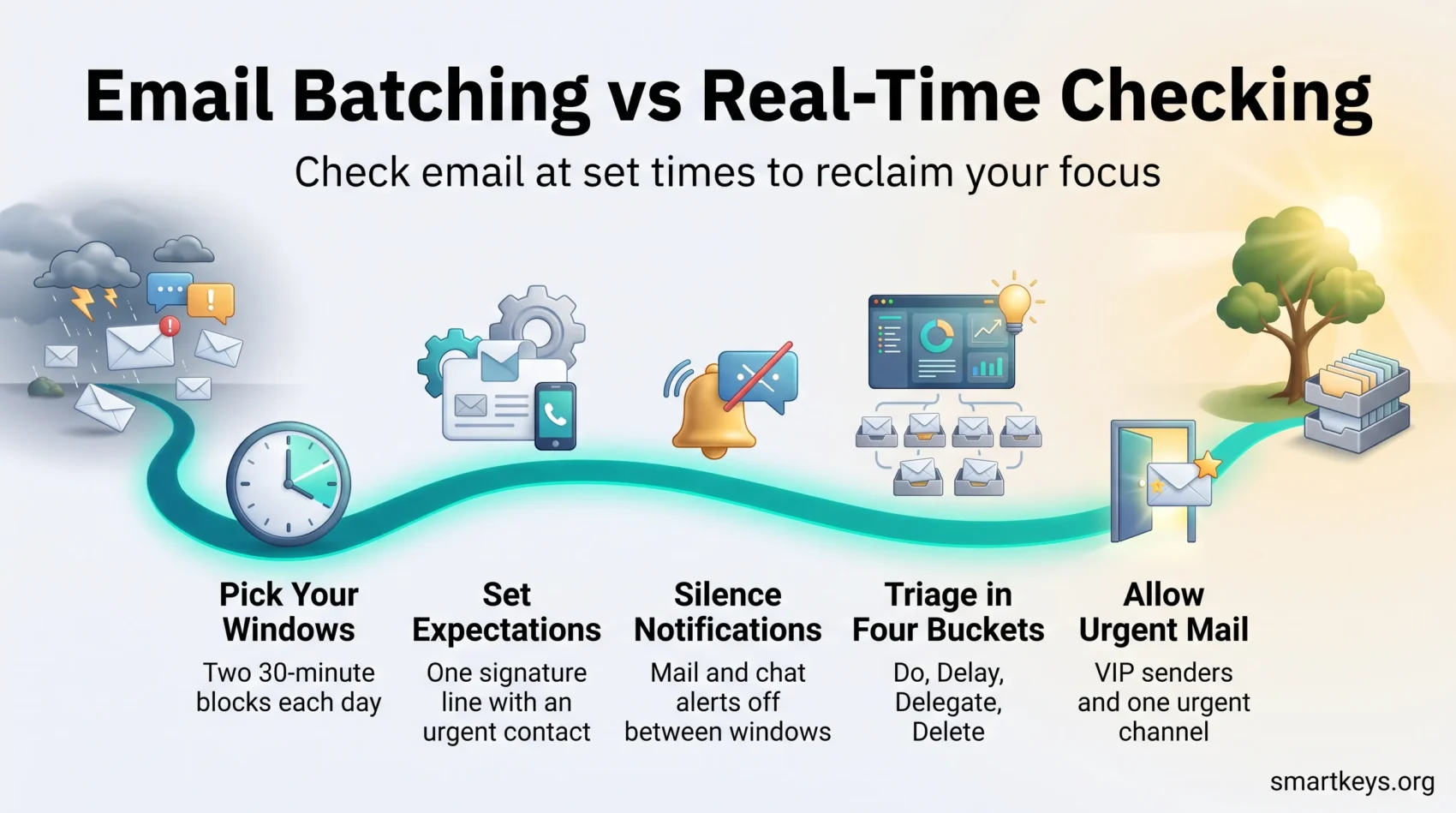
1. Pick your windows
Choose two or three fixed times of 30 to 60 minutes each. Mid-morning and mid-afternoon suit most schedules. Avoid the first hour of your day: opening mail first hands your best thinking time to other people’s requests. Put the windows in your calendar as real appointments. If your day is already full of meetings, a meeting audit will free the space first.
2. Tell people what to expect
Add one line to your signature: “I check email at 10 a.m. and 2 p.m. For anything urgent, call or text.” Name an alternative contact so the escape route is obvious. Prepared replies also make each window faster; our collection of email response templates covers the questions you answer every week.
3. Close the door
Turn off mail notifications on every device, not just the laptop. On iPhone, a Focus profile silences the right apps during your work blocks; our walkthrough on activating Focus mode has the steps. Windows and macOS have equivalent Do Not Disturb settings.
Chat deserves the same treatment. Microsoft found the average worker receives 153 Teams messages a weekday, so a silenced inbox beside a live chat window solves nothing. Our guides to managing work notifications and setting instant messaging boundaries cover the settings worth changing.
4. Use one triage rule
Inside a window, sort every message into four buckets: Do, Delay, Delegate, Delete. Anything you can finish in two minutes, do now. Anything longer becomes a dated task. Anything belonging to someone else, forward with a clear ask. Everything else goes.
The point is to leave the inbox as a queue, not a filing system. Both the Inbox Zero method and the more forgiving Inbox Infinity approach work; pick the one you will keep up.
5. Protect the blocks around them
Batching creates empty space. If you do not plan what goes in it, it fills with small tasks and you have gained nothing. Assign the freed stretches to specific work using time blocking, and keep the week visible with calendar management.
Tools that make batching stick
The habit does the work. Tools remove friction.
Start with what you already have. Gmail and Outlook both offer rules that label and route mail before you see it, a snooze function that hides a message until a time you choose, and scheduled send so a reply written at 8 p.m. arrives at 9 a.m. Set up rules for newsletters and automated reports first. Those are usually more than half the volume.
Add-ons go further. Boomerang for Gmail includes Inbox Pause, which holds new mail out of your inbox until you release it or a schedule you set. SaneBox files lower-priority mail into a separate folder. Clean Email handles bulk unsubscribing. Missive suits shared inboxes and can hold deliveries while letting VIP senders through. Test one at a time. If your desktop is already crowded with half-used tools, a digital declutter beats another subscription.
Then cut volume at the source. Every message you prevent is one you never triage. Unsubscribe properly rather than deleting, and ask to be removed from distribution lists you only skim; Microsoft noted that mass emails to 20 or more recipients rose 7% in a year while one-to-one threads fell. Move conversations that do not belong in email elsewhere, using the logic in our guide to choosing between email, chat, and a meeting.
Urgent messages, customer work, and teams
Batching fails when it has no exceptions. Design them deliberately instead of leaving a gap that forces you to peek.
Build a narrow escape hatch
Pick one channel for genuine emergencies and tell people what it is. A phone call works well precisely because it costs the sender something, so it stays rare. Inside the inbox, a rule that lets through named VIP senders, or subjects containing an agreed word, covers the rest. Keep the list short: an escape hatch everyone uses is just an open inbox with extra steps.
If you work in customer service
Map your service level agreements first. Where the promise is 15 minutes, that queue stays live. Everything else, such as internal mail, vendor threads, and project updates, usually can be batched. Many support teams run a rota so one person is on live duty while the others get real focus time.
If you lead a team
Your habits set the norm whether you intend it or not. Send mail at 10 p.m. and your team will read it at 10 p.m. Agree response times in writing: same day for internal mail, one hour for anything from a customer.
This is also becoming a legal question. Australia’s right to disconnect has applied to all employers since 26 August 2025, giving most employees a protected right to ignore unreasonable out-of-hours contact. Several EU member states have comparable rules.
Delegation is the other half. Decide in advance which calls your team can make without you, and say so. That is what stops a batched inbox from becoming a bottleneck. Teams that go further move status updates out of real time entirely, an approach covered in our guide to asynchronous work.
A batched day in practice
8:30 a.m. Start on the hardest task of the day. Mail is closed and notifications are off. This block pays for the whole system.
10:00 a.m. First window, 30 minutes. Run the four-bucket triage, answer what is quick, turn the rest into dated tasks, and close the inbox at 10:30 whether or not it is empty.
10:30 a.m. to 2:00 p.m. Meetings and project work. Anything urgent reaches you by phone or through your VIP rule.
2:00 p.m. Second window, 30 minutes. Clear what arrived since the morning, send follow-ups, and schedule any reply that need not land today.
Before you finish. Two minutes to confirm nothing on tomorrow’s list is stuck waiting on you. Skipping this is why unfinished threads resurface in the evening; our piece on open loops explains why.
Track three numbers for a fortnight: how long each window takes, how many messages you clear, and whether anyone complained. If windows run long, use three rather than two. Keeping the routine alive is mostly habit design, not discipline.
Conclusion
Batching is one decision, made once, that removes hundreds of small ones. You choose when the inbox is open, and the rest follows: notifications off, expectations set, one narrow route for emergencies.
Start with two 30-minute windows, a line in your signature, and notifications silenced everywhere. Give it two weeks before you judge it. The evidence supports a calmer day rather than a jump in output, which is a fair return for 20 minutes of setup.
Keep the exceptions honest. If your job requires fast replies, batch the mail that can wait and leave the rest live. A method you bend to fit your work beats a rule you abandon in week three.
Found this useful?
Make SmartKeys a preferred source on Google, and our articles will surface more often in your Top Stories, AI Overviews, and AI Mode.
Add as Preferred Source