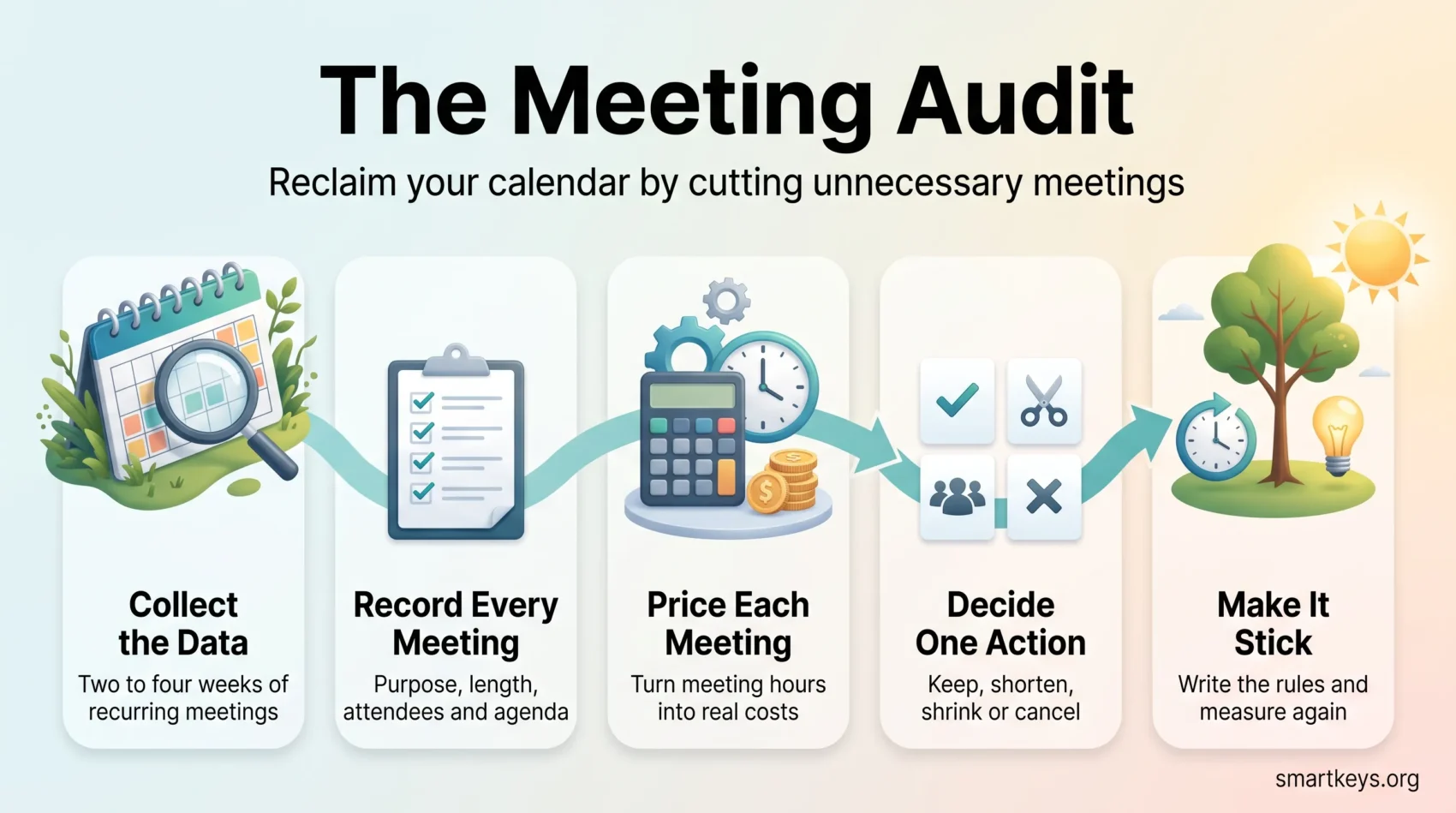
A meeting audit is a short, structured review of your team’s calendar. You record the same few facts about every recurring meeting, put a value and a rough cost against each one, then decide what to keep, shorten, shrink or cancel.
Calendars rarely get crowded on purpose. They fill one invite at a time: a weekly sync here, a standup there, a new hire added “for visibility”. Nothing is ever removed. A year later the week is full and nobody decided that it should be. An audit turns that into numbers, so the discussion moves from whether there are too many meetings to what the recurring ones cost in hours and money.
Key Takeaways
- An audit replaces “we have too many meetings” with hours, costs and one decision per meeting.
- Two to four weeks of calendar data is enough to see the pattern.
- Record purpose, frequency, length, attendee count and whether an agenda exists.
- Every meeting you cancel needs a replacement route for its information.
- Write the new rules down, or the calendar refills within a quarter.
- For the personal version of the same exercise, see this time audits guide.
Why calendars fill up on their own
Recurring meetings are sticky. A weekly slot survives long after the project that created it, because cancelling feels like a bigger decision than letting it run. Attendee lists grow the same way: adding a person is easier than removing one.
Microsoft’s 2025 Work Trend Index special report, based on anonymised Microsoft 365 usage signals, shows the scale. People are interrupted roughly every two minutes by a meeting, message or notification. 57% of meetings are ad hoc calls with no invite at all, half of all meetings land in the same two windows, mid-morning and mid-afternoon, and meetings of 65 or more people were the fastest growing category.
The result is a week with no uninterrupted stretches in it, and work that needs concentration will not fit into the twelve minutes between two calls. Our guide to deep work covers what those stretches are worth.
Managers have said the same for years. In a Harvard Business Review survey of 182 senior managers, 71% called meetings unproductive and inefficient and 65% said meetings kept them from finishing their own work.
There is a price attached. In a survey of 632 employees run by organisational psychologist Steven Rogelberg with Otter.ai, workers judged about a third of their meetings unnecessary. Scaled to a 5,000-person company, the researchers put the waste at roughly $25,000 per employee per year.
What a meeting audit covers
Before you open a calendar, decide what is in scope. An audit that reviews everything stalls.
Set the boundaries and the window
Focus on recurring meetings you or your team can change. Leave out ad hoc calls, one-off workshops and ceremonies owned by another department. Regular one-on-one check-ins are usually worth protecting rather than trimming. Pick a window of two to four weeks: two weeks catches the weekly pattern, four weeks catches the monthly meetings too.
Agree what success looks like
Pick one or two measurable targets first. Two that work well: cut the share of the workweek spent in recurring meetings by a set percentage, and raise the number of uninterrupted 90-minute blocks per person per week.
Set an end date, usually six to eight weeks out. An audit is a project, not a standing committee. Tie it to something leadership already tracks, such as faster decisions, and you get the mandate to cancel things.
How to run the audit, step by step
The whole process fits in a spreadsheet.
Step 1: Get the calendar data
Google Workspace and Microsoft 365 both expose calendar usage reports to admins, and tools such as Clockwise, Fellow and Flowtrace add analytics on top. Without either, ask each person to list their recurring meetings. That takes ten minutes each and is fine for a small team.
Step 2: Record the same fields for every meeting
Consistency matters more than detail. For each recurring meeting, capture:
- Name and owner: who is accountable for it running or not running.
- Stated purpose: one sentence. If nobody can write one, that is already a finding.
- Type: decision, status update, brainstorm, information sharing or relationship building. The type determines the right fix.
- Frequency and length, plus the number of people invited and actually attending.
- Agenda: yes, no or sometimes.
- Value rating: high, medium or low, from the people who attend rather than from you.
A three-question pulse survey covers the rating and makes later cuts easier to defend.
Step 3: Turn the rows into hours and money
Two calculations do most of the work.
Hours per person per week: add up each person’s recurring meeting time, divide by the number of weeks, then by their normal working hours. Anything above 40% for someone whose job is not coordination deserves a hard look.
Cost per meeting: average loaded hourly rate, times meeting length in hours, times attendees. A weekly 60-minute meeting with twelve people at $70 an hour costs about $840 a week, or roughly $40,000 a year. That figure changes the conversation, because it makes the meeting comparable to a budget line rather than a habit.
Both numbers are estimates, and you should say so. Their job is to rank meetings against each other, not to be defended to the penny.
Step 4: Decide one action per meeting
Group meetings by type and owner first. Patterns show up fast: three teams running near-identical status calls, or one owner holding six weekly slots. Then give each meeting one action:
- Keep: clear purpose, right people, good value rating.
- Shorten: useful but padded. Cut 60 minutes to 30.
- Shrink: useful for a few, background noise for the rest. Trim the invite list and share the notes.
- Reduce frequency: weekly becomes biweekly or monthly.
- Replace: the information matters but needs no live discussion.
- Cancel: no clear purpose, low value, no decisions made.
Give every action an owner and a date. An action item with neither is a wish.
Step 5: Give the information somewhere else to go
Most audits skip this step, which is why cancelled meetings come back. A status meeting exists because people need to know something. Remove it without replacing the route and the information stops moving. Match the replacement to the meeting type. Status updates move well to a written channel or a shared dashboard. Decisions that need no debate can run as a written proposal with a comment deadline. Broad updates can become a short recorded video. Our guides to asynchronous ways of working and the tools behind it cover the setups, and choosing between email, chat and a meeting is a useful rule to hand the team.
One caution: written replacements only work if people can find them later. Atlassian’s State of Teams 2025 report, based on 12,000 knowledge workers and 200 executives, found teams lose about a quarter of their time searching for answers. Decide where things live before you cancel anything.
Redesign the meetings you keep
Cutting is half the job. The survivors should get better too, and the audit gives you the evidence.
Name the decision, then send a real agenda
Every invite should state the decision to be made or the output expected. “Q3 planning sync” tells nobody anything. “Agree the three Q3 priorities and their owners” tells everyone what to prepare and when the meeting is finished.
An agenda is not a list of topics. It is a list of items with a time box, an owner and a link to the pre-read, sent at least a day ahead. If the pre-read is not ready, postpone. Our guide to running effective meetings goes deeper on format.
Keep decision groups small
Bain & Company’s research on decision making produced a useful rule of thumb: once a decision-making group passes seven people, each additional person cuts the group’s decision effectiveness by roughly 10%. Use a core-plus-optional model. Decision-makers are required; everyone else is optional and gets the written summary. For teams mixing office and remote attendance, hybrid meeting etiquette matters as much as the invite list, and silent meetings are worth testing where reading beats talking.
Close with decisions, owners and a written record
Spend the last five minutes on what was decided, who owns each step and by when, then publish a short summary the same day. A consistent meeting notes template makes this fast, and an AI meeting notes workflow can handle transcription so the note-taker can take part.
Make the changes stick
Without new rules, the calendar refills. Write a meeting policy of one page at most.
Set defaults instead of case-by-case rules
Useful defaults: 25 and 50 minutes instead of 30 and 60, so people can move between calls; no agenda, no meeting; optional means optional; and at least one protected no-meeting block a week. A team-wide focus time policy is the version that survives a busy quarter, and building buffers into the schedule stops the day stacking end to end.
Make it easy to decline and easy to book
Two things cut meeting load more than any policy. First, make declining normal: if the invite names a decision you are not part of, you can drop out, and learning to say no is a skill the policy should back up. Second, cut the friction that makes people book a call “just to align”, which automated scheduling and disciplined calendar management both help with.
Re-measure, then leave it alone
Run the same two calculations six to eight weeks later and compare. Report the difference in hours and cost, not in opinions. Then stop: a light check once or twice a year is enough, and a permanent review of meetings is its own kind of waste. For distributed teams, pair it with our guide to remote work productivity.
Conclusion
A meeting audit converts a complaint into a decision: the same facts about every recurring meeting, a price, and one verdict with an owner and a date.
The gains come from cutting the right meetings, giving their information somewhere else to live, and protecting the hours you free up before they get booked again. Start with one team, one four-week window and one spreadsheet. To run the same exercise on your own week, see the time audits guide and our walkthrough on conducting a time audit.
Found this useful?
Make SmartKeys a preferred source on Google, and our articles will surface more often in your Top Stories, AI Overviews, and AI Mode.
Add as Preferred Source