

Updated September 2026 with current interruption data from Microsoft’s Work Trend Index, a buffer sizing table, and a 7-day rollout plan.
You can make your day less frantic by adding a little padding to your plans. Time buffering means placing deliberate gaps before and after your commitments, so ordinary delays get absorbed instead of cascading into the rest of your schedule.
A quick example. Your 10:00 call runs six minutes long. With nothing after it, you join the 10:30 meeting late, skip your notes, and start the afternoon behind. With a ten minute gap, none of that happens. The overrun simply lands in the space you left for it.
The problem this solves has got sharper. For its 2025 Work Trend Index, Microsoft analysed anonymised usage data from Microsoft 365 and found that people are interrupted by a meeting, email or chat roughly every two minutes during core working hours, which adds up to about 275 interruptions a day. Meetings are a large part of that picture: 57% of them are ad hoc calls with no calendar invite, and half of all meetings land in the same two windows, 9 to 11 in the morning and 1 to 3 in the afternoon.
So the pressure is not only that there are meetings. It is that they cluster, they arrive without warning, and they leave almost no space in between. That is exactly what buffers are for. Get them right and you protect focus, lower stress, and make your planning realistic. Get them wrong in either direction, too little or too much, and you either burn out or invite Parkinson’s Law, the observation that work expands to fill the time made available for it.
Key Takeaways
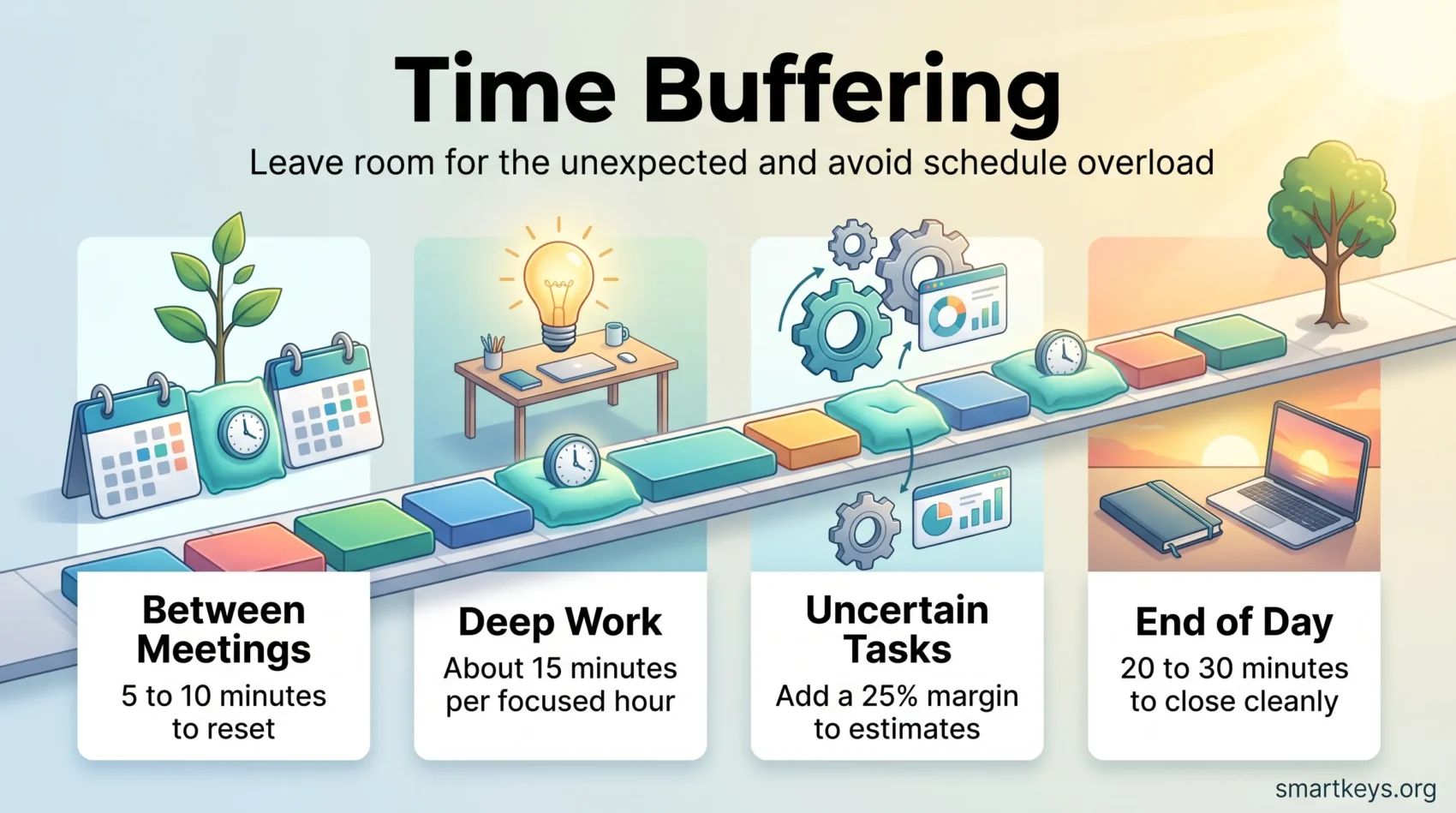
- Add 5 to 10 minutes between meetings and about 15 minutes per hour of deep work as your starting default.
- Switch your meeting defaults from 30 and 60 minutes to 25 and 50. It is one settings change that then works on its own.
- Use roughly a 25% margin on unfamiliar or dependency heavy work, not on routine tasks.
- Buffers are for recovery, not for squeezing in email. Filling them cancels the benefit.
- Label buffer blocks and set them to show as busy, so colleagues do not book over them.
- Review once a week how long things actually took, then right size. Over padding kills urgency.
What time buffering is and why it matters right now
A little extra padding around events stops a single overrun from wrecking your whole schedule. Buffer time is that planned padding you add before and after activities, so ordinary delays do not push the rest of your day off a cliff.
Most people underestimate how long tasks take. Psychologists call this optimism bias: we plan for the version of the task where nothing goes wrong. The result is a back to back calendar, constant context switching (stopping one kind of work to start another), and steadily rising stress.
That effect is measurable. In 2021 Microsoft’s Human Factors Lab fitted participants with EEG caps, which record electrical activity in the brain, and compared people running consecutive video meetings with people who got short breaks between them. Without breaks, stress markers built up across the day and spiked just before each new meeting, because the brain was already bracing to switch gears. With brief breaks, that buildup reset.
Remote work removed the buffer that offices used to provide for free. Walking to another room took five or ten minutes. A video call ends at 10:30 and the next one starts at 10:30, with no transition at all. If pings rather than meetings are what fragments your day, the guide to managing work notifications tackles that side of the problem.
The five kinds of buffer worth knowing
- Transition buffers: 5 to 15 minutes between back to back commitments, to close one context and open the next.
- Travel buffers: your commute estimate plus a delay margin, for anything with a physical location.
- Prep buffers: time before a high stakes call to review your notes instead of improvising.
- Recovery buffers: time after intense work, for the reset that makes the next block usable.
- End of day buffers: 20 to 30 minutes to file notes, write down next steps, and close cleanly.
Even a few extra minutes, or a single reserved block, can absorb an interruption you did not plan for. That small step turns daily friction into smoother handoffs, starting this week rather than someday.
Time buffering, defined: your built in cushion and shield
Deliberate gaps on your calendar act like a safety net for everyday glitches. Buffer time is scheduled, not improvised: minutes you place around a task, or at a project’s end, so you do not have to scramble.

Cushion vs shield: how buffer time absorbs delays and protects focus
As a cushion, a buffer soaks up overruns, quick fixes and handoff hiccups, so your next activity still starts on schedule. Even a few planned minutes prevent ripple effects down the day.
As a shield, it gives you psychological safety. You can sit through a long meeting, or a messy task, without the low grade panic of knowing you are already late for the next thing.
Where buffers live: before tasks, after tasks, and at project end
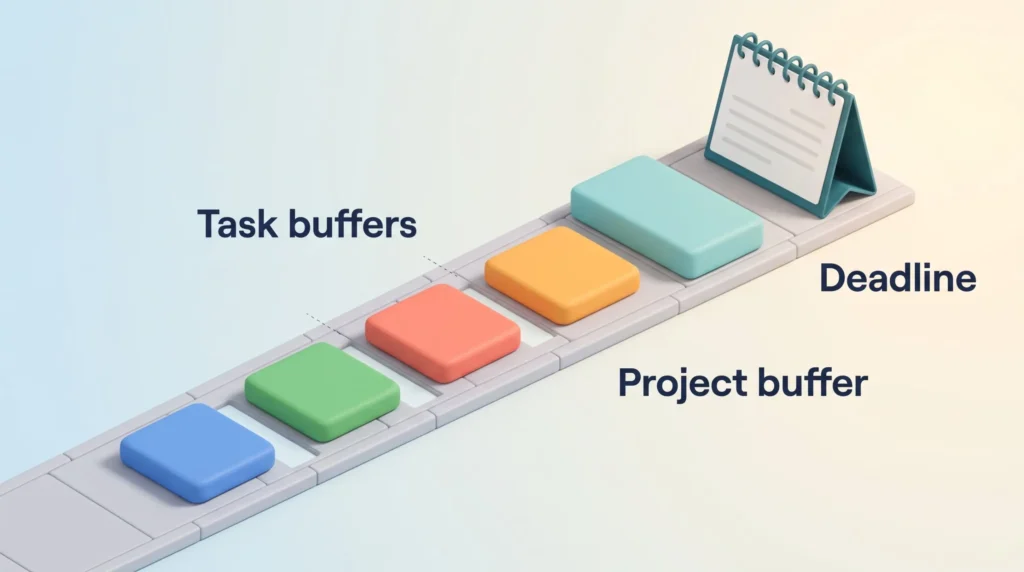
Place buffers before tasks for prep, after tasks for wrap up, and at a project’s end to cover unknowns. Task buffers are usually owned by individuals. Project buffers belong to whoever runs the project.
“Estimating duration with a small preplanned margin beats hoping for the best.”
- Put buffer blocks on your calendar as real entries, so others can see and respect them.
- Use short labeled gaps between meetings to jot notes or simply breathe.
- Keep buffers visible and marked busy to avoid accidental double booking.
Benefits that compound: less stress, better focus, realistic schedules
Small, intentional gaps add up to calmer work and steadier progress. Here is what each one buys you.
Lower stress and no rush effect
A modest buffer lets you absorb small delays and respond calmly when the scope of a task shifts. In practice: the client adds one more question at the end of the call, and you answer it instead of cutting them off to make your next meeting. That reduces overtime and stops the adrenaline driven sprint that quietly becomes your default operating mode.
No task spillover, better punctuality
Buffers stop one late meeting from pushing every following meeting off course. You hit deadlines and arrive prepared, instead of arriving flustered three minutes in.
Focus and energy from intentional recovery
Short recovery gaps after intense work let your brain reset, which is the effect the EEG research picked up. It is also why genuine downtime is not wasted time: unstructured pauses do real cognitive work, including the mind wandering that produces good ideas. A five minute walk counts, and the case for short breaks during the workday is stronger than most calendars suggest.
One caveat that surprises people: using a buffer to answer email defeats the purpose. Admin work is still work, and your nervous system does not count it as recovery.
Avoiding extremes: too little vs too much
Too little buffer raises error rates, causes overtime and hurts morale. Too much wastes capacity and invites Parkinson’s Law, where a task that genuinely needed 40 minutes quietly takes the full 90 you gave it. The fix for both is the same: set a rule, measure what actually happened, adjust.
“Right-sized margins help teams deliver higher quality work without burning out.”
How to add buffer time to your day starting today
Start with a quick audit. Look for back to back meetings, tasks that consistently run long, and the low energy windows where things reliably slip. Mark the hot spots. That is where your first buffers go.
1. Change your meeting defaults
Switch from 30 and 60 minutes to 25 and 50. This is the highest leverage move on the list, because it is a one time settings change that then works automatically. Google Calendar calls the option Speedy meetings; Outlook offers an equivalent setting that shortens the end time of every event you create. Once it is on, nobody has to remember anything.
If meetings are the core problem rather than a symptom, start further back. A meeting audit shows you what is really on the calendar, and the meeting reduction playbook covers what to cut. Fewer meetings beats better spaced ones.
2. Build transition gaps
Add 10 to 15 minutes between tasks and meetings, so you can switch context, capture notes and reset. If the gap is too short to start anything new, that is a feature rather than a flaw. It also lowers the cost of task switching, which is higher than it feels in the moment.
3. Overestimate, then schedule
For work you have not done before, or work that waits on other people, add roughly a 25% margin. A task you estimate at two hours gets two and a half. Do not apply this to routine tasks you have done fifty times, where the padding just becomes slack.
4. Install anchor buffers
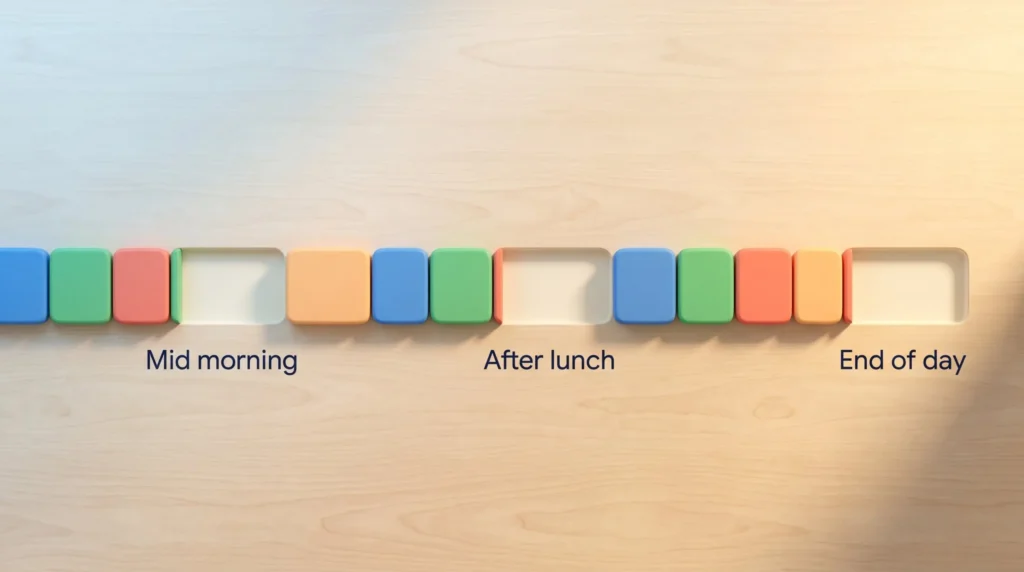
Place fixed blocks mid morning, after lunch and at the end of the day: say 20, 45 and 30 minutes. These absorb the day’s accumulated overruns and give you a landing zone before the next stretch of focused work.
5. Protect the blocks
Treat buffers as real appointments. Label them clearly, set them to show as busy, and resist booking over them unless something genuinely urgent lands. A buffer you routinely override is not a buffer. Teams can do the same thing at scale with a focus time policy that reserves no meeting hours for everyone at once.
6. Combine with time blocking
Surround deep work with protective gaps rather than stacking blocks edge to edge. Practical time blocking tactics pair naturally with buffers. If you want the tighter, estimate driven version of the same idea, the timeboxing playbook covers how to set fixed durations without over committing. And if the protected block itself is what you struggle with, the guide to deep work is the place to start.
Example daily plan
- 9:00 to 10:30: deep work
- 10:30 to 10:45: transition buffer
- 10:45 to 11:30: meeting
- 11:30 to 12:00: admin
- 12:00 to 13:00: lunch
- 13:00 to 14:30: project work
- 14:30 to 15:00: recovery buffer (anchor)
- 15:00 to 16:00: client call
- 16:00 to 16:30: end of day buffer
“Small, defended gaps keep your day movable without losing momentum.”
How much buffer time do you really need?
The right amount depends on how variable the work is and how often you get interrupted. Start with the defaults below, then let a week of real data correct them.
| Situation | Suggested buffer | Why |
|---|---|---|
| Between short meetings | 5-10 min | Enough for a reset; short enough that nobody objects |
| Between long or heavy meetings | 15 min | Notes, next steps, and a genuine mental switch |
| Per hour of deep work | ~15 min | Wrap-up plus recovery before the next demanding block |
| Unfamiliar or dependency-heavy task | +25% of estimate | Unknowns are the norm, not the exception |
| Routine, well-practiced task | 0-5 min | Padding here becomes slack and invites Parkinson’s Law |
| Travel or off-site commitment | Commute + 15 min | Delays are outside your control |
| End of day | 20-30 min | Close cleanly so tomorrow does not start behind |
Context matters
Choose the length by activity, not by rule alone. A critical client call needs prep before it and recovery after it. A heavy task needs extra wrap up minutes, so you can file your notes while the details are still fresh.
Energy based planning
Match buffers to your own peaks and troughs. Put larger gaps around low energy periods, such as the post lunch dip and the late afternoon, where overruns are most likely. Keep peak slots lean and guarded for your highest value work. The wider approach is covered in the guide to managing energy rather than hours.
If you want numbers rather than impressions, a few simple personal productivity metrics will show whether your buffers are sized right or merely decorative.
“There is no universal formula: set a rule, measure outcomes, and refine.”
Teams and projects: buffers without killing momentum
In project work, smart use of gaps protects deadlines without turning the plan into padding.
Task buffers vs project buffers
Ownership matters. Individual contributors set task buffers for prep and wrap up. Project managers hold a single project buffer at the end to cover unknowns. That is more efficient than letting every person pad every estimate privately, because one pooled contingency is smaller than the sum of the hidden ones. Ten people each quietly adding an hour costs ten hours; one shared three hour buffer usually covers the same risk.
Risk driven allocation
Judge the uncertainty of each piece of work and allocate accordingly. Add buffer where work is unpredictable or waits on someone outside your team. Trim it where tasks are routine and well understood.
Culture and communication
Talk openly about buffer assumptions, so stakeholders know what is protecting the deadline and what the trade offs are. Hidden padding gets cut in the first review. Explicit, justified buffer usually survives.
- Clarify ownership, so task buffers roll up into project planning instead of duplicating it.
- Tie buffer to risk, keeping momentum while protecting deliverables.
- Review actual durations frequently and adjust as scope changes.
- Treat white space as infrastructure, not as wasted hours.
“Add buffer explicitly where needed and protect it, so unexpected events don’t cascade into missed commitments.”
Tools and tactics to operationalize buffers
Small rituals and the right settings turn gaps into reliable protection. The goal is to make buffers automatic, so they do not depend on daily willpower.
Calendar tactics
Set meeting defaults to 25 or 50 minutes, so transition gaps appear without you doing anything. Label the blocks clearly. “Transition” or “Wrap-Up” reads as legitimate work; a blank slot reads as available. Set them to show as busy.
Booking tools do a lot of this for you: most scheduling apps let you enforce a minimum gap around every booking. If external calls fill your week, automated scheduling is the cheapest way to make buffers non negotiable. For the wider system, including batching, theme days and protected focus zones, see the guide to calendar management.
Measuring where you actually need buffer
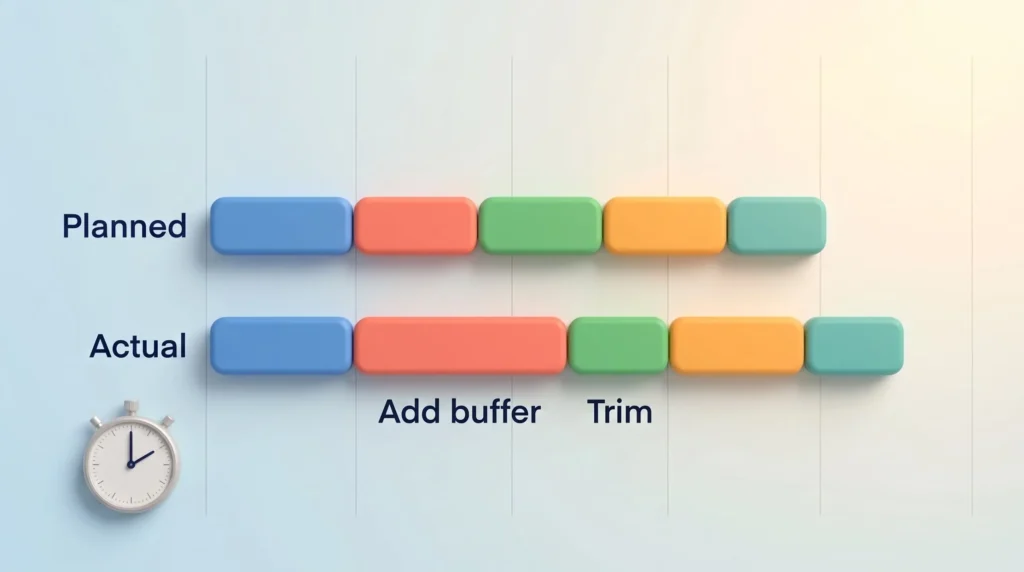
Time tracking tools that record real durations show where your estimates break down. Sync your calendar, compare planned against actual for a week, and the pattern usually appears quickly: two or three recurring commitments cause most of the overrun.
Add buffer there. Trim it where blocks consistently finish early. A short weekly planning session is the natural place to make that adjustment.
Buffers in personal life
The same logic works at home. Departure buffers before outings, an extra 15 minutes for errands, prep slots for meals, and a 30 minute evening wind down to shift out of work mode. When a buffer does end up unused, small useful tasks fit neatly into it, which is where micro-productivity and buffering complement each other rather than compete.
Common objections, and honest answers
A packed calendar is rarely a badge of honour. It usually hides avoidable scramble. The pushbacks are predictable, so here they are.
“I don’t have time for buffers”
Start with 5 to 10 minutes and watch how minor delays stop cascading. Shorten meetings, consolidate related events, and trim admin blocks. That frees space without stealing working hours. Most calendars have more slack hiding inside badly sized meetings than their owners think.
“White space looks lazy”
Reframe it as performance infrastructure. If you need the argument in your manager’s language: buffers reduce afternoon errors, late handoffs and rework. Present outcomes, not calendar aesthetics.
“Won’t I just fill the gap anyway?”
Probably, unless you label it and set it to busy. The discipline is the same one behind monotasking: a protected block only works if you have decided in advance what it is not for.
“Small, protected gaps act like insurance for your day.”
Your first week with buffers
- Day 1: change your calendar default to 25 and 50 minutes. One setting, done.
- Day 2: add one anchor buffer after lunch and label it.
- Day 3: note which commitments ran over. Just observe.
- Day 4: add a prep buffer before your highest stakes call of the week.
- Day 5: add a 20 minute end of day block for wrap up.
- Day 6: apply one buffer at home, either departures or an evening wind down.
- Day 7: review. Keep what absorbed real delays, cut what sat empty.
Conclusion
Treat gaps as intentional parts of your plan and disruptions become small, fixable problems instead of full blown setbacks. Add short buffer time around high risk meetings, give deep work a modest margin, and let the rest of the schedule stay tight.
Start with 5 to 10 minutes between events and roughly 15 minutes per hour of deep focus. Then adjust based on what your actual week teaches you, not what you hoped it would look like.
The blueprint is short: add small buffers, protect them, review the results, iterate. The payoff is calmer work, fewer cascading overruns, and a schedule that finally holds up under contact with reality.
Found this useful?
Make SmartKeys a preferred source on Google, and our articles will surface more often in your Top Stories, AI Overviews, and AI Mode.
Add as Preferred Source




