

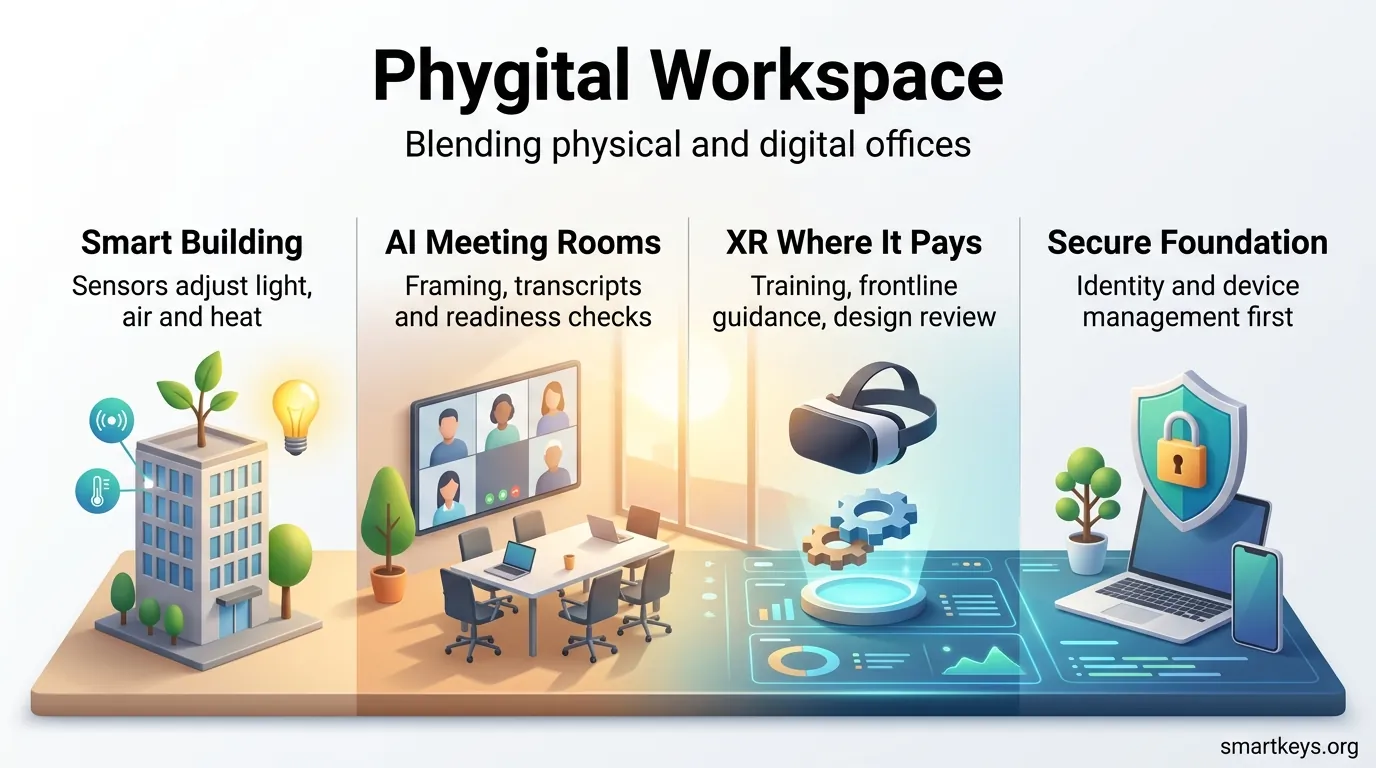
The phygital workspace is no longer a concept deck — it is how most companies now run. In 2026, offices blend physical and digital layers by default: sensors and building systems feed occupancy data, AI handles routine meeting work, and XR covers the narrow set of tasks where being there in 3D genuinely pays.
What changed is the baseline. CBRE’s 2026 occupancy benchmarking puts global building utilization near 53%, up from roughly 38% two years earlier, and almost every large organization now runs a written office policy — most commonly three days on site. Meanwhile, around 40% of in-office interactions now include at least one remote participant. The office filled back up, but the meetings stayed hybrid.
That combination is exactly what breaks older workplace designs. A room built for people sitting around a table fails the moment two of the eight attendees are on a screen. This guide connects the technology roadmap, the room design, the governance rules, and the metrics so your pilots turn into a portfolio instead of a graveyard of half-used equipment.
Key takeaways
- A phygital workspace fuses space, devices, and platforms into one predictable experience — orchestration matters more than gadget count.
- Three days on site is the 2026 norm, attendance clusters Tuesday to Thursday, and desk sharing at 1.1–1.5 people per seat is now standard practice.
- Meeting rooms have become active participants: AI agents run readiness checks, name speakers on screen, and capture actions by voice.
- XR earns its place in training, frontline guidance, and design review — not in your daily standup.
- From 2 August 2026, EU high-risk AI rules bite; workplace emotion recognition has already been banned since February 2025.
- Sustainability gains are real but leak through rebound effects — measure them or you will overclaim.
What changed in 2026 — and what it means for you
If your workplace plan was written before this year, four shifts have probably outdated it.
- Structured hybrid won. The three-in, two-out pattern is now the near-standard setup, with Tuesday the busiest day in roughly three quarters of organizations. Sizing your space to a flat weekly average will leave people hunting for desks midweek and heating an empty floor on Friday.
- Rooms became software. Microsoft’s 2026 Teams releases added persistent room agents that run pre-meeting readiness checks, respond to voice, and label each in-room person by name for remote viewers. A parallel update brings room-grade AI audio processing to plain laptops in BYOD spaces — which changes the economics of retrofitting.
- Big Tech stepped back from XR hardware while enterprise demand held. IDC estimates worldwide enterprise AR and VR spending around $12 billion in 2026, up roughly a fifth year over year, even as several flagship headset programs wound down. Buy for the workflow, not the brand.
- The compliance clock moved. The EU AI Act’s high-risk obligations apply from 2 August 2026, and any tool that infers employee emotions from biometric signals has been off-limits since February 2025 — regardless of whether the vendor calls it “wellbeing analytics.”
What a phygital workspace really means today
A phygital workspace is the deliberate fusion of physical space and digital systems so that where someone sits stops determining how well they can contribute.
How physical and digital experiences merge
The fusion happens across three layers. Sensors and building systems form the physical layer. Collaboration platforms, identity, and device management form the digital layer. Room design — sightlines, acoustics, camera placement — is the connective tissue that decides whether the first two layers actually help anyone.
Get all three right and people switch modes without friction: a focus block at home, a design review in a signature room, an async handover in Slack or Notion overnight.
Where it differs from traditional and fully remote setups
Against an office-first model, the phygital approach removes the penalty for dialing in. Camera framing, speaker labels, and spatial audio give remote attendees a seat at the table rather than a slot in a gallery.
Against fully remote work, it keeps high-performance rooms and secure on-site capability for the work that genuinely benefits from co-presence — onboarding, conflict resolution, hands-on training, and messy early-stage problem solving.
If you are building the digital half of this equation, our guide to creating a digital HQ for remote teams covers the platform side in detail, while virtual offices in a hybrid workforce looks at what happens when the “office” is mostly an address and a set of services.
Why you should move now: talent, cost, and the attendance squeeze
The business case has shifted from “attract people back” to “make the days they are here worth the commute.” Enforcement tightened through 2025 and 2026 — roughly seven in ten US employers now track attendance, up from under half in 2024 — but tracking attendance is not the same as earning it.
Flexibility still moves the retention needle. Cisco’s research found most employers reported better retention after introducing hybrid arrangements, with the largest gains at companies requiring the least on-site time. Research from the University of Pittsburgh and University of Chicago found that strict return-to-office mandates correlated with higher departures — concentrated among senior, well-networked employees who are the most expensive to replace.
The real estate math is equally direct. CBRE’s benchmark shows 57% of organizations expecting portfolio contraction over the next three years, with more hybrid work named as the leading driver. No respondent still targets one desk per employee.
Turning that into a business case
- Retention: model the replacement cost of your top quartile against the cost of better rooms and clearer policy.
- Space: size fixed seating to average attendance and absorb peak days with bookable, shared space.
- Meeting time: hybrid meetings that start late or exclude half the room are a recurring tax. Our meeting reduction playbook shows how to shrink the volume before you optimize the rooms.
- Travel: convert trips avoided into both budget and Scope 3 reporting lines.
For immersive options that cut travel and compress training cycles, see how virtual reality at work fits into the plan.
Inside the phygital workspace: the core building blocks
A phygital workspace ties people, places, and systems into a single predictable experience. Strip away the vendor language and it comes down to a handful of components you actually have to own.
The four technology pillars
- IoT and building systems — occupancy, air quality, lighting, and HVAC that respond to real use rather than a fixed schedule.
- AI — camera framing, noise suppression, transcription, summarization, and increasingly agentic room support.
- XR — VR for simulation-heavy training, AR for hands-free frontline guidance, MR for 3D design review.
- Identity and device management — the unglamorous layer that makes everything above safe to deploy.
Minimum viable components
Before adding anything immersive, make sure you have encrypted access, managed endpoints, a network that holds up under full-room video, and a named owner for each room type. Standardize meeting archetypes — huddle, mid-size, signature, all-hands — so procurement, support, and user expectations line up across sites.
A digital twin of the workplace is worth considering once you have sensor coverage: it lets you test layout and capacity changes against real occupancy patterns before you move a single wall.
Designing the hybrid office: from space to experience
Treat each room as an experience you design, not a set of furniture you order.
From table-centric to inclusive meeting spaces
Move attention away from the center of the room. Microsoft’s Hive lab and its signature boardroom designs both de-emphasize the traditional table, which measurably improves parity between in-room and remote participants. Angled seating, a display wall people can all face, and camera positions that capture faces rather than the backs of heads do most of the work.
Acoustics, spatial audio, and sightlines
Audio beats screen size every time. Treat hard surfaces, add absorption, and use spatial audio so remote voices come from where those people appear on screen. Front Row-style layouts with unified backgrounds and per-person name labels close the remaining gap: in-room attendees can tell at a glance who is speaking.
Agile rooms that scale cost-effectively
Design flexible zones with modular furniture, adjustable lighting, and framing presets that cover all-hands, training, and leadership sessions. Standardizing a small set of room archetypes is where the savings live — Microsoft has reported cost reductions of up to 75% by templating large rooms rather than designing each one.
- Redesign zones around sightlines and camera angles first.
- Apply acoustic treatment and spatial audio before upgrading displays.
- Standardize finishes and tech so the pattern travels to other sites.
- Plan desk sharing at roughly 1.1–1.5 people per seat and validate against your own peak-day data.
Your technology stack for seamless integration
Start with the outcome — lower energy, better meetings, faster training — and map only the sensors and services that serve it.
IoT and AI for responsive environments
Sensors turn a building from static to responsive. Occupancy grids, ambient light meters, and air quality monitors let systems adjust ventilation and lighting to actual load. Demonstrations at InfoComm 2026 showed room agents reading rising CO₂ in a filling huddle room, signaling the building’s ventilation system, and adapting the speaker algorithm to the denser acoustic environment at the same time.
The practical lesson from that work: AI is the brain, but the AV and sensor layer is the nervous system. An agent cannot release a room it cannot sense or fix a speaker it has no telemetry for.
Meeting platforms and room hardware
Room archetypes simplify procurement and keep meeting quality consistent across sizes. In 2026 the notable shift is downward: AI audio and video processing is arriving in the desktop client itself, which means BYOD huddle spaces can get far-field voice capture and speaker framing without dedicated hardware. Re-run your retrofit business case with that in mind before signing a large equipment order.
XR, AR, and VR where they actually pay
XR works as a spatial interface layer on top of systems you already run — your LMS, your collaboration platform, your asset management tool — rather than as a replacement for any of them.
The evidence is strongest in training. PwC’s research puts VR training at cost parity with classroom delivery in the low hundreds of learners and roughly 52% cheaper at scale, with faster completion. Forrester’s 2026 update to its enterprise VR training analysis still shows triple-digit ROI with payback inside six months.
Hardware choice follows the use case: high-volume shared-headset training favors the cheapest capable device with solid MDM, while premium visualization and executive design review justify high-fidelity units. Build against OpenXR so a platform exit does not strand your content — several vendors wound down programs in the past eighteen months.
Analytics, monitoring, and the line you should not cross
Use workplace data for coaching, load balancing, and space planning — never as a productivity scoreboard. Our guides to workforce analytics tools and AI in employee monitoring cover what these systems can and cannot legitimately tell you.
One warning worth repeating: booking data alone overstates usage. No-show rates in hybrid offices routinely run 25–30%, so layer sensor or check-in data on top before you take a utilization number to your CFO.
Guard against tool sprawl
Every layer you add is another login, another notification stream, another thing to learn. The consolidation pitch from platform vendors is partly self-serving and partly correct. Audit what you already own before buying — work tech overload is a real and measurable drag on the same productivity you are trying to lift.
Rethinking meetings for hybrid success
Room design and meeting behavior have to be fixed together. The best equipped room in the building still fails if nobody facilitates.
Signature rooms vs. retrofit strategies
Signature rooms concentrate spend on leadership sessions, client demos, and all-hands — the meetings where a bad experience is expensive. They are the right place for spatial audio, tailored layouts, and premium optics.
Retrofits spread fairness across the long tail: an intelligent camera, better audio, and a second screen for remote feeds cover most of the gap in an ordinary room. With room-grade AI processing now reaching laptops, the cheapest tier of retrofit just got cheaper. Validate upgrades in a test room before rolling them out.
Inclusive meeting etiquette
Pair the hardware with norms that cost nothing:
- Roles: a facilitator who watches the remote feed and a note-taker who is not also presenting.
- Turn-taking: hand-raise and chat cues, checked deliberately, so remote voices are not simply louder-voice-wins.
- One-in-all-in: when a meaningful share of attendees are remote, everyone joins from their own device.
- Agenda first: a visible agenda and a stated decision the meeting exists to reach.
Culture, engagement, and wellbeing in a phygital world
Design for people first, or the technology becomes another source of fatigue.
Asynchronous norms that protect deep work
Set explicit rules for which channel carries which kind of message, and what a reasonable response window looks like. Codify quiet hours and protect blocks of uninterrupted time — workers now report being interrupted every couple of minutes and handling well over a hundred chat messages a day, and “right to disconnect” rules are spreading across jurisdictions.
Our guide to instant messaging boundaries covers response-time tiers and the platform settings that actually enforce them.
Wellbeing programs that stay on the right side of the law
Opt-in wearable programs and AI coaching can genuinely help with movement, recovery, and break prompts. But the compliance boundary has hardened: inferring emotional states from biometric signals in a workplace is prohibited in the EU, and marketing the feature as engagement intelligence does not change the analysis.
Keep participation voluntary, aggregate results, and separate wellbeing data from anything touching evaluation or promotion. Our wearable tech policy guide walks through the consent and data-handling structure.
- Use recognition rituals and small community spaces to build belonging on office days.
- Balance social zones with genuinely quiet, bookable focus space — people who commute for a day of calls will stop commuting.
- Reduce isolation with buddy systems and predictable team rhythms rather than mandatory fun.
Security and governance without slowing your teams
Protection in hybrid environments has to be fast, adaptive, and largely invisible.
Zero-trust, encryption, and AI-driven detection
Apply zero-trust across identities, devices, rooms, and apps so access follows least-privilege rules regardless of location. Rooms are endpoints too — a meeting device with a persistent AI agent, a microphone array, and network access deserves the same scrutiny as a laptop.
End-to-end encrypted meetings have become a standard option rather than a niche feature, though they complicate e-discovery and legal hold. Decide in advance which meeting classes get them and how exemptions are approved.
What the EU AI Act changes on 2 August 2026
High-risk obligations under the EU AI Act become enforceable on 2 August 2026, and workplace AI that materially supports recruitment, evaluation, task allocation, or discipline decisions generally falls into that category. Article 26(7) already requires employers to inform and consult employee representatives before deploying high-risk systems — in Germany and similar jurisdictions, that means the works council, early.
Penalties are structured in tiers, with prohibited practices at the top: up to €35 million or 7% of global annual turnover. A proposed Digital Omnibus package may adjust the high-risk timeline, but it remains a proposal, the emotion recognition ban is unaffected, and planning around a hoped-for delay is a poor bet.
Privacy-by-design for monitoring and analytics
Build analytics with purpose limitation and data minimization from the start. Publish what you collect, how long you keep it, and who can query it. Run a data protection impact assessment before procurement rather than after the contract is signed.
- Operationalize zero-trust without adding daily friction.
- Classify every workplace AI feature as prohibited, high-risk, or low-risk before rollout.
- Prefer aggregated space metrics over anything individually identifiable.
- Align IT, Legal, HR, Security, and works council representatives on one review path.
Sustainability by design: lowering carbon while improving outcomes
Start by measuring how people actually move and meet. Under CSRD, office-related disclosures now reach into Scope 3 categories including commuting and business travel, which makes booking, attendance, and utilization data part of your reporting infrastructure rather than a nice-to-have.
Travel reduction through XR and better remote collaboration
Avoided trips are the clearest win. Telepresence and virtual design review remove flights and long drives while keeping collaboration quality acceptable for most sessions. Track them as a named line item so the saving is visible next to the equipment cost.
Be honest about rebound effects
This is where most sustainability claims fall apart. Research flagged by the Cornell–Microsoft work shows non-commute travel rising when people stay home, and residential energy use climbing meaningfully during periods of widespread remote work — heating one house for one person is far less efficient per head than conditioning a shared floor for fifty. For someone working from home a single day a week, the rebound can cancel most of the commuting saving.
The answers are structural: rightsize the footprint, consolidate attendance into fewer well-used days, and upgrade building systems so the space you keep runs efficiently. Sensor-driven lighting and HVAC control can cut energy waste by roughly a fifth in spaces that have been retrofitted for it.
Data-driven choices for space and emissions
Set baselines and dashboards for carbon per meeting, per day, and per site. Track peak and average utilization separately — sizing to the average creates midweek scrambles, and sizing to the peak means paying to heat an empty Friday. Factor XR hardware lifecycle, typically three to four years in shared use, into procurement so device production and disposal do not quietly offset the travel savings.
If you need auditable numbers, carbon accounting software is what turns these signals into something a reviewer will accept.
Managing distributed teams: policies, norms, and change enablement
A simple framework that ties task type to location removes most hybrid confusion.
Hybrid scheduling that aligns work, tasks, and locations
Label calendar sessions by purpose — focus, collaboration, learning, decision — and link each label to a recommended location and room type. Anchor days beat individual choice for collaboration-heavy teams, which is why midweek attendance clusters almost everywhere.
Be deliberate about the trade-off: teams that set their own hybrid agreements report the fairest outcomes, yet only a small minority of employees work under one. Blanket top-down mandates are easier to administer and more expensive in turnover.
- Clarity: match task type to location so people can choose correctly without asking.
- Coordination: shared anchor days beat individually optimized schedules that never overlap.
- Change support: communicate, train, and reinforce — new rooms fail on habit, not hardware.
- Manager coaching: train for proximity bias explicitly; it is the most common hybrid failure mode.
The scheduling, booking, and space-management layer that makes this workable is covered in our guide to hybrid workforce tools.
Analytics, KPIs, and continuous improvement
Good analytics turn everyday signals into decisions about rooms, platforms, and support.
What to measure
Track five things consistently rather than twenty things occasionally: average utilization, peak utilization, weekly attendance pattern, long-term trend, and a breakdown by space type. Add meeting quality signals — late starts, join failures, remote participation share — because those are what employees actually feel.
Measure outcomes first, activity second — and protect privacy while you do it.
Outcome metrics over activity tracking
Tie metrics to results: time to decision, throughput, quality, engagement, and retention. Screen time and keystroke counts tell you almost nothing useful and expose you to exactly the regulatory risk described above.
- Build a measurement stack that covers utilization, sentiment, and outcomes without surveilling anyone.
- Use the data to refine room archetypes and training spend, not to rank individuals.
- Define access and retention rules before the first dashboard goes live.
- Run a quarterly review loop that turns findings into small, low-risk changes.
Your implementation roadmap: from pilot to portfolio
Start with a lab where rapid prototypes show what actually works for your teams. Try-storming — building rough versions fast and testing them with real meetings — kills bad ideas early and surfaces the patterns worth scaling.
Phase 1: prove it in one room (weeks 1–6)
Prototype a single signature room or an upgraded standard room. Measure join time, remote participation share, and post-meeting sentiment against a control room. Collect feedback from the people who use it daily, not just from the tour.
Phase 2: template and expand (weeks 7–18)
Turn what worked into two or three documented archetypes with fixed component lists. Start where meetings drive the most value — leadership, client-facing, and training spaces — and standardize aggressively; that is where the reported cost reductions come from.
Phase 3: govern and sustain (ongoing)
Align training, champions, and playbooks. Assign a named owner per room type, publish a one-page guide in each room, and review telemetry monthly. Fold the AI governance review into the same cadence so new platform features get classified before anyone switches them on.
Adopt a lab mindset, stage phased rollouts, and train champions to turn pilots into a repeatable portfolio.
Conclusion
The phygital workspace stopped being a prediction and became an operating question. The offices are fuller than they were, the meetings are still hybrid, and the rooms now contain software that participates in the work.
Your job is to align three things that usually get planned separately: the space, the stack, and the behavior. Room archetypes and rapid prototyping handle the first two. Facilitation norms, anchor days, and manager coaching handle the third — and that third one is where most programs quietly fail.
Keep sustainability and governance visible throughout. Measure impact per site and per day, account honestly for rebound effects, classify every AI feature before you enable it, and consult employee representatives early. That discipline protects trust while the technology keeps moving.
With a shared language and a clear next step, your organization can build a workplace that meets people where they are — at home, on site, and everywhere in between.
Found this useful?
Make SmartKeys a preferred source on Google, and our articles will surface more often in your Top Stories, AI Overviews, and AI Mode.
Add as Preferred Source




