

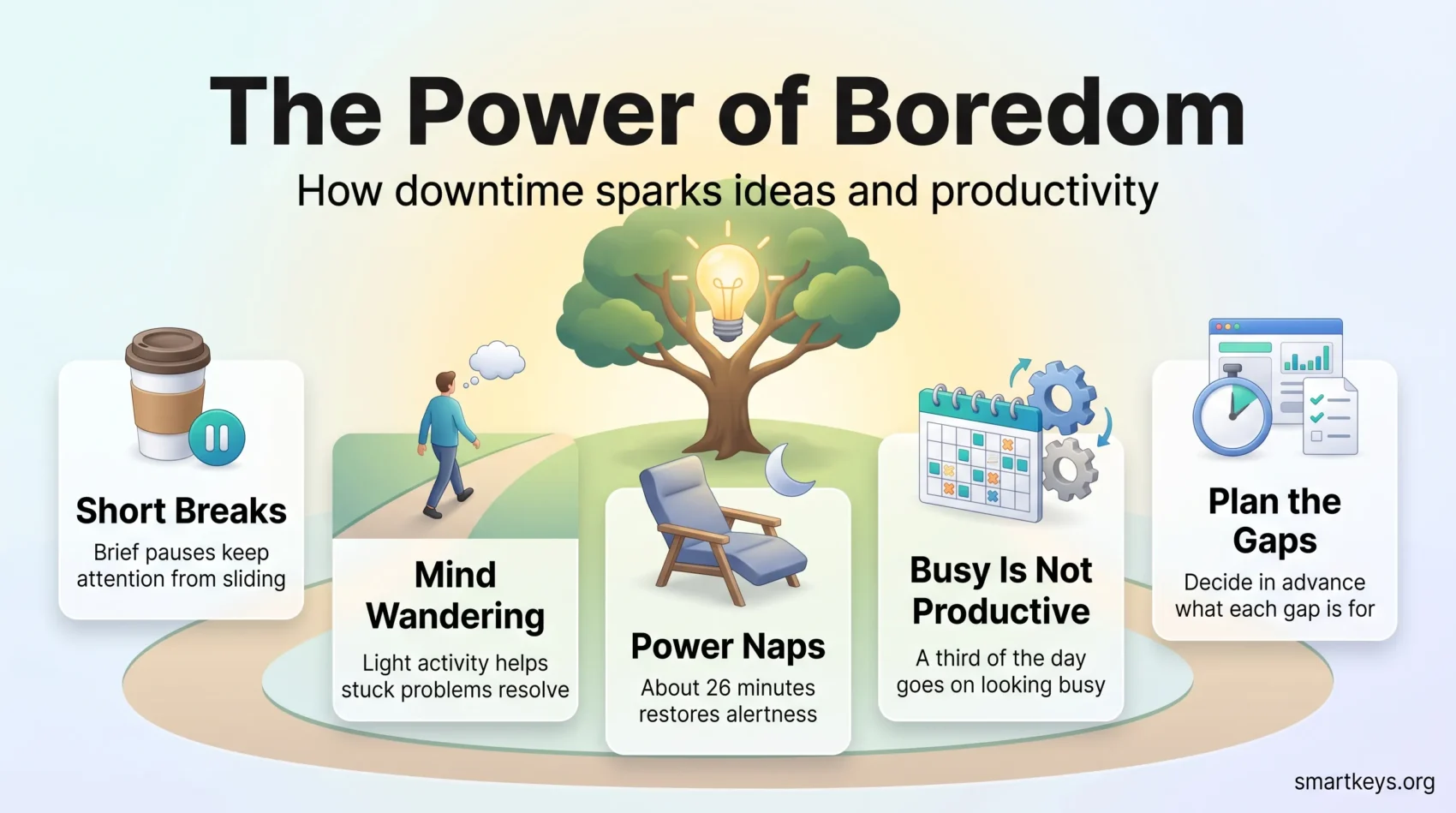
You often have pockets of free time that slide straight into scrolling. That habit keeps your mind busy without refreshing it. When you pause instead, your attention recovers and your thoughts are free to connect ideas that a packed schedule keeps apart.
This guide explains what the research on pauses does and does not support, and what to do with the gaps you already have. Downtime here means any stretch when you are not driving a task forward: a planned break, a cancelled meeting, the ten minutes before a call.
You will find ten practical things to do with a spare twenty minutes, habits for very short gaps, and the team policies that decide whether anyone gets to use them.
Key Takeaways
- Short breaks protect attention on long tasks. They stop performance sliding rather than magically improving it.
- A wandering mind helps most with problems you have already thought about and set aside.
- A nap of roughly 25 minutes measurably improves alertness, according to NASA research on pilots.
- Filling every slot produces visible activity, not progress. Around a third of the working day already goes on looking busy.
- Rest only survives if the calendar and the workload plan leave room for it.
Why idle minutes are worth protecting
The modern workday is already shredded, which is exactly why the remaining gaps matter. Microsoft’s 2025 Work Trend Index found that employees are interrupted roughly every two minutes during working hours by a meeting, an email or a chat message. When the day arrives in two-minute slices, an unbroken ten minutes becomes a genuine resource rather than dead air.
The instinct is to fill that gap. A quick scroll, a glance at the inbox, one more message. The problem is that this kind of filling is not rest: your eyes stay on a screen, your attention keeps switching, and you return no fresher than you left.
Treating gaps as a resource means deciding in advance what you want from them. Sometimes that is recovery, so you can concentrate later. Sometimes it is a small task that clears mental clutter. Sometimes it is nothing at all, which is the point of this article. Setting a few boundaries around messaging is usually the first step, because most gaps get eaten by pings rather than by work.
Planned breaks and unplanned lulls are different things
A planned break is one you put in the calendar: lunch, a walk between meetings, a scheduled maintenance window, a team social afternoon. You can design it, which means you can make it restorative. This is the territory covered in more depth in our guide to structured downtime.
An unplanned lull turns up uninvited. A client cancels, a build takes twelve minutes, a colleague is late. These are the gaps most people waste, because there is no decision waiting for them. Having two or three default options ready, a short walk, a queued podcast, a five-minute inbox sweep, turns a lull into something useful without any planning at all.
What the research actually supports
The evidence for breaks is real but narrower than the usual advice suggests. It is worth knowing what each study actually measured, because that tells you which kind of break to use and when.
Short breaks protect attention on long tasks
Atsunori Ariga and Alejandro Lleras at the University of Illinois published a study in Cognition in 2011 that has been widely cited ever since. Participants worked on a repetitive task for 50 minutes. Those who were briefly diverted twice during the task kept their performance steady, while those who worked straight through declined over time.
The finding is about maintaining performance, not boosting it. Attention to a constant stimulus fades; a brief interruption resets the goal and the fade stops. That is a good reason to break up a long stretch of concentration, and a poor reason to expect a break to make you sharper than you were at the start.
Micro-breaks reliably help energy, less reliably help output
A 2022 meta-analysis in PLOS ONE by Albulescu and colleagues pooled the available research on micro-breaks, meaning short pauses of around ten minutes or less. Micro-breaks consistently increased vigor and reduced fatigue. The effect on task performance was smaller, and it grew with the length of the break.
In practice that means a two-minute stretch will probably make you feel better without changing your output much. If you want the work itself to improve, the break usually has to be longer. Our guide on how often to take short breaks at work goes through the trade-off in detail.
A wandering mind helps with problems you have already met
This is where boredom earns its reputation. In a 2012 study in Psychological Science, Benjamin Baird and colleagues gave participants a creativity test, then an incubation period spent on a demanding task, an undemanding task, complete rest, or no break at all. Only the undemanding task improved later performance, and only on the problems participants had already seen.
That result explains the familiar shower thought. A light activity that leaves your mind free, walking, washing up, a slow commute, gives an unresolved problem room to recombine. It does not generate ideas out of nothing. You have to load the problem first, which is why so many people get their best thinking after a hard morning rather than before it.
A related point: unfinished tasks keep tugging at attention until you decide what to do with them. Writing down the next step usually quiets the noise, a pattern covered in our piece on open loops and unfinished tasks.
Naps do more than most people expect
The best known workplace nap evidence comes from a NASA and FAA study led by Mark Rosekind in the 1990s on long-haul flight crews. Pilots given a planned nap of around 26 minutes showed roughly 34% better performance and 54% better alertness than the control group.
That is a large effect for half an hour, but it comes with conditions. The nap has to be short enough to avoid deep sleep, and it works best in the early afternoon dip rather than late in the day. If you want the practical version, see our guide to power naps at work and, for the underlying issue, sleep and productivity. A nap is a patch, not a substitute for a decent night.
Busy is not the same as productive
A packed calendar is easy to defend and hard to justify. Slack’s 2023 State of Work research found that employees spend around 32% of their working time on performative work: activity that signals effort to colleagues rather than moving anything forward. Roughly a third of the day, in other words, is already spent on the appearance of productivity.
Scheduling people at full capacity makes this worse rather than better. With no slack in the plan, every sick day, every underestimated task and every urgent request has to be absorbed by overtime or by cutting quality. A common planning practice is to assume around 80% of available hours are usable and leave the rest as buffer. It is a rule of thumb rather than a measured optimum, but it beats planning for 100% and discovering the gap in week three.
The cultural version of the same problem is worth naming. When long hours are praised and finishing early is quietly suspect, people learn to look busy. If you want fewer performative hours, the fix is usually measurement: agree what a good week’s output looks like, then stop tracking presence. Clear prioritization does more for this than any exhortation to work smarter.
Ten things worth doing with a spare twenty minutes
Match the activity to what you actually need, which is usually either recovery or a cleared decision. None of these require preparation beyond deciding in advance that they exist.
- Walk without your phone. The single best default. It counts as the undemanding task the creativity research points to.
- Try one tool properly. Twenty minutes with an automation or an AI assistant, aimed at one repetitive task you actually do, beats a month of meaning to look into it.
- Take one lesson, not one course. Short, spaced sessions stick better than a marathon, which is the whole idea behind a microlearning strategy.
- Listen to something queued. A podcast or audiobook chapter turns a commute or a walk into input without extra effort.
- Sweep the inbox. Unsubscribe, archive and set two filters. The gain compounds every week afterwards; our guide to a calmer email workflow covers the setup.
- Do a controlled breathing exercise. A few minutes of slow breathing is the fastest way to bring stress down between meetings. See our breathing techniques for work stress.
- Write a brain dump. Empty every open item onto one page and mark the next action for each. Five minutes of this usually buys an afternoon of calmer thinking.
- Stand up and move. Stretch, or climb a flight of stairs. Changing posture resets more than you expect, and our guide to movement breaks at work shows how long and how often to do it.
- Turn a meeting into a walk. One-to-ones and idea sessions often work better on foot, as our piece on walking meetings explains.
- Do nothing at all. Look out of the window. This feels wasteful and is the option most likely to produce the idea you were stuck on.
Micro-strategies for gaps of ten to thirty minutes
Short gaps only get used well if the decision is made before the gap appears. Otherwise the phone wins, every time.
Preload your inputs. Download two podcast episodes and save three articles to a read-later app at the start of the week. When a lull arrives, you start in seconds instead of browsing for something to start.
Keep a short list of ten-minute tasks. Expense receipts, a calendar tidy, one overdue reply, a checklist update. Knowing they exist means you never spend the gap deciding what to spend the gap on. If you want to learn in these windows rather than clear admin, our guide to short learning bursts covers how to make small sessions stick.
Set a timer. A visible countdown stops a fifteen-minute gap quietly becoming forty. The apps in our roundup of focus tools handle this, though a kitchen timer works just as well.
One safety note: if you are driving, listening only. No tapping, no queue management, no reading.
Routines that build recovery into the day
The reliable approach is to pair concentrated work with real recovery, rather than hoping breaks happen.
The Pomodoro Technique alternates focused stretches of around 25 minutes with short breaks, and a longer break after four rounds. It works because the break is part of the system, not an admission of weakness. If fixed intervals do not suit your work, time blocking gives you the same protection with blocks sized to the task.
Either way, the block only holds if something defends it. Reserving recurring no-meeting hours as a team, which our guide to focus time policies covers, is the most effective single change most teams can make. Longer uninterrupted stretches are also the precondition for deep work, which no amount of micro-break discipline can replace.
Plan around your own energy curve rather than an idealised one. Most people hit a dip in the hours after lunch, so scheduling shallow work there and protecting the morning for hard thinking costs nothing. Our guide to the afternoon slump covers what helps and what does not.
Making it stick at team level
Individual habits fail inside a workload that leaves no room for them. If a team is planned at full capacity, every break is taken from something else, and people stop taking them.
Three changes do most of the work. First, plan capacity with a buffer, so that illness and overruns do not automatically become overtime. Second, cut the meetings that no longer earn their place: a structured meeting audit usually frees several hours a week per person and costs one afternoon to run. Third, make the boundaries explicit, so that no-contact hours and meeting-free days are policy rather than personal preference.
Rest that depends on individual willpower is not a policy. It is a hope.
Then measure something other than hours. Cycle time, rework, and the number of priorities actually completed per week tell you more about whether a team is working well than any attendance figure. For a concrete starting point, the practical list in seven focus management techniques is easy to pilot.
Conclusion
Boredom is not a productivity hack, and treating it as one misses the point. What the evidence supports is narrower and more useful: short breaks keep attention from sliding, a light activity gives a stuck problem room to resolve, and a short nap genuinely restores alertness.
Start with one change this week. Put a twenty-minute walk in the calendar, or agree two no-meeting hours with your team, or simply decide what your next unplanned lull is for before it arrives. If procrastination rather than overload is what is really eating your day, our guide to overcoming procrastination is the better place to start.
Then check one number after a month: quality, rework, or priorities finished. If nothing changed, drop it. If something did, you now have an argument for protecting the gaps instead of filling them.
Found this useful?
Make SmartKeys a preferred source on Google, and our articles will surface more often in your Top Stories, AI Overviews, and AI Mode.
Add as Preferred Source




