Microlearning means teaching one skill in a few minutes, right when people need it. Instead of pulling staff into a half-day course, you give them a short video, a quick quiz or a one-screen checklist that fits between two tasks. A new support agent learns how to process a refund. A shift lead refreshes a safety check before a busy weekend.
Why this matters now: skills are changing faster than long courses can keep up. In its Future of Jobs Report 2025, the World Economic Forum reported that employers expect nearly 40% of the skills required on the job to change by 2030. It also projected that 59 out of every 100 workers will need reskilling or upskilling by then.
This guide shows you how to build a microlearning strategy that holds up in practice. You will see when short lessons fit, how to design them so people remember, which tools make sense in 2026, and how to measure results. For the bigger picture, see our guide to upskilling and reskilling for future jobs. If you mainly want to learn faster yourself, the section on personal learning bursts near the end applies the same ideas to your own routine.
Key Takeaways
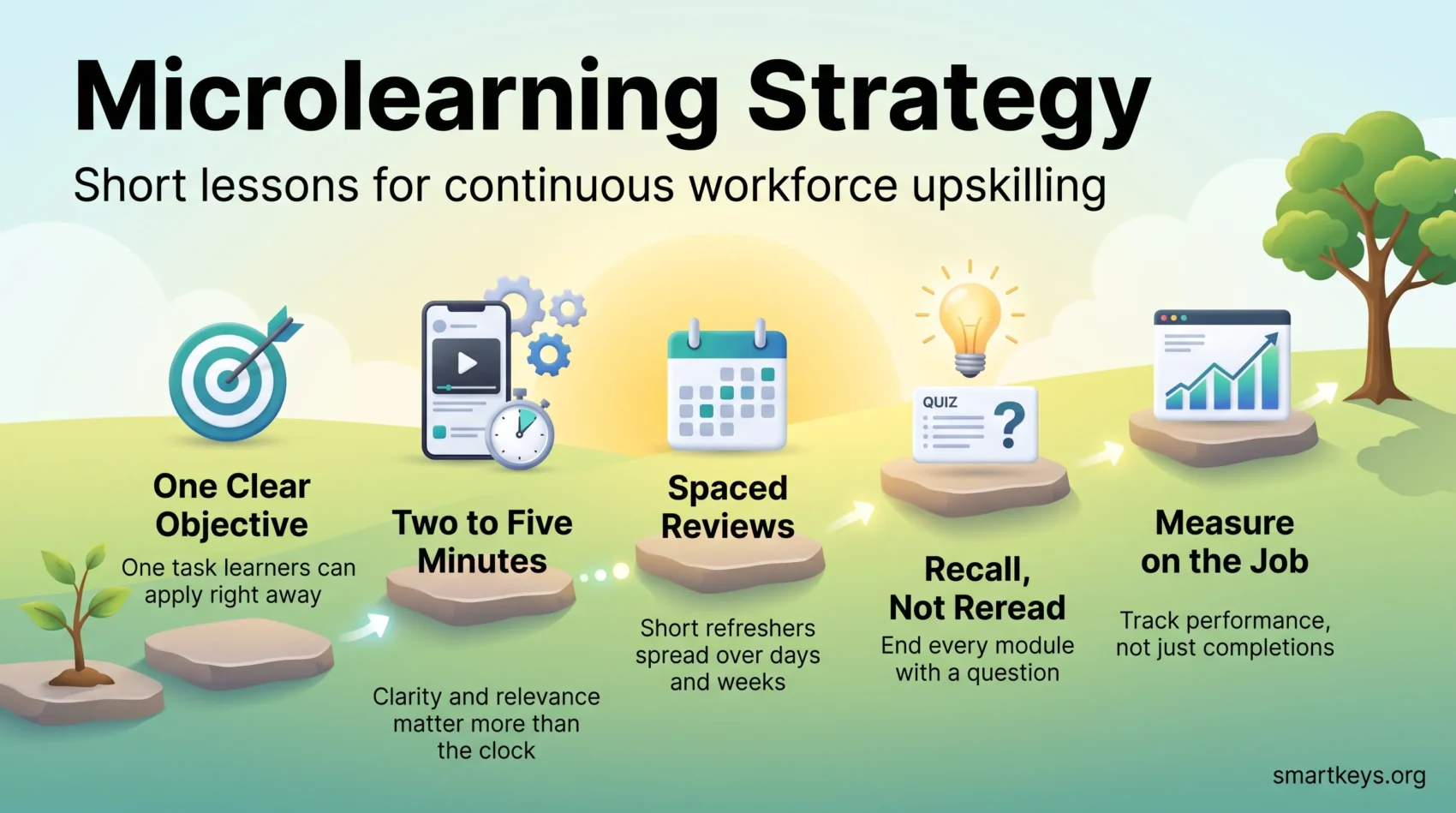
- Build each module around one task a learner can do right after finishing it.
- Two to five minutes is a useful guide, but clarity and relevance matter more than the clock.
- Space short reviews over days and weeks, and make learners recall answers, to fight forgetting.
- Choose platforms for mobile access, analytics and easy content export, because vendors do disappear.
- Measure changes in on-the-job performance, not just completions and badges.
- Use microlearning to reinforce longer training for complex skills, not to replace it.
- Individuals can use the same rules for personal learning bursts: one skill, a fixed daily slot and a quick self-test.
What Is Microlearning and Why It Fits the Modern Workday
Microlearning is short, focused training built around one clear outcome. A piece can be a 90-second how-to video, a five-question quiz or a short branching scenario. What makes it “micro” is not the format but the scope: one objective, delivered in minutes, usable right away.
How short is short? In a 2017 survey by the Association for Talent Development (ATD), most talent development professionals said microlearning works best when it runs between two and five minutes. The average “ideal” length they named was closer to 10 minutes, though. Treat these numbers as practitioner experience, not a law of learning.
- It fits the workday: lessons slot into gaps between tasks, on a phone or a desktop.
- It arrives just in time: people learn right before they need a skill, so they use it before they forget it.
- It is easy to update: when a product or policy changes, you replace one module instead of rebuilding a course.
For distributed teams, our guide to remote corporate training covers the wider setup.
When Microlearning Is the Right Fit for Your Topic
Start with one question: can someone learn this skill in a few clear steps and apply it straight away? If the answer is yes, a short module will usually beat a long course.
Good fits include how-to steps, product updates, compliance reminders, safety checks, sales talk tracks, and simple dos and don’ts. Each maps to a concrete task or decision.
Poor fits are deep fields such as law, medicine or advanced engineering, and any skill that needs long practice with feedback. There, short lessons still help as pre-work, as practice between sessions, or as reinforcement afterwards.
A quick test for fit
- Write a one-sentence objective. If it needs more than one verb, split it into two modules.
- Ask whether a learner can apply the skill after a few steps. If not, plan a longer course.
- Break complex processes into chunks and check whether each chunk stands on its own.
- Decide whether learners need a sequence or can pick modules in any order.
Keep only the information that supports a single objective.
Short modules also let a colleague learn a neighbouring role one task at a time, the core idea behind a cross-training strategy.
Core Principles of a Microlearning Strategy
Begin each module with a simple promise: what the learner will be able to do after a few minutes. That promise keeps the content tight and gives you something to measure.
Set one clear learning objective per module
Write a single, observable objective. “Understand our returns policy” is vague. “Process a return without a receipt in the checkout system” is observable, because a manager can watch someone do it.
Align modules to real job tasks
Design modules around the decisions people face right now. This is called performance support: help that sits inside the workflow, not in a separate classroom.
Keep the length flexible
Two to five minutes works for many programs, but a clear seven-minute demo beats a rushed three-minute one.
Define success before you build
- Write down which on-the-job behavior should change and how you will spot it.
- Use reusable templates so modules look and work the same across teams.
- Revisit length and format once you have performance data and feedback.
Designing Microlearning Content That Sticks
Start with the job a person needs to do, then pick the smallest piece of content that enables it. Keep each lesson short, single-minded and clearly finished.
Choose the right media: use video for demonstrations, infographics for step sequences, short audio for quick refreshers, and quizzes to check understanding. Microcopy, the short instructional text inside a screen or form, guides action and reduces errors. Every element should serve the objective.
Chunk and label your modules: split complex information into small, standalone lessons that each map to one task. Name them after the task, so people can find the exact module they need without scrolling through extra content.
Borrow from social media formats: swipeable cards, short captions and bold visuals match how people already consume content on their phones. Add captions and transcripts so lessons work with or without sound.
Start from what you already have: a well-written standard operating procedure is often the best raw material for a module. Our guide to standard operating procedures explains how to write them. Store finished modules where people already search for answers, ideally inside your knowledge management system.
What Memory Research Says About Knowledge Retention
Well-tested memory research explains why short, repeated lessons work, and how to design yours.
Beat the forgetting curve with spacing: in the 1880s, psychologist Hermann Ebbinghaus showed that new material fades quickly unless you review it. Spaced repetition, meaning reviews spread out at growing intervals, counters this. A large 2006 review of spacing studies by Nicholas Cepeda and colleagues found that spreading practice out reliably beat cramming the same study time into one session. In practice: send a two-minute refresher a few days after a module, then again a few weeks later.
Make people recall, not reread: retrieving an answer from memory strengthens it more than looking at the material again. In a well-known 2006 study, Henry Roediger and Jeffrey Karpicke found that students who tested themselves remembered more a week later than students who simply restudied. So end each module with a question, not a summary.
Respect the limits of working memory: working memory is the mental space where you hold information while you use it, and it is small. Psychologist Nelson Cowan estimated it holds about four meaningful chunks at once. Fewer points per module means learners actually process each one.
Make openings and endings count
People tend to remember the start and the end of a lesson best. Put the most important point first and repeat it at the close.
Use stories and quick practice
Real scenarios connect a lesson to daily work. Follow each module with a small task, such as “find this setting in the system now.”
Attention matters too. A lesson squeezed between chat notifications rarely sticks, for the same reasons that multitasking hurts productivity.
“Short, spaced touches and fewer chunks make learning stick.”
Tools and Platforms for Microlearning in 2026
The right platform makes short content easy to build, deliver and measure. Here is what to look for.
- Mobile-first delivery: frontline and field staff learn on phones, often in short breaks.
- Analytics: completion, quiz results and engagement, ideally broken down by team and role.
- Adaptive paths: learners who struggle get extra practice while others move on.
- Easy authoring: subject-matter experts should be able to update a module without an agency.
- Content export: support for SCORM, a common file standard for e-learning content, so you can move your library if you switch vendors.
That last point is not theoretical. EdApp, a popular mobile microlearning app that SafetyCulture had rebranded as SC Training, has retired. Customers had until 31 March 2026 to move their data, so older recommendations for the tool are out of date.
Examples of current options: Axonify focuses on frontline enablement with short daily training, Centrical combines microlearning with gamification and performance coaching, and Kahoot suits quick interactive quizzes. Run a pilot with real users before you commit.
A note on AI: many platforms now draft modules or quizzes from your existing documents with generative AI. That speeds up production, but a subject-matter expert still needs to check every module for accuracy. Our overview of AI-powered learning platforms covers personalization features in more depth, and our guide to edtech in corporate training puts the tool market in context.
If you want employees to co-create content, peer learning platforms layer Q&A hubs, user-generated content and structured feedback on top of your module library. For hands-on skills, immersive formats can complement short lessons; see what VR employee training actually delivers.
Microlearning for AI Literacy and Fast-Changing Skills
Some topics change so quickly that a yearly course is outdated before it ends. AI tools are the clearest example, and short modules suit them well: one module per tool feature, safe prompting rule or data-handling step.
In the EU there is also a legal angle. Article 4 of the EU AI Act has required companies that provide or deploy AI systems to address AI literacy among their staff since 2 February 2025. The Digital Omnibus on AI, Regulation (EU) 2026/1744, which entered into force on 27 July 2026, kept this duty but softened it. Companies must now take measures to support AI literacy, but they no longer have to guarantee a specific level. A documented series of short modules is one practical way to show that support.
The same logic applies to data skills. A data literacy program can be broken into short lessons, such as reading a dashboard or spotting a misleading chart. It also helps experienced employees who are moving into new roles through mid-career retraining.
From Plan to Practice: Launch and Measure Your Program
A small pilot gives you real signals fast, so you can refine lessons before a full rollout.
Audit and prioritize
Review your current training and find quick wins you can turn into short lessons. A digital skills gap analysis shows where the biggest needs are, so you start with topics that affect performance.
Map learning paths and sequence modules
Map paths by role and objective. Order modules from must-know to nice-to-know, and lock steps where order matters, such as safety procedures.
Add scenarios, quizzes and light gamification
Build mini-scenarios, quick quizzes and practice prompts into each unit. Light gamification, such as progress bars, badges and short challenges, can lift engagement if rewards are tied to real tasks. Our guide to gamification in the workplace explains where it helps and where it backfires. New hires are a good starting audience: see how gamified onboarding and remote onboarding use short modules.
Measure what changes on the job
Completion rates alone tell you little. Track three layers: engagement (completions, time spent), learning (quiz and scenario results), and behavior (fewer errors, faster handling, fewer support tickets). Compare the pilot group with a baseline or a similar team that has not started yet. Our article on measuring upskilling ROI shows how to connect these numbers to business results.
“Pilot, measure, iterate, then scale what improves on-the-job performance.”
- Plan timed nudges that respect work rhythms and arrive at the moment of need.
- Set a review cadence so lessons stay current with product and policy changes.
Common Challenges and How to Overcome Them
Most problems appear after launch, in maintenance and access.
Chopping a course into pieces
Cutting an hour-long course into twelve five-minute clips does not create microlearning. Each clip still depends on the others. Redesign each unit so it stands alone and matches one clear task.
Maintaining modules at scale
Assign an owner to every module, set review dates and track which modules depend on the same product or policy. Tag modules by role, task and priority so the platform can route the right content to the right people.
Accessibility and device usability
Make access universal. Use captions, transcripts, alt text, readable color contrast, keyboard navigation and mobile-ready layouts. Test with different users and devices before launch, and add a quick help link so nobody gets stuck when time is short.
Winning over skeptical employees
People used to classroom training sometimes doubt that a three-minute lesson can teach anything real. Arguing rarely helps; results do. Start the pilot with a topic that removes a daily annoyance, such as a confusing system step, and share the first improvements with the team. Managers who complete the modules themselves and mention them in meetings show that the time is well spent.
“Focus on high-impact areas first and expand only when you can maintain quality.”
Using Short Learning Bursts for Your Own Development
Microlearning is not only a tool for training departments. Freelancers, team leads and anyone learning a skill next to their job can apply the same principles in short personal learning sessions, often called learning bursts.
Pick one skill and one outcome
Choose a single skill and write down what you want to be able to do in four weeks, for example “build a pivot table from raw sales data.” Then split that goal into small steps, one step per session.
Fix a daily slot and protect it
Short sessions work best when they happen at the same time every day. Attach yours to a routine you already have, such as the first ten minutes after lunch. This is the idea behind habit stacking. Mute notifications for those minutes, because a short lesson that gets interrupted twice rarely sticks.
Use a timer, then test yourself
A timer keeps sessions short and honest. The Pomodoro Technique, 25 minutes of focused work followed by a five-minute break, is a simple frame: one round can hold two or three short lessons plus a quick self-test. End each session by writing down what you learned without looking at the material. Start the next day with a two-minute review of the previous session before you move on. That way you use spacing and recall, the same principles that make company programs work.
Track what you can do, not time spent
Measure progress by the tasks you can now complete on your own. Hours logged or courses finished say little about whether a skill is actually usable.
Conclusion
A microlearning strategy comes down to a simple rule: each module solves one problem, takes a few minutes and gets checked to see whether it stuck.
Spaced refreshers and recall questions do more for retention than longer lessons. Start with a small pilot on a topic that affects performance, measure the change on the job, and scale what works. The same rules help you as an individual: one skill, a fixed daily slot and a quick self-test after every session.
Found this useful?
Make SmartKeys a preferred source on Google, and our articles will surface more often in your Top Stories, AI Overviews, and AI Mode.
Add as Preferred Source