
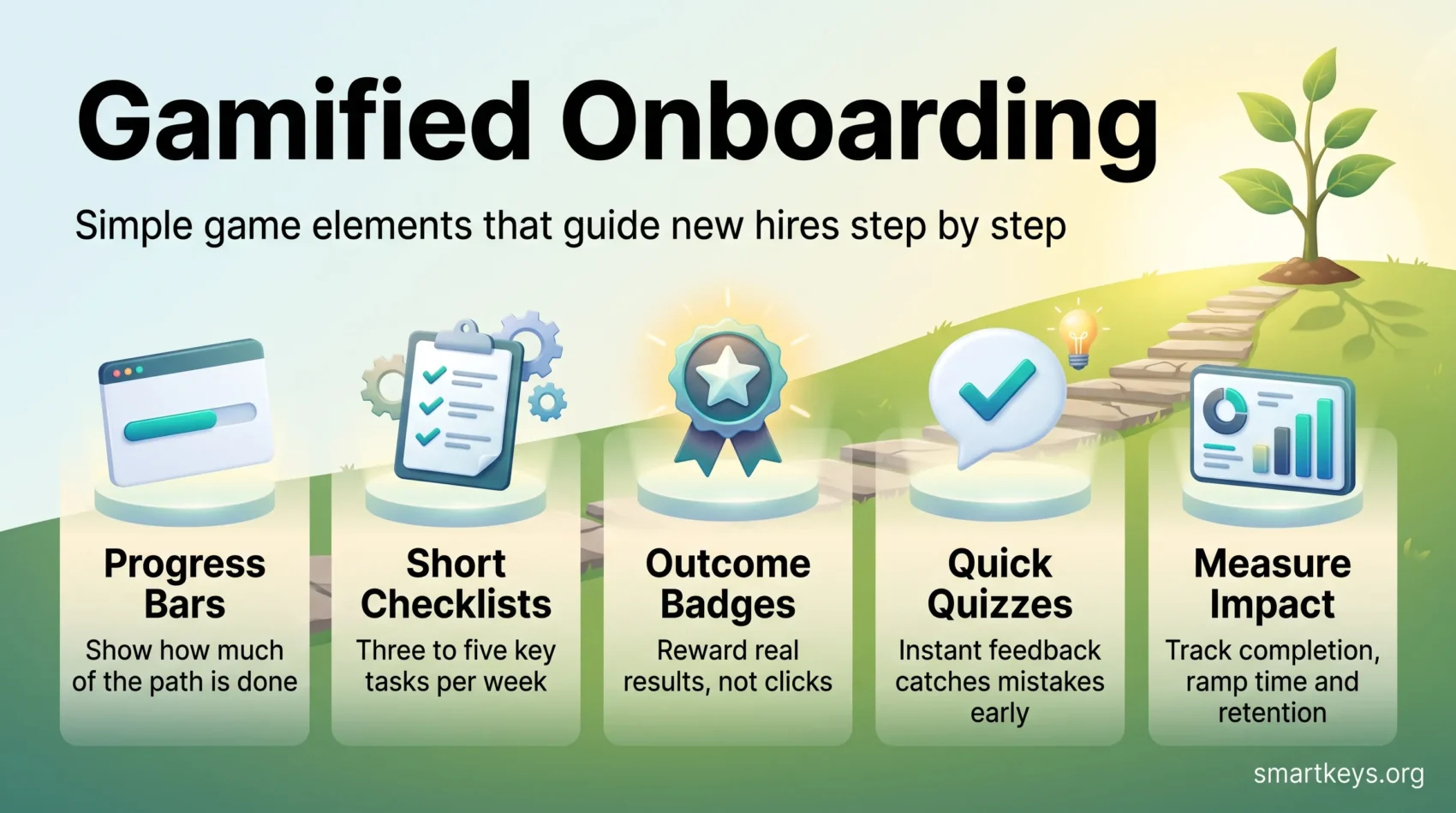
Gamified onboarding borrows simple game elements to make a new hire’s first weeks easier to follow. Think progress bars, short checklists, badges and quick quizzes. Each one shows people where they stand and what to do next, so a new job feels like a guided path instead of a pile of logins, documents and meetings.
The idea is not to turn work into a game. It is to remove guesswork. Picture a new support agent who sees that four of six setup steps are done. The next one reads “shadow two live calls”. That person needs fewer reminders and asks better questions. This guide explains which mechanics work, what the research actually supports, and where gamification backfires. If the concept itself is new to you, start with our explainer on what gamification is and why it motivates.
Key Takeaways
- Progress bars and short checklists do most of the work: they make the path visible and the next step obvious.
- Tie every badge, point or level to a real onboarding outcome, never to logins or clicks.
- Research shows gamification helps learning on average, but effects vary widely with design.
- Make competitive features opt-in: people who feel forced to play can end up less motivated.
- Measure completion, time to productivity and early retention against a baseline before you scale.
- For the wider picture beyond onboarding, see our guide to gamification in the workplace.
Why onboarding needs a better design
Most companies know their onboarding could be better. In Gallup’s research, only 12% of employees strongly agreed that their organization does a great job onboarding new employees (Gallup). The problems are familiar: too many tasks at once, unclear expectations and long stretches where a new hire waits for access or feedback.
These gaps matter because the first weeks shape how people judge the job. A slow, confusing start costs time for the new hire and for the manager who has to fill the gaps. It also hurts talent retention later on. If your team works remotely, the problem is sharper, because nobody can lean over a desk to ask what comes next. Our guide to remote onboarding and training covers that side in detail.
Game elements address the design problem directly. They break a large, vague process into small visible steps and give quick feedback when a step is done. They work best around the moments that matter most: first login, first task and first real contribution.
What gamified onboarding is and how it works
Gamification means using game mechanics in a non-game setting to encourage specific behavior. In onboarding, that usually means progress indicators, checklists, points, badges, levels and, occasionally, leaderboards (ranked lists that compare participants). The goal is to guide action, not to entertain.
Employee vs. customer onboarding: where they match and where they differ
Much of what we know about gamified onboarding comes from software products. There, companies use the same mechanics to help new customers get started. Both journeys share progress cues, feedback loops and small rewards.
The goals differ, though. Employees need to become ready for their role, learn the culture and build relationships. Customers need to reach the moment where a product proves its value, a topic our product-led growth playbook covers in depth. This article focuses on new hires and borrows from product design only where the lesson transfers.
The psychology that makes game mechanics work
A few well-studied effects explain why these mechanics work.
- Goal gradient. People speed up as they get closer to a goal. In a study of coffee-shop reward cards, customers bought coffee more often the nearer they came to a free drink (Kivetz, Urminsky and Zheng, 2006). A progress bar makes that distance visible.
- Endowed progress. A head start increases completion. In a car wash field experiment, 34% of customers finished a card that needed eight stamps but came with two of ten already filled. Only 19% finished a plain eight-stamp card (Nunes and Drèze, 2006). In onboarding, you can pre-check steps the new hire has already done, such as signing the contract.
- The urge to finish. Unfinished tasks are often said to stick in memory (the “Zeigarnik effect”). A 2025 meta-analysis found no such memory advantage. It did find a general tendency to resume interrupted tasks (Ghibellini and Meier, 2025). For onboarding, the practical point holds: an open item on a visible checklist invites people to come back and complete it.
- Fast feedback. A badge or a short “well done” right after a task confirms that the effort counted. This is a form of positive reinforcement.
What the evidence says about gamified onboarding
Gamification helps on average, but the size of the effect depends heavily on design. The most cited meta-analysis on gamified learning pooled experimental studies and found a medium positive effect on learning outcomes and smaller positive effects on motivation and behavior. The motivational and behavioral results varied a lot between studies (Sailer and Homner, 2020). The same analysis found that combining competition with collaboration worked better than pure competition.
Voluntary participation is the second big factor. In a Wharton study of several hundred salespeople, a basketball-themed sales game with leaderboards raised positive feelings among employees who accepted the game. Those who did not accept it felt worse about their job, and some performed worse (Knowledge at Wharton). The authors called this “mandatory fun”.
So expect gamification to support a good onboarding program, not to rescue a bad one. Here is where it tends to help most.
Faster time to productivity
Time to productivity is how long a new hire needs to do the job at the expected level. Visible checkpoints and quick feedback shorten this because people spend less time wondering what to do next. A new sales rep who can see “product quiz passed, CRM setup done, first demo shadowed” knows the next step without waiting for a manager.
Steadier engagement in the first 90 days
Milestones create natural moments for manager check-ins. Reaching a level at day 30 is a good prompt for a one-on-one meeting about what is going well and what is missing. Visible progress also helps new hires manage themselves, which matters in hybrid and remote teams.
Better knowledge retention through active learning
Short quizzes and scenario checks make people recall what they learned instead of just rereading it. That kind of active practice builds confidence before someone applies a skill on the job. Short, focused lessons fit well here; see our guide to a microlearning strategy.
Gamified onboarding mechanics you can put to work
Start with simple mechanics that make progress visible at a glance. Add more only if the data shows you need them.
- Progress bars: show how much of the onboarding path is done. Place one on the new hire’s start page and celebrate each finished stage.
- Checklists: list the three to five tasks that unlock the most value this week. Short lists reduce overwhelm, and each item should state why it matters. Our guide to checklists for productivity has more on writing good ones.
- Badges and points: tie them to observable outcomes, such as “handled first ticket alone”, not to logins or page views.
- Levels and milestones: group the journey into stages, for example week 1, day 30 and day 90, so growth feels paced rather than endless.
- Quizzes with instant feedback: short knowledge checks after each module catch misunderstandings early.
- Streaks and reminders: reward consistency for recurring habits like daily practice. Keep them forgiving so one missed day does not erase progress. The same logic drives micro-habits.
- Leaderboards: use them sparingly, segment them by cohort (a group that started at the same time) or by team, and make them opt-in.
Tip: If you cannot name the outcome a mechanic serves, drop it.
Gamified onboarding examples to learn from
The best-known examples come from consumer apps, but the patterns transfer to employee onboarding. Use them as patterns, not templates.
Progress cues: LinkedIn’s profile completion meter
LinkedIn became a textbook example by showing members how complete their profile was and suggesting the next section to fill in. The mechanic is simple: one visible measure and one clear next step. For new hires, the equivalent is a single onboarding progress bar with the next task highlighted.
Streaks: Duolingo’s habit loop
Duolingo rewards daily practice with streaks and experience points. In one published test, offering learners a “streak wager” raised day-7 retention by 14% (Duolingo, 2017). Note that this measured learners returning to an app, not employees learning a job. The lesson for onboarding is narrower: small, regular rewards help build a routine, such as a daily product-knowledge drill in the first month.
Micro-celebrations: Asana
Asana can show a brief animation when a user completes a task. In onboarding, a short message from the manager at each milestone does the same job.
An employee scenario: a 30-day support onboarding path
Picture a new customer support agent. Week 1 has a five-item checklist: accounts set up, product tour, policy quiz, two shadowed calls, one intro chat with a buddy. Week 2 unlocks a “first ticket solved” badge. Day 30 brings a level-up and a manager check-in. Nothing here is a game in the entertainment sense. It is a clear, visible path with feedback at each step.
How to design the first-week flow
Start the relationship with a short, personal welcome so every new hire feels expected from day one.
Use a welcome flow to personalize the journey
Begin with a friendly welcome that asks one or two questions, such as role and prior experience. Tailor the next steps to the answers so the path stays relevant and short. An experienced hire should not sit through the same basics as a graduate.
Guide setup with a short, high-impact checklist
Limit week one to three to five items. Focus on the steps that unlock the biggest gains, such as system access, the first meeting with a buddy and the first small real task. Assigning a buddy or mentor adds a social anchor; mentorship matching platforms can help pair people at scale.
Reinforce with timely nudges and rewards
Send a reminder when someone is stuck or close to a milestone, not on a fixed daily schedule. Show only what matters for that person’s role. Offer small, meaningful rewards at the moment of completion, such as recognition or access to the next stage.
A step-by-step process to implement onboarding gamification
Start by naming the outcomes that matter. Decide what the program should move: time to productivity, checklist completion or reaching the first milestone. That keeps the design tied to measurable results rather than novelty.
Define goals and success criteria tied to your culture
Levels and recognition suit roles where mastering a skill takes months. A simple checklist suits roles where people must be productive within days.
Set specific targets, such as a target time to productivity or a checklist completion rate. Share them with managers so everyone knows what success looks like.
Map the journey from first login to role-ready
- Sketch the full journey and mark the key milestones.
- Pick mechanics that match your culture: badges, levels or opt-in leaderboards.
- Pilot with a small cohort, gather feedback and adjust quickly.
- Give managers a simple dashboard and talking points to celebrate progress.
Then scale carefully: launch a minimal version, check it on every device new hires use, and review results before adding features.
How to measure the impact of your onboarding gamification
Pick a small set of metrics that show whether people learn faster and drop off less. Record a baseline before you change anything, so you can compare before and after. Combine numbers with short surveys to understand the reasons behind them.
Engagement signals
Track participation, task completion rate and completion time. Look at where people stall in the sequence; that is usually where a step is unclear or blocked.
Learning outcomes
Measure quiz results, then check them against what managers observe on the job. A high quiz score only matters if it shows up in real work.
Retention and time metrics
Monitor early turnover and cohort retention, meaning how many people from each starting group are still with you after three, six and twelve months. Track time to productivity to see whether new hires ramp up faster. Workforce analytics tools can pull these numbers together.
Surveys and qualitative feedback
Use short surveys at key stages while the experience is fresh. A simple score such as employee NPS (how likely someone is to recommend the company as a workplace) gives you a trend line. Comments explain why the numbers move.
Test one change at a time, review results in a simple recurring report and share what worked with stakeholders.
Implementation tips and ethical guardrails
Good gamification respects people’s choices and privacy. Start small, test with a pilot group and expand based on results.
Balance competition to avoid stress
Segment leaderboards by cohort, reward personal progress and highlight team wins. Make social features opt-in, so people who prefer privacy are not pressured. The Wharton “mandatory fun” finding above is the clearest warning of what happens otherwise.
Design for accessibility and every device
Make sure all content works with screen readers, on mobile and with simple navigation. Adjust pacing and difficulty to the role and to prior experience. Our guide to remote work accessibility lists practical checks.
Handle onboarding data with care
Progress data, quiz scores and rankings are data about identifiable people. In the EU they count as personal data under the GDPR, so collect only what you need and tell new hires what you track and why. Onboarding scores should support people, not become a hidden performance rating. Our articles on data privacy at work and AI employee monitoring explain the wider rules.
Finally, brief managers with simple messages and write down your principles: no manipulative mechanics and no over-reliance on rewards.
Tools to scale your onboarding gamification
Pick tools that let HR or team leads change flows without waiting for developers. No-code builders let you adjust progress bars, checklists and reminders quickly, so you can test what works.
No-code flows, A/B testing and analytics
An A/B test shows two versions of a step to comparable groups and compares the results. It is the simplest way to find out whether a badge or a reminder actually changes behavior. Built-in analytics then show where people stall.
Also check integration with your HRIS (human resources information system) or LMS (learning management system). That keeps employee data in sync and sets up new cohorts automatically. In a demo, ask to see your own use case and your own metrics.
Examples by category: many LMS platforms include badges, points and completion tracking. Userpilot focuses on in-app checklists, progress indicators and analytics, mainly for software products. Centrical links gamification to performance and coaching for employees. Broader employee experience platforms can host onboarding journeys alongside surveys and communication. Always check current features and pricing with the vendor.
Conclusion
Gamified onboarding works best as clear design, not as a game. Visible progress, short checklists and quick feedback help new hires find their way, and the research supports a real, if variable, benefit.
Start where the impact is highest: the first week and the first meaningful milestone. Pick one flow, launch it with a small cohort and collect feedback.
Keep participation voluntary where competition is involved, handle the data with care, and measure completion, time to productivity and early retention. If the numbers improve, expand. If they do not, simplify.
Found this useful?
Make SmartKeys a preferred source on Google, and our articles will surface more often in your Top Stories, AI Overviews, and AI Mode.
Add as Preferred Source