Virtual instructor-led training (VILT) is live training run by a real trainer over a video call, with learners joining from wherever they work. For distributed teams it has become the standard way to deliver anything that needs discussion, practice or feedback. Roughly 25% of paid full days in the United States were worked from home in May 2026, according to Stanford’s Survey of Working Arrangements and Attitudes, so a large share of any workforce is simply not in the building when training happens. Delivery has followed: online and computer-based methods now account for 34% of training delivery, ahead of instructor-led classroom sessions at 28%, with virtual classroom and webcasting at 24% (Training magazine, 2025 Training Industry Report).
The budgets have followed too, though not in the direction most L&D teams expected. US training expenditure rose nearly 5% to $102.8 billion, and spending per learner climbed from $774 to $874. Average training hours per employee fell from 47 to 40 a year. Companies are paying more for fewer hours, which makes the quality of each live hour the whole question.
This guide focuses on the live, trainer-led side of remote learning in corporate training: when VILT beats self-paced e-learning, how to run sessions across time zones, what really blocks it, and how to check that it worked. Live virtual training is one delivery channel inside a broader plan for upskilling and reskilling your workforce, so use that guide for the strategy and this one for the delivery.
Key Takeaways
- VILT is live, trainer-led training over video. Use it for practice, discussion and feedback, and move pure information into short recorded modules.
- About a quarter of US paid full days are worked from home (SWAA, May 2026), so remote delivery is the default rather than a fallback.
- Virtual classroom and webcasting already make up 24% of training delivery, next to 34% for online self-paced formats (Training magazine, 2025).
- Average training hours per employee fell from 47 to 40 a year, so each live hour has to carry more weight.
- Workload, not technology, is the main blocker: around half of HR managers and employees name it.
- For distributed teams, rotate session times, run repeat sessions for other time zones and record everything.
- Measure a behavior or an operational number weeks later, not attendance on the day.
What Virtual Instructor-Led Training Is and Where It Fits
Corporate training shifted from rooms to screens over roughly five years, and the pattern has now settled. Remote work did not take over the economy and did not disappear, and training delivery reflects that: a mixed model in which most content is consumed online, live sessions run in a virtual classroom, and in-person time is reserved for the things that really need a room.
VILT is the middle layer of that model. A trainer teaches a group in real time on a video platform, using polls, breakout rooms, a shared whiteboard and the chat. Learners can ask questions and practice with feedback, which recorded content cannot offer.
What the Delivery Mix Looks Like Now
The 2025 Training Industry Report puts online and computer-based delivery at 34% of training, instructor-led classroom at 28%, virtual classroom and webcasting at 24%, and blended learning at 22%. Mobile and social learning sit at 6% each. The technologies that dominate vendor marketing barely register in practice: artificial intelligence accounts for 2% of delivery and augmented or virtual reality for less than 1%.
That gap between pitch and practice is worth holding onto. Most of what employees experience this year is a video, a document, a quiz and a live call. Getting those right matters more than any emerging format.
What Companies Actually Spend
Spending per learner rose to $874 from $774 the year before, while total US training expenditure grew almost 5% to $102.8 billion. Spending on outside products and services jumped 29% to $16 billion, which suggests companies are buying more content and platform capability rather than building it in house.
The number that moves in the other direction is time. Employees received 40 hours of training on average, down from 47. Remote delivery removes travel and venue costs, and that saving is real, but it does not create hours in anyone’s calendar. If your business case rests on cost per head alone, you are measuring the easy half.
VILT or Self-Paced E-Learning?
The two formats solve different problems. Self-paced e-learning works for knowledge people can absorb alone: a new policy, a product update, the steps of a process. Live virtual training earns its cost when people need to try something and get feedback, such as handling a difficult customer call, running a first team meeting as a new manager or working through a case with colleagues.
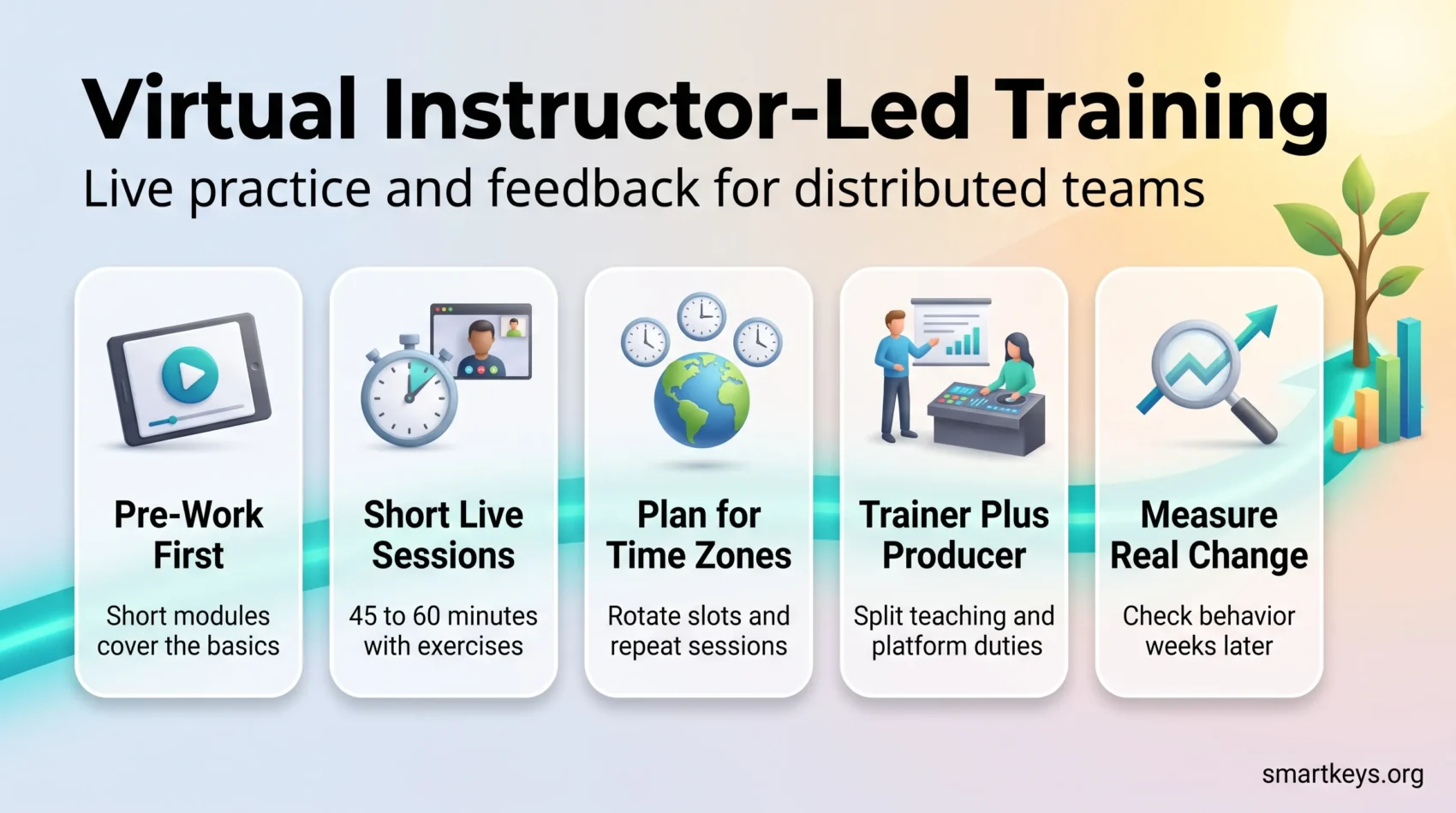
A simple rule helps: if a learner could get the same value by watching a recording at double speed, it should not be a live session. Most strong programs combine both. A short module before the session covers the basics, and the live hour goes to practice. For choosing the platforms behind this mix, see our guide to EdTech for corporate training.
What Live Virtual Training Does Well
Three benefits hold up under scrutiny. They are not the ones vendors lead with.
Reaching People Wherever They Work
A live session on video reaches the regional office, the field team and the home worker at the same moment, with the same trainer. For distributed teams, that consistency matters: everyone hears the same message and can ask the same person.
The catch is time zones. A single live slot always suits some people and forces others onto an early or late call. That is why the recording, and a short written summary, are part of the session rather than an extra. Our guide to knowledge management for remote teams covers how to keep that material findable once it exists.
Cost Control, Honestly Measured
Online delivery removes travel, accommodation and venue costs. Those savings are straightforward and immediate. What they do not tell you is whether the training worked, and the industry’s own numbers show why that matters: spending per learner is up while hours per learner are down.
The useful comparison is cost per outcome, not cost per seat. That means deciding in advance what should change (fewer support escalations, faster ramp for new hires, fewer compliance findings) and measuring it. Our article on measuring upskilling ROI works through how to set that up without turning it into a research project.
Retention and Commitment
The link between learning opportunities and staying is one of the better-supported findings in L&D. In TalentLMS’s 2026 report, based on 1,000 US full-time employees who received training in the past year, 73% said stronger learning and development opportunities would increase how long they stay, and 35% said limited learning opportunities would make them leave. Among HR managers surveyed, 95% agreed that better training improves retention.
Employee satisfaction with training is also rising: 84% reported being satisfied, up from 79% in 2024 and 75% in 2022. That is a real gain, and it fits the wider picture in our overview of talent retention strategies.
Where Virtual Training Breaks Down for Distributed Teams
The failure modes are consistent, and only one of them is technical.
Time Is the Real Blocker
Ask people why training does not happen and the answer is workload, not bandwidth. In the TalentLMS data, 50% of HR managers and 53% of employees said high workloads prevent training from taking place. Nearly half of employees, 46%, said their company treats training as time away from real work. And 70% of employees admitted to multitasking during training, up sharply from 58% in 2024.
That last figure is the one that should worry you. Attendance is not attention. A course with a 95% completion rate and a room full of people answering email has produced a number, not a capability. The fix is organizational rather than technical: protect the time in calendars, have managers name training as part of the job, and shorten sessions so that sitting through one is realistic.
Isolation and Flat Engagement
Remote learners lose the corridor conversation that follows a workshop, which is often where the actual sense-making happens. Without it, training becomes a solitary transaction with a video player.
Live polls, breakout discussion, cohort-based courses and a shared channel for questions restore some of that. So does peer teaching, where colleagues rather than L&D supply the examples. Peer learning platforms provide the Q&A hubs, review workflows and analytics that keep that material accurate.
Technology Problems That Are Actually Support Problems
Poor connections, forgotten passwords and outdated hardware do interrupt remote training, but a support process fixes them, not a new platform. Publish a one-page setup guide, staff a live channel during sessions, and record everything so a dropped connection is an inconvenience rather than a missed module.
Measuring Whether Anything Changed
Completion rates and satisfaction scores are easy to collect and tell you almost nothing about capability. Better signals take more effort: a short assessment several weeks after the course rather than immediately, manager observation against a defined behavior, and operational metrics tied to the skill in question.
Workforce data helps here. Our guide to workforce analytics tools covers the systems that connect training records to performance data.
How to Run Virtual Instructor-Led Training That Holds Up
Designing Sessions Across Time Zones
Start by mapping where your learners actually sit. If the team spans two or three neighboring time zones, one well-chosen slot usually works. If it spans continents, run the same session twice, once for each region, rather than asking one group to join at night.
Rotate recurring slots so the same people do not always carry the inconvenient time. Put pre-work and follow-up tasks in a shared channel, so the discussion can continue in writing after the call. Our overview of asynchronous communication tools covers the options for that written layer.
Running Virtual Sessions People Stay Awake In
Start with a stated objective and an agenda. Keep live sessions short; 45 to 60 minutes is a realistic ceiling for sustained attention on a call. Break every 15 minutes or so with a question, a poll or a short exercise, and use the chat deliberately rather than treating it as background noise.
Blend live discussion with recorded material so that the expensive synchronous time is spent on the parts that need a human: practice, feedback and questions. Record the session, publish it with a summary, and follow up with a short assessment a few weeks later rather than on the day. Our guide to remote onboarding and training covers how to sequence this for new hires specifically.
Trainer and Producer: Splitting the Roles
Teaching on camera is a different skill from teaching in a room. The trainer cannot read body language, and managing the chat, breakout rooms and technical issues at the same time pulls attention away from the content.
Many teams therefore pair the trainer with a producer. The producer handles the platform, launches polls, moves people into breakout rooms and answers technical questions in the chat. The trainer can then focus on the group. For internal experts who teach only now and then, a short practice run on the platform before the first session prevents most of the awkward moments.
Choosing Platforms and Tools
Pick for the workflow you actually have. A platform that requires a separate login, sits outside your chat tool and reports in a format only L&D can read will lose to a shared folder within six months. Prioritize a clean learner interface, working search, mobile access and reporting managers can act on.
Where training needs to reach people mid-task, integration with the tools they already use matters more than feature depth. Our overview of AI collaboration tools for global teams covers what those platforms now cost and where the AI features are billed separately.
Blending Live Sessions With Other Formats
Live sessions work best as one part of a wider learning path, not as a standalone event. Each of the formats below has its own guide, so here is only how they connect to VILT.
Personalization. Before a live session, a short skills check shows who needs the basics and who can skip ahead. A digital skills gap analysis gives you that baseline, and AI-powered learning platforms can route people to the right pre-work automatically.
Microlearning and gamification. Short modules before and after a session prepare people and refresh what they practiced. Our guide to a microlearning strategy for continuous upskilling covers how to build them. Points and badges can lift attendance and practice frequency, but they work poorly for judgment skills, as our articles on gamification in the workplace and gamified onboarding explain.
AI support. AI accounts for only 2% of training delivery in the 2025 Training Industry Report, but it already helps behind the scenes: drafting session material, summarizing recordings and generating follow-up questions. Human review of anything AI drafts stays essential. For simulated practice of difficult conversations, see AI soft skills training, and for the employee side of AI-driven change, our article on mid-career retraining.
VR and AR. Immersive formats show strong results but pay off only at high learner numbers, which is why they remain under 1% of delivery. Our articles on AR in on-the-job training and VR employee training in 2026 cover where they make sense.
What Comes Next
The pressure on corporate learning is not going to ease. The World Economic Forum’s Future of Jobs Report projects that nearly 40% of the skills required on the job will change by 2030 and that 59 out of every 100 workers will need reskilling or upskilling.
Against that, 40 hours a year is not a lot. Hybrid delivery is the settled answer on format: online modules for knowledge and reference, live virtual sessions for discussion and practice, and in-person time for the rare cases where physical presence changes the outcome. What decides whether it works is not the ratio. It is whether people have the time, whether managers reinforce it, and whether anyone checks afterwards that something changed. Our overview of what is really changing in work culture and our look at which skills will be most in demand set out the wider context.
Conclusion
Virtual instructor-led training is no longer a stopgap. For distributed teams, it is the main way to give people live practice and feedback without flying them to one room. What has not been settled is whether each session actually builds capability.
The evidence points to a short list of things that matter. Protect the time, because workload is what stops training rather than technology. Keep sessions short, plan for time zones and make every learner do something during the call. Pair trainers with a producer when groups get larger. Measure a behavior or an operational number rather than attendance.
Do those, and the platform choice becomes a detail. Skip them, and a better platform will not help.
Found this useful?
Make SmartKeys a preferred source on Google, and our articles will surface more often in your Top Stories, AI Overviews, and AI Mode.
Add as Preferred SourceFAQ
What is virtual instructor-led training (VILT)?
Virtual instructor-led training is live training run by a trainer over a video platform, with learners joining from their own locations. It keeps what makes classroom training valuable, such as real-time questions, practice and feedback, while removing travel and room costs. VILT differs from self-paced e-learning because it happens at a fixed time with a person guiding the group. It works best for skills that need discussion, role-play or coaching, and it is usually combined with short recorded modules that cover the knowledge part before or after the live session.
Is remote corporate training as effective as in-person training?
It depends far more on design than on delivery mode. Online delivery now accounts for 34% of corporate training and virtual classroom sessions for a further 24%, so remote formats carry most of the load already. Where remote training underperforms, the cause is usually structural: sessions too long to hold attention, no protected time in people’s calendars, and no follow-up to check whether anything was retained. In TalentLMS’s 2026 survey, 70% of employees admitted multitasking during training. A short, well-structured online module that people actually focus on beats a full-day classroom session that nobody applies afterwards.
How long should a virtual instructor-led session be?
Plan for 45 to 60 minutes per live session as a realistic ceiling for sustained attention on a call. If a topic needs more time, split it into several shorter sessions spread over days or weeks rather than running a half-day marathon. Inside each session, change the activity every 15 minutes or so with a poll, a question or a short exercise. Move anything that is pure information, such as definitions or process steps, into a short pre-work module, so the live time goes to practice, discussion and feedback.
What is the biggest obstacle to remote training?
Workload, not technology. In TalentLMS’s 2026 report, 50% of HR managers and 53% of employees named high workloads as the reason training does not happen, and 46% of employees said their company treats training as time away from real work. Connectivity and hardware problems do occur, but they are support issues with straightforward fixes: a setup guide, a live help channel during sessions, and recordings for anyone who drops out. The time problem is organizational and needs managers to schedule training as work rather than as something people fit in around it.
Does offering training actually improve retention?
The employee-reported evidence is consistent. In the 2026 TalentLMS survey of 1,000 US full-time employees, 73% said stronger learning and development opportunities would increase how long they stay with their employer, and 35% said limited learning opportunities would push them to leave. Among HR managers, 95% agreed that better training improves retention. Satisfaction with training is also climbing, from 75% in 2022 to 84% in 2026. These are self-reported intentions rather than tracked departures, so treat them as a strong signal rather than a measured effect on turnover.
How should I measure whether remote training worked?
Not with completion rates or same-day satisfaction scores, which mostly measure whether the session was pleasant. Decide before the training what should change, then check it afterwards. Useful signals include a short assessment several weeks later rather than immediately, manager observation against a specific defined behavior, and an operational metric tied to the skill, such as support escalations, error rates or time to competence for new hires. Connecting training records to performance data through a workforce analytics system makes this practical; running it as a manual exercise per course rarely survives past the first quarter.