

Educational technology, usually shortened to EdTech, is the set of digital tools a company uses to teach, train and measure skills. It covers learning management systems (the software that hosts courses and tracks completions), authoring tools, virtual classrooms, AI tutors and the analytics on top. In corporate training, EdTech is the layer between “our people need to learn X” and “our people can now do X.”
The market is large and still growing. Grand View Research put the global education technology market at about $187 billion in 2025, with companies accounting for 67% of that spend. Demand is not slowing either: the World Economic Forum’s Future of Jobs Report 2025 expects nearly 40% of job skills to change by 2030 and 59 out of every 100 workers to need reskilling or upskilling by then.
This guide explains what EdTech does for a business in 2026, how the platform types differ, how to run a rollout people actually use, and where the risks sit. It is written for team leads and business owners, not learning specialists. EdTech is the delivery layer: the decision about which skills to build belongs in your workforce upskilling and reskilling plan.
Key Takeaways
- EdTech is a stack, not a single tool: an LMS tracks courses, authoring tools build them, virtual classrooms deliver live sessions, analytics show whether behavior changed.
- US organizations spent $102.8 billion on training in 2025, about $874 per learner, while training hours per employee fell to 40 a year.
- 89% of them already run an LMS. The differentiator in 2026 is how well tools connect to real work.
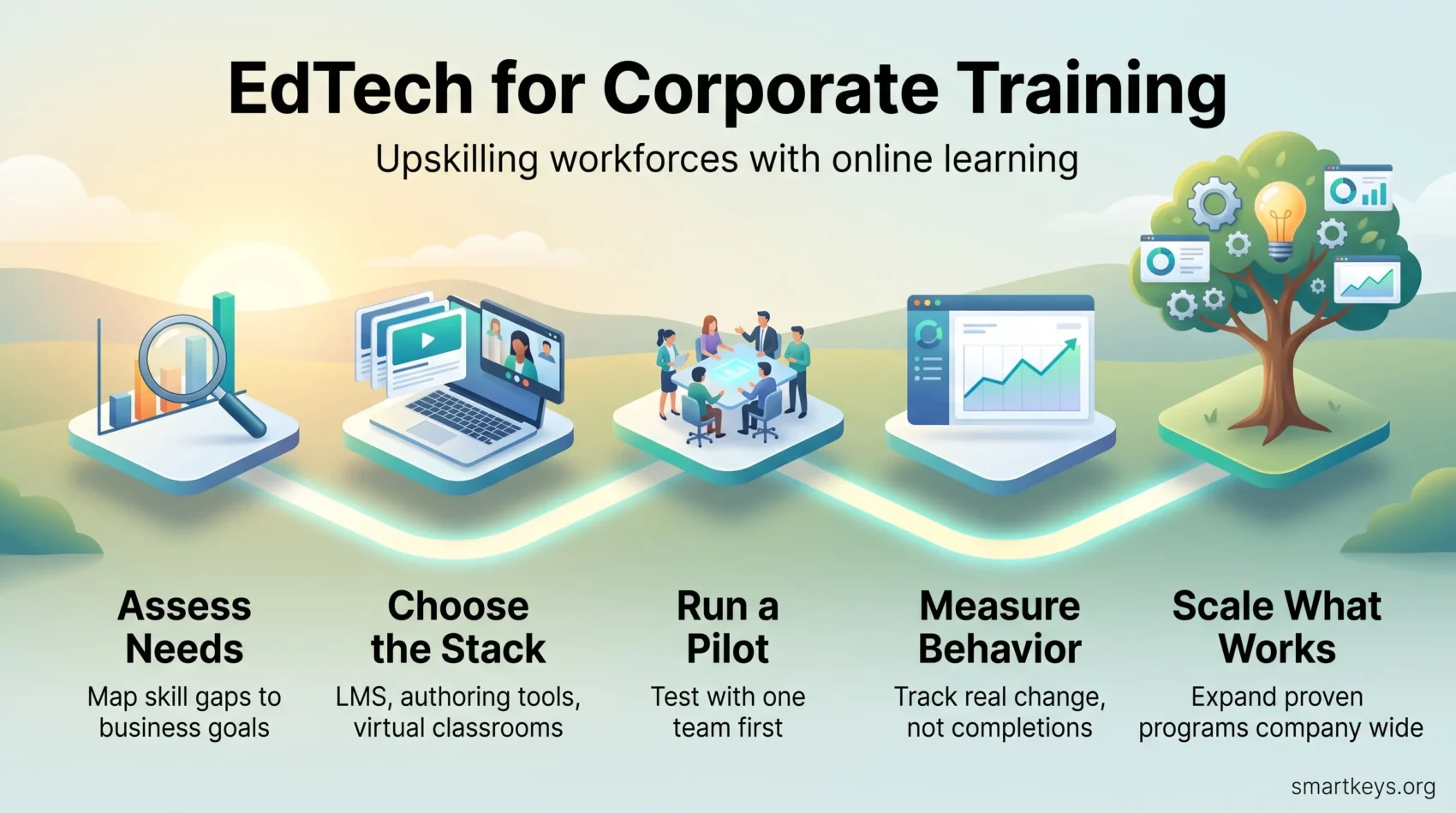
- Start with a needs analysis and a small pilot, measure behavior change rather than completions, then scale.
- In the EU, AI that decides access to training or grades learners counts as high-risk, with full obligations due by December 2027.
Why EdTech matters for corporate learning in 2026
Three pressures push companies toward digital learning at once: skills expire faster, workforces are spread out, and budgets are watched more closely. Cloud-based tools answer all three: they update content in minutes, reach people on any device and show what the training bought.
The numbers back this up. In the 2025 Training Industry Report, US organizations with 100 or more employees spent $102.8 billion on training, up nearly 5% on the year, and $874 per learner. Yet average training hours per employee dropped from 47 to 40. Companies pay more for less seat time, so each hour has to do more work. That is what well-chosen technology is for.
The state of educational technology today
Heavy, single-user systems have given way to lightweight, collaborative tools. Subject experts can edit a lesson together in the morning and push it to 3,000 employees the same afternoon. Delivery has spread out too: 34% of training hours were computer-based and 24% ran through virtual classrooms, while only 28% took place in a physical classroom.
AI is now a normal part of the toolkit. The share of organizations using AI in training jumped from 25% to 37% in one year, mostly for practical jobs: drafting quiz questions, cutting long documents into short modules, translating content and recommending the next course. The SmartKeys guide to AI-powered learning platforms covers the tools involved.
How digital transformation reshapes workplace training
Digital training changes three things for a manager. Access: a night-shift employee gets the same course as head office. Speed: a product update that used to need a travelling trainer becomes a 10-minute module released on launch day. Evidence: instead of an attendance sheet, you see who completed what, how they scored and whether error rates moved afterward.
“Digital platforms turn one-off lessons into lasting pathways that follow the learner.”
Challenges remain. Content goes stale, managers do not always protect learning time, and people multitask through modules (70% of employees admitted to it in the TalentLMS 2026 L&D Report). Good tools reduce this friction but do not remove it, which is why this guide spends as much time on rollout and culture as on software. For distributed teams, see the guide to remote learning for corporate training.
EdTech vs. e-learning: What you need to know before you build
People often use “EdTech” and “e-learning” as synonyms. They are not, and the difference matters when you shop for tools: it prevents buying a course catalog when you actually needed reporting, integrations or live coaching.
Definition
Educational technology is the full stack that manages, creates, delivers and measures learning: the LMS, authoring tools, collaboration apps and analytics. E-learning is one delivery method inside that stack: online courses, webinars and self-paced modules. One is a system; the other is a format. Everyday tools such as Microsoft Teams, Slack or Zoom sit alongside both and often carry more informal learning than the formal platform does.
Where things fit in your ecosystem
Virtual classrooms handle live teaching. Online courses and external catalogs give scalable self-paced options. An LMS centralizes enrollments, assessments and compliance reporting. Increasingly, a learning experience platform (LXP) sits on top and recommends content the way a streaming service recommends shows.
- Fast launch: the conferencing app you already pay for, plus short recordings.
- Scale and control: an LMS for centralized courses, certificates and audit trails.
- Engagement: simulations and hands-on practice, which is how 86% of employees in the TalentLMS survey say they learn best.
From goals to roadmap: Building your best practices plan
Start by mapping what your people need to do their jobs better, then turn that map into a staged plan. A short needs analysis connects specific skill gaps to measurable learning objectives. Without it, you end up with a library nobody opens.
Identify stakeholders early: HR, IT, the business leaders whose teams will use the tools, and a few employees who will sit through the courses. That alignment secures budget and settles ownership.
Needs analysis and objectives
Use surveys, task audits and short interviews to define goals. Translate gaps into specific outcomes (“new sales hires can run a discovery call unassisted within 30 days”). The digital skills gap analysis guide walks through a practical version of this exercise.
Pilots, feedback and success criteria
Run a pilot with one team before you buy for the whole company. Set KPIs that go beyond completion rates: a completed module proves attendance, not competence. Measure behavior change (fewer support escalations, faster onboarding, higher first-call resolution) and tie it to a business number.
- Governance: assign owners, keep learner data clean and schedule quarterly content reviews.
- Resources: budget for enablement so users adopt new tools with minimal friction.
- Feedback loops: survey learners after the pilot and refine your course roadmap over time.
Tip: Pilot immersive programs with a small group before scaling. The SmartKeys guide to VR employee training covers what headsets cost and where they pay off.
EdTech corporate training solutions and how to choose them
Choose solutions by mapping what you must manage, create and deliver. That keeps vendor comparisons practical and stops you paying for features you will never switch on.
Learning management systems and key features
Learning management systems act as the central hub to host content, plan courses and track progress. Look for a clean learner interface, strong reporting, and integrations with your HR system and single sign-on. In regulated industries you also need certificates, expiry reminders and audit logs. Nearly all systems are cloud-based now, so ask about uptime commitments, support hours in your time zones and where learner data is stored.
Check content standards too. SCORM is the older packaging format most courses ship in, xAPI records learning activity wherever it happens, and cmi5 combines the two. A platform that supports all three accepts content from almost any vendor (the FAQ below explains the three in more detail).
Authoring tools and rapid creation
Authoring tools let subject matter experts build interactive lessons, quizzes and assessments without a developer. Templates and review workflows keep quality consistent.
AI has changed this category most. Text-to-video tools such as Synthesia turn a script into a presenter-led video in minutes, and AI voice generators like Murf AI add narration in dozens of languages without a studio. Treat the output as a first draft that a subject expert still has to check.
Virtual classrooms and collaborative applications
Use video conferencing and virtual classrooms (Zoom, Microsoft Teams, Google Meet) for live coaching, sales role-plays and product updates. Pair each session with a short follow-up module and a quiz a week later so the content sticks. Cut recordings into short clips: a 45-minute webinar rarely gets watched twice, a four-minute clip does.
“Pick tools that match your pace: lightweight authoring for quick wins and full-featured systems for regulated programs.”
Implementation that sticks: Training, support and learner experience
The platform is rarely the reason a program fails; the handover is.
Onboarding employees to tools and ongoing enablement
Onboarding employees to tools starts with short, role-specific workshops that explain the benefit to the learner, not to HR: a warehouse supervisor needs the mobile app and the safety checklist, a sales rep needs the role-play library. Follow with quick-start guides, in-app help and office hours. The remote onboarding guide covers distributed teams, and the guide to gamified onboarding shows how game mechanics can help in week one.
Hybrid models that balance human interaction and technology
Mix digital modules with coaching and peer discussion so learners rehearse real tasks rather than clicking through slides. AI performance coaching tools give instant feedback on a recorded sales pitch, and a human coach reviews the hard cases. Use analytics to spot friction points, such as a module where 40% of learners drop out on slide seven, and target help there.
“When you combine clear onboarding, ongoing support and human coaching, adoption becomes part of the way people work.”
Make learning a team sport: Culture, UGC and alignment with business
User-generated content (UGC) means employees create learning material themselves: a two-minute screen recording of a workaround, a checklist from a veteran technician. It surfaces practical knowledge that no vendor course contains.
Empowering employees as co-creators and champions
Start small: pick “sweet spots” like onboarding tips or sales plays where employee content helps fast and the risk of being wrong is low. Identify champions who will model creation and rally peers, and give them tools that make contributing a matter of minutes. Peer learning platforms are built for this exchange, and the broader approach is covered in the guide to knowledge management 2.0.
Moderation, governance and tying learning to outcomes
Set editorial guidelines, a light peer review step and named owners so content stays accurate. A wrong safety procedure in a popular employee video is worse than no video.
- Integrate: fold UGC into formal programs alongside certified vendor materials.
- Incentivize: recognize contributors with visibility, micro-badges or small rewards.
- Measure: link learning outputs to time-to-proficiency, win rates and customer satisfaction. The upskilling ROI guide explains how to build that case.
Current trends shaping corporate learning with educational technology
The trends that matter in 2026 all point the same way: more personal, more realistic and closer to the actual job. Cloud delivery is no longer a trend but the baseline.
Adaptive learning for personalized paths
Adaptive learning uses pre-tests and analytics to tailor lessons to each person. Someone who knows the basics skips ahead; someone who struggles gets extra practice. In 2026 most adaptive features are AI-driven and built into the LMS or LXP. HR managers are optimistic: in the TalentLMS 2026 report, 84% believe generative AI will help close skills gaps.
Extended reality for hands-on, risk-free practice
Extended reality (XR) covers virtual reality, where the learner is inside a simulated environment, and augmented reality, where digital instructions are layered over the real world. VR lets people practice equipment operation or emergency procedures without real-world consequences. AR guides a technician through a repair step by step. The SmartKeys guide to augmented reality training covers the AR side in detail.
Gamification to boost engagement and retention
Gamification adds points, levels and challenges to keep learners motivated. It works best when the mechanics reward the behavior you want (finishing practice scenarios) rather than what is easy to count (logging in). The guide to gamification in the workplace covers what the evidence supports and where it backfires.
Microlearning in the flow of work
Microlearning delivers content in short units, usually under ten minutes, at the moment someone needs it: a checklist inside the CRM, a two-minute video linked from the ticketing system. With training hours per employee falling, this is where much of the growth sits. See the microlearning strategy guide.
Scenario-based learning for real-world decision-making
Scenario-based approaches simulate choices and consequences so people build judgment, not just recall. A branching scenario for a customer complaint teaches more than a definition of “empathy.” Start with one or two of these trends and validate value before scaling.
Risks, challenges and how to mitigate them
Connectivity, access and equity considerations
Assess device readiness and bandwidth before launch. Frontline and shift workers are the most likely to be left out of a laptop-first program, so provide low-bandwidth versions, offline downloads and loaner devices where needed.
Data privacy, security and compliance
Learning systems hold sensitive information: assessment scores, performance gaps, sometimes video of employees. Collect only what you need, restrict access by role and require vendor security certifications and a signed data processing agreement.
AI adds a regulatory layer in 2026. Under the EU AI Act, AI systems that decide who gets access to training, or that evaluate learning outcomes, are classified as high-risk. The Digital Omnibus amendment, in force since 27 July 2026, moved the compliance deadline for these systems to 2 December 2027. The transparency duty (telling people when they interact with an AI system) has applied since 2 August 2026. If your LMS scores learners with AI, ask the vendor how it will meet these rules. The SmartKeys guides to EU AI Act compliance and data privacy at work explain what applies to employers.
Document retention and consent policies, and delete assessment data you no longer need.
Cost management and change resistance
Manage total cost by choosing the right SaaS tier, phasing rollouts and reusing systems you already pay for. For scale: in the TalentLMS survey, the largest group of employers spends between $1,000 and $3,000 per employee per year on learning.
Reduce resistance with a clear “why,” short workshops and visible pilot wins. Managers matter most: if they do not protect learning time, the platform sits idle. The change management strategy guide shows how to bring them along.
Quality assurance for learning content and providers
Set QA gates for accuracy, accessibility and consistency, whether content is built in-house, bought from a vendor or generated by AI. The last category needs the most scrutiny: 22% of HR managers in the TalentLMS report already cite unreliable AI-generated content as a barrier. Use review cycles, version control, a named owner per course and sample audits for providers.
“Mitigation is practical: reliable infrastructure, strict privacy controls, hybrid learning and ongoing QA keep programs resilient.”
Conclusion
Make the final step a focused launch: assign owners, set milestones and measure your first learning cycle. Run a short pilot, refine content against clear KPIs, then scale what works.
Balance self-paced modules with live sessions and practice so learners apply new skills in real work. Treat AI features as tools that need supervision, not replacements for judgment. For the wider picture, the guide to upskilling and reskilling trends is a good next read.
Found this useful?
Make SmartKeys a preferred source on Google, and our articles will surface more often in your Top Stories, AI Overviews, and AI Mode.
Add as Preferred Source




