Put your big rocks on the calendar before small urgencies steal your time. Set aside 45 to 60 minutes on one day of the week to empty your head, check your goals, and decide which tasks earn your hours.
Weekly planning is a short, repeatable session that turns a vague list of things you should do into a week you can work through. “Big rocks” is Stephen Covey’s term for the few commitments that matter most: the client proposal, the exam revision, the appointment you keep postponing. Put them in the calendar first and the smaller items still fit around them. Do it the other way round and the small stuff quietly fills the week.
Key Takeaways
- Zoom out on the week before you plan any single day.
- Schedule two or three big tasks first, then fit smaller work around them.
- A 45 to 60 minute session once a week is enough for most people.
- Connect daily tasks to longer-term goals, not just busywork.
- Pick tools that match your habits, or the plan dies by Wednesday.
Why weekly planning gives you control, clarity, and a calmer week
A half-hour review before the week starts sets the tone. You check goals, choose priorities and look at what is already booked, so Monday does not begin with a pile of decisions.
A bird’s-eye view also shows the conflicts: the report due Thursday and the offsite that eats Wednesday. Spotting that on Sunday costs five minutes. Spotting it on Thursday costs you the report.
- Control: your hours go to the right work.
- Clarity: goals become next steps you can tick off.
- Calm: buffer time stops one surprise wrecking the plan.
- Improvement: reviewing what worked tells you what to change next week.
Build your toolkit: calendars, to-do lists, and focus helpers
Match the tool to your habits so it helps instead of adding friction. Most calendar apps now ship with AI scheduling helpers that propose focus blocks, find a slot everyone can make, or shuffle flexible tasks around a new meeting. They handle the mechanical part well, but they cannot decide what matters this week, and that is the part that makes a plan work.
Digital vs. paper planners: choose what fits your life
Digital calendars handle repeat events, sync, shared views and search. Paper wins on low friction when you want fewer screens. Plenty of people run both. Our roundup of productivity apps worth using covers the main options.
Use reminders, shared calendars, and time blocking
Use the calendar to block time for deep work, meetings, and personal tasks. Time blocking means giving each task a start and an end on the calendar instead of leaving it floating on a list. Keep a few empty slots so a late meeting does not knock over everything after it, and set repeating events for weekly commitments.
Proven methods: Eisenhower Matrix, Pomodoro, and focus timers
- Keep one to-do list that captures everything, so nothing lives only in your head.
- Sort urgent against important with the Eisenhower Matrix, a four-box grid separating what needs doing now from what moves your goals.
- Use the Pomodoro Technique or a plain timer to protect short stretches of uninterrupted work.
- Prefer one place that holds priorities and time blocks together over five apps holding fragments.
Your weekly planning session, step by step
The session takes about an hour the first few times and less once it is routine. Get everything out of your head, decide what deserves your best hours, then put it in the calendar.
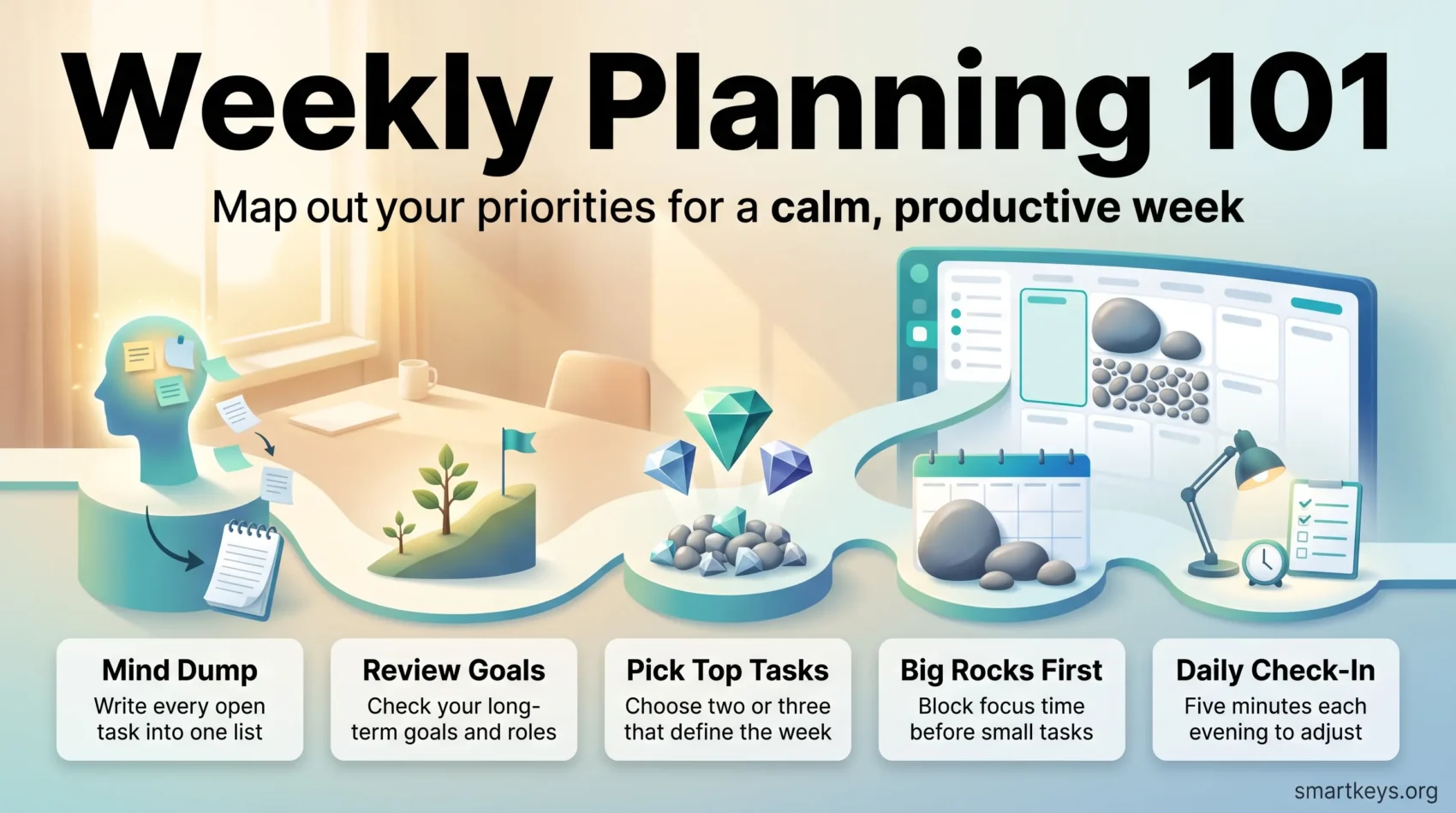
Do a mind dump to clear mental RAM
A mind dump means writing every open item into one place: calls, errands, half-finished project steps, the thing you keep meaning to book. Unfinished tasks keep resurfacing while you try to think about something else, and getting them onto paper stops that loop. Spend 10 to 15 minutes. Write short, actionable lines: “email Sam about the Q3 numbers” can be scheduled, “Q3 stuff” cannot.
Review your long-term goals and roles
Look at where you are heading before you fill the week. If a longer-term goal gets no time at all, that is a decision, better made on purpose than by accident. Roles help: pick one thing that matters for each major role you hold, whether that is team lead, student, parent or friend.
Set weekly priorities and MITs that align with your goals
Choose two or three MITs, short for most important tasks: the items that make the week a success even if other things slip. Block focused time for them before anything else claims the slot. Deciding what will not happen is part of the same job, and a short not-to-do list protects the MITs better than good intentions.
Sharpen the saw: block recurring time for health, learning, and reflection
“Sharpen the saw” is Covey’s phrase for maintenance work on yourself: exercise, study, rest, thinking time. None of it is urgent, so it loses to any deadline unless it has a slot. Make these repeating events and treat them like meetings you cannot move.
Schedule your Big Rocks first using Covey’s “first things first”
Put the MITs on the calendar at the hours when you actually think well, using your own pattern rather than a general rule. Everything smaller fills the gaps around them. If a task feels too large to schedule, it is not one task: break it into steps until each piece fits a block.
Students and complex projects: block class, study, and project sessions
For a class-heavy week, block lectures and labs first, add an hour after each for review while it is fresh, and plan one study hour per contact hour. Long projects work the same way: schedule named sessions (“draft section 2”), not blocks labelled “thesis”.
Place smaller tasks in the gaps and add realistic reminders
- Estimate how long each block needs, then add a margin. Most of us underestimate: the planning fallacy is our tendency to assume the smooth version of every task.
- Drop small items into the leftover gaps rather than giving them prime time.
- Finish with a read-through of the week to check it is survivable.
Weekly planning on Sunday: set the tone for the week ahead
A focused half-hour before the week starts clears calendar clashes and protects time for the big work. Sunday evening suits many people, but Friday afternoon works just as well and leaves the weekend clear. What matters is that it happens at the same time each week.
Scan your calendar for conflicts and create focus blocks
Look for overlaps, back-to-back stretches and impossible turnarounds, then move or shorten meetings so a few uninterrupted blocks survive. Good calendar management is mostly this: noticing the collision before it happens. Reserve 60 to 90 minute slots for your hardest work, and if your team agrees on shared no-meeting hours, those blocks survive far more often than ones you defend alone.
Balance your to-do list across the week (skip the Monday pileup)
Spread the load. Monday collects everything that felt undecided, which is why it collapses. Put quick items on lighter days and stretch a big project across two or three focus blocks instead of one heroic afternoon.
- Spend 30 minutes reviewing goals and projects, then set your top priorities.
- Block prime hours for the MITs and leave gaps between commitments.
- Include personal commitments and study slots so the plan reflects your real life.
Review and adjust daily to keep plans realistic
A five-minute check at the end of the day makes tomorrow easier. Do a short scan of your calendar and to-do list so you start each morning knowing what comes first.
Protect the big rocks. When a focus block is threatened, move the smaller tasks around it rather than sacrificing the block. That is the difference between a week that produces something and one that only produces activity.
Evening check-ins: move tasks, protect Big Rocks
End the day by looking at tomorrow’s events and the time you reserved, and reschedule anything that slipped so it does not fall out of view. Attaching this to an existing evening routine makes it far more likely to stick.
“A five-minute nightly check saves you half an hour of scrambling tomorrow.”
Use a simple “today view” to stay focused every day
Keep a today view that shows only what you can realistically finish: pull items from the master list, cap the day at one or two MITs, leave the rest where it is. Picking a single daily highlight works well when the day is fragmented.
- Re-block time when a meeting runs long; push small tasks later in the week.
- Reschedule rather than drop commitments, so progress stays visible.
- Keep the check-in short. Five minutes tonight saves far more tomorrow.
Over time these corrections make your estimates more accurate and your days calmer. Respect your real capacity and the right things get done, instead of everything getting half done.
Track progress and protect work-life balance
Track outcomes, not hours logged. A week can look full and still move nothing forward, so name what “done” looks like in advance.
Keep goals visible with milestones and OKRs
Break big goals into weekly milestones and put them where you will see them. Personal OKRs, a lightweight version of the objectives-and-key-results method companies use, give you one objective and two or three measurable results to check each week. A notebook line per milestone is enough; you do not need a dashboard.
Avoid burnout with reasonable workloads and short focus sessions
Protect your energy by capping what you commit to and working in shorter sessions with real breaks between them. Consistently overfilling the week is a reliable route to burnout, and a plan you cannot finish teaches you to ignore your own plan.
- Review projects weekly and adjust scope before a deadline forces it.
- Keep the check-in simple: what moved, what is stuck, what needs help.
- Notice what you finished. It trains you to value completed work over busy days.
“Small, measurable wins stack into real progress.”
Not sure where your hours go? Run a short audit before your next session: time audits for productivity.
Conclusion
A small weekly ritual builds rhythm, so your days point at what matters most.
Book the session, empty your head, pick two or three MITs, and put them in the calendar first. Keep it simple: one list, a few priorities, a five-minute check each evening. Done consistently, weekly planning gives you a week that starts with clarity and ends with something finished. Put the next session in the calendar now, while you are thinking about it.
Found this useful?
Make SmartKeys a preferred source on Google, and our articles will surface more often in your Top Stories, AI Overviews, and AI Mode.
Add as Preferred SourceFAQ
What is the easiest way to start organizing your week?
Start with a mind dump: spend ten minutes writing every open task, errand and half-finished project into one list. Then pick two or three items that would make the week a success on their own, and put those in the calendar before anything else. Everything left over fills the gaps around them. That is the whole method, and it works on paper as well as in an app. Do not build a perfect system in the first session.
How often should you run a planning session to stay on track?
Once a week for the full session, plus a short check-in each evening. The weekly session is where you choose priorities and block time; it takes 45 to 60 minutes at first and often half that once it is routine. The daily check-in takes five minutes and only handles what changed: moving a task that slipped, protecting a focus block a new meeting threatens. Many people use Sunday evening, but Friday afternoon works just as well. Consistency matters more than the day you pick.
Should you use a digital app or a paper planner?
Use whichever one you will actually open. Digital calendars handle recurring events, reminders, shared availability and search, so they fit better if you coordinate with other people or work across devices. Paper is faster to write on and does not pull you into notifications every time you check the day. A common compromise: appointments in a digital calendar, today’s short list on paper. Plans fail when the tool adds friction, not when you pick the wrong category.
How do you decide what to schedule first?
Schedule your big rocks first: the two or three tasks that move a real goal forward, plus the recurring commitments you treat as non-negotiable, such as exercise or study time. Give them the hours when you concentrate best, not whatever is left at the end of the day. Admin, email and small requests fill the gaps around those blocks. This is what Stephen Covey meant by “first things first”. Schedule the small work first and it expands until the important work has nowhere left to go.
How can you prevent a heavy Monday backlog?
Monday fills up because it is the default answer to “when should this happen?” during planning. Spread the work across all five days instead: put quick items on lighter days, and split a large project into two or three focus blocks on different days rather than one long Monday session. Leave a real gap on Monday morning too, because that is when last week’s leftovers and new requests arrive. A Monday already full at 9 a.m. can absorb nothing.
How do you balance long-term goals with urgent daily tasks?
Give the long-term goal a specific block in the week, not an intention. Urgent tasks carry deadlines, so they win any unscheduled contest; the only reliable defence is a calendar slot with a named next step, such as “outline chapter 3” rather than “work on book”. During the weekly session, check whether each major goal got any time at all. If one gets nothing two weeks running, either move it up or admit it is not a priority this quarter and stop carrying it as guilt.
What do you do when the week goes off plan by Wednesday?
Rebuild rather than abandon. Most weeks deviate, which means the plan met reality, not that planning failed. Take five minutes, look at the days left, and ask which of your MITs can still be finished. Protect those blocks, push everything else out, and let the rest go. Then note what caused the derailment. If the same interruption shows up three weeks running, it is not a surprise any more and belongs in the plan as scheduled time.