

Working from home is no longer the experiment it was five years ago. It is how a large slice of work gets done. Stanford’s Survey of Working Arrangements and Attitudes put roughly 25% of paid days in the United States as work-from-home days in May 2026, and that share has barely moved for two years.
What has not settled is how people organise those days. Remote work removes the built-in structure of an office: the commute that marks the start, the colleague who wanders over with a question, the visible signal that everyone is going home. Without that scaffolding, you have to build your own.
This guide covers the habits that do the building: clear hours, visible progress, and protected blocks where concentration can actually live. None of it requires a productivity system with a name.
Key Takeaways
- Short, repeatable routines beat elaborate systems you abandon in week two.
- Clear boundaries stop the workday from expanding into your evening.
- Brief written updates make your progress visible without extra meetings.
- Planning tomorrow tonight protects your first focused hour.
- Blocking distractions and tracking focused minutes builds real concentration.
What remote work habits actually mean
A habit here means something narrower than a lifestyle change. It is a small action tied to a fixed moment in your day: reviewing your calendar when you sit down, writing a status note before lunch, closing the laptop at a set time. Each is small enough that you do it without deliberating.
They matter more remotely because of coordination. In a shared space, colleagues absorb your availability by looking at you. At home, they only know what you tell them. So each habit does two jobs: it organises your day, and it broadcasts enough that nobody has to guess.
There is a second reason, and it is about you rather than your team. Gallup’s 2026 State of the Global Workplace found daily loneliness at 23% among fully remote employees, against 22% for on-site staff in remote-capable jobs. The gap is small, which is the interesting part: remote work is not automatically isolating. What is isolating is a week with no deliberate contact in it.
Communicate to stay visible, not to make noise
Visibility is a communication problem, not a performance one. The goal is that a colleague can find out where your work stands in ten seconds without messaging you. That takes fewer messages than most people send, not more. For the wider picture, see our guide to remote work productivity.
Share progress early on team tools
Post a short note near the start of your day: what you finished, what you are working on, what is blocked. Three lines is usually enough, in the channel your team already reads. Do it early, because a blocker discovered at 9am can be cleared by 10am, while the same blocker mentioned at 5pm costs a day.
Most of this belongs in asynchronous communication, meaning messages people read when it suits them rather than live. Save live calls for the things that need back and forth: disagreements, ambiguity, anything where tone matters.
Set clear working hours and keep your calendar honest
Publish your hours, focus blocks and lunch break, and keep them accurate. A calendar that shows you as free when you are not is worse than none, because people book over your work and then wonder why you missed a deadline.
If your team spans countries, a shared holiday calendar prevents a lot of back and forth about who is available. For the personal side of the same problem, our guide on setting boundaries at work covers how to decline a meeting without damaging the relationship.
Turn your camera on and actually engage
Camera on is not a rule worth enforcing, but it changes how meetings go. Put the camera near eye level so you are looking at people rather than down at them, and get the audio right first. Bad sound wrecks a call faster than bad video.
The harder habit is not multitasking. If you are answering messages during the call, your contribution arrives late and half-formed, and everyone can tell. Our notes on hybrid meeting etiquette cover the specifics when some people are in a room and some are not.
Schedule relationship time on purpose
Casual contact does not happen by accident when everyone is at home. Book it: a recurring 20-minute call with no agenda, a channel for things that are not work, a monthly session that is genuinely social. Keep the cadence modest and consistent.
Design a schedule you can repeat
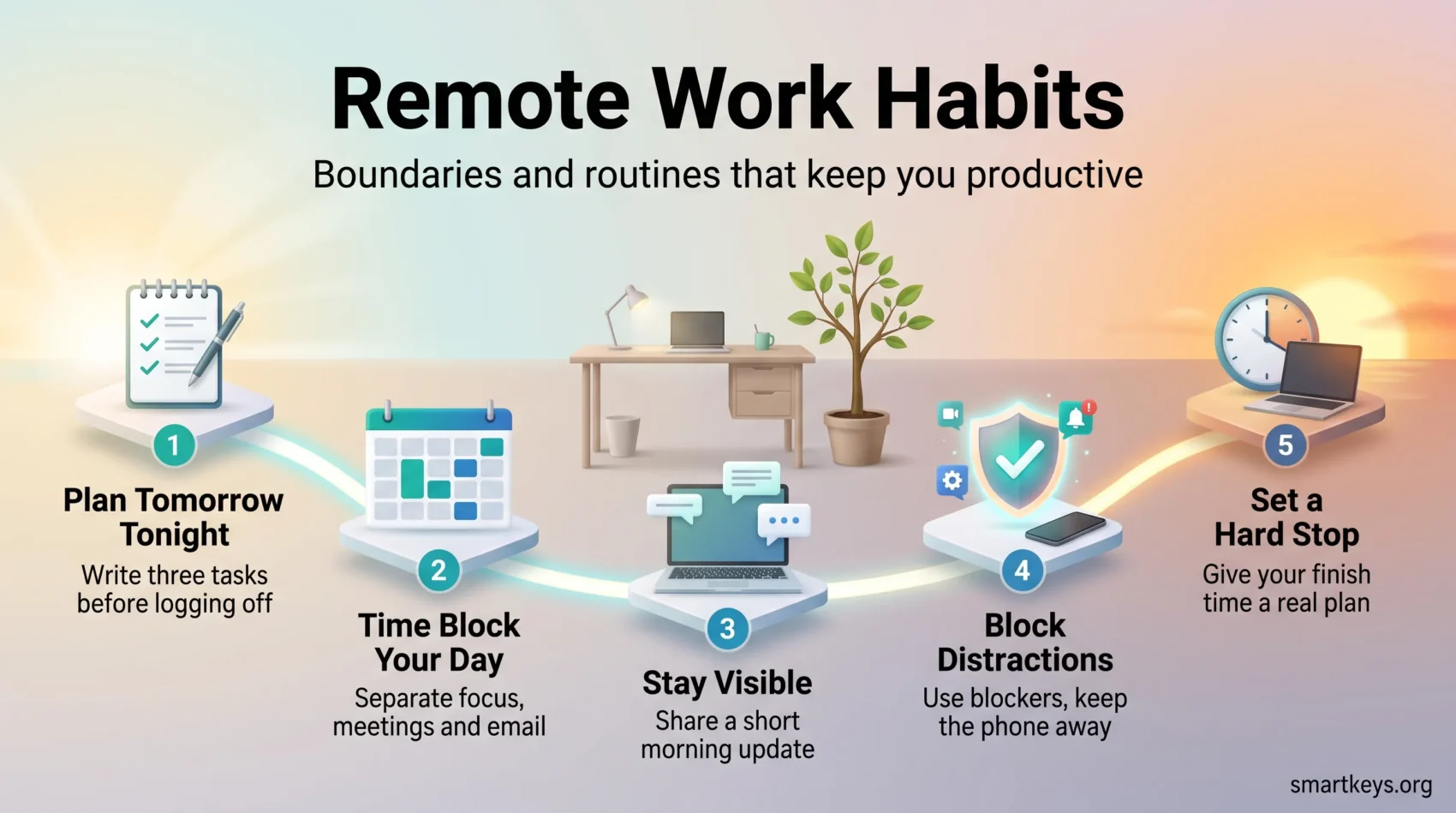
A five-minute plan the night before is the highest-return habit on this list. Write one objective for tomorrow and the first task you will do. That single decision removes the morning drift where you open your inbox because you have not decided what else to do.
Match the day to your energy. If you think best in the morning, put demanding work there and push admin later. If you come alive after lunch, protect that window instead. This is what people mean by chronotype: the time of day when your concentration is naturally at its best.
Plan tomorrow tonight
Before you log off, capture anything new and give it a slot, then write your top three tasks for tomorrow. Three, not ten: a list you cannot finish stops functioning as a plan.
The end of the day is also when you close open loops: the half-finished thought, the reply you owe. An evening routine that takes ten minutes saves the first thirty minutes of tomorrow.
Time block meetings, breaks and deep work
Time blocking means assigning each part of your day to a specific kind of work in advance, rather than reacting to whatever arrives. Put deep work in one block, meetings in another, and shallow tasks like email in a third.
Two mechanical adjustments help more than they should: end meetings five or ten minutes early by default, and leave a gap between calls. Back-to-back video with no break is where the afternoon slump comes from. Our guide to time blocking covers how to build the first week without over-engineering it.
If your team is willing, a shared focus time policy reserves the same no-meeting hours for everyone, which works far better than each person defending their own blocks alone.
Audit your calendar to cut stale meetings
Recurring meetings accumulate, because cancelling one feels like a judgement on whoever set it up.
The Microsoft 2025 Work Trend Index found that 57% of meetings are ad hoc calls with no calendar invite at all, and that meetings starting after 8pm rose 16% year over year. If your calendar looks full and your evenings look busy, the problem is usually structural rather than personal. A quarterly meeting audit is the cleanest fix: list every recurring meeting, ask what decision it produces, and drop or shorten the ones that produce none.
A professional mindset at home
Small rituals mark the transition between personal time and working time. Without them the two blur, and that blur is what makes remote work feel exhausting even on a light day.
Getting dressed still works, not because anyone sees you, but because changing clothes signals that something has shifted. The same applies to a short start ritual: tidy the desk, open the two apps you need, put the phone face down.
Treat the space as a satellite office while you are working, so household tasks wait until a break, as they would if you were in a building across town.
Set up your workspace for comfort and focus
You will spend thousands of hours at this desk, so the setup compounds. Discomfort is a steady, low-level distraction that pulls attention away all day.
Get the ergonomics right once
Monitor at eye level, wrists neutral, feet flat, lower back supported. Those four adjustments cover most of the benefit and cost nothing if your furniture already allows them.
A sit-stand desk is worth considering if you sit for long stretches, though the evidence is more modest than the marketing suggests: it reliably reduces sitting time, with smaller effects on productivity itself. Our overview of standing desks covers what the studies actually found.
Own your on-camera space
Pick a tidy wall or a simple shelf instead of background blur, which tends to smear around your head. Put your main light source in front of you rather than behind, so you are lit rather than silhouetted. Our guide to workspace lighting covers colour temperature and layering for different kinds of work.
Declutter weekly
Spend ten minutes at the end of the week: file the paper, clear the desktop, put chargers and headset back in one place. This is maintenance rather than tidiness, and it saves the small searches that interrupt you mid-task.
For digital clarity, declutter your digital workspace so your schedule and tasks stay visible and manageable.
Protect focus: fewer distractions, more deep work
Deep work means concentrating on one demanding task without switching away from it. The term comes from Cal Newport, and the reason it needs a name is that the default modern workday makes it nearly impossible.
The Microsoft 2025 Work Trend Index measured this directly: employees are interrupted every two minutes during core working hours, roughly 275 times a day, by meetings, emails and messages. You cannot out-discipline that. You have to remove the interruptions.
Block the apps that pull you away
Use a blocker rather than willpower. Freedom and Cold Turkey block sites and apps across devices for a set period; Forest ties a growing tree to your phone staying untouched. What matters is that the decision is made before the block starts, not during it.
Put the phone in another room, close the tabs you are not using, and set your status so colleagues know you are heads-down. Our roundup of website blockers compares the main options.
Tie every block to an outcome
“Work on the report” is not an outcome. “Finish the methodology section” is. When a block has a finish line, you know whether it worked, and you stop measuring your day in minutes spent rather than things completed.
Pick one prioritisation method and stick with it long enough to judge it. The Eisenhower Matrix sorts tasks by urgency and importance; Eat That Frog says do the hardest thing first. Both work. Switching between them every fortnight does not.
Track your deep work minutes
Keep a simple tally of focused minutes each day. Start with 25 to 50 minute sessions and a short break after each, then lengthen the sessions as concentration improves.
The tally is feedback rather than reporting: it shows you honestly how much of the day went into work that matters. Our guide to deep work covers the four scheduling approaches and when each one fits.
Use fewer tools, better
Most remote teams do not have a tool problem. They have a convention problem. Adding another app rarely fixes confusion about where things belong.
Decide, once, where status updates go, where you ask for help, and where decisions are recorded. Then hold the line. The most common failure is a decision made in a direct message that nobody can find three weeks later. One place for updates, one for action items, one for decisions is usually the whole system.
Write a short “how we work” note covering response time expectations, meeting agendas and what a summary should contain. A page is enough, and a summary with next steps after every meeting takes two minutes.
Boundaries that protect your life outside work
Protecting your evening is not a wellbeing perk. It is what keeps you capable of concentrating tomorrow. The Gallup 2026 data is useful here: remote and hybrid employees both report thriving at 45%, well ahead of on-site staff in remote-capable roles at 32%. Remote work can protect wellbeing. It just does not do so automatically.
Set a hard stop and mean it
Pick a finish time and attach something real to it: a class, dinner with someone, a walk that happens whether or not the task is done. A hard stop with nothing behind it gets negotiated away by 6:30pm.
Declare the hours on your calendar so colleagues know when you answer messages. In several European countries this has moved from courtesy to law: our overview of the right to disconnect covers where the rules apply.
If the evenings keep slipping anyway, that is worth taking seriously rather than pushing through. Our guide to remote work and mental health covers what the research says about the warning signs.
Choose where you work
Home is not always the right room for the task. Deep analytical work often goes better somewhere with no domestic interruptions; routine admin is fine at the kitchen table.
Coworking spaces suit people who need separation between home and work, or who find the isolation wearing. They cost real money, so check whether your employer contributes. Platforms like Deskpass, LiquidSpace and Coworker list day passes in most large cities. Our guide to coworking spaces covers current costs and what to look for.
- Attach a real commitment to your finish time so it holds.
- Publish your hours so colleagues know when to expect a reply.
- Match the location to the task rather than defaulting to the same desk.
- Keep an afternoon break so the evening does not become recovery time.
Conclusion
None of this requires a system with a name. It requires a handful of decisions made once: when you start, when you stop, where deep work lives, and how your team finds out what you are doing.
Start with two: plan tomorrow tonight, and set a hard stop you actually keep. They carry most of the weight and make the others easier to add.
Then measure outcomes rather than hours. If your finished work is visible and your evenings are your own, the routine is working. If not, change one thing and check again next week. That is why remote teams that stay engaged tend to look boringly consistent rather than heroically busy.
Found this useful?
Make SmartKeys a preferred source on Google, and our articles will surface more often in your Top Stories, AI Overviews, and AI Mode.
Add as Preferred Source




