Want your remote team to feel like they share the same office? A telepresence robot is, in plain terms, a screen on wheels that a remote person drives over the internet. It carries a camera, a microphone, a display and a speaker, so the person at the other end can see the room, be seen by everyone in it, and roll to wherever the conversation is happening.
That last part is the whole point. A normal video call parks you in a fixed rectangle on someone’s laptop. A telepresence robot lets you walk down a corridor, stop at a colleague’s desk, lean in toward a whiteboard, or follow a doctor into the next room.
This guide is written for the person who has to sign off on the purchase. It covers what these machines actually do, what the market looks like in 2026, which vendors are still selling, what the running costs are, and how to test one properly before you commit budget.
Key Takeaways
- Presence comes from three things: video, audio and movement. Remove the movement and you have a video call on a stand.
- This is a small, specialised market. Market Research Future sizes it at roughly $128 million in 2024, with healthcare as the anchor customer.
- Vendor availability has thinned out. Confirm current stock and support before you build a plan around one specific model.
- Your network decides the experience. A Wi-Fi dead spot ruins a robot faster than a mediocre camera does.
- Budget for the subscription, not just the hardware. Cloud management fees are annual and charged per unit.
- Pilot on your worst route, never in a quiet demo room.
What a Telepresence Robot Actually Is
Picture logging in from your laptop and steering a device that shows your face, hears you, and moves through a building on the other side of the country. That is the whole concept. Everything else is engineering detail.
The hardware in the box
The unit carries a camera and microphone pointed outward, so the remote person can see and hear the room. It also carries a screen and a speaker, so the people nearby can see and hear the remote person. Height matters more than the spec sheet suggests: a display at roughly eye level makes a conversation feel like a conversation, while a device at knee height feels like talking to a vacuum cleaner.
How you drive it
You control the device from a browser or a mobile app. Most mobile models roll on two or three wheels and let you pan, tilt and zoom the lens. That last capability is usually written as PTZ, short for pan, tilt and zoom: it means you can look around a room without moving the whole robot.
Three features separate a usable unit from a frustrating one:
- Smooth steering. You should be able to cross a room without a three-point turn.
- Reliable docking. Obstacle detection plus automatic return to the charging dock keeps the robot ready instead of stranded and flat.
- Connectivity options. Wi-Fi is standard; cellular or 5G support for remote work matters on large or multi-building sites.
Because the whole machine is designed around human conversation rather than data collection, people on site tend to treat it as a colleague rather than as equipment. That social effect is a genuine part of the value, and it is the thing a webcam on a tripod cannot reproduce.
Where the Market Stands in 2026
This is a real product category, but a small one. Treat any vendor claim of explosive growth with care, and treat the market forecasts with the same caution.
Size and growth
Market Research Future puts the global telepresence robot market at about $128 million in 2024, projecting roughly $413 million by 2035, a compound annual growth rate of 11.25% across the 2025 to 2035 forecast period. Other research firms publish figures several times larger, largely because they draw the category boundaries differently, for example by folding in video conferencing endpoints or service robots. The honest summary: the direction is upward, the absolute numbers are modest, and no single figure should anchor your business case.
Better batteries, better wireless coverage and cheaper sensors are pushing the whole category forward, the same tailwinds behind autonomous delivery. North America leads adoption, helped by mature vendors and IT departments already comfortable with managed devices. Healthcare is the largest end user, which matters for a practical reason: it means the products have been tested in strict, compliance-heavy settings rather than only in open-plan offices.
Which vendors are actually selling
This is the part most buyer’s guides skip, and it is the part that will waste your time if you get it wrong. Availability in this category changes quickly, so verify status yourself before you shortlist:
- Ava Robotics launched its first commercial Ava robot in June 2024 and announced a partnership with VSee Health in August 2024 to build an autonomous robot for hospital intensive care units, aimed initially at stroke care. It targets large offices, events and clinical settings, with autonomous navigation and built-in security controls.
- OhmniLabs publishes its subscription pricing openly, which is unusual here (details in the cost section below).
- Double Robotics lists the Double 3 as sold out on its own website as of September 2026. If a supplier quotes you one, ask where the stock came from and what the support path looks like.
- VGo is still reachable online, but the site carries a copyright notice ending in 2021, which is a reasonable signal that the product line is no longer actively developed. Ask directly about firmware updates and spare parts before buying.
- Kubi, the tablet-mounted option, is manufactured in California by Xandex Inc. Earlier coverage credits Revolve Robotics, so vendor references you find online may be out of date.
The practical lesson is simple. Ask every shortlisted vendor two blunt questions: is this model in stock today, and how long will you support it? If either answer is vague, keep looking.
Where Telepresence Robots Earn Their Keep
These devices stop being a novelty the moment they map onto one specific workflow. Below are the four that consistently justify the spend.
Healthcare
Clinicians use them for virtual ward rounds, specialist consultations across sites, and checking on patients in extended care without adding an in-person visit. A neurologist can look at a patient in a hospital 200 miles away within minutes rather than hours. The mobility matters more here than anywhere else, because a specialist needs to see the patient, the monitors and the chart, not just a fixed camera angle. This sits alongside the broader shift covered in digital transformation in healthcare.
Education
A student who cannot attend in person, whether because of illness, distance or disability, can join class, turn to face whoever is speaking, and move between rooms with everyone else. Districts also use the same units to bring in subject specialists for languages or science without paying for travel. It is one of the few genuinely practical answers to the access problems described in remote work accessibility.
Factories, warehouses and site oversight
An engineer can inspect a production line, look at a specific machine and talk to the operator standing next to it, all without a flight. This is close cousin territory to augmented reality training: technology that puts expertise where the physical work is.
Offices and hybrid teams
In an office, the case is more about fairness than travel. Remote staff often lose out on the informal conversations that happen after a meeting ends, a pattern known as proximity bias, where people who are physically present get more attention and more opportunities. A robot lets a remote colleague linger, join the corridor conversation and be visible. It is a partial fix, not a complete one, and it works best alongside good hybrid meeting etiquette and deliberate work on proximity bias.
“Start with the highest-value workflow, prove the result, then scale.”
Mobile or Stationary: Which One Fits
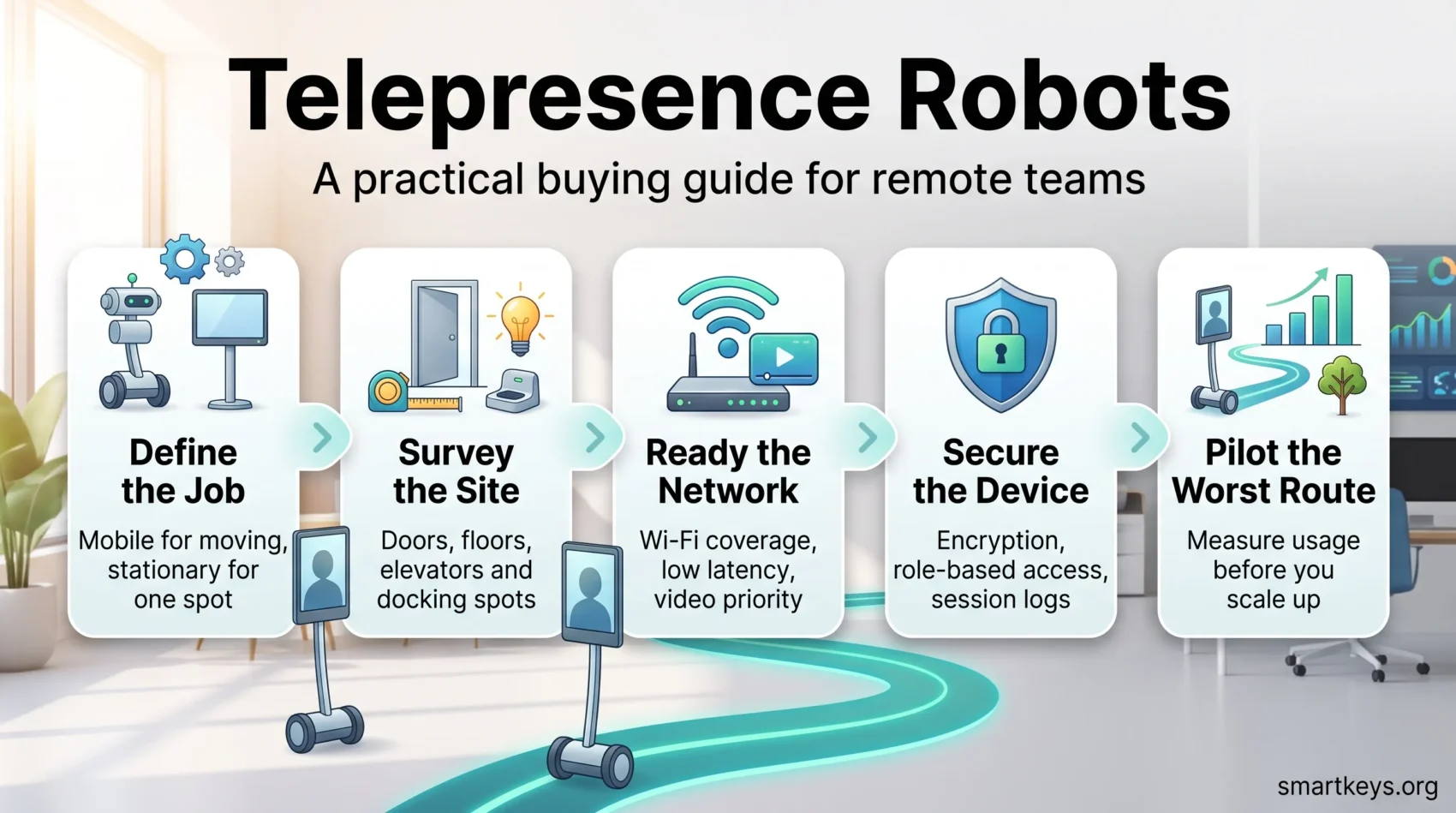
Choosing between a driveable unit and a fixed one comes down to a single question: how often does the remote person actually need to move?
Choose mobile when the job involves crossing rooms, checking several departments, or leading a walk-through. Wheels and dependable navigation save real coordination effort, because nobody on site has to carry a laptop around.
Choose stationary for a single fixed spot such as a classroom podium or a nursing station. A fixed setup costs less, breaks less, and is easier for staff to use daily. Tablet-mounted units that pan and tilt are a sensible middle ground for huddle rooms.
Then check the building itself. Door widths, elevator thresholds, floor transitions and ramp access all decide whether a mobile unit can actually complete its route. Map quiet docking spots with reliable power so charging does not block a walkway.
Validate the choice with a short pilot on your hardest route. That single test surfaces access blockers before you have bought five units.
Features Worth Comparing Before You Buy
Compare the details that affect daily use, not the marketing copy. Four areas matter.
Vision
Check resolution and whether the camera supports PTZ. A wide field of view, or a second camera pointed at the floor, reduces how often the remote driver has to reposition the whole robot just to see something. Double 3, for example, pairs two 13 MP PTZ cameras; Ava adds side cameras for wider coverage.
Audio
Audio is the feature buyers underrate and users complain about first. Look for a microphone array (several microphones that work together to pick out a speaker and suppress background noise) and a speaker loud enough for a busy corridor. Ask the vendor for a sample recording made in a space like yours, not in a studio.
Navigation
Look for proven obstacle avoidance, smooth automatic routing and dependable docking. Ohmni Pro is noted for collision avoidance and a responsive neck tilt that keeps the screen at eye level. Confirm auto-docking works on your actual floor surfaces, since carpet edges and thresholds cause most failures.
Control and fleet management
Test the web and mobile control apps yourself. Check for role-based permissions, so you can decide who may drive, who may only watch, and who may change settings. If you expect to run more than two or three units, ask about fleet tools for health monitoring and firmware updates, and about APIs if you want scheduling or logging to connect to your existing systems.
Network Readiness: The Thing Most Buyers Underestimate
Connectivity decides whether a robot feels like presence or like a bad phone call. Plan the network before the robot arrives, not after the first complaint.
Coverage
Map Wi-Fi coverage along the routes the robot will actually take. Pay attention to elevators, stairwells and long corridors, which is where video typically drops. If you find blind spots, cellular or private 5G in those zones can preserve quality while the unit is moving. The same coverage thinking applies in industrial settings, as covered in private 5G in manufacturing.
Latency, bandwidth and priority
Work with IT to give real-time video priority on the network. That is usually done with QoS, or quality of service: a setting that tells network equipment to move video and audio ahead of less urgent traffic such as backups.
Test on the production network during a busy period, not at 7am on a Sunday, and check what happens when the robot moves between Wi-Fi access points. A two-second dropout in the middle of a clinical conversation is not a minor glitch.
- Put the devices on their own network segment, which simplifies troubleshooting and security.
- Check upload bandwidth at remote clinics and warehouses, which is often far weaker than at head office.
- Write a short runbook for IT covering network names, required ports and monitoring steps, then revisit coverage after any building work.
This is the same groundwork that underpins any connected-device rollout, as discussed in IoT and remote work.
Security and Compliance
Treat these devices as managed endpoints, exactly like laptops. A robot is a mobile camera and microphone that can be driven into any room on your floor, so the security review is not optional.
Encryption, logins and who can drive
Require end-to-end encryption, so a session cannot be intercepted in transit, and modern authentication rather than a shared password. Apply role-based access control, which simply means separating who can drive the robot, who can watch a session, and who can change the settings. Keep an access log.
Protected environments
In healthcare, align with HIPAA and with the facility’s own rules for patient interaction. Limit recording, log every session, and restrict the management interface to admin networks. Everywhere else, the same principles apply under whatever privacy rules cover you: our guides to data privacy at work and zero trust security cover the wider framework, and cybersecurity for remote work covers the endpoint side.
- Enforce strong credentials and signed firmware updates.
- Issue time-limited access to guests and external clinicians rather than standing accounts.
- Agree a storage and tamper-prevention policy with facilities, since an unattended robot is a physical asset too.
Run a short tabletop exercise with IT and compliance so everyone knows the incident steps before something happens.
What It Costs to Own One
Separate one-time purchases from recurring fees. That single distinction is what makes vendor quotes comparable.
The line items
OhmniLabs is one of the few vendors that publishes its recurring pricing. Its cloud subscription runs at $300 per robot per year on the Starter plan, $540 on Growth and $780 on Scale, with the higher tiers adding longer warranty cover, longer data retention, a branded portal and enterprise API access. Hardware is quoted separately. Most other vendors in this category quote everything through sales, which is a reason to insist on a written three-year total before you compare anything.
Build your total cost of ownership, meaning every cost across the life of the device rather than the purchase price alone, from these items:
- Hardware, plus spares and accessories such as extra docks.
- Cloud subscription and any per-seat licensing.
- Warranty, maintenance and battery replacement.
- Network upgrades, which can quietly exceed the robot itself.
- IT and training hours in the first three months.
Measuring whether it paid off
Quantify avoided travel in mileage, airfare and hotel nights, then convert the recovered hours into work people actually did instead. Track usage honestly: sessions per week, average session length and which departments use it. A robot parked in a cupboard after month two is the most common failure mode, and it shows up in usage data long before anyone admits it in a meeting. Our guide to measuring remote versus office ROI covers how to frame that comparison.
Site Planning: Floors, Doors, Light and Noise
A short site survey reveals the constraints that decide daily usability. Walk the routes yourself and note floor transitions, thresholds, carpet edges and cables that could snag wheels or confuse sensors.
Measure door frames and elevator gaps so the unit can pass unaided. Where a doorway is too tight, plan for an automatic opener or accept that a person will need to help.
Test lighting at different times of day. Glare from an afternoon window and dim corridors both degrade video quality, and both are fixable with camera presets or a lamp.
- Check ambient noise and echo. A busy lobby may need an alternative route or a designated quiet spot for conversations.
- Identify docking locations with power and low foot traffic.
- Map the views that matter, such as whiteboards or line-side stations, and save camera presets for them.
Repeat the checklist at every site. Small differences in layout produce large differences in how usable the robot feels, and documenting your constraints lets vendors recommend the right tyres, speed settings or camera presets.
Fitting It Into Your IT Stack
Your collaboration tools and your device management have to work together. Plan the integration early so admins and users get a consistent experience.
Working with Teams, Zoom and the rest
Verify how the unit joins your preferred platform, and whether calls start from the device, from the app, or both. That choice shapes the user flow more than any feature comparison. If you are still deciding on the underlying platform, see Slack versus Microsoft Teams and Zoom versus Microsoft Teams.
Check support for single sign-on (SSO), which lets staff use their existing company login rather than a separate account, and for multi-factor authentication. Both reduce the number of credentials floating around.
APIs and fleet tools
Ask about APIs and webhooks if you want automatic scheduling, usage logging or service desk integration. Double 3 offers an API for custom applications. Make sure device management supports remote updates, health checks and role-based admin access, and review firewall rules and media paths with IT before onboarding. Where clinical systems are involved, confirm network segmentation matches your compliance rules.
From Pilot to Rollout
Start small. Validate the routes, train the staff and settle the support model before you scale.
Survey, safety and route maps
Send facilities and IT on a short survey to document routes, docking spots and traffic hazards. Create navigation maps and camera presets for the stops people use every day, such as a nurses’ station or a specific huddle room. That preparation is what makes the second week easier than the first.
Training and change management
Deliver short, hands-on training covering driving basics, etiquette and simple recovery steps when something goes wrong. Be explicit about privacy: tell people when the robot is in use and what is and is not recorded. Staff who feel watched will avoid the device, and adoption never recovers. The same principles that make remote onboarding and training work apply here, and a structured change management approach is worth the effort for anything beyond a single unit.
Support and service levels
Define how someone requests access, who handles repairs, and how issues escalate to the vendor. Agree uptime and response targets in writing.
- Measure: adoption, session counts, travel avoided, user satisfaction.
- Phase it: one floor or department first, then expand.
- Collect feedback: user comments will improve your presets, signage and training faster than any vendor document.
Mistakes That Kill Adoption
A polished demo hides the small, real-world problems that decide whether anyone uses the thing. A demo in a quiet conference room will never show you a roaming dead zone, a raised door threshold or afternoon glare.
Run the practical tests instead. Drive the unit across your own floors on your own network. Record audio in a busy corridor. Check video where people actually meet.
- Test connectivity on site. A vendor’s network is not your network.
- Check audio and video in the worst room, not the best one.
- Budget for subscriptions, spares and maintenance from day one.
- Bring IT and compliance in early, not after you have chosen a model.
- Confirm repair logistics and turnaround times in writing.
Match the device to the primary job. Mobility is powerful, but a stationary unit is often the better answer for a single-room task, and it costs less to run. Avoid feature creep: the simplest option that delivers consistent quality wins on adoption every time.
Insist on a pilot with defined success metrics before you scale. Track uptime, session counts and user satisfaction so the purchase stays a tool rather than an expensive ornament.
Conclusion
Telepresence robots solve a narrow problem well: they give a remote person the ability to move through a physical space and be treated as present. In healthcare, education and multi-site operations, that is worth real money in avoided travel and faster decisions. In a standard office, the case is thinner and rests mainly on fairness for remote staff.
Before you buy, do three things. Confirm the model you want is actually in stock and supported, since availability in this category has thinned since 2024. Get a written three-year cost including the annual cloud subscription. And run a pilot on your most difficult route, on your own network, at a busy time of day.
Do that, and a single robot in the right workflow can reasonably grow into a fleet. Skip it, and you will own an expensive charging dock. For the wider picture of how physical and remote work are converging, see our guides to virtual offices in a hybrid workforce, AR and VR in the workplace and robotics and automation.
Found this useful?
Make SmartKeys a preferred source on Google, and our articles will surface more often in your Top Stories, AI Overviews, and AI Mode.
Add as Preferred Source