

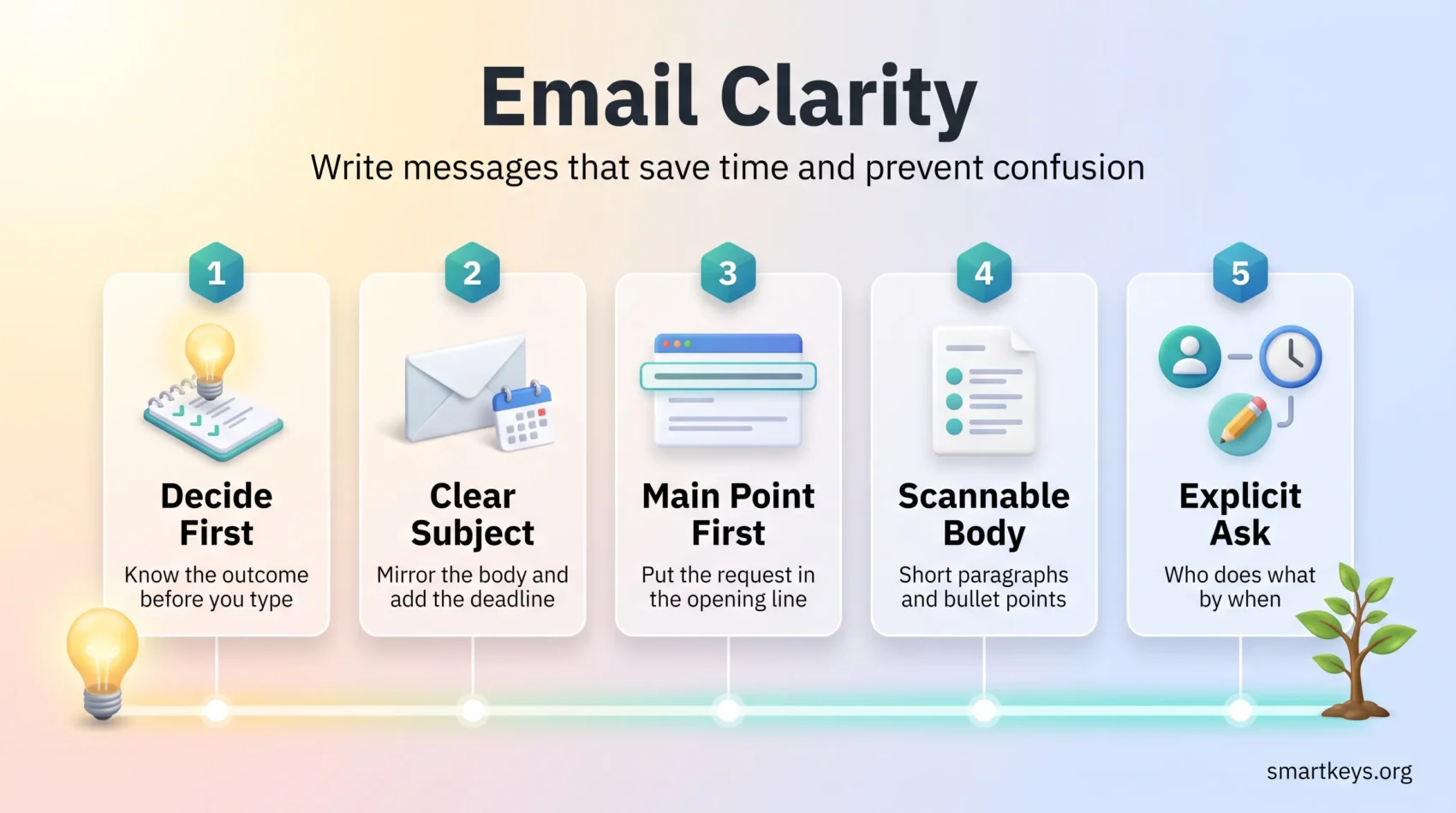
A clear email says one thing, names one owner, and gives one deadline. Everything else is supporting detail.
That discipline matters more than it used to. Microsoft’s Work Trend Index special report “Breaking down the infinite workday” (June 2025) found that the average worker receives 117 emails a day and skims most of them in under a minute. The same analysis measured interruptions from meetings, email and chat roughly every two minutes of the working day. Your message is rarely being read in the way you wrote it. It is being triaged.
So write for triage. Put the request in the first sentence. Keep one topic per message. Make the subject line say what the body says. A reader who can answer in ten seconds usually will, and a reader who cannot often leaves your email for later and forgets it.
Key Takeaways
- Start with the main point so readers know the purpose immediately.
- Keep one issue per message and use short, scannable paragraphs.
- Make the ask explicit: who, what and when should be easy to find.
- Write subject lines that mirror the body so people can triage the inbox.
- Choose a call for sensitive or fast moving discussion instead of a long thread.
Why Unclear Email Costs Real Time
An unclear email does not fail quietly. It turns into a thread. The reader asks what you meant, you clarify, someone else joins, and a decision that needed one message takes three days.
Volume makes this expensive. Alongside those 117 daily emails, Microsoft’s report recorded 153 Teams messages per person per weekday, and mass emails to twenty or more recipients rising 7% year over year. Every ambiguous message competes with hundreds of others.
Here is what that looks like in practice. You write “Can you take a look at the deck when you get a chance?” Your colleague does not know whether you want a proofread, a factual check or sign off, and no date is attached. They park it. Two days later you ask again. The clear version takes no longer to write: “Please approve slides 4 to 9 of the Q3 deck by Thursday 5 p.m., or reply with the changes you want.”
Clarity is not politeness. It is the difference between one message and six. If your inbox is already too full for anything to get a proper answer, clear the backlog first.
Decide What You Want Before You Type
Name the outcome before you write a word. Most confusing emails are confusing because the sender had not decided what they wanted either.
State the purpose in one sentence
Write the purpose as a single sentence at the top of the message. Add only the context the reader needs to decide. Then say what response you want and in what form: a confirmation, a time slot, an approval, a file, or comments in a document.
If you cannot fit the purpose into one sentence, you probably have two emails, not one.
Think about who is reading it
Match the tone and level of detail to the person. A finance manager who sees the invoice every month needs less background than a new client. Check who is on cc and whether any of them need to act, because a reader who is unsure usually assumes the message is not for them.
- One sentence purpose: what you need and by when.
- Essential context only: paste the short excerpt that matters.
- Sign off details: your name and role when the reader may not know you.
Before you send, check that the purpose, the recipient and the requested response are all easy to find. A tidy inbox helps here too, and the inbox zero method is one way to keep incoming messages from crowding out the ones you owe an answer to.
When Email Is the Right Tool, and When It Is Not
Email is good at records, files and time zones. It is poor at negotiation, nuance and anything that needs a fast back and forth.
Use it when the information is not urgent, when people need something they can look up later, and when the people involved work at different hours. Give the message a precise subject and expect a reply within normal working hours unless you state a tighter deadline.
Good fits for a written message
- Documenting a decision, sending an attachment, or briefing a distributed team on a project.
- Simple approvals, routine updates and client summaries that need no negotiation.
- Work handed between time zones, which is the core of follow the sun scheduling.
- Anything that belongs in a written record rather than a chat window. For faster, lower stakes exchanges, instant messaging usually fits better.
Signals to pick a call or a meeting
- The topic is sensitive, confidential, or depends on tone that written words will not carry.
- The thread has passed three or four replies without a decision.
- Two people are clearly reading the same sentence differently.
When you do switch to a call, close the loop in writing afterwards. A short recap using a meeting notes template records what was agreed and who owns the next step. If most of your calendar is meetings that could have been messages, start with a meeting audit. A regular one on one also absorbs the small questions that would otherwise become five separate emails.
Distributed teams often go further and make asynchronous work the default, so written updates replace most status calls. That only works when the writing is clear. The right asynchronous communication tools help, and silent meetings apply the same idea to the meetings you keep.
The Fundamentals: One Point, Stated First
Limit each message to one outcome and put that outcome in the opening sentence. Readers act faster and fewer things get forgotten.
One topic per message
If you need to cover related items, split them into separate messages or clearly numbered sections. Mixed topics create mixed priorities. The reader answers the easy question, plans to come back to the hard one, and does not.
Context first, then the ask
Open with one line of background, then move straight to the request, the owner and the deadline. Save the detail for the end, where the people who need it can find it and everyone else can skip it.
- One point: treat multi topic threads as the exception.
- First sentence: put the purpose there so nobody has to hunt.
- For questions: use a short bullet list so answers can come back line by line.
Close by naming the outcome you want and who owns the next step. This one habit removes most follow up messages. The same principle applies well beyond email, and the wider case for it is covered in this guide to clear communication at work.
Subject Lines That Do Real Work
Treat the subject line as a headline for someone deciding whether to open the message now or later. It also decides whether anyone can find the message again in six weeks.
Mirror the body
The subject should name the topic and the expected action. If the body asks for approval, the subject should say approval. A subject that describes a different thing from the body is the most common reason a message sits unopened.
Add the deadline and a tag
Put the date in the subject when timing matters, for example “Action by Fri 10 May: approve Q2 budget”. Start with a project or client tag so people who filter by project can route the thread automatically.
Examples that work
- “April sales projection report: slides attached” tells the reader the topic and that there is a file.
- “Confirm: UX kickoff agenda for Tue 2 p.m.” combines the purpose with the time.
- “Invoice 8743: line item clarification needed” routes straight to the right person in finance.
If a thread changes topic, change the subject line. Searching for a decision inside a thread titled after a different project is one of the quiet time sinks of office work.
Structure People Can Scan
Open with the action and who must take it, then add context. This cuts reading time and reduces the number of replies asking what you meant.
Use short paragraphs and clear line breaks so the message reads well on a phone. Break anything complex into bullets, which also makes it easier to answer point by point.
- Open: one line stating the action and the owner.
- Format: put owner and due date on their own line, for example “Owner: Maya | Due: Thu 18 April, end of day”.
- Emphasis: one bold date on its own line beats capital letters, which read as shouting.
Use cc for people who need visibility but no action. Use bcc to protect a large list of addresses, and remember that a bcc recipient who hits reply all can reveal themselves. Give every attachment and link a one line note saying what it is and why it matters, because an unexplained file is usually opened last.
A deadline that lives only in an email will be missed. Move it into the system you work from, whether that is a task management tool, a to do list, or a habit of capturing tasks as you read them.
Plain Language and a Steady Tone
Choose plain words and a calm tone. Clear language reduces the number of replies, and a steady tone keeps a disagreement from turning into a thread that nobody wants to read.
Cut the jargon
Avoid insider terms unless everyone on the message shares them. Prefer active verbs and one idea per sentence. Say “use” rather than “utilise” and “start” rather than “initiate”. Short words are not less professional, just faster, which matters most for colleagues reading in a second language.
Greetings and sign offs
Match the greeting to the relationship: more formal for a new client or a senior leader, relaxed for a team you speak to daily. End with your full name, and add your role and company when the reader may not know you. That routes replies correctly and saves someone a search.
- Use names to assign ownership without sounding sharp.
- Keep punctuation and grammar standard, because errors cost credibility.
- When you disagree, offer an alternative rather than only an objection.
Read the message aloud before sending, because jokes and sarcasm rarely survive the trip. Written clarity is also only half the job. The other half is reading what other people wrote, which is the point of this guide to active listening and productivity.
Context and Detail Without the Dump
Give readers just enough background to act without reopening an old thread. Paste the specific line or error message that matters, then name the source so anyone who wants the full document can find it.
Quote the line that matters
One relevant sentence quoted in the body beats a link to a forty page file. Add a one line note for each attachment, for example: Q3_Roadmap_v2.pdf, updated milestones and dependencies.
Put dates and owners on their own lines
- Meeting: Tue 15 July, 10 a.m. Please confirm.
- Project: UX redesign, draft deliverable by 22 July (owner: Maya).
- Timeline: dev handoff 1 Aug, QA complete 15 Aug.
When you ask for clarification, reference the invoice number, the date or the version, and state what happens once you have an answer. For example: payment goes out the same day the line item is confirmed. That tells the reader why their reply matters.
The Ask, the Deadline and the Next Step
A request with a named owner, a deadline and a response format is the single highest value habit in this guide.
Put the request on its own line near the top, and repeat it at the end. That one line should say who acts, what they do, and by when.
Make the response format explicit
Say what kind of reply you want: a one word confirmation, comments in a shared document, or two possible meeting times. Add the time zone whenever the team is distributed, because “Friday 3 p.m.” means three different moments to three colleagues in different places.
- Owner and deadline: Maya, due Fri 12 September, 3 p.m. ET.
- Break a large request into staged steps with separate dates so people can start without clearing their week.
- Offer a yes or no reply when one will do: “Reply approved or needs changes by Tue 3 p.m.”
Say what happens if nobody replies
State your follow up plan in the original message. “If I have not heard back by Wednesday I will call on Thursday morning” is not pushy. It removes the chasing email and tells the reader how much time they have.
If you send the same kind of request often, keep a small library of email response templates so the structure is already right and you only change the details. Handling replies in a few set blocks rather than all day is the idea behind email batching, and a defined email workflow keeps messages moving from inbox to action instead of sitting half read.
“Put the ask where it cannot be missed and name the owner for each next step.”
The One-Minute Proofread
A sixty second pass catches most of the small problems that cause long delays. Run two quick checks: one for meaning, one for scanning.
Meaning checks
Make sure every “it”, “this” and “they” points to an obvious noun. Remove double negatives, which flip the meaning without anyone noticing. Make bullet lists parallel, so each item starts the same way and can be answered line by line.
- Confirm every pronoun has a clear subject.
- Fix bullets that do not match each other in structure.
- Check that dates, times and figures match the attachment.
Scan checks
Look at the message the way a busy reader will, then check the subject line one last time against what the body actually asks for.
- Does the subject line still match the request?
- Is there jargon a new reader would stumble over?
- Is every attachment named and explained in one line?
Protecting a short block for this kind of careful work is easier when your calendar allows it, which is the argument behind a team focus time policy and behind taking control of work notifications.
“A quick proofread saves time and prevents missteps.”
Conclusion
A clear email says who does what by when, in the first few lines, on one subject.
Use a subject line that mirrors the body. Open with the ask. Add only the context that helps someone decide. Close with the owner and the date. Pick a call when the topic needs tone, speed or negotiation, then send a short written recap so the decision has a record.
None of this takes longer than the vague version. It moves the thinking from the reader back to the writer, which is where it belongs.
Found this useful?
Make SmartKeys a preferred source on Google, and our articles will surface more often in your Top Stories, AI Overviews, and AI Mode.
Add as Preferred Source




