

A digital workflow is a business process whose steps, handoffs and approvals run inside software instead of on paper, in email threads or in somebody’s head. A holiday request that travels from a form to the manager and on to payroll, without anyone chasing it, is a digital workflow. So is a support ticket that gets routed, escalated and closed by rules the team agreed on in advance.
The appeal is easy to see. Work loses most of its time between the steps, not inside them. People wait for an approval, retype data into a second system, or ask who owns the next task. Digital workflows attack that gap, which makes them one of the most practical levers in a broader plan to lift team productivity.
This guide covers what digital workflow automation changes for a team in practice, how to find the process worth automating first, how to choose workflow management software, and what the evidence supports.
Key Takeaways
- A digital workflow defines who does what, in which order, and what happens next.
- The biggest gains usually come from removing waiting time and handoffs, not from working faster.
- Writing the process down is what reduces errors. The software only enforces it.
- Start with one high-volume, rule-based process rather than a company-wide rollout.
- Tools alone rarely pay off. Redesigning the process around them is what separates the projects that work.
What a Digital Workflow Actually Is
Plenty of teams use software for every task and still have no workflow. Documents sit in a shared drive, approvals happen in chat, and the order of steps lives in the memory of whoever has been there longest. That is digitised work, not a digital workflow.
A real workflow answers four questions in a way the software can act on. What triggers the process? Who does each step? What has to be true before it moves on? Who gets told when it is done?
Take onboarding a new hire. The manual version is a checklist somebody forgets to open. The workflow version starts when HR marks a contract as signed. It then opens an IT account request, books the induction session, and reminds the manager three days before the start date. Nobody has to remember any of it. For a distributed team, our guide to remote onboarding and training covers what to include.
The tools that run these processes are sold as workflow management software or as a workflow automation platform. Larger organisations add an integration layer on top so data moves between the applications involved, which our explainer on iPaaS and business integration covers.
Why the Time Between Steps Costs So Much
The case for workflows gets clearer once you see how fragmented a normal workday is. Microsoft’s Work Trend Index special report on the “infinite workday” found employees are interrupted every two minutes during core working hours by a meeting, an email or a chat, roughly 275 times a day. The same research counted 117 emails and 153 Teams messages for the average worker per weekday, and found that 57% of meetings are ad hoc calls with no calendar invite.
Many of those interruptions are handoffs that a process failed to handle on its own. Somebody needs a status, an approval or a file, so they ask a person instead of the system.
A workflow removes a slice of that traffic. Status becomes visible without a question. Approvals arrive as a task rather than a “quick ping”. Teams that move updates out of live conversation entirely often adopt silent meetings for remote teams, where written input replaces most of the talking.
What Digital Workflows Actually Improve
Shorter Cycles, Because Waiting Time Disappears
When a request routes itself to the right person, the time it spends in nobody’s hands drops. That is where most of the saving comes from. Invoice approval, expense claims, content sign-off and IT access requests are all fast to do and slow to move.
Grouping similar items so they are handled in one pass helps for the same reason. Our guide to batch processing your tasks applies that idea to your own day.
Fewer Errors, Because the Process Is Written Down
Standardising a process is what reduces mistakes. The software just makes the standard hard to skip. Required fields stop half-finished submissions. Automatic routing stops a request reaching the wrong approver. Version control stops two people editing different copies.
The written rule matters more than the tool. That is why standard operating procedures, checklists and reusable templates come first, not as an afterthought.
Visibility You Can Act On
A workflow leaves a record: when each step started, how long it took, where items pile up. That turns “this process feels slow” into a bottleneck with a name. You can feed the data into business intelligence tools and track cycle times over months.
One caution. Process data is also data about people. Before reporting step-level timings, check what your rules on employee data privacy allow, and tell the team what is measured.
The Features That Matter When You Compare Tools
Automation of the Steps That Repeat
Automation tools handle the parts of a process that follow a fixed rule: sending the reminder, copying the record, assigning the reviewer, closing the item once the last box is ticked. Look for any step a human performs identically every time, with no judgment involved.
Typical results are quicker approvals, less duplicate data entry and fewer invoices sitting unpaid because nobody noticed them. Our overview of streamlining workflows with automation tools goes into the mechanics.
Integration With What You Already Run
A workflow that ends at the edge of one application just moves the copy-and-paste somewhere else. Check which of your systems the tool connects to natively, and what a custom connection costs.
Workato versus Zapier shows the trade-off between depth of integration and ease of setup. To build small internal apps around a process, start with low-code business process automation.
How to Spot a Process Worth Fixing
Signs a Workflow Is Broken
- Deadlines slip regularly, and the delay is always in the same place.
- The same information is entered into more than one system.
- People ask who is responsible for a step.
- Mistakes recur in the same task rather than randomly.
- Progress is only visible when someone asks for a status update.
Running a Simple Process Analysis
Business process analysis sounds heavier than it is. It means writing down the actual steps of one process, in order, with the person and the tool for each. Do it with the people who run the process, not from memory in a meeting room.
Then look for four things: steps that repeat, steps where work waits, steps nobody can explain, and steps where errors keep appearing. A board with one column per step is usually enough to make the pile-ups obvious.
Pick one process to start with. The best candidate is high in volume, low in judgment and painful enough that people notice the improvement.
How to Choose Workflow Management Software
Start from the process you mapped, not from a feature list. The question is which tool runs your process with the least configuration, not which tool has the most capabilities.
Useful things to check:
- Task assignment and prioritisation that matches how your team actually works
- A visual builder, so non-technical staff can read and adjust the flow
- Real-time status and history for every item
- Reporting that shows cycle time and where work stalls
- Native connections to the systems you already pay for
- Permissions granular enough for the data involved
For general project work, mainstream platforms often cover this well enough. Our reviews of Asana and ClickUp, plus the Trello versus Jira comparison, cover current pricing and limits.
Weigh ease of use heavily. A tool that only one person understands recreates the dependency you were trying to remove.
Four Steps to Streamline a Process
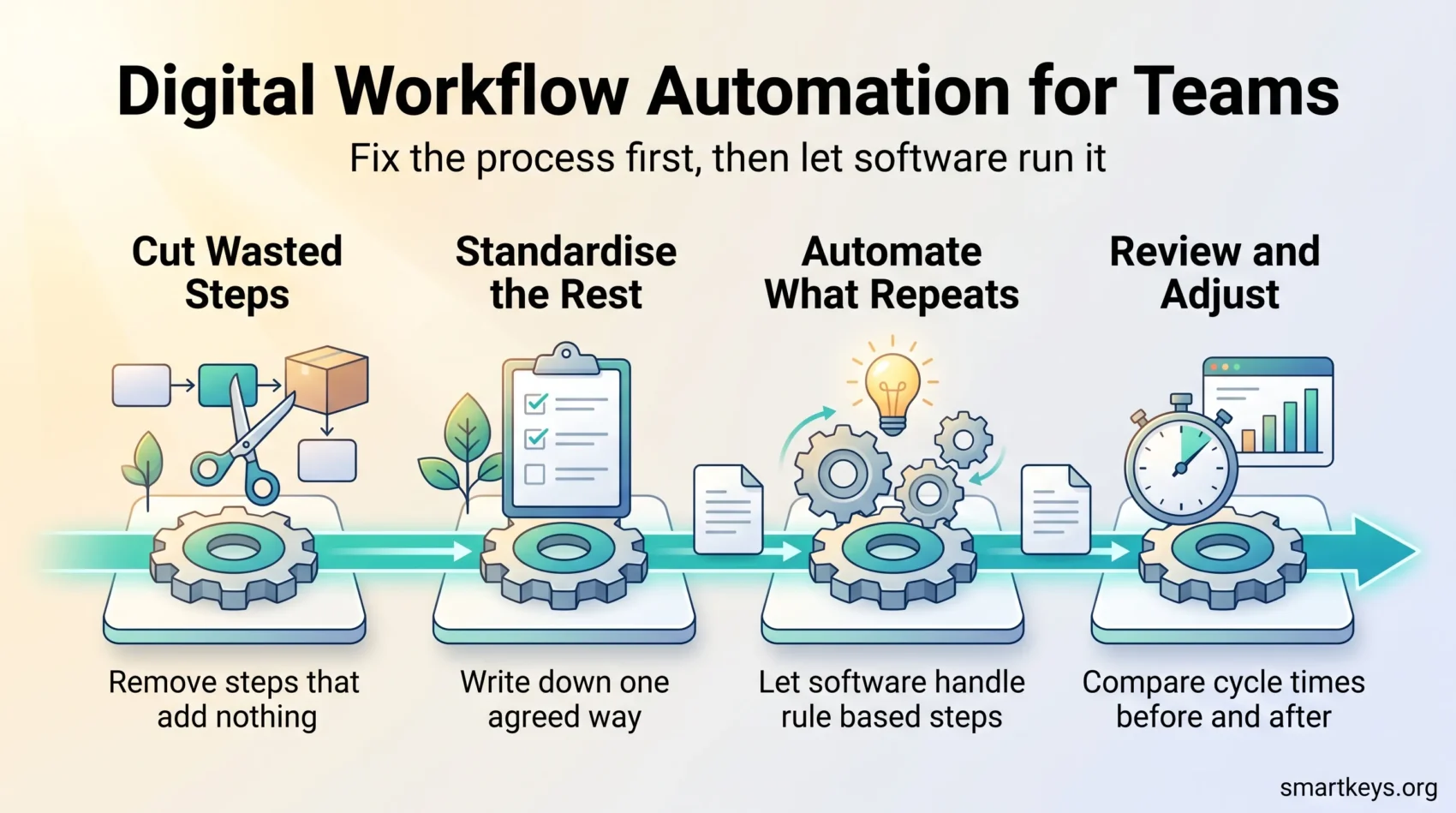
1. Cut the Steps That Add Nothing
Map the process, then challenge each step: what breaks if we remove it? Approvals nobody has ever rejected, forms nobody reads and duplicate records are the usual candidates. Simplify before you automate. Automating a bad process just makes it fail faster.
2. Standardise What Is Left
Agree one way of doing the remaining steps and write it down. This is the point where good task management habits and clear ownership matter more than any software.
3. Automate What Repeats
Now add the tool. Automate the rule-based steps first, leave judgment calls to people, and resist automating everything at once.
4. Review After a Few Weeks
Compare cycle times before and after, ask the people who use the workflow what still annoys them, and adjust. A workflow that is never revisited drifts back into workarounds.
For teams across time zones, AI collaboration tools and AI-assisted project management can take over some routing and summarising. They still need a clean process underneath.
Where Digital Workflows Pay Off, and Where They Do Not
The honest picture in 2026 is that adoption has run ahead of results. McKinsey’s State of AI survey, published on 25 August 2026, found that 44% of organisations say AI is scaling across the enterprise, up from 38% a year earlier, while only 37% attribute any EBIT impact to it. EBIT is simply operating profit before interest and tax, so this is a measure of whether the work showed up in the accounts.
The most useful finding there is about method, not technology. Nearly three-quarters of the high performers were fundamentally redesigning workflows because of their AI use, against roughly a quarter of everyone else. Bolting a tool onto an unchanged process is the pattern that fails.
Gartner made a related prediction in June 2025: more than 40% of agentic AI projects will be cancelled by the end of 2027, largely because of unclear business value and rising costs. The lesson is not to avoid automation. It is to pick a process with a known cost, change the process, and measure the result.
Where digital workflows do reliably help is unglamorous and repetitive: approvals, onboarding, ticket routing, document review, procurement requests, recurring reporting. These processes have high volume, clear rules and a measurable cycle time. That combination is what makes an improvement visible. Our broader look at digital transformation trends puts this in context.
Conclusion
Digital workflows are less about technology than about deciding, once, how a piece of work should move through your organisation. The software then makes that decision stick.
Start narrow. Map one process that people complain about, remove the steps that add nothing, write down what is left, and automate only the parts that follow a rule. Measure the cycle time before and after, so you know whether it worked.
Done that way, workflows give back what fragmented workdays take away: the ability to finish something without being asked where it stands. For a wider view of process improvement across a team, read our operations efficiency playbook next.
Found this useful?
Make SmartKeys a preferred source on Google, and our articles will surface more often in your Top Stories, AI Overviews, and AI Mode.
Add as Preferred Source




