

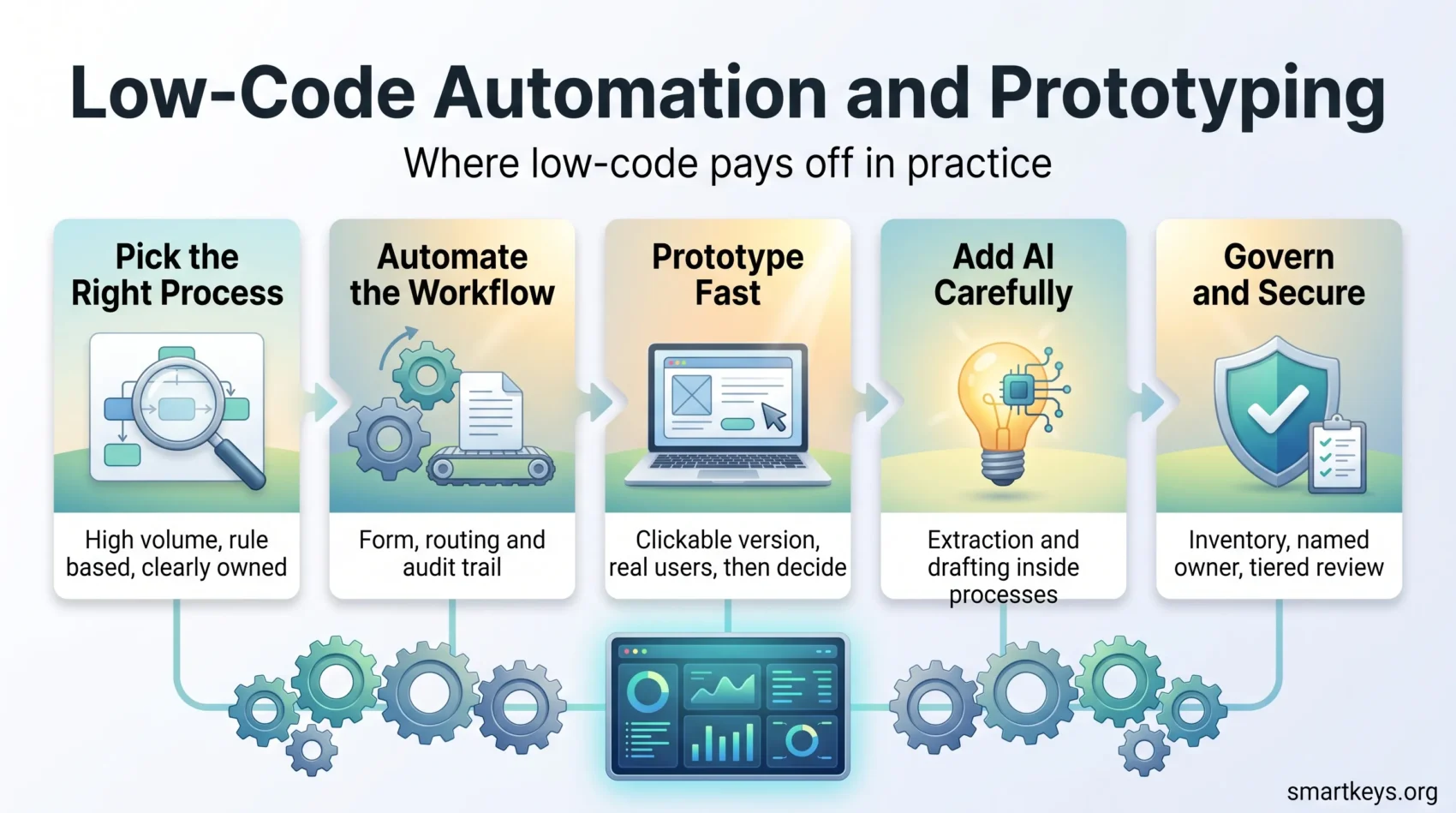
Low-code platforms earn their keep in two places: automating the business processes that still run on email threads and spreadsheets, and turning an idea into something people can click on within days. That is a narrower promise than “democratizing software”, and the one that holds up in practice. This guide covers low-code business process automation, rapid prototyping and the AI features vendors added over the past two years, plus the governance work that decides whether any of it survives contact with your IT department.
For the broader picture (what low-code is, how it differs from no-code, and what it means for non-technical staff) see our companion guide on low-code platforms and non-technical workers. This article assumes you already know the basics and focuses on what you build with them.
Key Takeaways
- Process automation and prototyping are the two low-code use cases with the clearest payback.
- Gartner forecasts the low-code development technologies market will reach $58.2 billion by 2029, a 14.1% compound annual growth rate.
- Agentic AI is now a headline feature on most platforms, and Gartner expects 40% of enterprise apps to carry task-specific agents by the end of 2026.
- Start with a process that is high volume, rule based and already documented. Ambiguous processes fail first.
- Integration and identity work is where low-code projects overrun, not the app building itself.
- The OWASP Low-Code/No-Code Top 10 is a practical checklist for reviewing anything a citizen developer ships.
- Most prototypes should be thrown away. That is a feature of the method, not a failure.
Where Low-Code Stands in 2026
The category has stopped being novel and started being budgeted for. Gartner’s forecast analysis puts the low-code development technologies market on track to reach $58.2 billion by 2029 at a 14.1% compound annual rate, driven by agentic AI adoption, citizen development programs and a push on operational excellence.
The vendor landscape has settled too. Gartner’s Magic Quadrant for Enterprise Low-Code Application Platforms, published in July 2025, placed six vendors in the Leaders quadrant: Mendix, OutSystems, Microsoft Power Apps, ServiceNow, Appian and Salesforce. That list matters less as a shopping guide than as a signal of consolidation. Evaluate the platform your IT team already owns first, because the license, the identity integration and the security review are usually the expensive parts.
Older forecasts circulate widely and should be read with care. Gartner’s 2022 prediction that 75% of new applications would be built with low-code by 2026 was a directional call, not a measured outcome. Treat such numbers as an argument about direction rather than evidence of where your own organization sits.
Who Builds What
The useful distinction is not low-code versus no-code but who owns the result. Three patterns cover most of what companies actually do.
Business teams building for themselves. A finance analyst replaces a shared spreadsheet with a small app. Fast, cheap and fine as long as the data stays inside one department.
IT building with low-code instead of custom code. Developers use the platform because it removes boilerplate, not because they cannot write the code. Most enterprise-grade low-code work happens here.
Fusion teams. A business owner and a developer build together in the same tool. Slower to set up, but the only pattern that reliably produces something other departments can use.
Citizen development sits in the first pattern and needs guardrails proportional to what the app touches. An app that reads public data and sends a reminder needs almost none. An app that writes to your ERP needs the same review as anything else. Our guide to low-code for non-technical workers covers the enablement side in more depth, and a bring-your-own-app policy is the usual place to write the rules down.
Business Process Automation Is the Strongest Use Case
Process automation is where low-code stops being interesting and starts being profitable. The reason is unglamorous: most companies still run significant processes through email, attachments and manual re-keying, and those processes have obvious inputs, obvious outputs and few decision points.
Typical candidates that work well:
- Approval chains such as purchase requests, expense claims, holiday bookings and contract sign-off, where the delay is people waiting on people.
- Intake and triage for IT tickets, facilities requests, supplier onboarding or customer complaints, where a form plus routing rules replaces an inbox.
- Data reconciliation between two systems that do not talk to each other, where someone currently exports a CSV every Monday.
- Compliance evidence such as inspections, audits and safety checks, where the record matters as much as the task.
None of these require clever software. They require a form, a workflow, an audit trail and connections to two or three existing systems. That is precisely the shape of problem low-code platforms are built for, and it overlaps with the wider business automation trends reshaping back-office work and with hyperautomation programs that combine low-code with RPA and process mining.
Finance is often the best department to start in, because its processes are documented, repetitive and measured. Our guide to finance automation covers that ground.
Choosing the Right First Process
The first project sets the reputation of the whole program, so pick it on evidence rather than enthusiasm.
Score candidates on four things. Volume: how many times a month does this run? Low volume rarely repays the build. Rule clarity: can you write the decision logic as if-then statements without arguing? If three people describe the process differently, fix the process before automating it. System reach: how many systems does it touch, and do those systems have usable APIs? Owner: is there one named person who can decide when the requirements change?
The processes that fail are the ones with hidden exceptions. A purchase approval that “always” follows three steps but has a dozen informal workarounds produces an app people route around. Spend the first week mapping what actually happens, not what the process document says, and decide early what the app will not do. Covering 80% of cases cleanly and escalating the rest to a human beats encoding every exception.
Rapid Prototyping With Low-Code
The second strong use case is prototyping, and it works for a different reason. Low-code compresses the distance between a requirement and something a user can react to, which changes the quality of the feedback.
A Practical Prototype Loop
A workable rhythm is one week to a clickable version, one week of real use with a handful of people, then a decision. Build the smallest thing that lets someone complete one real task end to end. Skip authentication edge cases, reporting and admin screens. If the prototype needs data, use a copy rather than a live connection.
Tools built for this include Bubble.io for web apps, Google AppSheet for data-driven internal tools, FlutterFlow and Webflow for mobile and marketing-facing builds, and lighter database platforms compared in our Airtable versus Notion and Smartsheet reviews.
Plan to Throw It Away
The most common prototyping mistake is letting a successful prototype become production software by accident. It was built without error handling, without access control and without anyone asking what happens at ten times the volume. Decide before you start which outcome you want: a disposable prototype that answers a question, or a first version you intend to keep. The two are built differently.
Keeping Business and IT in the Same Room
Prototyping works best when the person with the problem and the person with the platform skills sit together. Drag-and-drop interfaces are not why this succeeds. A shared screen removes a translation step: instead of a requirements document, you get “no, move that field above the date” while it is still cheap to change.

That shared session is also where scope gets honest. Watching a prototype fail on a real case tells you more in ten minutes than a month of stakeholder interviews, and it usually reveals that the process itself, not the software, is the problem. Fixing it there is far cheaper than discovering it after a digital transformation program has already committed to a design.
AI-Driven Low-Code Development in 2026
Every major platform now ships AI assistance, and the marketing has run ahead of the reality. It helps to separate three things.
AI that helps you build. Natural-language app generation, formula and expression help, test generation. This is genuinely useful for a first draft and unreliable for anything with subtle business logic. Treat it as a fast way to get to something you then correct.
AI inside the app. Classification, extraction from documents, summarization, drafting replies. This is where low-code and AI combine most usefully in process automation: an invoice arrives, the model extracts the fields, a human approves the exceptions.
Agents that act. Gartner predicts that 40% of enterprise applications will include task-specific AI agents by the end of 2026, up from fewer than 5% in 2025, and warns explicitly about “agentwashing”, where an assistant that needs constant human input is sold as an autonomous agent. The same analysts expect more than 40% of agentic AI projects to be canceled by the end of 2027, largely on cost and unclear value.
The practical reading: use AI for extraction and drafting inside processes you already automated, and be skeptical of agent demos that assume clean data and a happy path. Our guide to AI agent workflows goes deeper on where agents fit, and AI in business operations covers the returns question honestly.
If your automated process makes or supports decisions about people, check the compliance position before you build. Our overview of EU AI Act compliance explains which obligations apply to which use cases.
Integration, Governance and Security
Low-code projects rarely overrun on screens. They overrun on everything behind them.
Integration Is the Real Work
A workflow app is only as good as its connections. Budget time for authentication, rate limits, field mapping and the inevitable legacy system whose API is a nightly file drop. Where several systems are involved, an integration layer usually beats point-to-point connectors: see our guides to iPaaS platforms, the comparison of Workato and Zapier, and the wider API economy.
Governance Without Gridlock
Two failure modes exist, and they are opposites. Ungoverned citizen development produces a sprawl of business-critical apps nobody maintains, a variant of the shadow IT problem. Over-governed programs push every request through a review board until people go back to spreadsheets.
The workable middle is tiering. Classify apps by what they touch: personal productivity, departmental, or business critical. Only the top tier gets full review. Every tier gets an inventory entry, a named owner and a review date. Data classification rules from your data governance strategy should decide the tier, not the enthusiasm of the builder.
Security Review
The OWASP Low-Code/No-Code Top 10 is the most useful public checklist here. Its risks are specific to this style of development rather than borrowed from traditional application security, and they include account impersonation (apps running under a creator’s identity rather than the user’s), authorization misuse, data leakage, security misconfiguration, credential and secret handling failures, asset management failures and inadequate logging.
Two of those cause most real incidents. Identity, because a low-code connector often inherits the permissions of whoever built it, and asset management, because nobody can secure an app they do not know exists. Fix the inventory first.
Conclusion
Low-code is worth adopting for specific, boring reasons: it removes manual steps from processes that already have clear rules, and it puts a testable idea in front of users while changing it is still cheap. Both are measurable, and both fail predictably when the underlying process is undefined or the integration work is underestimated.
Pick one high-volume, rule-based process and build it with the people who run it. Put an inventory and an owner behind every app from day one, and use the OWASP list to review anything touching customer or employee data. Add AI where it removes reading and typing, and treat autonomous agent claims as something to prove on your own data before committing budget.
The market forecasts will keep rising. What determines whether low-code pays for you is narrower: whether the first three apps you ship are still running, still owned and still trusted a year later.
Found this useful?
Make SmartKeys a preferred source on Google, and our articles will surface more often in your Top Stories, AI Overviews, and AI Mode.
Add as Preferred Source




