

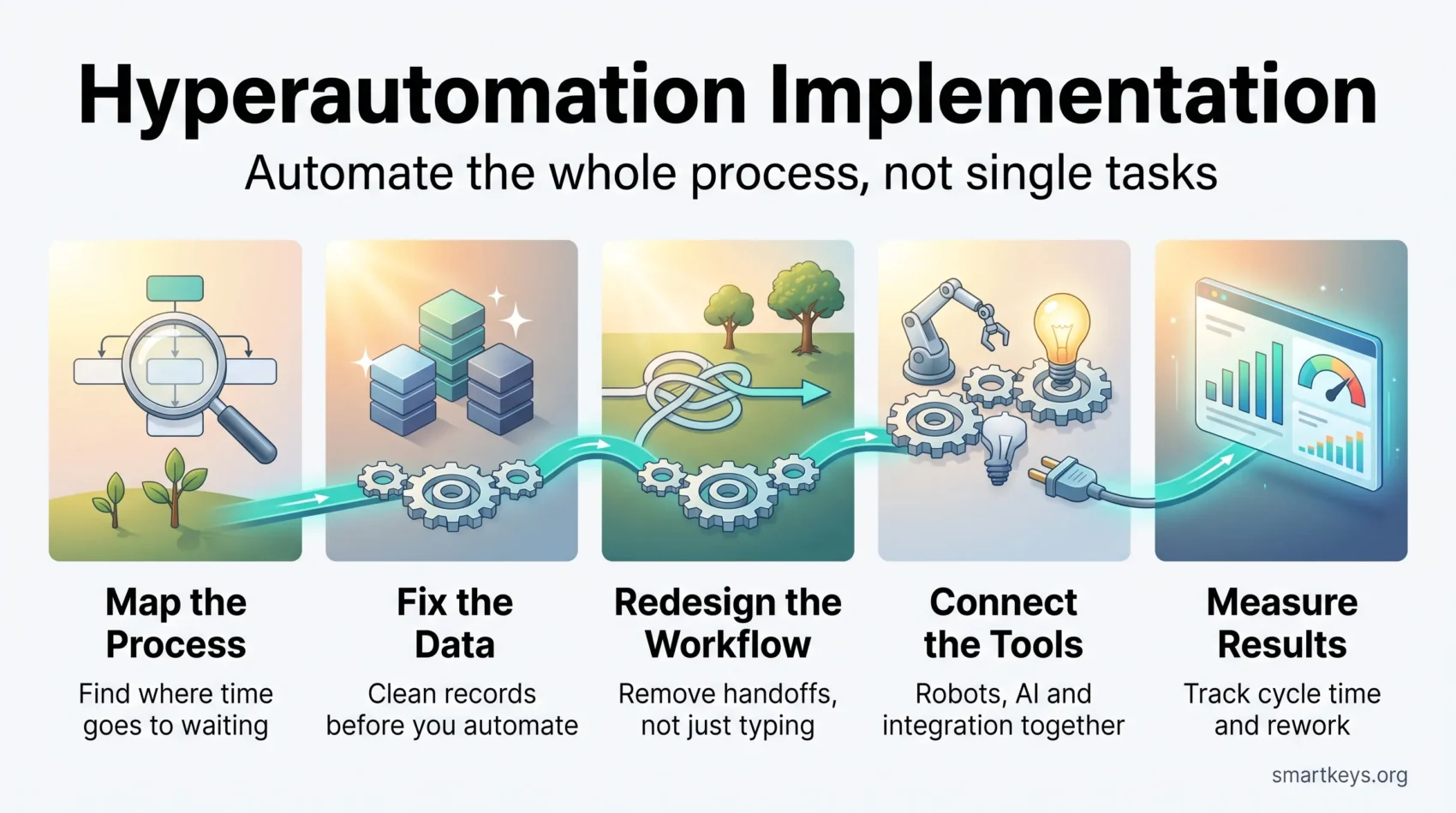
Hyperautomation is the practice of automating a whole business process end to end, not just the single steps inside it. Instead of one bot copying data between two systems, you combine several technologies so an entire workflow, from incoming request to final approval, runs with little manual handling.
The word came from Gartner around 2019 and quickly became a fixture in vendor marketing and in the wider conversation about business automation trends. In 2026 the label matters less than the idea. Gartner now groups these tools under Business Orchestration and Automation Technologies (BOAT) and published the first Magic Quadrant for that category in 2025. The goal is unchanged: connect the tools you already own so work moves through them without people acting as the glue.
It sits inside a wider digital transformation effort, alongside the use of AI in business operations. This guide focuses on hyperautomation implementation: what it involves, what the evidence supports, the challenges that make projects fail, and a practical rollout roadmap for getting started.
Key Takeaways
- Hyperautomation means automating a complete process, not isolated tasks.
- Gartner has largely folded the term into Business Orchestration and Automation Technologies (BOAT).
- Almost nine in ten companies use AI somewhere, but only 37% see any earnings impact (McKinsey, 2026).
- Redesigning the process, not buying the platform, separates the winners from the rest.
- Poor data quality and unclear ownership sink more projects than the technology does.
- Start with one high-volume, rules-based process and measure it before scaling.
What Hyperautomation Actually Means
Most companies already automate something. Payroll runs on a schedule, invoices trigger reminders, a form fills a spreadsheet. Hyperautomation is the step after that: looking at a process as a whole and asking which parts a machine can handle, which need judgement, and how the two hand off.
A Plain Definition
Hyperautomation uses several automation technologies together to run a business process from start to finish. The distinguishing feature is coordination: a single tool automates a task, while hyperautomation orchestrates the tools, the data and the people so the process itself gets faster.
An example: an insurance claim arrives as a PDF. Document reading software extracts the fields, a rules engine checks the policy, a model flags anything unusual, and only flagged cases reach a human assessor. The routine majority never touches a desk. Scanning the PDF alone is not hyperautomation.
The Technologies Involved
The usual components are:
- Robotic process automation (RPA): software robots that click through applications the way a person would, useful when a system has no API.
- Artificial intelligence and machine learning: models that read documents, classify requests or predict outcomes.
- Integration platform as a service (iPaaS): the connective layer that moves data between cloud and on-premises applications.
- Business process management (BPM): the map of how a process should run, including approvals and exceptions.
- Low-code and no-code tools: visual builders that let people outside IT assemble a workflow.
- Process mining: software that reads system logs to show how a process really runs, which is rarely how the flowchart says it does.
No company needs all six. A serious effort usually needs more than one, and the value comes from making them work together rather than from any single piece.

What Changed by 2026: Agents and Orchestration
Two things shifted the conversation since this category got its name.
First, the vocabulary moved on. Gartner’s Business Orchestration and Automation Technologies category treats orchestration, not automation, as the hard part. The assumption is that most companies already own several automation tools and now struggle to make them cooperate.
Second, AI agents arrived. An agent is software that takes a goal, decides on the steps itself, and uses other tools to carry them out, rather than following a script written in advance. The promise fits hyperautomation exactly, which is why every vendor now offers one.
The results so far are mixed. Gartner’s 2026 CIO and Technology Executive Survey found 17% of organizations had deployed AI agents, while more than 60% expected to within two years. Gartner also predicts more than 40% of agentic AI projects will be cancelled by the end of 2027, citing unclear business value, rising costs and weak risk controls, and analyst Anushree Verma has warned about “agent washing”, where vendors rebrand chatbots as agents without the underlying capability.
The practical reading: agent-based workflows are worth piloting on a contained process, and worth treating sceptically in a sales meeting.
What Hyperautomation Delivers
The honest summary is that results vary enormously, and the difference is usually organizational rather than technical.
Fewer Handoffs, Shorter Cycles
The clearest gains come from removing waiting time. In most processes the work takes minutes and the handoffs take days: a request sits in an inbox, then a queue, then waits for approval. Automating the transitions compresses calendar time far more than automating the typing does. This is where structured digital workflows pay off. If a process has eight handoffs and you remove six, elapsed time drops even if nobody works faster.
Cost and Efficiency: What the Evidence Supports
Vendor case studies report large savings, and some are documented. The broader picture is more sober. McKinsey’s 2026 State of AI survey, based on 1,719 respondents across 97 countries, found that nearly nine in ten organizations use AI in at least one business function, yet only 37% attribute any EBIT contribution to it, essentially unchanged from the previous year. Just 6% qualify as high performers.
The survey also points at the reason. Among high performers, 73% had fundamentally redesigned workflows because of AI, against 25% of everyone else. Automating a bad process makes it faster. Redesigning it first is what produces the number that shows up in the accounts.
Customer and Employee Experience
Faster processes are visible to customers. A claim settled in two days instead of two weeks changes how a company is judged. AI in customer service and personalized e-commerce both depend on this back-end plumbing working.
For employees, the effect depends on what replaces the removed work. McKinsey found 80% of respondents say AI improved their individual productivity. That is self-reported, but it fits the pattern that people dislike rekeying data and are glad to stop.
Hyperautomation Compared With Simple Automation
The difference is scope and the ability to handle exceptions.
Traditional automation handles one repeatable task with fixed rules. If the input changes format, it breaks. It is cheap, fast to build and useful for stable, high-volume work.
Hyperautomation spans a whole process and mixes rule-based steps with model-based ones. A model can read an invoice in a layout it has never seen; a rules engine cannot. That flexibility is the main argument for the extra complexity, and also the reason these systems need monitoring: a model that quietly gets worse is harder to notice than a bot that stops.
A useful test: if you can write the rules down completely, you probably do not need AI.
Implementation Challenges: Where Projects Go Wrong
Data Quality
This is the most common failure and the least discussed in sales meetings. Automated processes act on data without a human sanity check, so duplicated customer records or ambiguous product codes get propagated at speed.
Fixing it is unglamorous work: agreeing which system holds the authoritative version of each record, cleaning what is there, and validating at the point of entry. It usually takes longer than building the automation, and companies that skip it end up rebuilding. Reliable reporting tools depend on the same foundation.
The Skills Gap
Hyperautomation needs people who understand the process, not only the software. The scarce skill is process analysis: someone who can sit with a team, map what actually happens, and spot the three steps causing most of the delay. Vendor certifications teach the tool, not that. Building the capability internally through structured upskilling tends to beat hiring around it, because knowledge of how your processes really run is not on the market.
Tool Sprawl
Many companies arrive with an accidental collection of tools: an RPA licence from one department, a low-code platform from another, three integration services and a workflow builder inside their CRM. Each works. Together they overlap, duplicate data and nobody owns the whole.
This is the problem the orchestration category was named for. Before buying anything else, map what you have, ideally through one automation centre of excellence rather than department by department. Comparisons such as Workato against Zapier or a look at a full iPaaS platform are more useful after that inventory than before it.
What It Looks Like in Practice
- Healthcare: filing patient documents so records are complete when a clinician opens them, part of a wider shift in healthcare digital transformation.
- Financial services: transaction monitoring, where models flag anomalies in real time and analysts review only the exceptions.
- Manufacturing: linking sensor data to maintenance scheduling and parts ordering, the core of predictive maintenance.
- Procurement: matching invoices to purchase orders and routing only mismatches to a person.
- HR: onboarding, where one accepted offer triggers accounts, equipment, payroll and training enrolment without eight separate emails.
These share high volume, clear rules for the common case, and a defined exception path. Those conditions predict success better than the industry does.
Case Study: Heineken
Heineken’s programme, documented by UiPath, is one of the more specific public examples. The company reported saving roughly 14,000 hours a month across finance, IT, HR, procurement and commercial functions, running about 140 end-to-end automations with 60 software robots and 13 federated teams worldwide.
The Brazil team is the instructive part. In one year it created 34 processes, accounting for 41% of all automations and 62% of all hours saved. One data refresh task went from six months to two days.
Two lessons hold up: a small number of well-chosen processes produced most of the value, and a federated model with local teams building against central standards scaled better than one central function would have.
How to Get Started: A Hyperautomation Rollout Roadmap
Assess the Processes You Have
Pick candidates with four questions:
- How often does it run, and how many people touch it?
- How much follows rules you can write down?
- Where does the time go, and is it work or waiting?
- What happens today when something unusual arrives?
Process mining answers the third question with evidence rather than opinion. Without it, a week of asking the team to note where they wait gets you close.
Choose Tools After the Process, Not Before
Once you know which process you are fixing, the choice narrows. The wider automation market moves fast, so judge candidates on three things: whether they connect to the systems you actually run, whether people outside IT can maintain a workflow without waiting in a queue, and what happens to cost when volume triples. Consumption pricing that looks cheap in a pilot can become the largest line item at scale.
Start with one process, in production, with a number attached to it.
What It Means for Jobs
The realistic picture is redistribution rather than wholesale replacement. The World Economic Forum’s Future of Jobs Report 2025 projects 170 million new roles and 92 million displaced by 2030, a net gain of 78 million, and estimates that 39% of workers’ core skills will change over the same period.
That second figure matters most for planning. The risk for most people is not that their job disappears but that its content shifts under them. Roles built around moving data between systems shrink. Roles built around handling exceptions, checking model output and improving the process grow.
Two responsibilities follow. One is retraining, which works better started before the automation ships, as the evidence on how workers adapt to automation suggests. The other is governance: in the EU, deployer obligations under the AI Act began applying on 2 August 2026, including transparency when people interact with an AI system. Companies automating decisions in hiring or performance management should read the compliance requirements and work through the workplace ethics questions before deployment, not after a complaint.
Measuring Whether It Worked
Set the baseline before you automate. Four measures cover most cases:
- Cycle time: request received to request completed, in calendar time.
- Straight-through rate: the share of cases finishing without human intervention, the most revealing number of the four.
- Error and rework rate: how often output must be corrected, against the manual baseline.
- Cost per transaction: including licences, infrastructure and the people still involved.
Hours saved is the metric vendors prefer and the weakest of the set. Saved hours only matter if the time went somewhere useful, so track what replaced the work, not just what was removed.
Conclusion
Hyperautomation is a sound idea wrapped in a noisy market. Automating a process end to end genuinely does shorten cycles and cut errors, and the technology is mature and widely available.
What separates the companies that get a return has little to do with which platform they bought. It is whether they fixed the data, redesigned the process instead of encoding the old one, picked a few high-volume workflows, and measured the result. Start narrow, measure honestly, and expand only what demonstrably worked.
Found this useful?
Make SmartKeys a preferred source on Google, and our articles will surface more often in your Top Stories, AI Overviews, and AI Mode.
Add as Preferred Source




