

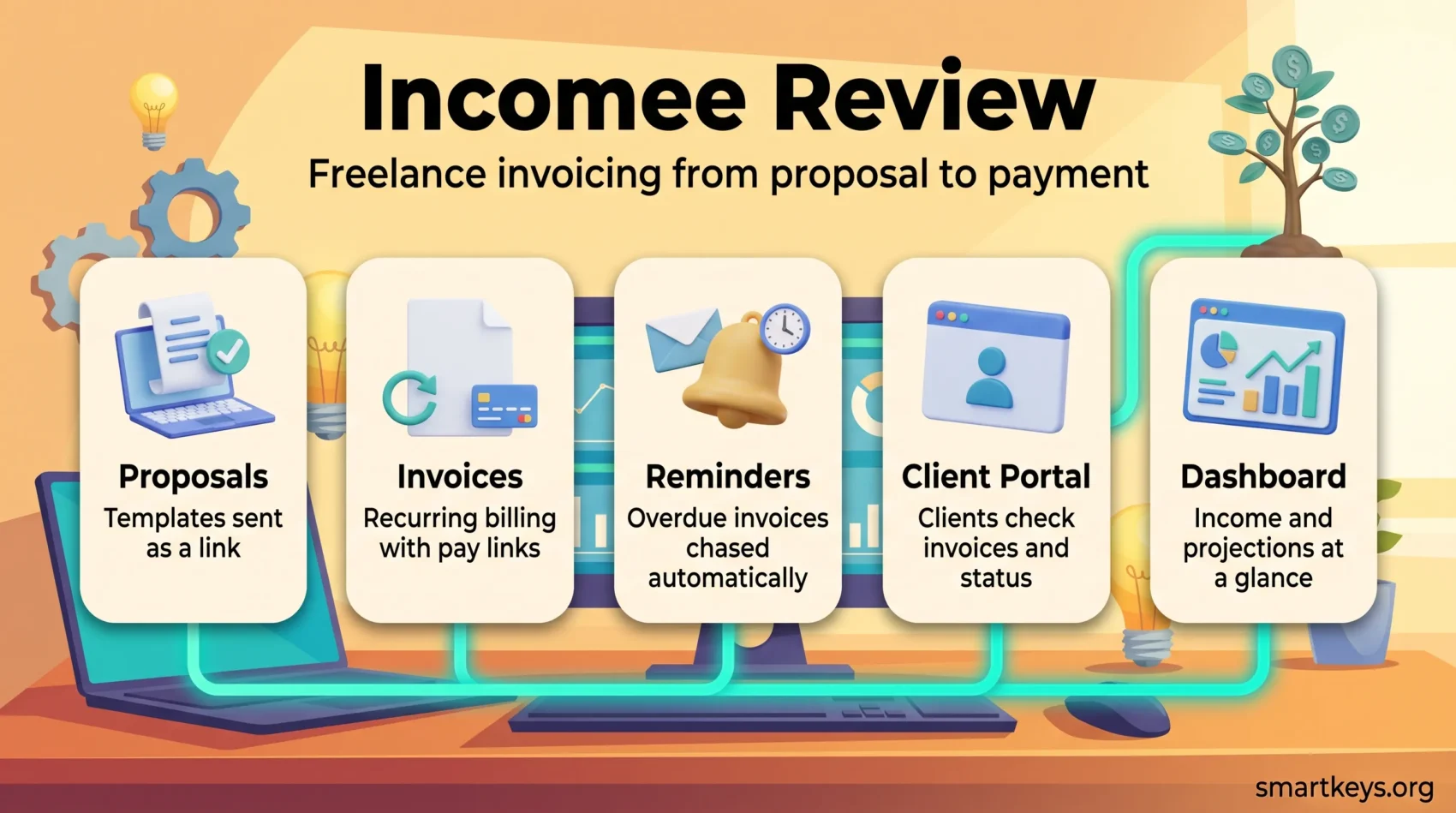
Incomee is a browser-based invoicing and proposal tool for freelancers who want billing handled without running accounting software. This review covers what it does, what can and cannot be confirmed about its pricing in 2026, and which alternatives fit better.
The short version: the feature set is sensible for a one-person business, but Incomee is a small product with almost no independent user feedback, and the pricing figures in software directories contradict each other. Treat the vendor’s own pricing page as the only reliable source.
Key Takeaways
- Covers proposals, invoices, payment reminders, a client portal and a simple financial dashboard.
- Pricing is not consistently documented by third-party directories – check incomee.co directly.
- The public review base is essentially empty, so there is no crowd verdict to lean on.
- Suits solo freelancers, not teams that need bookkeeping.
- FreshBooks, QuickBooks and Xero are the realistic step-up options.
What Incomee is
Incomee is a cloud invoicing app for freelancers and very small businesses, run from the browser at incomee.co. It sits between a manual invoice template and a full accounting suite: send proposals, turn accepted work into invoices, chase payment automatically, watch a dashboard that projects the year ahead.
That positioning matters. If your bookkeeping is a folder of PDFs and a spreadsheet, this removes real friction and makes cash flow easier to see. If you already file VAT returns and reconcile a business account, you will outgrow it quickly. The audience is freelancers, which fits the shift covered in our overview of current freelancing trends and the changing shape of contract work.
Key features of Incomee
The feature set is deliberately narrow: proposal out, invoice, get paid.
Professional proposals
Proposals are built from templates and sent as a link rather than an attachment, so clients read and accept without printing anything. For freelancers writing proposals in a word processor today, this saves the most time and supports a genuinely paperless workflow. If long, scoped proposals are how you win work, Proposify goes considerably deeper.
Invoicing and recurring billing
Invoices are customisable, stored with full history, and can recur for retainer clients. Online payment links sit on the invoice itself, the biggest single lever on how fast you get paid. Directory listings also credit Incomee with time and expense tracking, though it is thinner than a dedicated timer such as Toggl.
Dashboard and projections
The dashboard shows income to date, outstanding invoices and project progress, with a projection of where the year is heading – enough to answer the two questions that matter each month: what has been paid, and what has not.
Where Incomee helps freelancers
Automated chasing
Payment reminders are the feature freelancers most underuse and most need. Incomee sends them on a schedule, so you are not emailing a client about an overdue invoice yourself – the task people postpone longest. Automated reminders are among the cheapest wins available to anyone self-employed, and they pair with broader finance automation and other freelancer productivity habits.
A client portal instead of an inbox thread
The customer portal lets clients check invoices and project status without asking you, cutting status emails and looking more professional than forwarded PDFs. The same clarity helps when managing other freelancers or outsourcing tasks.
Incomee pricing in 2026
Here honesty is more useful than a price table, because the public listings contradict each other outright.
As of 2026, Capterra’s Incomee profile lists a flat $5.00 per month with a free trial of unstated length. AllRemote’s directory lists $12 per month with two months free annually and a 14-day trial. SaaSworthy and SpotSaaS both describe a freemium model with a free plan and no trial – SaaSworthy noting its profile is unclaimed and was last updated in 2019.
Those cannot all be true. Earlier versions of this review quoted $15 monthly and $180 annually with a 20% discount; that cannot be substantiated, and $180 is exactly twelve months at $15 rather than a saving. Both figures have been removed rather than repeated.
So: check the vendor’s pricing page and confirm the trial length and free-tier contents at signup. At this level the price is rarely the deciding factor – the question is whether the tool removes enough manual work to justify another recurring line item, worth asking of your whole stack given how easily subscription fatigue sets in.
Getting paid: payment methods
Card payments
Incomee advertises card payments taken straight from the invoice, so the client pays on the same screen where they read it. Removing that step reliably shortens payment times.
PayPal and bank transfer
PayPal and bank transfer remain supported, which matters for international work. Cross-border freelancers usually add a multi-currency account – see our Revolut Business review – and the wider direction is covered in our piece on digital wallets in work payments.

What user reviews actually show
Very little, and that is the finding rather than an omission. Incomee’s Capterra profile carries no user reviews, and SpotSaaS still invites visitors to be the first to review it. No aggregate score is worth quoting, including any this review once carried.
That is not evidence the product is bad, only that it is small and you are on your own evaluating it. So: use the trial on real client work rather than test data, and check early that invoices and contacts can be exported. Directory feature lists disagree too – Capterra flags missing quote and estimate handling while SpotSaaS lists quotes as supported – so verify anything that matters against the live product.
Alternatives to Incomee
The realistic alternatives split by what you actually need.
- Full freelance accounting: FreshBooks adds expense tracking, time billing and reporting.
- Growing into a small business: QuickBooks Online and Xero scale into real bookkeeping with accountant access and bank reconciliation.
- Expense-heavy work: our Expensify versus QuickBooks comparison covers the case where receipts, not invoices, are the bottleneck.
- Occasional invoicing: free options such as Wave, if you bill a few times a year and want no recurring cost.
Verdict
Incomee does a specific job for a specific person: the solo freelancer invoicing a handful of clients who wants proposals and reminders handled automatically and has no interest in accounting software. Within that scope the feature set is sound and the cost will be modest.
The reservations concern the product’s size rather than its design. The public review record is effectively empty, third-party pricing information is contradictory, and the vendor is the only reliable source on both. That is a manageable risk at this level but a real one – so run the trial on live client work and confirm your export options before your invoice history lives entirely inside it. If you already need expense tracking, VAT handling or an accountant looking over your books, start with FreshBooks, QuickBooks or Xero instead.
Found this useful?
Make SmartKeys a preferred source on Google, and our articles will surface more often in your Top Stories, AI Overviews, and AI Mode.
Add as Preferred SourceFAQ
What is Incomee and who is it built for?
Incomee is a browser-based invoicing and proposal tool for freelancers and very small businesses, run from incomee.co. It handles proposals, invoices, recurring billing, automated payment reminders, a client portal and a dashboard that projects income for the year. It is not accounting software: there is no bank reconciliation, no VAT filing and no accountant access. That makes it a reasonable fit for a solo freelancer invoicing from a spreadsheet today, and a poor fit for anyone who already keeps proper books.
How does Incomee help with client management?
Incomee provides a customer portal where clients see their invoices and project status without emailing to ask. That removes a category of low-value correspondence: the “did you get my invoice” and “where are we on this” messages that interrupt work without advancing it. A contact database keeps client details and history in one place, so repeat work does not mean re-entering the same information. For freelancers juggling several clients, the portal often justifies the tool more than the invoicing does.
Can I try Incomee before committing to a subscription?
Yes, but confirm the terms at signup rather than trusting a directory. Third-party listings disagree: Capterra records a free trial without stating its length, AllRemote describes a 14-day trial, and SaaSworthy and SpotSaaS describe a free plan with no trial. Whichever applies when you sign up, use the trial on real client work rather than test data. Send an actual proposal, issue an actual invoice and let a reminder fire – that is the only way to see whether the automation fits how you work.
What payment methods does Incomee support?
Incomee advertises online card payments taken directly from the invoice, alongside PayPal and manual bank transfer for clients who prefer them. The card option is the one that changes behaviour: when a client can pay on the same screen where they read the invoice, the gap between sending and being paid shortens noticeably. PayPal and bank transfer matter more for international clients, where card acceptance and currency handling vary. Freelancers billing across borders usually add a multi-currency business account alongside the invoicing tool.
What does Incomee cost?
No figure can be stated with confidence, because the public listings contradict each other. As of 2026, Capterra shows a flat $5.00 per month, AllRemote shows $12 per month with two months free on an annual plan, and SaaSworthy and SpotSaaS both describe a freemium model with a free plan – SaaSworthy noting its unclaimed profile was last updated in 2019. Older figures of $15 monthly or $180 annually cannot be substantiated either. Check incomee.co directly and confirm what the plan includes before paying.
How does Incomee automate invoicing?
Two mechanisms do most of the work. Recurring invoices generate and send themselves on a schedule, which suits retainer clients and removes a monthly admin task. Automated reminders chase overdue invoices on your behalf, so the awkward follow-up is handled by the system rather than postponed by you. Proposals can also be converted into invoices rather than rebuilt. None of this is unusual for invoicing software, but for a freelancer moving up from manual templates it removes most of the admin around getting paid.
What do user reviews say about Incomee?
Almost nothing, which is worth knowing before you commit. Incomee’s Capterra profile carries no user reviews, and SpotSaaS still asks visitors to be the first to review it. Any published rating should therefore be treated sceptically, including scores that appeared in earlier versions of this review and have since been removed. A thin review base is not proof of a weak product, but you cannot outsource the evaluation to other users. Test it during the trial and check that your data can be exported.
Are there alternatives to Incomee I should consider?
Yes, and the right one depends on what you are missing. FreshBooks is the closest direct alternative for freelancers, adding expense tracking, time billing and reporting. QuickBooks Online and Xero scale into real bookkeeping with bank reconciliation and accountant access, which matters once tax filing is involved. Wave remains an option for freelancers who invoice occasionally and want no recurring cost. If proposals rather than invoices are where you lose time, a dedicated proposal tool goes deeper than any invoicing app.





