

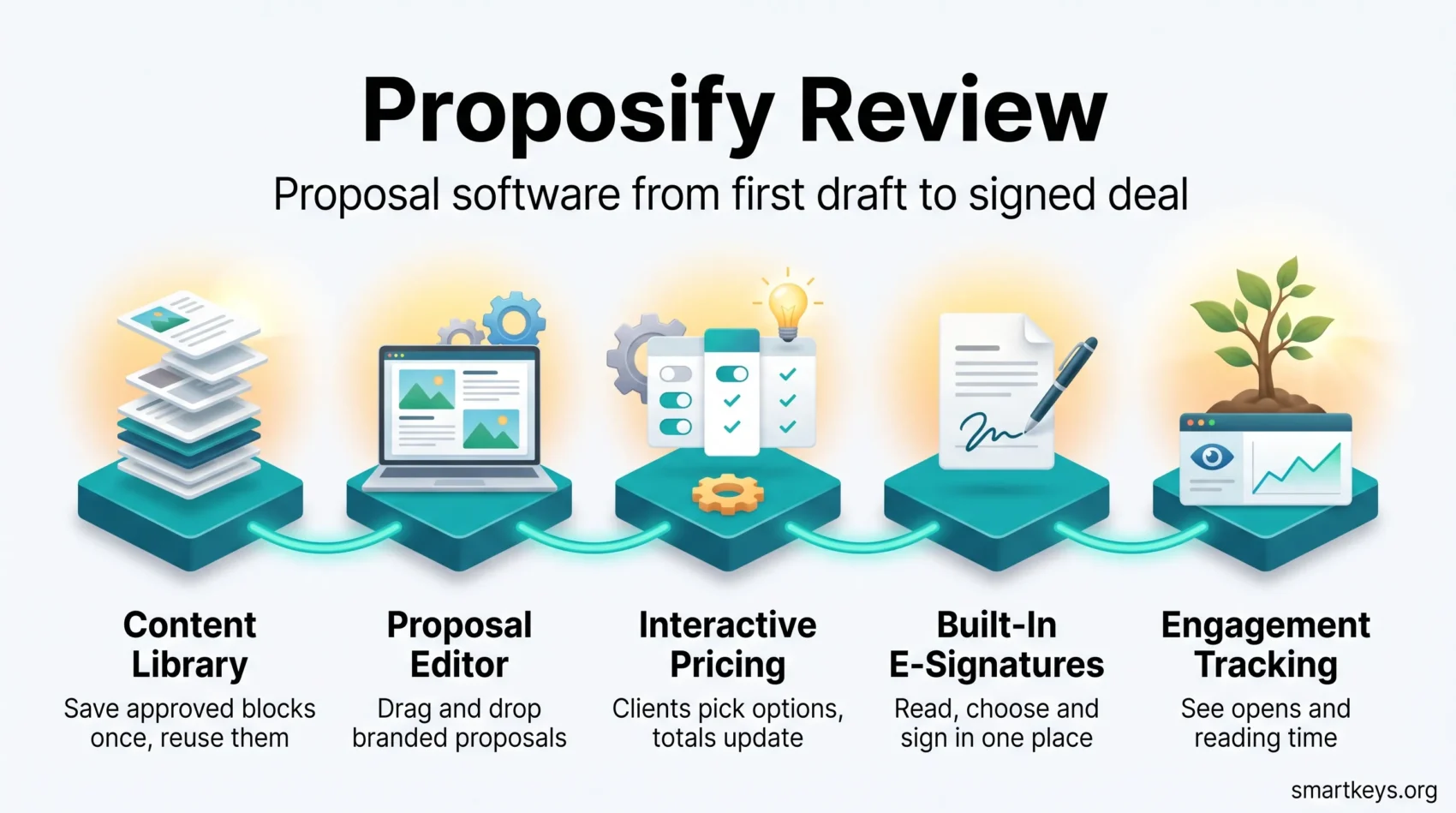
A sales proposal is often the last thing a buyer reads before deciding. Proposal software turns that document from a hand-built Word file into a repeatable, trackable process. Proposify is one of the better known options: a cloud editor with a reusable content library, interactive pricing tables, e-signatures and reporting on who opened what.
This Proposify review covers what the platform does in 2026, what the four plans cost after the move away from the old Tall, Grande and Venti tiers, what verified reviewers praise and complain about, and who is better served by something cheaper or more flexible.
Key Takeaways
- Proposify is proposal software: it stores approved content, assembles documents from it, collects signatures and tracks how clients read them.
- Pricing starts at $19 per user per month on annual billing ($29 monthly) and rises to a Business plan quoted from $3,900 a year.
- There is no free plan. Every tier caps how many documents you can send per month, with per-send overage fees above that.
- Verified ratings are solid: 4.6 out of 5 on G2 across more than 1,100 reviews, 4.4 out of 5 on Capterra across roughly 300.
- The most common complaint is the editor: formatting imported text and fine-grained design control frustrate a lot of users.
What Is Proposify?
Proposify is a web platform for building, sending and tracking sales documents: proposals, quotes and contracts. Instead of copying last quarter’s proposal and editing it by hand, your team assembles a new one from approved blocks: a company overview, a case study, a service description, a price table. Everything lives in the browser, so no files go back and forth by email and there is no question which version the client received.
The practical payoff is consistency. When a new rep sends a proposal, the pricing, legal wording and branding are the ones the company signed off on, not whatever was in the file they happened to copy.
Who Built It and Who It Is For
Kyle Racki and Kevin Springer founded Proposify in 2013 after running a web design agency and writing proposals themselves. The company says it now serves more than 8,000 customers with roughly 60 employees and over $10 million in annual recurring revenue.
The typical customer sells a considered service rather than a shelf product: digital and marketing agencies, accounting and consulting firms, IT providers, construction and landscaping companies. These are businesses where a deal starts with a document that has to explain scope, price and terms in one place.
Proposify’s Main Features
The Proposal Editor and Content Library
The editor is a drag-and-drop canvas rather than a word processor. You place text, images, video, tables and signature fields on a page and control how they look.
Behind it sits the content library, where most of the time savings come from. Save a service description, a team bio or a testimonial once, and anyone can drop it into a new document. Update it centrally and future proposals pick up the change. A template gallery covers common document types, which helps if you have never structured a proposal before.
Interactive Pricing Tables and E-Signatures
Pricing tables are the feature that most clearly separates proposal software from a PDF. You can mark line items as optional or let the client choose quantities, and the total recalculates in the document as they click. That turns a fixed quote into a small configurator, which is useful when you sell tiers or add-ons.
E-signatures are built in on every plan, so the client reads, selects and signs in the same browser tab. If signing is genuinely all you need, a dedicated tool is cheaper: see our DocuSign review, the lighter DocHub review, or our Adobe Sign and HelloSign comparison.
Tracking and Metrics
Once a document is sent, Proposify reports when it was opened, which sections were read and for how long. Metrics roll up across the team so you can see win rates and how long documents sit unopened.
The value here is timing rather than analytics theatre. Knowing a prospect reopened the pricing page twice this morning is a better reason to call than a calendar reminder. For teams building this kind of visibility into a wider process, our guides to remote and hybrid sales teams and to RevOps forecasting cover where proposal data fits.
Proposify Pricing in 2026
Proposify has retired the old coffee-cup plan names. There are now four tiers, and the pricing model has an important wrinkle: you are limited by how many documents you send each month, not how many you create.
The Four Plans
- Basic: $19 per user per month billed annually, or $29 billed monthly. Includes 10 sends a month, one collaborator seat, the editor, e-signatures, document tracking and the content library.
- Team: $41 per user per month billed annually, or $49 billed quarterly. Includes 30 sends a month and three collaborator seats, and adds integrations, automations, metrics, custom fields and variables, and a pricing catalog.
- Business: custom pricing, quoted from $3,900 a year. Includes 75 sends a month and five collaborator seats, and adds user roles and permissions, approval workflows, single sign-on, API access and multiple workspaces.
- Enterprise: custom pricing and custom limits, negotiated with sales.
All plans come with a 14-day free trial that does not ask for a card. There is no free tier, which is a change worth noting if you read an older review.
What the Send Limits Really Mean
Sends decide your bill, and the number is easy to underestimate. Basic allows 10 a month and charges $0.50 beyond that. Team allows 30 at $0.30 each after. Business allows 75 at $0.75 each after.
Work out your real volume first. A two-person agency sending 15 proposals a month is on Basic plus roughly $2.50 in overage, which is fine. A team sending 60 is better off on Team than paying Basic overage on every extra document.
One more cost to check: the Salesforce integration is a Business-plan add-on charged at $9 per user per month on top of the plan. If Salesforce is your system of record, budget for that. Our Salesforce CRM review and Salesforce versus HubSpot comparison cover what that platform costs on its own.
How the Price Compares
Against direct competitors, Proposify sits in the middle. PandaDoc’s Starter plan is $19 per seat per month and it still offers a free plan capped at 60 documents a year. Qwilr starts at $35 per user per month on annual billing. GetAccept’s e-signature tier is $25 per user per month, with its full sales-room plan at $49 and a five-user minimum.
The figure that moves the comparison is the send cap. Proposify’s headline price looks competitive, but PandaDoc’s Starter plan sends unlimited documents (with per-document overage priced separately), while Proposify’s Basic plan stops at 10. Compare on your expected volume, not on the number at the top of the pricing page.
What Proposify Does Well
Three things come up repeatedly in verified reviews.
The output looks professional. Reviewers praise the control they have over placing graphics alongside text, and finished documents look designed rather than typed. For a business selling creative or consulting work, the proposal is itself a sample of the work.
Templates and the library cut turnaround. The gain is not that one proposal is faster to write; it is that the tenth does not start from a blank page or quietly contradict the ninth.
Support is a real differentiator. Capterra reviewers score customer service at 4.4 out of 5, and support quality appears often enough in renewal comments to count as a reason people stay.
Where Proposify Falls Short
The complaints are just as consistent, and they cluster around the editor.
Pasting content in from Word is the most cited frustration: reviewers report extra spacing and bullet points that do not survive the transfer. If your proposals live in Word today, plan on rebuilding them rather than importing them.
The editor also feels restrictive to anyone who wants precise design control. It is more flexible than a text document and less flexible than a design tool. Teams wanting full creative control often build layouts in something like Canva and treat Proposify as the delivery and signature layer.
Cost is the third theme. For a one-person consultancy sending a handful of proposals a year, $19 a month plus the effort of building a library is hard to justify against a good template. Freelancers may prefer a lighter invoicing and proposal tool; our Incomee review looks at one.
Some reviewers also report occasional caching issues and lost edits. Not universal, but it matters when a proposal is due in an hour.
What Reviewers Actually Say
Proposify’s independent ratings are good rather than exceptional: 4.6 out of 5 on G2 across more than 1,140 reviews, and 4.4 out of 5 on Capterra across roughly 300, where ease of use scores 4.3. That gap between the overall score and the ease-of-use score is the product in one number. People like what Proposify produces more than they like producing it.
Be careful with the win-rate claims that circulate about proposal software generally, including on vendor sites. Those figures come from self-selected customer surveys, not controlled studies. The defensible case is operational: less rework, fewer version mistakes, faster follow-up.
Proposify Alternatives
Four alternatives are worth checking before you commit.
- PandaDoc: the closest direct competitor. Starter is $19 per seat per month, Business is $49, and there is a free plan capped at 60 documents a year. Broader document workflow features, and the free tier makes it easy to try properly.
- Qwilr: builds proposals as interactive web pages rather than paper-style documents. Starter is $35 per user per month on annual billing, Growth is $55 with a five-user minimum. Choose it if you want the proposal to feel like a mini website.
- Better Proposals: the budget option, from roughly $13 to $19 per user per month on the Starter plan, which allows one seat and 10 documents a month. Simpler and less designed than Proposify.
- GetAccept: covers the whole deal room rather than just the document. eSign is $25 per user per month; the Professional plan is $49 per user per month annually with a five-user minimum.
Pick Proposify when you send proposals regularly, care how they look, and want a shared content library that keeps a growing team consistent. Pick something else when signing is all you need, when volume is very low, or when you want full design freedom.
Getting Started With Proposify
The 14-day trial is long enough to test properly if you use it deliberately rather than clicking around.
- Pick a template close to what you already send.
- Rebuild one real, recent proposal in it. Typing the text fresh beats pasting from Word.
- Move the reusable parts into the content library: company overview, case studies, standard terms.
- Build one pricing table with an optional line item and check the total updates as expected.
- Connect your CRM. HubSpot and Pipedrive are included on Team; Salesforce needs the Business plan and a paid add-on. See our Pipedrive review and HubSpot review if you are still choosing one.
- Send a live proposal and watch the tracking.
Two habits matter afterwards: review the library quarterly so old pricing does not resurface, and read the tracking data before following up rather than after.
Verdict: Who Should Buy Proposify
Proposify is a capable, well-supported platform that earns its price for small and mid-sized teams sending proposals every week. The content library and tracking pay for themselves; the editor is the part you will occasionally fight.
Buy it if you send proposals often enough that consistency is a problem and the way a document looks affects whether you win. Look elsewhere if you mainly need signatures, if your volume is a few documents a year, or if you already have a design process you like. Either way, test it on one real deal during the trial.
If you are building out the wider commercial stack around it, our guides to CRM trends, pricing strategy and sales enablement cover the neighbouring decisions, and QuickBooks, Xero and FreshBooks are the accounting tools Proposify connects to once a proposal is signed.
Found this useful?
Make SmartKeys a preferred source on Google, and our articles will surface more often in your Top Stories, AI Overviews, and AI Mode.
Add as Preferred Source




