Finance automation means letting software handle the repetitive parts of accounting: entering invoice data, matching payments to bank lines, routing approvals and assembling reports. Your team still decides what the numbers mean. The software stops them retyping the numbers first.
The shift is no longer theoretical. In Consero’s 2026 CFO Survey of 102 finance leaders at investor-backed companies with $20 million to $500 million in revenue, 42% said AI is now broadly or fully embedded in their finance function. A year earlier that figure was 22%. In the same survey, 65% of respondents closed their books in under 10 days, up from 8% in 2024.
This guide covers what finance automation includes, which processes to tackle first, how to choose tools, how to prove the result, and where these projects go wrong.
Key Takeaways
- Finance automation moves routine data work to software so your team can spend time on analysis.
- Three approaches exist: whole-process automation, single-task bots, and AI-assisted versions of both.
- Start with high-volume work: invoicing, accounts payable, expenses and reconciliation.
- Integration quality decides the outcome more often than the tool you pick.
- Gartner names data quality, integration complexity and skills gaps as the main barriers for CFOs.
- Measure hours saved, error rates and close speed against a baseline you recorded before you started.
What finance automation actually means
The term covers three different things. They solve different problems, and picking the wrong one is a common reason pilots stall.
Business process automation: the end-to-end route
Business process automation (BPA) redesigns a whole workflow, from the trigger to the final approval. An accounts payable process built this way receives the invoice, reads it, matches it to a purchase order, routes exceptions to a reviewer and schedules the payment. Nobody copies anything between systems.
BPA suits work that crosses departments: accounts payable and receivable, payroll, vendor payments, forecasting and employee onboarding. It takes longer to set up because you have to agree on the rules first. The payoff is that handoffs disappear rather than getting faster. Our overview of business automation trends covers how this has developed across functions.
Robotic process automation: the single repetitive task
Robotic process automation (RPA) is narrower. A bot imitates the clicks and keystrokes a person would perform in an existing application. It opens the system, copies a field, pastes it somewhere else, and repeats.
RPA works well when a task is high volume, rule-based and unlikely to change: pulling a daily sales report, sending standard invoices, filing expense claims. It is quick to deploy and requires no rebuilding. The trade-off is fragility: change the screen layout of the underlying system and the bot breaks.
Intelligent automation: adding judgment
Intelligent automation adds machine learning to either of the above. Machine learning here means software that learns patterns from your historical data rather than following rules someone typed in.
That matters for tasks where the rules are hard to write down. Categorising an unusual expense, spotting a duplicate invoice with a slightly different reference, or flagging a payment that does not fit a supplier’s usual pattern are all easier to learn from examples than to specify in advance. Combining several of these layers across a business is what vendors mean by hyperautomation.
Which finance processes are in scope
- Bookkeeping, expense management and bank reconciliation
- Accounts payable, accounts receivable and vendor payments
- Budgeting, forecasting and month-end close
- Procurement approvals and purchase order matching
- Tax checks, audit trails and regulatory reporting
The practical rule: use BPA when the problem is handoffs between people, RPA when the problem is one person doing the same thing 200 times, and machine learning when the problem is judgment on messy inputs.
Where finance automation stands in 2026
Adoption is high, but depth varies enormously. Consero’s 2026 survey found 97% of respondents using AI somewhere in finance, while only 42% had it embedded across the function. Most companies are still running pilots rather than operating models.
Gartner forecasts that finance teams using cloud ERP systems with built-in AI assistants will close their books 30% faster by 2028. ERP stands for enterprise resource planning: the central system that holds your ledger, purchasing and inventory data. Gartner also expects 62% of cloud ERP spending to go to AI-enabled products by 2027, up from 14% in 2024.
The same Gartner analysis is blunt about why most CFOs are still early: data quality, integration complexity, skills gaps and patchy support for companies with multiple legal entities. None of those are fixed by buying better software.
There is a matching warning on the AI side. Gartner predicts that more than 40% of agentic AI projects will be cancelled before the end of 2027, largely because of unclear value and rising costs. Agentic AI refers to systems that plan and carry out multi-step tasks on their own rather than answering one question at a time.
One encouraging finding from Consero: 87% of the surveyed companies were still hiring finance staff while scaling AI.
How finance automation works in practice
Underneath the marketing, every finance automation setup does the same five things. Knowing them makes vendor demos easier to judge.
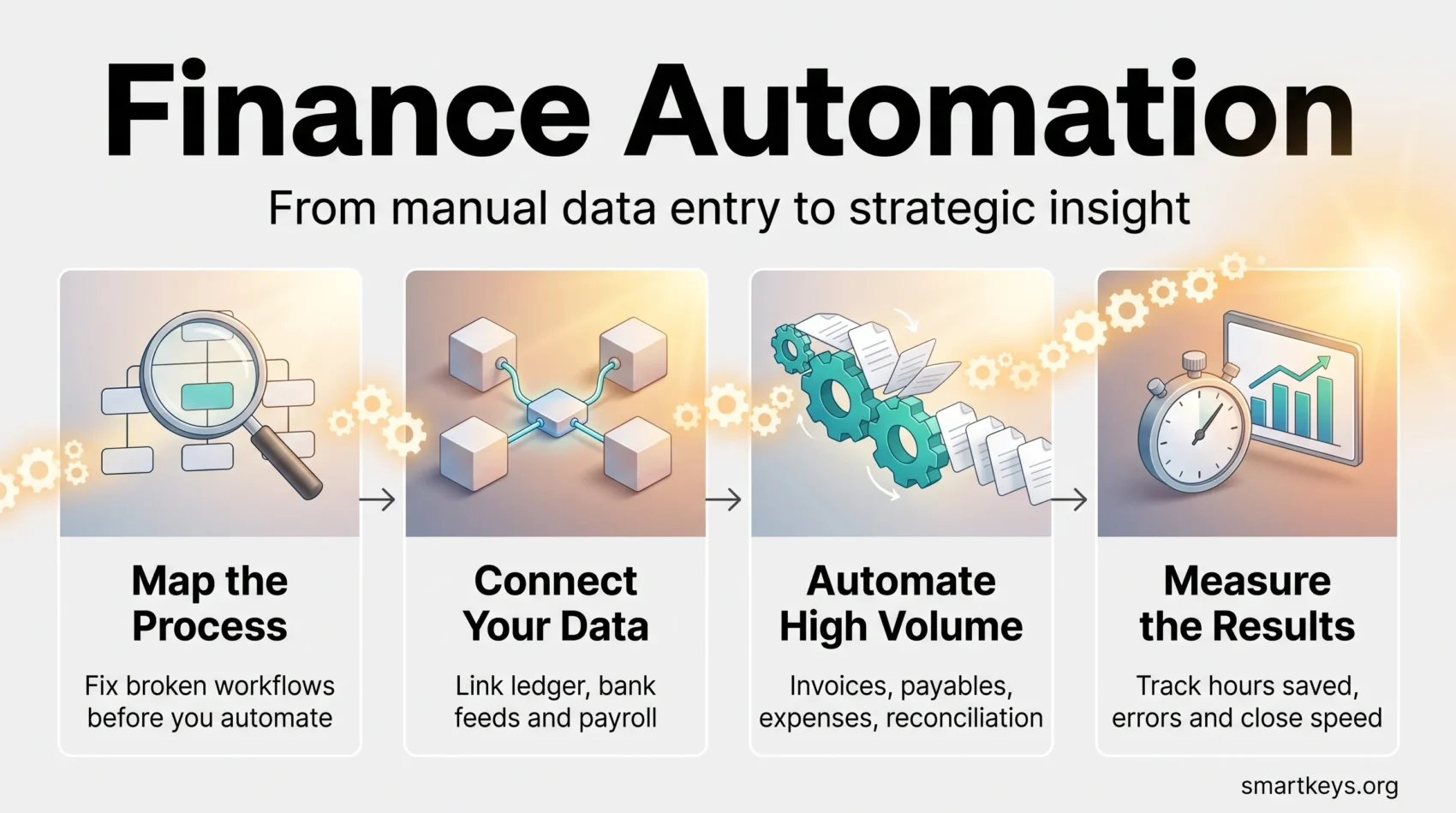
Connecting ERP, CRM, banking and other data sources
The platform pulls live data from your ledger, your bank feeds and your customer records so it is working from current balances. CRM means customer relationship management: the system that holds your customer and deal records.
Without this layer nothing else works. If your invoicing tool does not know a payment arrived, it will chase a customer who already paid. Building this connective layer is the job of an integration platform, and tools such as Workato or Zapier and Make exist specifically for it.
Rules and decisioning at scale
You define the logic once and the system applies it to everything. An invoice under $500 from an approved supplier with a matching purchase order gets paid automatically. Anything outside those conditions goes to a person.
The hard part is not the technology. It is getting finance, procurement and budget owners to agree where the thresholds sit.
Approval workflows and reconciliations
Workflows route each item to the right approver, record why a decision was made and keep a complete audit trail. Reconciliation logic matches ledger entries to bank transactions and surfaces only the pairs that do not line up.
This is where most of the visible time saving comes from. A controller who used to tick off 400 matched lines now reviews the 12 that did not match.
Alerts, exceptions and compliance checks
Instead of someone checking a queue, the system raises a notification when something is overdue, unusual or against policy. Good exception handling is the difference between automation that reduces work and automation that simply moves it.
Set thresholds deliberately. An alert that fires on every third invoice will be ignored within a week.
Models that improve with use
Machine learning models retrain on the corrections your team makes. When a reviewer reclassifies a transaction, that correction becomes training data, and the model misclassifies that pattern less often.
This only works if the corrections are captured in the system. Teams that fix things in a side spreadsheet get none of the benefit.
High-impact use cases to start with
Pick processes that touch the most transactions and the most people. That is where a small improvement per item turns into real hours.
Invoicing and accounts receivable
Automate invoice creation, payment matching and reminder sequences. The direct effect is on days sales outstanding, the average number of days between issuing an invoice and getting paid. Chasing overdue invoices is also the work finance teams most dislike, so automation here tends to be welcomed rather than resisted.
Cloud accounting tools handle much of this at the small-business end. Our reviews of QuickBooks Online, Xero and FreshBooks compare what each automates out of the box.
Accounts payable and vendor management
Three-way matching compares the invoice, the purchase order and the goods receipt before anything is paid. Automating it improves on-time payment rates and removes the back-and-forth between finance and the person who ordered the goods. Extending the same logic upstream into purchasing is what digital procurement platforms do.
Payroll and employee expense management
Employees photograph a receipt, the system reads it, applies your policy and books it to the right cost centre. Reimbursements land faster and finance stops acting as a receipt inspector. If you are weighing a dedicated expense tool against your accounting package, our Expensify versus QuickBooks comparison sets out the trade-off.
Reporting, closes and planning
Automated journal entries, reconciliations and standard report packs shorten the close. That matters beyond finance: a close that finishes on day five instead of day twelve gives the rest of the business a week more to act on the numbers.
Rolling forecasts built on actual data also improve cash flow management, and statistical forecasting has become a standard part of the toolkit. Our guide to predictive analytics in finance covers what those models can and cannot do.
Choosing the right tools
Start from the gap you are trying to close, not from a feature list. A platform that shortens your close by four days is worth more than one with twice as many integrations you will never use.
Capabilities that matter
- Native connections to your ERP, accounting software, payroll provider and banks, so every system reads from one source
- Role-based access and complete audit logs, so you can show an auditor who approved what and when
- Configurable workflows you can change without a developer
- A test environment, so you are not debugging rules in your live ledger during month-end
- Clear service level commitments that cover your close window, not just business hours
Security, data integrity and compliance
Finance systems hold bank details, salary data and customer records. Ask vendors for their encryption standards, their independent security certifications and their most recent penetration test summary. Ask what happens to your data if you leave.
Where you operate shapes what else you have to check. Compliance automation is now a category of its own, covered in our guide to RegTech solutions, and European teams using AI in finance workflows should read our summary of EU AI Act obligations.
Scalability and ease of integration
Favour platforms that need little custom code. Every custom connector is something you have to maintain and re-test after each upgrade. Check that the vendor’s APIs are documented and versioned, and confirm the platform handles multiple legal entities and currencies if you have them. Gartner specifically flags weak multi-entity support as a gap in the current market.
Your implementation roadmap
Most failed automation projects were not beaten by the technology. They were beaten by unclear processes, absent sponsors and a rollout that tried to do everything at once.
Map the process before you automate it
Write down how the work actually happens today, including the spreadsheet someone keeps on their desktop. Note who owns each step, where data is typed in by hand, and which control points exist for audit reasons.
Automating a broken process just breaks it faster. If two people re-key the same figures because nobody trusts the source system, fix the source first.
Deploy in phases
Choose one process, set a measurable target, and run it for a full cycle before expanding. A single accounts payable workflow proven over two months builds more support than five half-finished pilots.
Avoid going live during a close or year-end. The people you need for testing are the busiest then.
Change management and training
Automation changes what people do all day, so treat it as a people project with a technology component. Agree early who owns exceptions, who can change a rule, and who signs off on model behaviour. Our guide to change management strategy covers how to structure that.
Be honest with the team about what changes. Vague reassurance produces quiet resistance, and quiet resistance produces shadow spreadsheets.
Monitoring and continuous improvement
Define a small set of measures and review them monthly: cycle time per transaction, exception rate, rework rate and user satisfaction. A rising exception rate usually means your rules have drifted out of step with how the business now operates.
Document how each rule was configured and why, or the knowledge leaves with the person who built it.
Governance, risk and controls
Connecting systems increases what an attacker or a mistake can reach. Controls are what make faster processing safe rather than merely fast.
Data security across connected systems
Encrypt data in transit and at rest, enforce role-based permissions, and log every change. Review third-party vendors on a schedule and require evidence of their controls before you share data. Strong data governance is the foundation, since automated reporting inherits whatever quality problems your source data already has.
Catching errors at the point of capture
Validation rules and mandatory fields stop bad data entering the ledger, which is far cheaper than correcting it downstream. Document each control, test it, and keep a change log.
Keeping humans in the loop
Set thresholds so only genuinely unusual items reach a reviewer. Separate duties through permissions: whoever configures a payment rule should not also be able to approve payments under it.
Models need their own oversight. Track whether your input data is drifting away from what the model was trained on, schedule retraining, and test new versions against known historical cases before they go live.
Integration strategy: one version of the numbers
Treat integration as an engineering discipline with named owners, not a one-off IT ticket. A hub-and-spoke design, where systems connect through a central integration layer rather than to each other directly, keeps the number of connections manageable as you add tools.
Agree data contracts so every system means the same thing by “invoice date” or “cost centre”. Document lineage so anyone can trace a figure back to the transaction behind it. Define who owns each data domain, and plan what happens when a feed fails: retries, fallbacks and a way to spot silent gaps.
Near real-time feeds reduce the delay between an event and its ledger entry, which is what makes daily cash visibility possible. Build reconciliation checks into the pipeline itself so mismatches surface immediately instead of at month-end. Once the data is trustworthy, business intelligence tools can turn it into reporting the rest of the business will actually use.
Measuring impact: ROI, efficiency and decision speed
Record a baseline before you change anything. Count the hours the process takes, the error and rework rate, and how long the close runs. Without that, every later claim is an anecdote.
Convert hours into money using fully loaded labour rates, which include employer taxes and overheads rather than salary alone. That gives you a payback period you can defend in a budget meeting.
Track error rates before and after. Fewer corrections is often the more durable benefit, because errors consume senior time rather than junior time. Note where manual entry survives and set a target for reducing it without weakening controls.
Then measure decision speed: how long between a month ending and a manager acting on the result. Run controlled pilots where you can, so seasonal effects do not get credited to your project.
What leading teams have actually achieved
Published case studies are useful for calibration, as long as you read what was actually measured.
IBM: pricing decisions at scale
IBM automated parts of its own bid pricing process. According to its case study, the global rollout removed roughly 35,000 hours of manual work per year and cut average cycle time by 75%. Around 15% of bids became eligible for automatic approval under predefined rules, and more than 50 manual checklists were retired.
One detail is worth more than the headline number. An individual pricer saved about seven minutes per bid. Across a day of bids that added up to half an hour or more. Large numbers in automation case studies are usually small savings multiplied by high volume.
TD Ameritrade: rules-based account opening
TD Ameritrade replaced manual checks with automated rules and field validation using IBM Cloud Pak for Business Automation. The case study reports up to a 70% reduction in account opening time in its Hong Kong operation, roughly 30% in the retail business and more than 50% in the institutional division. Around 97% of new margin and option requests went through automatically.
Note the spread. The same system produced very different results inside one company, which is a fair warning about transferring a headline figure to your own situation.
Primanti Brothers: a single report, automated
The restaurant chain Primanti Brothers used IBM RPA to automate daily sales and labour reporting, saving around 2,000 hours of manual work according to IBM. This is a good example of a narrow RPA project: one recurring report, clearly defined, delivered without rebuilding any underlying system.
What to watch: agentic AI in finance
The current direction of travel is from assistants that answer questions to agents that carry out sequences of work. An agent might draft a forecast, run a reconciliation, write up the variances it found and present the exceptions for review.
The sensible approach is narrow scope first. Reconciliation, cash forecasting and working capital analysis are rules-rich and high volume, which makes results easy to check. Our AI agent workflows playbook covers how to structure this, and AI in business operations gives the wider picture on where returns are and are not appearing.
Keep the controls in place. That means restricted API access, monitoring, documented rollback procedures and a person who owns each agent’s behaviour. Gartner’s forecast that over 40% of agentic AI projects will be cancelled by the end of 2027 is a reason to insist on measurable scope, not a reason to avoid the technology.
Routine questions are a different matter and a safer starting point. Trusted AI assistants can handle common supplier and employee queries and pass complex cases to a specialist with the full context attached.
Conclusion
Finance automation is worth doing because it moves skilled people from typing to thinking. The evidence for that is reasonable: IBM removed 35,000 hours a year from one pricing process, TD Ameritrade cut account opening time substantially, and most finance leaders in Consero’s 2026 survey now close their books in under 10 days.
The evidence on what makes projects fail is just as clear. Gartner points to data quality, integration complexity and skills gaps, not to inadequate software. Map your processes honestly, fix the broken ones, then automate one high-volume process and measure it against a baseline you recorded first.
Pick your starter use case this quarter. Define what success looks like in numbers before you sign anything.
Found this useful?
Make SmartKeys a preferred source on Google, and our articles will surface more often in your Top Stories, AI Overviews, and AI Mode.
Add as Preferred Source