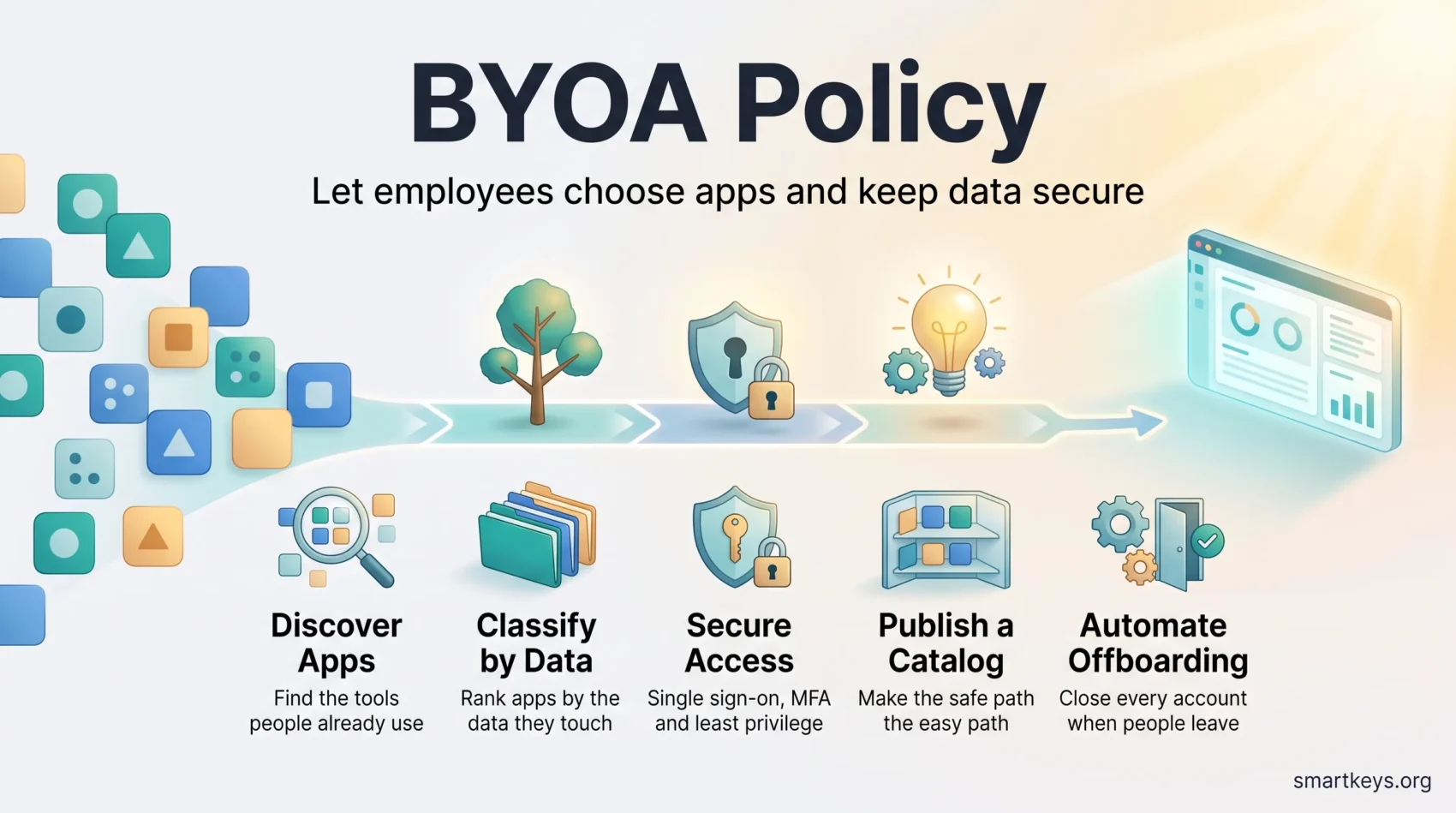
BYOA stands for “bring your own application”. It means letting employees choose the software they use for work instead of handing them a fixed list from IT. Your finance lead picks the spreadsheet add-on she trusts. A designer signs up for the whiteboard tool her last team used. Neither one files a procurement ticket.
This already happens in most companies, with or without permission. The real question is whether you can see it, and whether the data flowing through those apps is protected.
A written BYOA policy answers both questions. It sets out which apps people may choose, what data those apps may touch, and how access is granted and removed. Done well, it turns invisible tool adoption into something you can measure and secure.
The result: teams move faster, and your security group gets a clear view instead of a blind spot.
Key Takeaways
- BYOA means employees pick their own work apps. It is already happening in most organizations.
- Start with discovery. You cannot govern applications you cannot see.
- Classify apps by the data they touch, not by how popular they are.
- Single sign-on, multi-factor authentication and least-privilege access cover most of the risk.
- Automated offboarding closes the gap that leaves former employees with live accounts.
BYOA and BYOD: what the difference actually is
Both terms get used loosely, so it helps to separate them.
BYOD, or “bring your own device”, is about hardware. An employee uses a personal laptop or phone for work. The security question is the device itself: is it patched, is it encrypted, and can you remove company data from it?
BYOA is about software. An employee signs up for a cloud service that IT never approved. The security question is the account and the data: who can log in, what has the app been connected to, and what leaves your control?
Most companies now face both at once. Verizon’s 2025 Data Breach Investigations Report found that 46% of compromised systems holding corporate logins were unmanaged devices carrying both personal and business credentials. Our guide to cybersecurity practices for remote work covers the device side in more detail.
Why BYOA matters right now
Three things changed at roughly the same time.
Buying software got easy. A team lead can start a subscription with a company card in two minutes. Zylo’s 2026 SaaS Management Index found that shadow IT, meaning software running without IT’s knowledge, makes up about 34% of a typical organization’s application portfolio while accounting for only 4% of SaaS spend. A third of your apps, almost none of your budget, and very little oversight.
AI tools arrived from the bottom up. Microsoft and LinkedIn’s 2024 Work Trend Index surveyed 31,000 knowledge workers across 31 countries. It found that 75% used generative AI at work, and that 78% of those users brought their own AI tools rather than waiting for an approved one. At small and midsize companies the figure rose to 80%. If you have no policy, you still have AI in your business. You simply cannot see which documents go into it. Our generative AI usage guidelines cover that case specifically.
The cost of not knowing went up. IBM’s 2025 Cost of a Data Breach report put the global average breach at USD 4.44 million. Breaches involving shadow AI cost an extra USD 670,000 on average. The same report found that 63% of organizations had no AI governance policy at all, and that 97% of the organizations hit by an AI-related security incident lacked proper AI access controls.
None of that argues for banning employee choice. It argues for seeing it.
What you gain, and what can go wrong
The upside is real, and mostly about speed
People work faster in tools they already know. A new hire who has used the same project tracker for five years does not need three days of training on yours. That is time returned in the first week.
You also spend less on shelfware, the licensed software nobody opens. When teams choose tools instead of inheriting them, unused seats become visible quickly and the budget can move. Our guide to cloud cost optimization covers how to find that waste systematically.
There is a retention angle too: being trusted to pick your own tools signals that the company treats people as adults.
The downside is data you cannot account for
Every unapproved app is a copy of your data somewhere nobody has checked. Three failure modes come up again and again.
Credentials leak. Verizon’s 2025 report put credential abuse at 22% of the ways attackers first get in. An app outside single sign-on means another password, often a reused one.
Data spreads. A file uploaded to a personal cloud account stays there after the employee leaves. Nothing in your offboarding process touches it.
Connections multiply. Employees grant apps permission to read their mailbox or drive. Those permissions, called OAuth scopes, persist quietly until someone revokes them.
The takeaway: speed and safety are not opposites here. The apps you know about are far less dangerous than the ones you do not.
Start with visibility: find the apps people already use
You cannot write a sensible policy against a list you do not have. Begin by measuring reality.
Automated discovery beats surveys
Asking employees what they use produces an incomplete and flattering answer. Automated discovery tools read signals you already collect: sign-in logs from your identity provider, browser telemetry, expense records, and the “welcome to” emails that follow every new sign-up.
Expense data alone is unreliable. Zylo reports that 51% of expensed software is filed under a category other than software, so a finance report will miss much of it.
Classify by data, not by popularity
Once you have a list, rank each application by what it can reach:
- Data category: does the app hold customer records, financial data, source code, or nothing sensitive?
- Access model: does it support single sign-on and admin controls, or only individual passwords?
- Vendor posture: where is the data stored, is it encrypted, and does the vendor publish an audited security report?
- Connections: what has the app already been granted permission to read in your other systems?
A note-taking app used for lunch orders and a note-taking app used for board minutes carry very different risk, even though they are the same product. Classify the use, not just the tool. A broader data governance strategy gives you the categories to sort against.
Your BYOA policy: what to put in writing
Keep it short. A policy nobody reads protects nothing. Four sections are enough.
1. Scope and ownership
Say which apps and data classes the policy covers, and which sit outside it. Name the person who approves new apps and the team that keeps the catalog current. Ambiguity here is what turns a policy into a queue.
2. Data handling rules
State plainly where each class of data may live. For example: customer records stay in approved systems only, internal drafts may go into any approved app, published material has no restriction. Give retention periods and say what happens when they end.
3. Access requirements
Require single sign-on, meaning employees log in through one central company account rather than a separate password for every app. Require multi-factor authentication, a second check such as a one-time code or a security key, on anything touching sensitive data. Grant the minimum permissions a role needs, and set them to expire for contractors.
4. Review and exceptions
Set a review cadence: once a year, plus after any major change such as a merger or a new regulation. Write a fast path for low-risk requests, answered in days rather than weeks. If your exception process is slower than signing up with a credit card, people will use the credit card.
“Make the rules easy to follow, and security becomes an enabler rather than a blocker.”
If you are drafting this alongside other workplace rules, our hybrid work policy template and wearable tech policy guide cover adjacent ground.
Security by design: controls that do not slow people down
MDM or MAM: manage the device, or just the data
Mobile device management (MDM) manages the whole device. You can enforce patching, encryption and screen locks, and wipe the device entirely. It is strong, and it is intrusive on a phone the employee owns.
Mobile application management (MAM) manages only the work apps and the data inside them. Company files sit in a protected container. You can wipe that container without touching family photos.
For most BYOA and BYOD situations, MAM is the better trade. Reserve MDM for regulated workloads or for roles with unusually broad access, where the extra assurance is worth the friction.
Zero trust, in plain terms
Zero trust means the location of a request tells you nothing. Being on the office Wi-Fi does not make a login trustworthy. Every request is verified on its own merits: who is asking, from which device, in what state.
In practice that comes down to a handful of settings:
- Conditional access rules that demand a second factor when a sign-in looks unusual.
- Device posture checks, so an unpatched laptop gets limited access rather than full access.
- Segmentation, so a compromised account reaches one system rather than all of them.
- Data loss prevention (DLP), which blocks sensitive files from leaving approved locations.
Our articles on zero-trust adoption in 2026, cybersecurity mesh architecture and biometric authentication for remote work go deeper on each of these.
Compliance and legal guardrails
When company data sits on a device you do not own, consent stops being a formality.
Get written agreement, and be specific
Employees should know exactly what you can see, what you can access, and what you can delete. Vague language creates disputes later. A one-page acknowledgment, signed during onboarding, does the job.
Say plainly that a selective wipe removes company data only, and explain how personal content is protected. People accept controls they understand.
Keep the evidence
Auditors ask for proof, not intent. Retain approval records, risk assessments, access reviews and configuration baselines. Log which apps run through single sign-on. Under the GDPR and comparable US state privacy laws, you also need to know where personal data is processed, which is exactly what your app inventory tells you.
Our guides to workplace data privacy rules, evolving data privacy regulations and a practical privacy compliance framework set out the wider obligations. If monitoring is part of your setup, AI in employee monitoring covers the limits that now apply, and EU AI Act compliance explains the transparency duties that reached ordinary employers in August 2026.
Wipes, searches and disputes
Write down who authorizes a remote wipe and on what grounds. Do the same for device searches and legal discovery requests. Involve legal counsel before the first incident, not during it.
Lifecycle: joining, moving, leaving
Most BYOA failures are not clever attacks. They are accounts nobody closed.
Joining. Tie app access to the role rather than to the person. A new sales hire gets the sales bundle automatically, through single sign-on, with multi-factor authentication on from day one.
Moving. A role change should add and remove permissions in the same action. Access that only ever accumulates is how one employee ends up able to see everything.
Leaving. This is the one that matters. Connect your HR system to your identity provider so a departure triggers deprovisioning automatically. Revoke tokens, disable accounts, rotate shared credentials, transfer file ownership, and selectively wipe company data from personal devices.
Shadow apps are the hard part, because offboarding cannot revoke an account you never knew existed. That is the practical argument for discovery: it is what makes offboarding complete. Give contractor access an expiry date rather than relying on someone’s memory.
“Automated lifecycles turn offboarding from a checklist into something that simply happens.”
Enablement beats enforcement
Blocking is a weak control, because people route around it. The stronger move is to make the safe path the easy path.
Publish a catalog. List approved apps by the job they do: note-taking, diagramming, transcription, scheduling. When someone needs a tool, an answer should already exist. Our roundup of productivity apps worth using is a reasonable starting point for the common categories.
Make requests fast. Use a short form asking for the business need, the data involved and an owner. Prefill it with what discovery already knows about the app. Answer low-risk requests within days.
Train on the specific risks. Show people what an over-permissive OAuth grant looks like, and how to check what an app can read in their mailbox.
Measure the right things. Track approval turnaround time, the share of app usage covered by single sign-on, and how many new apps discovery finds each month. If discovery keeps producing surprises, your request process is too slow.
As the stack grows, the tools that connect applications to one another become part of the same governance question. Our pieces on iPaaS and business integration and low-code platforms for non-technical staff cover how those choices affect control, and SaaS consolidation explains why your vendor list keeps changing on its own. For the wider backdrop, see our overview of cloud computing trends.
Where to start this quarter
Sequence the work:
- Weeks 1 to 3: run discovery and build the inventory. No decisions yet.
- Weeks 4 to 6: classify the top 50 apps by data sensitivity and user count.
- Weeks 7 to 9: move the highest-usage apps behind single sign-on and multi-factor authentication.
- Weeks 10 to 12: publish the policy and the catalog, and open the fast-track request path.
Automate offboarding as soon as your identity provider and HR system can talk to each other. That single change closes more risk than any document.
Conclusion
BYOA is not really a decision you get to make. Employees are already choosing their own tools, and the shadow IT that results in remote teams grows quietly whether or not a policy exists.
What you do get to decide is whether you can see it. Discovery, classification, single sign-on with multi-factor authentication, and automatic offboarding cover most of the risk without slowing anyone down.
Start with the inventory. Everything else gets easier once you know what you are actually running.
Found this useful?
Make SmartKeys a preferred source on Google, and our articles will surface more often in your Top Stories, AI Overviews, and AI Mode.
Add as Preferred Source