

Remote work is no longer an experiment. About 25% of paid workdays in the US were worked from home in May 2026, according to Stanford’s Survey of Working Arrangements and Attitudes. That is roughly four times the pre-pandemic level. Every one of those days starts with a login from a kitchen table or a hotel room, and that login is where most of the security risk now sits.
Passwords are the weak point. The 2026 Verizon Data Breach Investigations Report found that stolen or abused credentials played a part in 39% of the breaches it analysed. A password can be guessed, phished or bought from a leak. A fingerprint or a face cannot be typed into a fake login page.
Biometric authentication confirms who you are using a physical trait: your fingerprint, your face, your voice or your iris. This guide explains how it works on the devices remote employees already own, where it can be fooled, and what the privacy rules in the US and the EU require in 2026.
Key Takeaways
- Remote work has settled at about a quarter of US paid workdays, so secure logins from outside the office are a permanent need.
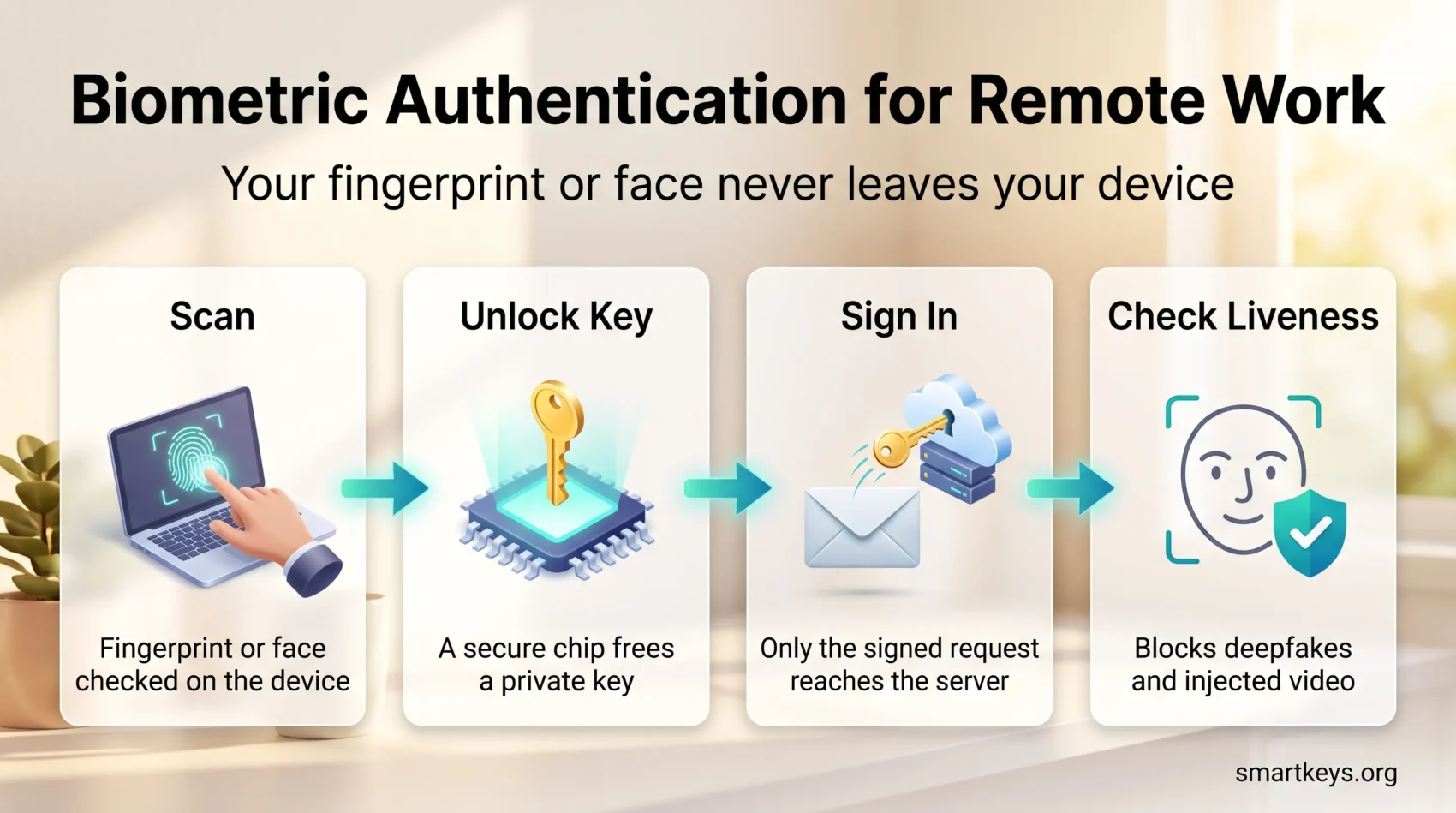
- On modern laptops and phones, the biometric stays on the device. It unlocks a cryptographic key, and only that key talks to the company system.
- Biometrics work best as one layer of multifactor authentication. NIST’s 2025 guidelines make that a requirement.
- Deepfakes and injection attacks are the main new threat. Liveness detection is the main answer.
- Biometric data is legally sensitive. Consent, retention limits and a non-biometric fallback are not optional.
Why Remote Work Changed the Login Problem
Inside an office, the building did part of the identity check: reception, a badge, a network the IT team controlled. Remote work removed that layer. The shift did not reverse; it settled. Companies now confirm identity without ever seeing the person, often on devices they did not issue.
Biometric authentication ties access to something a person is, rather than something they know. That makes a stolen password far less useful.
To delve deeper into the implications of this shift in workplace dynamics, visit this resource.
Challenges Faced by Remote Workers
Most remote security problems come back to one question: is the person logging in really the employee the account belongs to? Remote employees connect from home Wi-Fi, cafés and shared spaces, and often mix personal and work use on one device. Phishing, fake login pages and social engineering all target the moment a person types a password, because that is when a secret changes hands. Cybersecurity for remote work therefore starts with the login, not the firewall.
- Biometric checks make identity verification stronger, because a face or fingerprint cannot be phished the way a password can.
- Multifactor authentication (MFA), meaning two or more independent checks before access is granted, limits the damage when one factor is compromised.

Fixing identity removes the most common entry point. Combined with a zero trust approach, where every request is verified no matter where it comes from, it gives distributed teams a security posture that does not depend on an office.
What Is Biometric Authentication?
Biometric authentication confirms a person’s identity from a physical or behavioural trait that is hard to copy. The system captures the trait, turns it into a mathematical template and compares it with the template stored during enrolment.
The most common forms are:
- Fingerprint recognition: The most widespread form, built into most business laptops and phones. Cheap and fast, though wet fingers and cuts cause false rejections.
- Facial recognition: The most convenient option for laptops, because the camera already points at the user. Good implementations use infrared or depth sensors so a printed photo or screen does not pass. It is also the type most exposed to deepfakes.
- Voice recognition: Used mostly in call centres and phone banking. Voice cloning is now cheap and convincing, so voice alone should never protect anything valuable.
- Iris and retina recognition: Very accurate and used where the highest security is needed, but rare on everyday devices.
Each method stores a template, a set of numbers describing the trait, not a photo or raw scan. That distinction matters for privacy, as the legal section below shows. For remote teams the practical benefit is speed: 5G and home broadband rarely slow these checks down.
How Biometrics Work on a Laptop or Phone
When you unlock a work laptop with your face, your face is not sent to the company server. It never leaves the device.
Windows Hello, Apple’s Face ID and Touch ID, and Android’s biometric system all work the same way. The template lives in a protected chip on the device. When you present your face or finger, the chip compares it locally. If it matches, the chip releases a cryptographic key, and that key signs a login request. The server only ever sees the signed request, never the biometric.
This is also how passkeys work. A passkey is a password replacement built on the FIDO standard. A private key on your device proves your identity to a website or app, and the biometric is simply how you unlock that key. The FIDO Alliance reported in May 2026 that an estimated 5 billion passkeys are in use worldwide. In the same survey, 68% of organisations said they had deployed or were deploying passkeys for employee sign-ins.
A phishing site cannot steal a passkey, because the key is bound to the real domain. And a leaked database cannot expose your fingerprint, because the fingerprint was never in it.
The US National Institute of Standards and Technology (NIST) built this into its Digital Identity Guidelines (SP 800-63-4), finalised in August 2025. The guidelines state that biometrics shall only be used as part of multifactor authentication together with a physical authenticator, such as the device itself. In plain terms: the fingerprint proves you, and the device proves the fingerprint came from your hardware. Neither alone is enough.
Benefits of Biometric Authentication for Remote Work
The biggest benefit is that the most common attack stops working. In a 2023 study of Microsoft account data, researchers found that MFA reduced the risk of account compromise by 99.22% across the whole population. Biometrics are the most convenient way to supply that second factor, because they require nothing to remember or carry.
The second benefit is friction. A remote employee who logs in ten times a day saves real time when each login is a glance at the camera, and fewer workarounds such as reused passwords follow.
The third benefit shows up in remote onboarding. A new hire can prove who they are from home on day one by matching a selfie against an ID document.
Biometrics and Multifactor Authentication
Multifactor authentication combines two or more independent checks from three categories: something you know (a password or PIN), something you have (a phone or hardware key) and something you are (a biometric). A biometric on its own is one factor. A biometric that unlocks a key stored on your laptop is two.
Common factors, roughly from weakest to strongest:
- Passwords and PINs
- SMS codes (easy to intercept through SIM swapping and phishing)
- Authenticator app codes
- Smart cards
- Biometrics bound to a device
- Hardware security keys such as YubiKeys, and passkeys
The last two categories are called phishing-resistant, because a fake website cannot trick them into handing over anything useful. For a remote team, the practical setup is a passkey or device certificate on each work laptop, unlocked by fingerprint or face, with an authenticator app as backup. That is far stronger than a password plus an SMS code, and easier to use.
Streamlining Remote Onboarding
Onboarding a remote hire involves several steps to ensure new employees fit in seamlessly, and identity proofing is the first of them.
Modern identity verification services handle it in minutes. The candidate photographs an official ID with a phone, then takes a selfie. The service checks the document for tampering and matches the face to the document photo. The same process satisfies know-your-customer (KYC) rules in regulated industries.
Continuous Authentication
Continuous authentication extends the check beyond the first login. Instead of trusting a session for eight hours, the system re-verifies at sensitive moments, such as a payment approval or a login from a new country five minutes after one from home.
Behavioural signals such as typing rhythm can feed into this, but they overlap with employee monitoring, so tell people what is measured and why.
Deepfakes and Injection Attacks
The main new threat to biometrics is software, not a fake finger. In an injection attack, the attacker bypasses the camera entirely and feeds a generated face directly into the verification system, as if it came from the camera.
Gartner predicted in early 2024 that by 2026, 30% of enterprises would no longer consider identity verification and authentication solutions reliable in isolation because of AI-generated deepfakes. Human judgement does not fill the gap. In a 2025 iProov study of 2,000 consumers, only 0.1% correctly identified every real and fake sample they were shown.
The defence is presentation attack detection (PAD), often called liveness detection. It checks that a real, present human is in front of a real camera, using depth, texture or a short challenge such as turning the head. NIST SP 800-63-4 requires PAD for facial recognition and recommends it for fingerprint and iris systems. When evaluating a vendor, ask how it detects injection attacks, not just printed photos.
This is also why device-bound biometrics hold up better than cloud-based face matching: a deepfake cannot be injected into the secure chip on a laptop.
Privacy and the Law in 2026
Biometric data is treated as sensitive almost everywhere, because a person cannot change their face if a template leaks.
In the EU, biometric data used to identify a person is a special category under Article 9 of the GDPR. Processing it needs a specific legal basis, and for employees that usually means explicit consent or a provision in national labour law. The EU AI Act adds two rules that matter at work. Since February 2025 it has banned AI systems that infer emotions in the workplace, a topic covered in our guide to emotion recognition AI at work. Biometric identification systems are also classed as high-risk under the Act. After the Digital Omnibus published in July 2026, the obligations for those systems apply from 2 December 2027 rather than August 2026.
In the US there is no federal biometric law. Illinois’s Biometric Information Privacy Act (BIPA) is the strictest state law and lets individuals sue. An August 2024 amendment limited damages to one recovery per person rather than one per scan, and confirmed that electronic signatures count as written consent. Texas and Washington have their own biometric statutes, and a growing number of state privacy laws, including Colorado’s, require opt-in consent for biometric data. Our overview of data privacy at work covers the wider employee data rules.
Practical steps that satisfy most of these rules:
- Get explicit, written (or e-signed) consent before enrolling anyone, and explain what is collected and why.
- Prefer device-bound biometrics, so the company never stores templates centrally.
- Where templates must be stored, encrypt them and set a retention limit tied to employment.
- Always offer a non-biometric alternative. NIST requires one, and it covers employees who cannot or will not enrol.
Handled this way, biometrics tend to increase trust rather than erode it. That transparency is central to building digital trust in remote teams, and it keeps pace with the data privacy trends regulators are pushing.
How to Implement Biometric Authentication
Most companies do not need to buy a biometric system. They need to switch on the one their devices already have and connect it to their identity provider.
Choosing the Right Biometric System
When selecting or configuring a system, consider these factors:
- Integration: It should plug into your existing identity provider (Microsoft Entra, Okta, Google Workspace and similar) rather than creating a separate login island.
- Device coverage: Check which devices in your fleet have secure biometric hardware, and plan a fallback for the rest.
- Liveness and injection detection: For any cloud-based face matching, ask the vendor how it detects deepfakes and injected video.
- Privacy design: Prefer solutions that keep templates on the device, and confirm what is stored, where, and for how long.
- Policy fit: Write the biometric option into your hybrid work policy, alongside rules on employee-chosen apps and unapproved tools.
A short pilot with one team surfaces the practical issues, such as a laptop without a working sensor or an employee who prefers a hardware key. If your stack spans many cloud services, the cybersecurity mesh approach explains how one identity layer can cover them all.
Conclusion
Remote work made the login the front door of the company, and passwords are a poor lock for it. Biometric authentication, done the modern way, fixes that. The fingerprint or face stays on the employee’s device, unlocks a key, and that key proves identity without anything an attacker can phish or leak.
The technology is already in the laptops and phones your team uses. The work is in configuration, policy and consent: pair biometrics with a physical device, insist on liveness detection for remote face checks, and be open about what is collected.
The same pattern is spreading beyond logins: decentralized identity wallets and biometric payment systems both rely on it. For another angle on securing distributed work, see our guide to blockchain and remote work security.
Found this useful?
Make SmartKeys a preferred source on Google, and our articles will surface more often in your Top Stories, AI Overviews, and AI Mode.
Add as Preferred Source




