

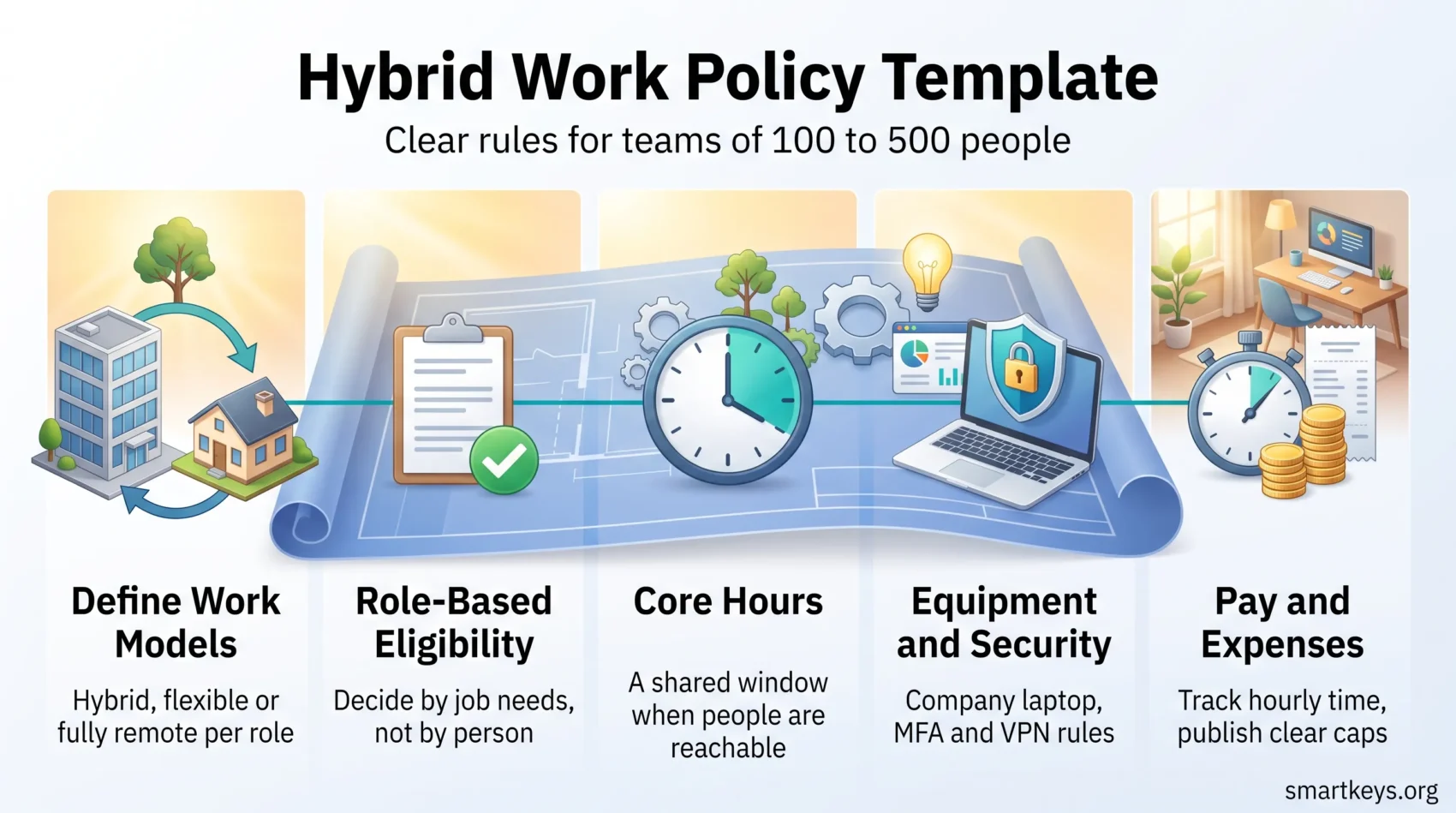
This guide gives you a hybrid work policy template you can copy, adapt and publish. Hybrid work simply means splitting the working week between an employer’s office and another location, usually home. For how teams make both halves of that week productive, see our broader guide to hybrid work. A policy turns that arrangement into written rules: who qualifies, how many days on site, when people have to be reachable, who pays for the internet connection, and what happens when someone ignores the rules.
It is written for companies of roughly 100 to 500 employees. That size is the awkward middle: too big to settle questions in a corridor conversation, too small for a dedicated policy team. The sections below give you language to adapt plus the legal points most drafts miss. Every figure is sourced, and where a rule depends on your state or country, the text says so.
Key Takeaways
- You get a copy-ready structure you can tailor for 100 to 500 employees.
- The guide covers eligibility, core hours, equipment, security, safety and pay.
- OSHA does not inspect home offices, but home injuries can still be recordable.
- Time tracking for hourly staff and expense reimbursement are the two areas where a sloppy policy creates legal risk.
- Clear roles, review dates and consequences keep the policy fair and usable.
Why Hybrid Now: Set Goals Before You Write Rules
A policy that starts with rules produces arguments. A policy that starts with goals produces decisions.
Hybrid is where most office work has landed. Gallup’s tracking of US employees in remote-capable jobs, updated in May 2026, puts 52% on a hybrid schedule, 26% fully remote and 22% fully on site. Preference runs the same way: about six in ten of those employees say hybrid is what they want, roughly a third prefer fully remote, and fewer than one in ten want to be on site every day.
Hybrid employees give concrete reasons: in the same data, 76% point to better work-life balance and 52% say they get more done. Those are perceptions rather than measured output, so read them as a retention signal, not proof of productivity. The practical consequence is that a policy pushing hard against that preference needs a reason people can hear. If you want three days on site, say what those days are for. “Design reviews and new-hire onboarding happen in person” is a reason. “Three days, because that is the policy” is not, and it is the single most common cause of a return-to-office mandate backfiring.
- Name the outcome: retention, faster onboarding, lower real estate cost. Pick two, not six.
- Say what office days are for: tie them to activities, not to a headcount target.
- Measure results, not presence: badge swipes tell you who came in, not who contributed.
- Build in a review date: a first policy is a draft with a publication date.
Hybrid, Flexible and Fully Remote: Name the Models Before You Draft
Most hybrid policies fail on vocabulary before they fail on substance. Three different arrangements get called “flexible” and then people argue about which rules apply.
Hybrid is about place
Hybrid changes where someone works, not when. Employees split the week between office and home, commonly one to four days remote. The working hours stay the same.
Your policy should list which office days are fixed for the team, which are chosen by the individual, and which roles must be on site because the equipment or the files are there.
Flexible working is about place and time
Flexible working changes the schedule as well: shifted start times for school runs, compressed weeks (the same hours in four longer days), or staggered shifts to cover a longer support window.
This is a bigger commitment than hybrid and needs its own approval route. Our guide to flexible work schedules covers what the evidence supports about each variant.
Fully remote is a different contract
Fully remote means no regular office attendance at all. Once someone works permanently from another state or country, payroll, tax registration and employment law follow their location, not your headquarters. Route those requests through legal, not through a line manager. If you employ people across borders, a virtual office setup can cover the registered-address question, but it does not solve the tax one.
- Set a default per role: every job description names one model.
- Document exceptions: who requests, who approves, how long it lasts.
- Use one vocabulary: pick the three terms above and never mix them.
The Hybrid Work Policy Template: What Goes In It
Keep the core document short enough that a manager can find an answer in under a minute. Everything else belongs in an appendix.
Copy-ready structure
A workable policy has nine sections: purpose and scope; definitions; eligibility and approval; schedules, core hours and availability; communication norms; equipment, software and support; workspace safety; security and confidentiality; and pay, time tracking and expenses. Close with performance expectations, consequences and the review date.
How to tailor it for 100 to 500 people
At this size the bottleneck is manager time. Make eligibility role-based, so most cases are settled by the job description rather than a conversation. Use one digital request form instead of email threads. Give managers a one-page decision guide so two of them reach the same answer on the same facts.
Core policy or addendum?
Put anything that applies company-wide in the core document. Put team-specific details in an addendum: the support team’s on-call rota, the finance team’s month-end office days, location-specific pay rules. Core edits need executive sign-off; addenda do not. That split is what stops the document being reopened every quarter.
- Core: purpose, eligibility, expectations, equipment, security, consequences.
- Addendum: team rotas, local rules, pilot arrangements, temporary exceptions.
- Neither: tool instructions. Those belong in your intranet, not in a policy.
Draft the Purpose and Scope
Open with why the document exists, in language an employee would use.
Two or three sentences are enough: what the company is trying to achieve, what it expects in return, and what it will not compromise on (usually data security and customer commitments).
Then define scope. Which employee groups are covered, who is excluded and why. Contractors and interns usually sit outside the policy because their own agreements set their terms. Note whether the arrangement is permanent or under review, and what would trigger a change.
Make the governance obvious. Name the owner (normally HR, with IT and legal as reviewers), the review cadence, and where the current version lives. A policy nobody can find is a policy nobody follows.
- Coverage: which roles and contract types, and the exceptions.
- Interactions: how it relates to travel, expense and IT security policies.
- Governance: owner, review date, version location, works council or union consultation where required.
Define Eligibility Without Bias or Confusion
Start from the job, not the person. Ask what the role requires: physical equipment, access to secure files, in-person customer contact, supervision of others on site. Those requirements decide eligibility. Personal circumstances do not.
This matters legally as well as culturally. Where eligibility rests on manager discretion, patterns emerge that look like discrimination even when nobody intended it. A documented, role-based rule is far easier to defend.
- Eligible: roles whose output is digital and whose tools run on a laptop.
- Not eligible: lab work, warehouse and workshop roles, reception, on-site client service, anything requiring hardware that cannot leave the building.
- Conditional: roles that are mostly digital but need occasional physical access. Name the condition rather than the person.
Where you use individual criteria, keep them objective and written down: completed probation, no active performance plan, a workspace that meets the safety checklist. Say explicitly that requests connected to a disability go through your accommodation process instead, where a different legal standard applies.
Approval workflow: a written request, a manager review against the role criteria, an HR check on location and compliance, then a signed agreement recording schedule, duties and the next review date.
“Decide on role requirements first, then document the decision so a second reader could reach the same conclusion.”
- Employee submits the request form.
- Manager checks it against the role criteria and records the reasoning.
- HR confirms location, tax and compliance, then countersigns.
Add guardrails: how far from the office someone may live if they are expected on site at short notice, the time zone overlap required, and what triggers a review (a role change, a move, a sustained drop in performance).
Set Schedules, Core Hours and Availability
Distributed teams do not need everyone online at the same time. They need to know when they can expect an answer.
Core hours: name a window when most people are reachable, for example 10:00 to 15:00 in the company’s main time zone. Outside that window, work is asynchronous by default. Ask everyone to publish their working hours and time zone in their calendar and chat profile, so nobody has to guess.
Response time standards
Set expectations per channel rather than a blanket rule, and keep them realistic:
- Chat: same working day for normal messages; within two hours during core hours if flagged urgent.
- Email: one working day.
- Ticket system: whatever your service agreement already says. Do not invent a second standard.
A response time standard is not an always-on rule. State plainly that nobody is expected to answer outside their working hours, and ask managers to use scheduled sending rather than messaging late.
Meetings versus written updates
Status belongs in writing. Meetings are for decisions, disagreement and anything where tone matters. Setting that expectation once, in the policy, saves every team from relitigating it. Teams that work this way lean on asynchronous communication tools and keep live calls short.
Communication, Meetings and Collaboration Norms
Pick a default channel for each kind of message, then write it down. Most friction in hybrid teams comes from people using different defaults, not from the tools themselves.
Chat handles quick questions and small approvals. Email carries formal notices and anything that needs a record outside a workspace. Video is for decisions, brainstorming and difficult conversations. Shared documents hold status, specifications and anything a future colleague will need to read.
Cameras and inclusive practice
Avoid a blanket camera-on rule. Require video where faces genuinely help: interviews, client presentations, one-to-ones, the first meeting of a new group. Everywhere else, make it optional. People have bandwidth limits, shared rooms and caregiving responsibilities, and a mandate turns those into a visible disadvantage.
Accessibility is cheaper than it looks. Turn on live captions, circulate the agenda beforehand, and treat written contributions in the chat as equal to spoken ones. That does more for participation than any camera rule.
Keeping connection and development visible
The risk in hybrid teams is not that work stops. It is that informal learning and visibility fade for whoever is not in the room. Two defences work well: a recurring one-to-one that never gets cancelled, and a rule that any decision made in the office is written up where remote colleagues can see it. Optional social time helps too, but only if it is genuinely optional and inside working hours.
“Write status down. Meet to decide. Summarise every decision in the shared channel afterwards.”
Tools, Equipment and Technical Support
Say exactly what the company provides, what employees may use instead, and how to get help. Ambiguity here generates more support tickets than any other section.
Company equipment versus personal devices
The standard kit for a hybrid role is usually a laptop, a docking station, an external monitor, a headset and a keyboard and mouse. Decide whether that set is issued once for home or duplicated at a shared desk, and say so.
BYOD means bring your own device: letting employees use a personal laptop or phone for work. If you allow it, set the conditions. A typical minimum is a supported operating system with current updates, disk encryption, a screen lock, company-approved endpoint protection (security software that detects and blocks threats on the device itself), and enrolment in the company’s device management system so IT can wipe company data remotely. A device that cannot meet those conditions does not get access.
Software licences are assigned by role. Say where employees request an application outside their standard set, and keep that route short. Long approval routes are the main reason people install unapproved tools.
Stipends and what they cover
State whether you pay a monthly allowance for internet and phone, a one-off setup budget, or reimburse actual costs against receipts. Give the amounts and the caps in the policy itself. A stipend nobody can find the value of is worse than no stipend.
Support hours and escalation
Publish help desk hours, the ticket route for normal requests, and a separate route for anything that stops work completely. Give indicative resolution times rather than promises you cannot keep, and name an out-of-hours contact for a suspected security incident or a lost device.
- Ownership: company devices remain company property and come back at the end of employment.
- Loss or theft: report immediately through the incident route, not by email to a manager.
- Accessibility: equipment needed as a workplace adjustment goes through HR, not the standard request form.
Workspace Safety and Ergonomics at Home
The legal position surprises most employers, so get it right in the policy.
Under OSHA’s directive on home-based worksites (CPL 02-00-125), the agency does not inspect employees’ home offices, does not hold employers liable for home office conditions, and does not expect employers to inspect them. That is the clear part.
The part people miss: work-related injuries that happen at home are still recordable under the injury and illness recordkeeping rules in 29 CFR Part 1904 if they meet the usual criteria. So you cannot inspect, but you may still have to record. Two things follow. Give people the information to set up safely, and give them an obvious way to report an injury that happens while they are working.
A short checklist does the first job: chair height and back support, the top of the screen at roughly eye level, feet flat or on a rest, the keyboard close enough that elbows stay near the body, and enough light that the screen is not the brightest thing in the room. Add basic electrical safety: no daisy-chained extension leads, no cables across walkways. Our guide to workplace ergonomics goes into the detail, and the home office setup guide covers the rest of the room.
“You are not expected to inspect anyone’s home. You are expected to tell people how to work safely and to make reporting an injury straightforward.”
Outside the United States the position is often stricter. Several European jurisdictions place a duty of care on the employer that extends to the home workstation, sometimes with a self-assessment the employee must complete. If you employ people abroad, check locally rather than applying the US rule everywhere.
Security, Confidentiality and Data Protection
Hybrid work moves company data onto home networks and into public spaces. The controls that matter are unglamorous and few.
Passwords, MFA and VPN
Require a unique password per account, held in the company password manager, and multi-factor authentication (MFA), which asks for a second proof of identity such as a code or a hardware key on top of the password. Phishing-resistant methods such as passkeys or security keys are stronger than codes sent by text message.
A VPN, or virtual private network, encrypts the connection between a device and company systems. Require it for anything not reachable through a browser with single sign-on. Be specific about which systems need it, because a rule that says “always use the VPN” gets ignored the first time it slows something down. Broader context sits in our cybersecurity trends overview.
Public networks, screens and printing
- No confidential work on an open public network without the VPN.
- Automatic screen lock after a short idle period, and a privacy filter for anyone who regularly works in cafés, trains or shared spaces.
- Keep printing to a minimum; if a document must be printed at home, say how it is stored and how it is destroyed.
- Take client calls with a headset, away from other people, and check who is in earshot before naming names.
Monitoring: say what you do
If you monitor devices, email or internet use, the policy has to say so. New York requires employers to give written notice of electronic monitoring to employees on hiring, obtain acknowledgment and post a notice; Connecticut and Delaware have their own notice requirements. Beyond the legal minimum, vague monitoring is corrosive: people assume the worst. Name what is collected, why, who can see it and how long it is kept. Our look at AI in employee monitoring covers what these tools now do, and the data privacy rules that apply to employee data.
Travel, On-Site Events and In-Person Time
Treat in-person time as expensive, because it is. Getting a distributed team into one room costs travel, hotels and a day of nobody doing their normal job. Spend it on what genuinely needs a room: planning a quarter, onboarding a group of new starters, resolving a disagreement that email has made worse.
Say how much notice you will give for a mandatory on-site day. Two weeks is workable for people with caring responsibilities; two days is not. Name who decides, and what counts as a valid reason to miss one.
Travel and expenses: point to your existing travel policy rather than repeating it. Add the hybrid-specific questions it probably does not answer: whether the commute to a mandatory on-site day is reimbursed for someone hired as remote, and how travel time is treated for hourly employees.
- Plan regional gatherings rather than one central event where that cuts travel.
- If any participant is remote, run the meeting as if everyone is: one person per screen, or a room camera plus a shared document.
- Collect feedback afterwards and drop the formats that do not earn their cost.
Compensation, Time Tracking and Overtime
This is where a loose policy turns into a wage claim. The rules differ for salaried and hourly staff, so write the section twice if you have to.
Nonexempt employees are those covered by the overtime provisions of the Fair Labor Standards Act (FLSA), the US federal law on minimum wage and overtime. In practice that means most hourly staff. They must be paid for all hours actually worked, including hours the employer did not schedule.
The Department of Labor’s Field Assistance Bulletin 2020-5 sets out what that means for remote work. An employer must pay for unscheduled hours it knew about or had reason to believe were worked, and must exercise “reasonable diligence” to find out. The practical answer the bulletin gives is a reporting procedure: give employees a straightforward way to record unscheduled time, tell them to use it, and pay what gets reported. An employer that provides that route and is not otherwise aware of extra hours generally meets the standard.
So the policy needs three things: daily time entry in one system of record, written pre-approval for overtime, and an explicit statement that an employee who works unapproved extra hours still gets paid for them and may face a performance conversation instead. Those are not in conflict. Refusing to pay reported hours is what creates liability.
Location and pay
Decide whether base pay follows location, and say so before anyone asks to move. If it does, publish the mechanism: which pay zones exist, what triggers a review, how much notice an employee gets. If it does not, say that too. Improvising per request is how two people doing the same job end up on different terms for no defensible reason.
A move across state lines also changes payroll tax registration, unemployment insurance and sometimes which employment law applies. Route relocation requests through HR and finance before a manager agrees to anything. Guidance on fair review practice sits in our piece on continuous performance management.
“Tie pay, promotion and review outcomes to results, not to how often somebody was seen in the building.”
Expense Management: What You Reimburse and How
Start with the legal floor, then decide what you want to add.
There is no general federal requirement in the US to reimburse home office costs, but several states impose one. California’s Labor Code section 2802 requires employers to indemnify employees for all necessary expenditures incurred in carrying out their duties. Illinois has a comparable duty under the Wage Payment and Collection Act. Montana, North Dakota, South Dakota and the District of Columbia have their own reimbursement provisions. If you employ people in any of those places, “we do not reimburse internet” is not a policy choice you can safely make.
Above that floor, pick one of two models and stick to it. A fixed monthly allowance is simple to administer and predictable for employees, but may not cover an unusually expensive case. Reimbursement against receipts is precise and more work for everyone. Mixing the two invites people to claim both.
- Typically covered: laptop and peripherals, a desk chair or ergonomic equipment, a share of internet cost, approved software.
- Usually not covered: furniture beyond the agreed budget, home improvements, personal subscriptions, and coworking day passes unless pre-approved.
- Worth checking with payroll: whether an allowance is taxable in your jurisdiction, since the answer changes the net value to the employee.
Set a submission deadline (30 or 60 days is common), name who approves, give an expected payment date, and publish the caps. Most expense disputes are really disputes about not knowing the limit in advance. For what has become normal elsewhere, see our summary of remote work trends.
Performance, Accountability and Consequences
Separate two things that get confused: someone not doing the job, and someone not following the policy. They need different responses.
Performance is managed as it always was: agreed outcomes, regular one-to-ones, written feedback, and a documented improvement plan if nothing changes. Location is not evidence. If a manager’s only concern is that they cannot see someone, that is a management problem, and the evidence on presence mandates is worth reading before acting on it.
Policy compliance is narrower and more concrete. Someone repeatedly misses agreed office days, or works from an unapproved country, or refuses to use MFA. Handle it as a compliance matter with a defined escalation.
- An informal conversation, with a short written note of what was agreed.
- A formal written warning naming the specific requirement and a date by which it must be met.
- Withdrawal of the hybrid arrangement, or standard disciplinary steps for serious or repeated breaches.
“Apply the same standard to everyone, and record the reasoning each time, so the pattern holds up when somebody questions it.”
Two safeguards keep this fair. Require employees to acknowledge the policy and any material change, so nobody can claim they were unaware. And if several people in one team hit the same friction, treat the rule as wrong rather than the people. Friction nobody fixes is a reliable path to burnout.
Examples Worth Reading Before You Write
Published policies are more useful than templates, because they show the compromises a real organisation made.
Fordham University publishes its hybrid and remote work policy for administrators openly, with a separate employee guide and supervisor guide, plus a distinct version negotiated for a unionised group. Three things in that structure are worth copying. Splitting guidance by audience means neither side wades through rules meant for the other. A separate union version shows how collective agreements sit alongside a general policy. And a published policy is one candidates can read before they apply, which removes a category of week-one surprises.
When you read a published policy, look for the parts that are specific: the number of days, the named approver, the deadline, the amount. Those took an argument to settle, and they are exactly what most templates leave blank. For the wider shift these documents respond to, see our overview of work culture in 2026 and the HR trends guide.
Rollout, Adoption and Review
Pilot it before you publish it. Pick two or three teams that differ from each other, run the policy for a quarter, and collect what broke. A pilot costs a quarter; a bad company-wide rollout costs a year of goodwill.
Train managers first
Managers apply the policy, and they are usually the least prepared. Give them the decision guide, two or three worked examples of borderline eligibility cases, and a short script for the conversation where they have to say no. Bringing a new hire into a hybrid team has its own pitfalls, set out in the remote onboarding guide.
Ask people, then show them the answers
A short pulse survey every quarter is enough: is the policy clear, does your equipment work, do you know who decides. Publish what you heard and what you changed. Surveys that disappear teach people not to answer the next one.
Review on a schedule
Put the next review date in the document itself. Quarterly for the first year, then annually once it has settled. Keep a short change log at the end so people can see what moved and when. Where the tooling is not keeping up with the policy, our roundup of hybrid workforce tools is a reasonable starting point.
Conclusion
A hybrid work policy is not a statement of values. It is a set of answers to questions people would otherwise have to ask a manager one at a time: am I eligible, when do I need to be reachable, who pays for my internet, what happens if I move.
Write those answers down, make them specific, check the two areas that carry legal risk (hours for nonexempt staff, and expense reimbursement in states that require it), and put a review date on it. Then let it survive contact with a real quarter before you rewrite it.
The policies that work are rarely the most generous or the most restrictive. They are the ones where people find the answer without asking, and where the answer is the same whoever asks. For the wider debate, our guide to the future of work-life balance and the four-day workweek evidence are both worth a read.
Found this useful?
Make SmartKeys a preferred source on Google, and our articles will surface more often in your Top Stories, AI Overviews, and AI Mode.
Add as Preferred Source




