

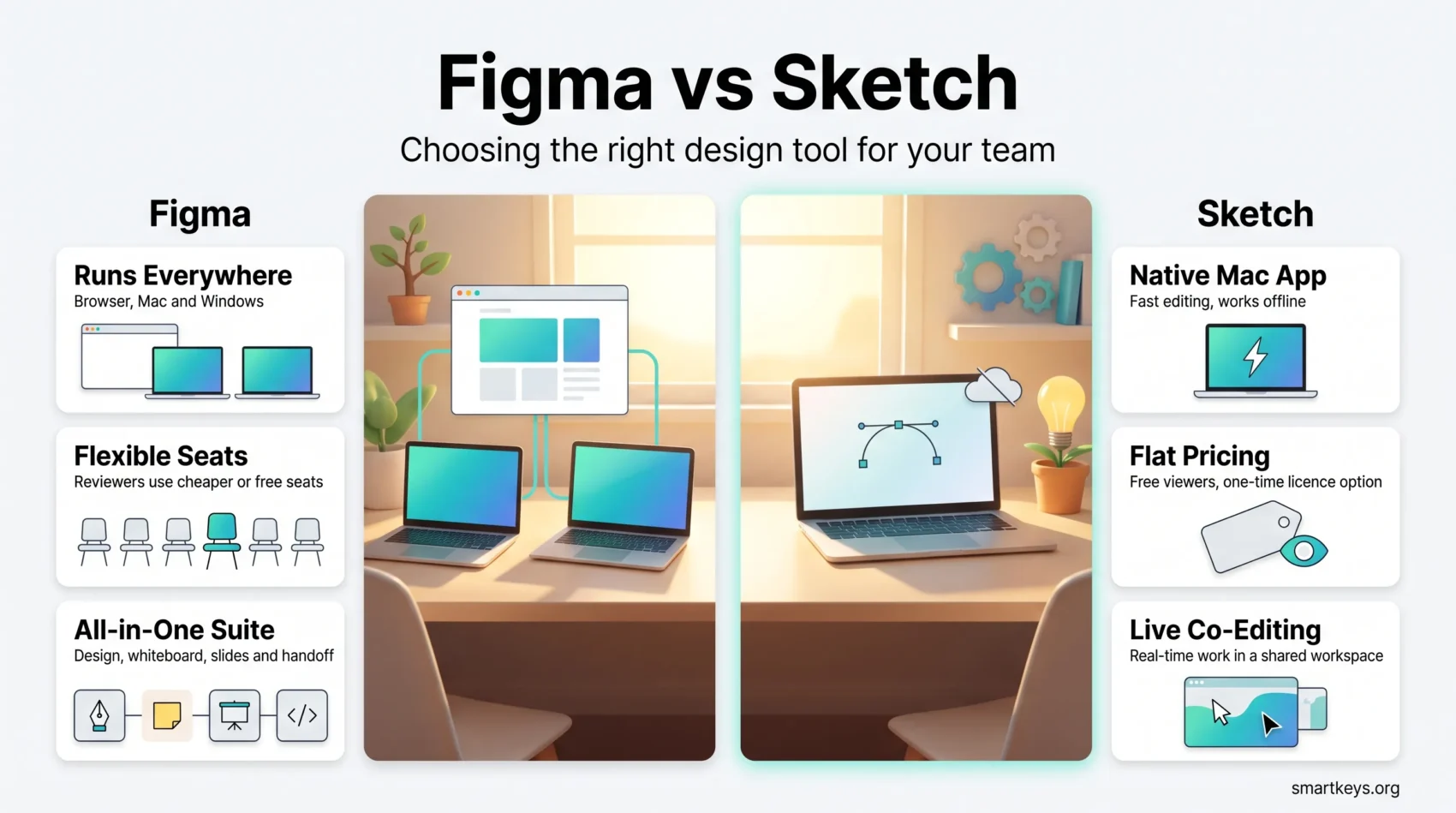
Choosing between Figma vs Sketch used to be a simple question: did you want browser-based teamwork, or a fast native Mac app? That framing no longer holds. Sketch added real-time co-editing and moved to a subscription. Figma grew from a design editor into a suite that also covers whiteboards, slides, developer handoff and AI-assisted builds.
Both are vector editors for user interface work. You draw app or website screens, save reusable pieces, and pass the result to developers. The 2026 decision comes down to three practical questions: which computers your team uses, how much you want to pay per person, and how much of your workflow you want inside one vendor.
Key Takeaways
- Sketch edits only on macOS. Figma runs in any modern browser, plus desktop apps for Mac and Windows.
- Sketch does support real-time collaboration today. The old claim that it cannot co-edit is out of date.
- Sketch publishes fixed subscription prices per editor and still sells a one-time Mac-only licence.
- Figma charges by seat type, so people who only comment cost far less than people who design.
- Figma is now a suite: design, whiteboard, slides, illustration, developer handoff and site publishing.
- Migrating Sketch files into Figma keeps layers and symbols, but styles and plugin work need rechecking.
What You Are Actually Choosing Between
A few terms come up constantly in this comparison, so it helps to fix them first.
A component (Sketch calls it a symbol) is a design element you build once, such as a button, and reuse everywhere. Change the original and every copy updates. A design system is the shared library of those components, colours and text styles that keeps a product looking consistent. Handoff is the moment a developer opens the design to read spacing, colours and code snippets. A prototype is a clickable version of static screens, used to test a flow before anyone writes code, which is the cheapest point in any design process to find out an idea does not work.
Both tools do all four. Where they differ is everything around them.
Figma Is a Suite, Not Just an Editor
Figma Design is still the core product, but Figma now bundles several tools under one account: FigJam for whiteboarding, Figma Slides for presentations, Dev Mode for developer inspection, Figma Draw for illustration, Figma Make for generating interfaces from a prompt, and Figma Sites for publishing a design as a live page. That last one overlaps with dedicated website builders such as Bubble and Webflow, though it is aimed at simpler pages.
That breadth cuts down on tool sprawl. A team that would otherwise pay for a separate whiteboard such as Miro or Lucidspark may get enough from FigJam. It also raises the obvious risk: more of your work sits with one vendor. The prompt-driven parts follow the same pattern as AI features across the wider software market: useful for a first draft, rarely finished work.
Figma listed on the New York Stock Exchange under the ticker FIG on 31 July 2025, pricing its shares at $33. If vendor stability is part of your decision, a public company with published financials is easier to assess than a private one.
Sketch Is a Focused Mac Editor With a Shared Workspace
Sketch takes the opposite approach. The editor is a native macOS app and needs macOS Sequoia (15.0) or newer. Around it sits a browser-based Workspace where teammates open files, leave threaded comments, inspect measurements and download assets, all without a Mac.
So the split is: designing happens on a Mac, everything else happens in a browser. For a design team that already runs on Apple hardware and only needs reviewers elsewhere, that arrangement works cleanly.
Platform Support Is the First Hard Filter
This is the decision that overrides all others. If a single person who needs to edit designs uses Windows or Linux, Sketch is out. There is no workaround, no web editor and no Windows build.
Figma has no such limit. It runs in the browser and offers desktop apps for both macOS and Windows, so a designer on a Windows laptop and a designer on a MacBook open the same file the same way. For teams spread across countries and contractors who bring their own machines, that alone often settles the question.
Reviewers are the softer case. Sketch’s Workspace lets anyone view and comment in a browser, so a Windows-based product manager is not locked out of feedback. They simply cannot move a rectangle.
Collaboration: What Actually Changed
For years the standard line was that Sketch could not do live collaboration. That is no longer accurate, and it is the single most outdated claim in most Figma vs Sketch comparisons.
Sketch now supports co-editing in real time through a shared Workspace, with shared libraries, drafts and version history. Several designers can work in the same document and see each other’s changes.
Figma still has an edge in reach rather than mechanics. Because everyone works in a browser, the person joining a review session does not need the right operating system or a licence to be in the room. Comments, prototypes and developer inspection all live at the same URL you already shared.
In practice, the difference shows up in how teams review work. Figma suits live sessions where a group looks at one file together, usually alongside a call in Zoom or Microsoft Teams. Both tools handle written, asynchronous feedback well, which is often the better habit anyway: comments left on a specific frame beat a video call that nobody writes down. If your review process runs through Slack or another chat tool, check that the previews and notifications work the way your team expects before you commit.
Pricing in 2026
The two vendors price very differently, and the cheaper option depends almost entirely on how many people on your team actually design.
What Sketch Charges
Sketch publishes its rates openly. Billed yearly, Standard costs $12 per editor per month, Professional costs $24 and adds single sign-on, project archiving and permission groups, and Enterprise costs $44 and adds SCIM provisioning, bring-your-own-key encryption and dedicated support. Viewers are free on every plan, and there is a 30-day free trial with no card required.
Sketch also kept something almost nobody else offers: a one-time Mac-only licence at $120 per seat, including one year of updates. That licence covers the native app for design, prototyping and illustration, and it works offline. It does not include collaboration, online sharing, iOS previews or the free trial. For a solo designer who never shares a working file, it is a genuinely different deal from a subscription.
What Figma Charges
Figma moved away from a single editor price to seat types, and this is the part people get wrong when budgeting.
There are four. A Full seat gives complete access to Figma Design, Dev Mode, Figma Make, Figma Draw, Figma Slides and FigJam. A Dev seat covers Dev Mode, Slides and FigJam, plus viewing and commenting in design files, which suits engineers who read designs but never draw them. A Collab seat covers Slides and FigJam with view and comment access to design files, aimed at product managers and marketers. A View seat is free and allows viewing and commenting only.
The free Starter plan lets you keep unlimited files in your personal drafts and co-edit on up to three files, with a limit of three pages per file. That is enough to evaluate the tool, and enough for a very small side project, but not for a product team.
Figma has changed its per-seat rates more than once since introducing this model, so check the current numbers on Figma’s own pricing page before you build a budget around them.
Which Works Out Cheaper
Run the count for your own team rather than trusting a headline price.
If nearly everyone who touches the file is a designer, Sketch’s flat per-editor rate is simple and predictable. If you have three designers and fifteen people who only comment, review or inspect, Figma’s tiered seats usually cost less, because those fifteen sit on free or cheap seats.
One more habit worth keeping: recheck both bills once a year. Design tools follow the same subscription pricing patterns as the rest of software, and vendor acquisitions regularly reshuffle plans after a deal closes.
Figma in Practice
Two features explain why Figma spread through product teams so quickly.
The first is auto layout, a rule you attach to a frame so its contents resize and reflow automatically. Add a longer label to a button and the button grows around it, instead of you nudging every element by hand. For anything that has to work on both a phone and a desktop screen, that saves real hours.
The second is Dev Mode, a separate view built for engineers. It shows measurements, colour values, exportable assets and generated code snippets, without the developer needing to understand the design canvas. That removes the old ritual of a designer exporting a spec document that is out of date the next morning.
Figma also keeps design, prototyping and comments in one file rather than three tools. If you want something faster and simpler for non-designers making marketing graphics, Canva is a better fit than either tool here, and teams already invested in Adobe Creative Cloud should weigh what they already pay for.
Sketch in Practice
Sketch’s appeal is the opposite: it does one thing and does it natively.
Because it is a real Mac application, it uses the machine’s own graphics stack rather than relying on the cloud-native architecture Figma is built on. On large files with hundreds of layers, that usually feels faster and steadier than a tab. It also means you can keep designing on a plane or a bad hotel connection, since the editor does not need the network to run.
The plugin ecosystem is the other draw. Plugins let you automate repetitive steps, pull in real content instead of placeholder text, or generate assets in bulk. Sketch has had this ecosystem far longer than Figma, and long-standing Mac studios often have plugin-based workflows they would rather not rebuild.
The honest limit is reach. Everything above only helps people on a Mac, and only helps them if the rest of the organisation is happy reviewing in a browser.

Community and Learning Resources
Both tools have real communities, but they are shaped differently.
Figma’s community is larger and more public. You can browse and duplicate published files, use free UI kits and templates, install plugins from an in-app browser, and follow official tutorials. Because so many teams publish their design systems openly, learning by taking someone else’s file apart is realistic.
Sketch’s resources are older and narrower. There is thorough documentation, a mature plugin directory and a long tail of guides written by studios that have used the app since the 2010s. If you hit an unusual problem, an answer probably exists. If you are hiring, though, the pool of designers who already know Figma is noticeably deeper.
Migrating From Sketch to Figma
Figma imports Sketch files directly, and the structural mapping is good. Symbols become components, artboards become frames, and layers keep their names and hierarchy.
Expect friction in three places. Shared styles for colour, text, grids and effects often need to be rebuilt or reconnected, because the two tools organise them differently. Anything produced by a Sketch plugin does not carry over, since the plugin itself does not exist on the other side. And complex nested symbols with many overrides can arrive intact but behave differently once you start editing them.
The pragmatic approach is to migrate the design system first, check it carefully, and only then move project files. Trying to move everything in one weekend is how teams end up with two half-broken libraries.
Choosing the Right Tool for Your Team
Work through these in order.
Hardware. Any editor on Windows or Linux means Figma. This filter decides most cases before you compare features.
Who needs to be in the file. Count the people who design versus the people who only review. A large second group favours Figma’s seat model.
Offline work. If designers regularly work without reliable internet, Sketch’s native app is the stronger option.
Scope. If you also want whiteboards, slide decks and site publishing from the same vendor, Figma covers more ground. If you already run separate diagramming tools, a shared file and document platform and a project management tool you like, that breadth matters less.
Existing investment. A studio with years of Sketch libraries and plugin workflows should price the migration honestly, including the weeks of lost momentum, before switching on principle.
Verdict
For most teams starting fresh in 2026, Figma is the default answer. It removes the platform question entirely, its seat pricing scales sensibly when non-designers need access, and it now covers work that used to require two or three separate subscriptions.
Sketch is not a legacy relic, and treating it as one is a mistake. It is a fast native editor with live collaboration, transparent pricing, free viewers and a one-time licence option that no major competitor offers. For an all-Mac team, for a solo designer who values owning the app, or for anyone who regularly works offline, it remains a defensible choice.
Both offer free access to test with. Rebuild one real screen from your own product in each, with your actual reviewers invited, and the answer usually becomes obvious within a week.
Found this useful?
Make SmartKeys a preferred source on Google, and our articles will surface more often in your Top Stories, AI Overviews, and AI Mode.
Add as Preferred Source




