Adobe Creative Cloud is the subscription behind Photoshop, Illustrator, Premiere Pro and roughly twenty other applications. It is also one of the most argued-about line items in any creative budget. In June 2025 Adobe restructured its individual plans, folding generative AI into the price and raising it, so the question is worth asking again in 2026.
This Adobe Creative Cloud review covers what the current plans include, what they cost in the United States today, how generative credits work, the cancellation fee that caught Adobe a federal lawsuit, and where the free alternatives have closed the gap.
Key Takeaways
- Creative Cloud All Apps is now Creative Cloud Pro, with a cheaper Creative Cloud Standard plan below it and far tighter AI limits.
- Pro lists at $69.99 per month annually, Standard at $54.99, single apps from $22.99.
- Pro includes unlimited standard image generation plus 4,000 monthly credits for premium video and audio features. Standard includes 25.
- Cancelling an annual plan after 14 days costs 50% of the remaining balance.
- Adobe settled with the US Department of Justice for $150 million in March 2026 over how those terms were disclosed.
- Affinity is now free, which changes the maths for image, vector and layout work.
What Adobe Creative Cloud Includes in 2026
Creative Cloud unlocks Adobe’s desktop, web and mobile applications plus the services that connect them. The catalogue spans photo editing (Photoshop, Lightroom), vector design (Illustrator), layout (InDesign), video (Premiere Pro, After Effects), audio (Audition), 3D (Substance) and documents (Acrobat Pro).
What binds them together matters more than the app count. Creative Cloud Libraries push colours, character styles, logos and assets between applications and devices, so a palette defined in Illustrator is available in InDesign and Premiere Pro without exporting anything. Shared file commenting lets a reviewer mark up a design in the browser without owning a licence. For studios that hand work between specialists, that shared layer is the product.
The counterweight is the file format lock. PSD, AI and INDD files are the currency of the industry, and while competitors can open them, complex documents rarely survive the trip intact. If your collaborators send layered Adobe files, your choice of software is partly made for you.
Storage and the Extras
Both individual plans include 100GB of cloud storage; the Photography plan is the exception at 1TB. Adobe Fonts is bundled at no extra charge, which removes a recurring licensing headache. Adobe Stock is a separate subscription, not an included perk.
Adobe Creative Cloud Pricing in 2026
Adobe’s pricing changed shape in 2025, and older reviews still quote plan names that no longer exist. The figures below are Adobe’s published US list prices at the time of writing. Adobe runs promotional rates almost continuously, so check the checkout page before you commit.
Creative Cloud Pro vs Creative Cloud Standard
On 17 June 2025 in North America, and 1 August 2025 elsewhere, Adobe renamed Creative Cloud All Apps to Creative Cloud Pro and introduced Creative Cloud Standard beneath it. The split is not about which applications you get. Both include the 20-plus desktop apps. The split is about AI.
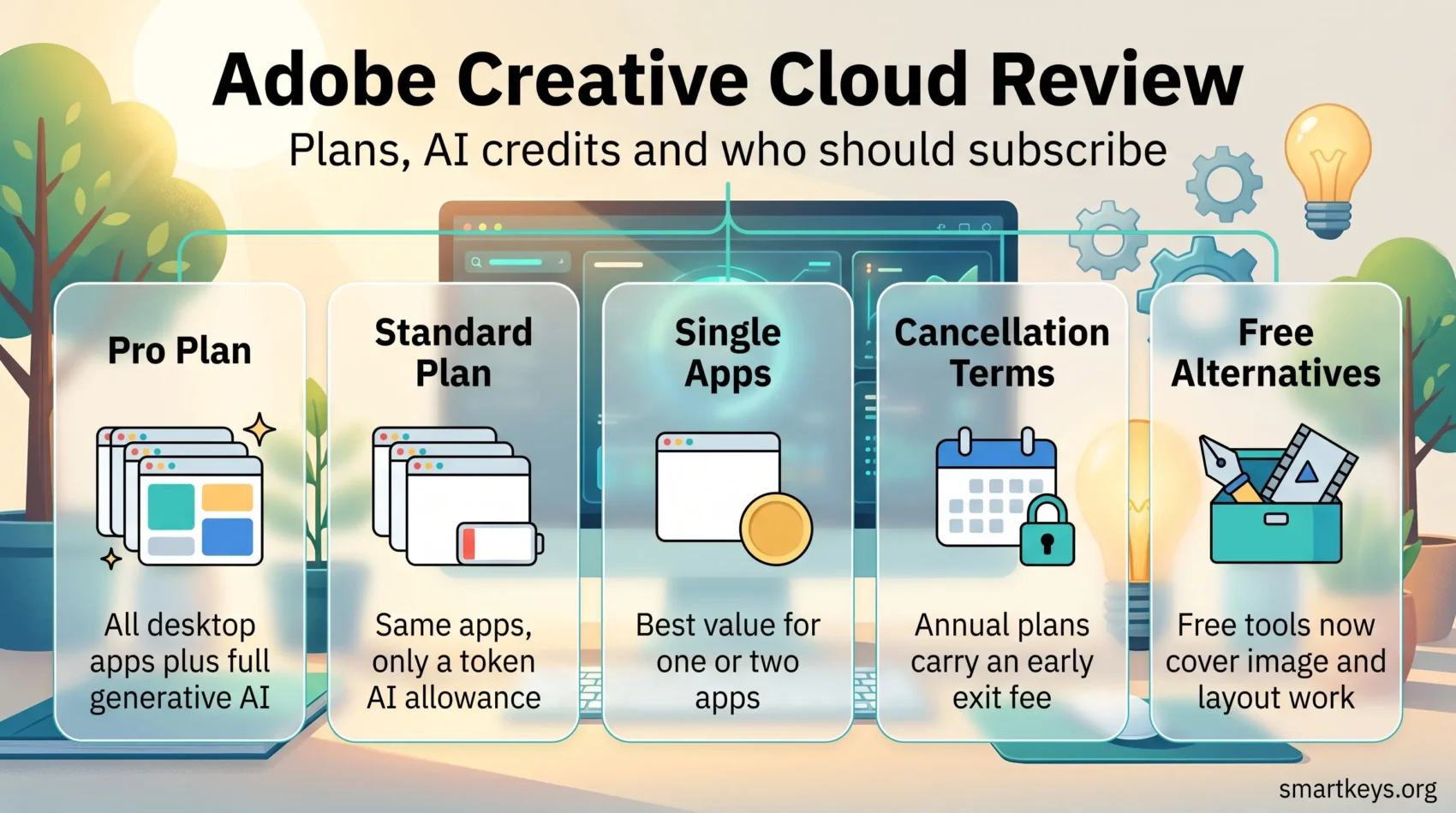
Creative Cloud Pro lists at $69.99 per month on an annual commitment and includes unlimited standard image and vector generation, 4,000 monthly credits for premium features such as video and audio generation, multiple boards in Firefly Boards, and access to third-party models from OpenAI, Google and Black Forest Labs inside Adobe’s apps.
Creative Cloud Standard lists at $54.99 per month annually, with 25 monthly credits, no premium generative features, no partner models and restricted mobile and web app access. Twenty-five credits is a token allowance, not a working budget. Treat Standard as the plan for people who intend to ignore the AI.
This pattern is not unique to Adobe. Metered AI allowances are now the standard way vendors bill for generative features, which is worth knowing before you compare any two AI-enabled SaaS products on headline price. If you manage a stack of them, the discipline behind cloud cost control applies to creative software too.
Single Apps, Photography and Acrobat
If you live in one application, the full suite is poor value. Single app plans start at $22.99 per month annually. The Photography plan bundles Photoshop, Lightroom and Lightroom Classic with 1TB of storage at $19.99 per month and remains the best-value entry point Adobe sells. Acrobat Pro alone is $19.99, which matters if your real need is document workflow rather than design; our Adobe Sign and HelloSign comparison covers that decision.
The arithmetic is worth five minutes. Two single apps cost roughly $46 a month against $69.99 for Pro, and three cost more than the full suite. The break-even sits between two and three applications.
Students, Teachers and Teams
Students and teachers get Adobe’s largest discount, a heavily reduced first year that steps up to $39.99 per month afterwards. The entry offer moves several times a year, so check the renewal rate as well as the introductory one. The step-up is where most people are surprised.
For teams, Creative Cloud Pro is $99.99 per licence per month on annual billing, with a Pro Plus tier at $110.49 that adds unlimited Adobe Stock. Team licensing buys centralised seat management, licence reassignment when someone leaves, and admin console controls. Whether that is worth roughly $30 a seat depends on how often your headcount changes.
The Cancellation Fee You Should Know About
This generates the most complaints and is the part most reviews omit. Annual plans paid monthly are contracts, not rolling subscriptions. Adobe offers a full refund within 14 days of purchase. After that, cancelling early triggers an early termination fee of 50% of the remaining contract balance.
Regulators took an interest. On 16 March 2026 Adobe agreed to a $150 million settlement with the US Department of Justice, split between $75 million in civil penalties and $75 million in services to affected customers, over allegations that it buried early termination terms in fine print and made cancellation difficult. Under the settlement, still subject to court approval, Adobe must disclose the fee and its calculation before signup, remind customers before trials convert, and simplify cancellation.
The practical advice is unchanged: if you are not certain you need the software for twelve months, take the month-to-month option and accept the higher rate. It is cheaper than paying half of what you did not use, and commitments like this are what drive subscription fatigue in small teams.
Generative AI: What the Credits Actually Buy
Adobe integrated Firefly across the suite and then began enforcing limits on it. Credits are consumed by Generative Fill, Generative Expand and Generative Remove in Photoshop, plus video and audio generation in Firefly. Standard image generation on Pro is unlimited; the metered budget covers the expensive premium operations.
In March 2026 Adobe went further. Photoshop gained an AI Assistant in public beta on web and mobile that edits images from conversational prompts, removing objects, changing backgrounds and adjusting lighting, alongside an AI Markup feature that lets you draw on an image and attach an instruction to a specific area. Firefly also routes to partner models including Google’s Nano Banana 2, OpenAI’s image generation, Runway Gen-4.5 and Flux.2 from Black Forest Labs.
That last point matters. Adobe is positioning Firefly as a front end to the whole generative model market, not just its own, so a separate generative subscription may now be redundant. The same consolidation is running through AI video platforms, avatar generators, AI voice tools and ad creative generators.
One caution for commercial work: if generative output goes into client deliverables, check what your contracts and your clients’ policies say about disclosure. Teams operating in Europe should read our notes on EU AI Act compliance before assuming silence is acceptable.
Where Creative Cloud Earns Its Price
Three things justify the cost, and none of them is a single feature.
The first is depth in the hard cases. Photoshop’s masking, Illustrator’s type handling and InDesign’s long-document controls handle edge cases lighter tools cannot. Most users never reach those limits. The ones who do reach them constantly.
The second is the ecosystem. Round-tripping between After Effects and Premiere Pro, dropping an Illustrator file into InDesign with live links, or syncing a brand library across a team removes friction that otherwise consumes hours. If your work involves consistent brand storytelling across formats, that layer has real value.
The third is employability. Adobe proficiency is still the default expectation in creative job listings, and the training material for it dwarfs everything else. For anyone planning an upskilling path, that matters beyond the software.
Where It Falls Short
The price is the obvious complaint, but not the sharpest one. At $69.99 a month, Pro costs roughly $840 a year with nothing owned at the end. For a freelancer with irregular income, that is a fixed cost that does not flex with the work.
Performance is a persistent grievance. The Creative Cloud desktop application is heavy, updates are large and frequent, and the suite rewards strong hardware. On an older machine, Premiere Pro turns a routine edit into an exercise in patience.
Offline use is more workable than the reputation suggests, but licence validation still requires periodic reconnection and every generative feature needs the network. Plan around that rather than discovering it mid-project.
Complexity also has a cost. Onboarding someone into the full suite takes weeks, not days. If most of your output is social graphics and simple documents, you are paying for capability you will not use, and a lighter tool such as Canva will get the work out faster.
Alternatives Worth Checking Before You Renew
The competitive picture changed in late 2025. On 31 October 2025 Canva relaunched Affinity as a single free application combining the former Photo, Designer and Publisher, on macOS and Windows, with a Canva account required for activation and Canva’s AI features behind a paid Canva plan. A free, capable, offline-first image, vector and layout tool is the most serious challenge Adobe has faced at the low end.
Beyond that:
- Figma owns interface and product design, where Adobe never established itself. Our Figma and Sketch comparison covers that market.
- DaVinci Resolve offers a genuinely professional free tier for video editing and colour grading.
- GIMP and Inkscape remain free and open source, capable but rougher in daily use.
- Canva wins on speed for template-driven marketing output rather than bespoke design.
- Whiteboard tools in our Miro and Lucidspark comparison cover the collaborative ideation stage Adobe does not.
For web publishing, Dreamweaver is no longer where most teams start; a hosted builder covered in our Squarespace and Wix comparison gets a site live faster. Storage and collaboration are worth separating from creative tooling too, which is where a Dropbox and Google Workspace comparison or our Google Workspace review matters more than Adobe’s 100GB allowance.
Who Should Subscribe, and Who Should Not
Subscribe to Creative Cloud Pro if you use three or more Adobe applications professionally, exchange native files with collaborators, and will use generative features often enough that 4,000 credits are a working budget rather than a rounding error.
Choose a single app or the Photography plan if your work sits in one or two applications. This is the most commonly overpaid decision in Adobe’s line-up.
Consider Creative Cloud Standard only if you want the desktop applications and genuinely will not use AI. The $15 gap is small enough that most people who hesitate should take Pro.
Skip Adobe if you work solo, do not exchange native files, and mainly produce images, graphics and layouts. Free Affinity plus DaVinci Resolve covers a lot of ground at zero recurring cost.
Adobe Creative Cloud remains the most complete creative toolkit available, and for professional studios the question barely arises. What changed is that the answer is no longer automatic for everyone else. The price rose, the AI moved behind a meter, and the free alternatives improved sharply in a single year. Price the decision deliberately rather than renewing out of habit.
Found this useful?
Make SmartKeys a preferred source on Google, and our articles will surface more often in your Top Stories, AI Overviews, and AI Mode.
Add as Preferred Source