

A website builder is a hosted tool that lets you create and run a website without writing code or renting a server. You choose a template, edit it in your browser, and the company takes care of hosting, updates and security. Squarespace and Wix are the two names most people weigh up first.
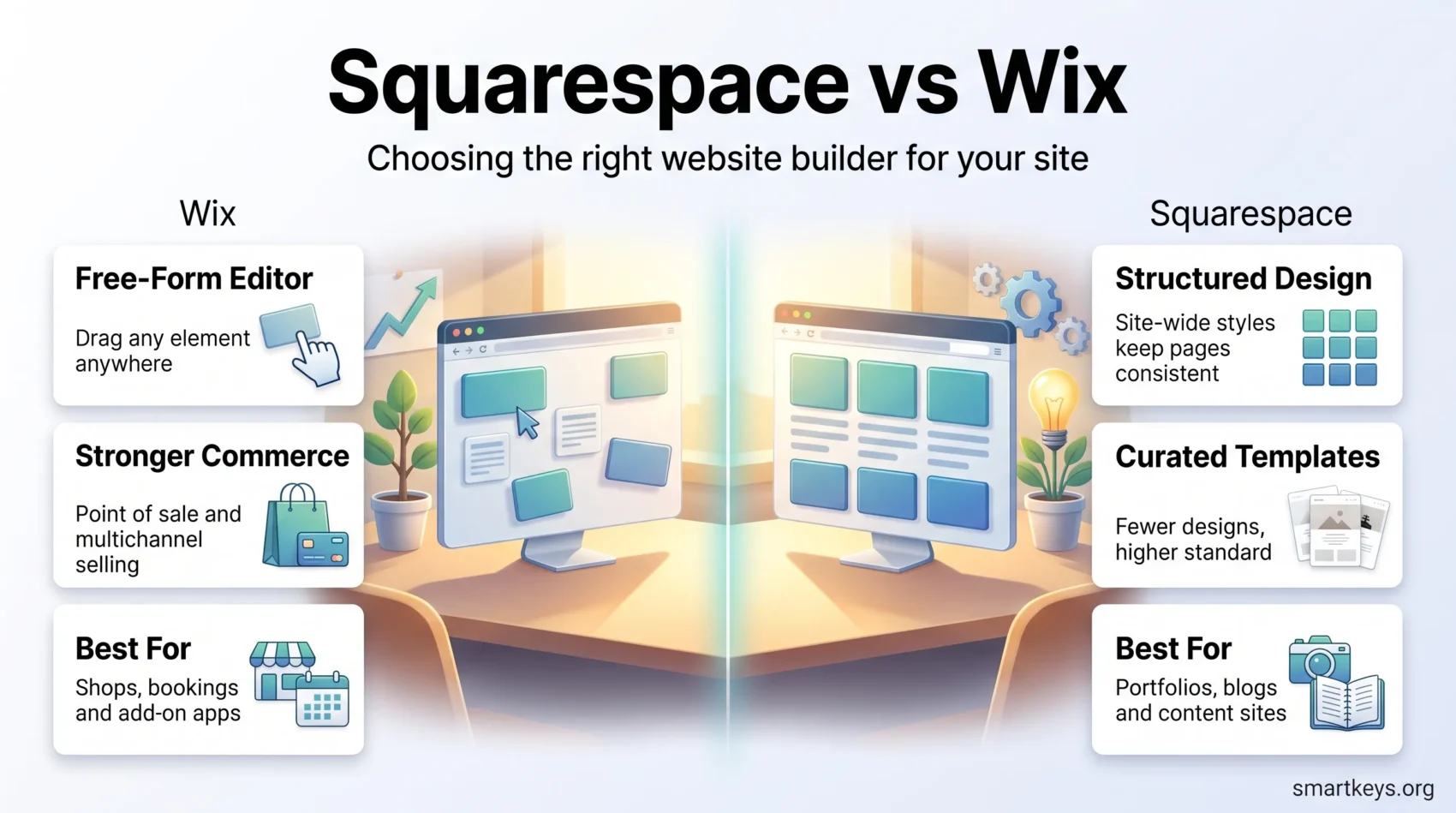
Both solve the same problem in different ways. Wix gives you a free-form canvas where you drag any element anywhere on the page. Squarespace gives you a tighter, more opinionated system that is harder to break and harder to bend.
This website builder comparison covers what each costs in 2026, how the two editors feel in daily use, what you get for selling online, how their SEO tools compare, and where support differs. By the end you should know which fits the site you are trying to build.
Key Takeaways
- Free options: Wix has a free plan with Wix branding. Squarespace offers a 14-day trial and nothing free afterwards.
- Entry pricing: Wix Light starts at $17 a month and Squarespace Basic at $19 a month, both billed annually.
- Selling online: Wix requires the Core plan at $29 a month. Squarespace allows sales on Basic but adds a 2% fee that disappears on higher plans.
- Design: Wix has the far larger template library and more freedom. Squarespace has fewer templates but a more consistent design standard.
- Best fit: Wix for shops, bookings and add-on apps. Squarespace for portfolios, blogs and content-led sites.
What a Website Builder Actually Does
Website builders bundle four things that used to be bought separately: hosting, a content management system, a design layer and a checkout. You rent all of it for one monthly fee, and nobody has to install software, patch a server or move files with FTP.
The trade-off is control. You work inside the platform’s rules, and moving a finished site elsewhere means rebuilding it. For a brochure site or a small shop that hardly matters. For a product with custom logic it matters a lot, which is when people look at Bubble.io and Webflow or app-focused tools like FlutterFlow instead.
So start from the site you need. A photographer showing twenty images, a consultant with a contact form and a shop with 300 products are different jobs, and the two platforms are not equally good at all of them.

Wix in 2026
Wix is the more flexible of the two. Its editor treats a page as an open canvas: you place a heading, a button or an image wherever you want it, rather than dropping content into a fixed slot. That freedom is why beginners like it and why untidy pages are easy to build if you are careless.
What Wix Gives You
The parts that matter most in daily use:
- A drag-and-drop editor with free placement of every element.
- An AI site builder that asks a few questions and generates a first draft you then edit.
- AI helpers for writing text, editing images and filling in SEO fields.
- An app market covering bookings, events, memberships, live chat and much more.
- A separate mobile view you can tune without changing the desktop layout.
The app market is the quiet advantage. If you need an appointment calendar or a members area, you add it rather than rebuild the site elsewhere.
Who Wix Suits
Wix fits small businesses that need a website plus something else: a booking system, a shop, an events page, a chat widget. It also suits people who want to nudge every element into place themselves, and it connects cleanly to outside tools for email marketing and social scheduling.
Squarespace in 2026
Squarespace takes the opposite view. Its templates are design systems, with typography, spacing and color set at site level. Change a heading style once and it changes everywhere. You give up freedom and get a site that looks finished with less effort.
What Squarespace Gives You
Its strongest features:
- Templates with a consistently high design standard, especially for image-led sites.
- A capable blog with proper categories, tags and scheduled posts.
- Blueprint AI, a guided setup that builds a starting site from your answers.
- Brand Identity, which keeps generated text in a tone you define.
- Acuity Scheduling, the appointment tool Squarespace owns, for service businesses.

Who Squarespace Suits
Squarespace is built for people whose work is visual or written:
- Artists and photographers who need galleries that do not fight the images.
- Writers and bloggers who publish regularly and want the reading experience to look right.
- Service providers taking bookings, where Acuity does the heavy lifting.
- Small brands selling a tight product range rather than a large catalogue.
If your site is mainly a shop window for creative work, Squarespace gets you to a presentable result faster. Pair it with Canva for quick graphics, or with Figma and Adobe Creative Cloud if you design the assets yourself.
Ease of Use: Which Editor Gets Out of Your Way
Both editors are learnable in an afternoon. They fail in different directions, and knowing which failure annoys you more is a better guide than any score.
Working in Wix
Wix is faster to start and slower to keep tidy. Because elements float freely, nothing stops you putting a button two pixels out of line, and desktop and mobile layouts can drift apart. The upside is that when you want something in an unusual place, you simply put it there. For a one-off landing page that flexibility helps, though dedicated tools like ClickFunnels and Leadpages are built for that job.
Working in Squarespace
Squarespace takes longer to learn because you have to understand its structure: sections, blocks and site-wide styles. Once that clicks, it is the calmer tool. The Fluid Engine editor added grid-based drag-and-drop, so layouts are more flexible than they were, but the system still steers you towards something coherent. It is the steeper start with the tidier finish.
Templates and Design Flexibility
Template counts are the most abused numbers in this comparison. Review sites count Wix at anywhere from about 900 to over 2,000, and Squarespace at roughly 100 to 190, depending on whether they include legacy versions and industry variants. Treat any precise figure with caution. The shape of the difference is clear enough: Wix publishes far more templates across far more industries, Squarespace a much smaller curated set with a higher average standard.
The Wix Library
Breadth is the point. Whatever niche you work in, there is probably a Wix template built for it, and you can restyle it heavily afterwards. The risk is choice paralysis and, without a plan, a page that looks assembled rather than designed.
The Squarespace Library
Squarespace templates are responsive by default and lean towards generous white space and large imagery. You will not find one for every trade, but you are less likely to end up with something that looks amateurish. Switching later is possible, though it usually means reworking sections by hand.
Selling Online: E-commerce Compared
Both will run a real shop. The gap opens once you sell in more than one place or need stock control across channels. Our overview of current e-commerce trends covers where online retail is heading.
E-commerce in Wix
Wix is the stronger commerce platform of the two:
- Physical products, digital downloads and subscriptions.
- Abandoned cart recovery and automated marketing emails.
- Inventory management across products and variants.
- A point-of-sale system, so in-person and online sales share one stock list.
- Multichannel selling to marketplaces and social platforms.
- A wide choice of payment providers.
For a shop with a growing catalogue, a physical outlet or wholesale on the side, Wix is the safer pick. Once you pass a few hundred products and need serious fulfillment and reporting, a dedicated platform is worth pricing up; our Shopify review covers what you gain and what it costs.
E-commerce in Squarespace
Squarespace commerce is deliberately narrower and visually stronger:
- Product pages that show off photography properly.
- Automatic shipping and tax calculation.
- Digital products, memberships and paid content.
- Built-in sales analytics.
- Course-style content, though specialists like Kajabi and Teachable go much further.
There is no point-of-sale system and no marketplace selling. For an artist selling prints or a studio selling a handful of digital products, none of that is missed.
Squarespace vs Wix Pricing in 2026
Prices below are per month on annual billing unless stated. Wix figures come from Wix’s own plans page. Squarespace does not publish a plain price grid in every region, so its figures follow the 2026 pricing breakdowns from Tech.co and Website Builder Expert, which agree with each other.
Wix Plans
Wix keeps a genuinely free plan. It includes hosting and the editor, but shows Wix branding and gives you a wix.com web address instead of your own domain. It is fine for testing and wrong for a business.
The paid tiers:
- Light, $17: your own domain free for a year, 2 GB storage, two collaborators. No selling.
- Core, $29: 50 GB storage, five collaborators, basic e-commerce. This is the first plan that takes payments.
- Business, $39: 100 GB storage, ten collaborators, standard e-commerce.
- Business Elite, $159: unlimited storage, 100 collaborators, advanced commerce and marketing.
Squarespace Plans
Squarespace has no free tier. You get a 14-day trial, and you cannot publish during it. Four plans follow, with monthly billing costing noticeably more:
- Basic, $19 ($25 billed monthly): a full site with selling enabled, but Squarespace takes 2% of store sales.
- Core, $29 ($39 monthly): the 2% sales fee is removed.
- Plus, $49 ($65 monthly): more commerce and content features, no Squarespace sales fee.
- Advanced, $99 ($139 monthly): the lowest fees on digital products and memberships, plus the largest AI allowance.
What the Sticker Price Leaves Out
Three costs catch people out. The free domain lasts one year, then renews at normal prices. Card processing fees (commonly around 2.9% plus a fixed amount per transaction) apply on top of any platform fee. And monthly billing is much more expensive than annual on both, so the headline number assumes a year’s commitment.
On plan price the two are close at the bottom and Wix costs more at the top. For selling, the fair comparison is Wix Core at $29 against Squarespace Core at $29: the first plan on each side that takes no cut of your sales.
SEO Tools
Neither builder will rank a site on its own. Both now cover the basics that used to separate them: editable page titles and meta descriptions, clean URL slugs, 301 redirects, automatic sitemaps, SSL on every plan and mobile-responsive output. Reviewers who once rated Wix well ahead now call it close.
SEO in Wix
Wix leads you through setup with an SEO checklist that generates a task list and can fill in title and description tags for you. It connects to Google Search Console, and the separate mobile editor lets you fix a cramped phone layout without touching the desktop version. That last point matters, because mobile layout problems are a common and avoidable drag on rankings.
SEO in Squarespace
Squarespace gives you the same controls with less hand-holding: per-page titles and descriptions, editable slugs, redirects and built-in analytics. It has closed most of the gap with Wix over the past two years. Where it still asks more of you is diagnosis, since there is no guided checklist telling you what is missing.
For anything beyond on-page basics you will want an external tool. Our comparison of Surfer SEO and Ahrefs covers content and backlink work, while the Semrush review and SE Ranking review look at cheaper all-rounders. If you are also chasing visibility inside AI answers, see our guide to generative engine optimization.
Support and Help Resources
This is the clearest split between the two.
Wix offers 24/7 phone support, usually as a callback, alongside a large help centre and in-editor guidance. Getting to a human takes a few steps through the help flow, but the phone option exists.
Squarespace has no phone support at all. You get email, live chat during set hours, a well-organized help centre and an active community forum. Several reviewers rate Squarespace higher on support quality despite the missing phone line, because reaching an agent by chat or email is straightforward.
Which suits you depends on how you like to solve problems. If a phone call is your first instinct when a checkout breaks, that alone may decide it.
Performance, Hosting and Security
Both platforms run managed hosting on a global content delivery network and include an SSL certificate on every plan, including the Wix free tier. You cannot break the server, and you never patch it.
Independent speed tests put the two close, and results vary far more with your own images and apps than with the platform. Neither vendor publishes a contractual uptime guarantee on standard plans, so treat any headline uptime figure as a marketing claim.
The Verdict: Which One Should You Pick
Choose Wix if you are running a small business that needs more than a website. It wins on shops, bookings, add-on apps and sheer flexibility, it has the only genuinely free plan of the two, and its phone support is a real advantage when something breaks during trading hours.
Choose Squarespace if the site is the shop window for creative or written work. Its templates hold together with less effort, its blog is the stronger of the two, and it makes a portfolio look considered without a designer.
If you are torn, decide on the next twelve months rather than today. A site that will grow a catalogue, take in-person payments or add bookings points to Wix. A site that will publish more writing and images points to Squarespace. Either way, budget for the tools around it: email automation, social publishing and a newsletter platform such as beehiiv usually do more for growth than the builder itself, as our overview of digital marketing trends shows.
Found this useful?
Make SmartKeys a preferred source on Google, and our articles will surface more often in your Top Stories, AI Overviews, and AI Mode.
Add as Preferred Source




