

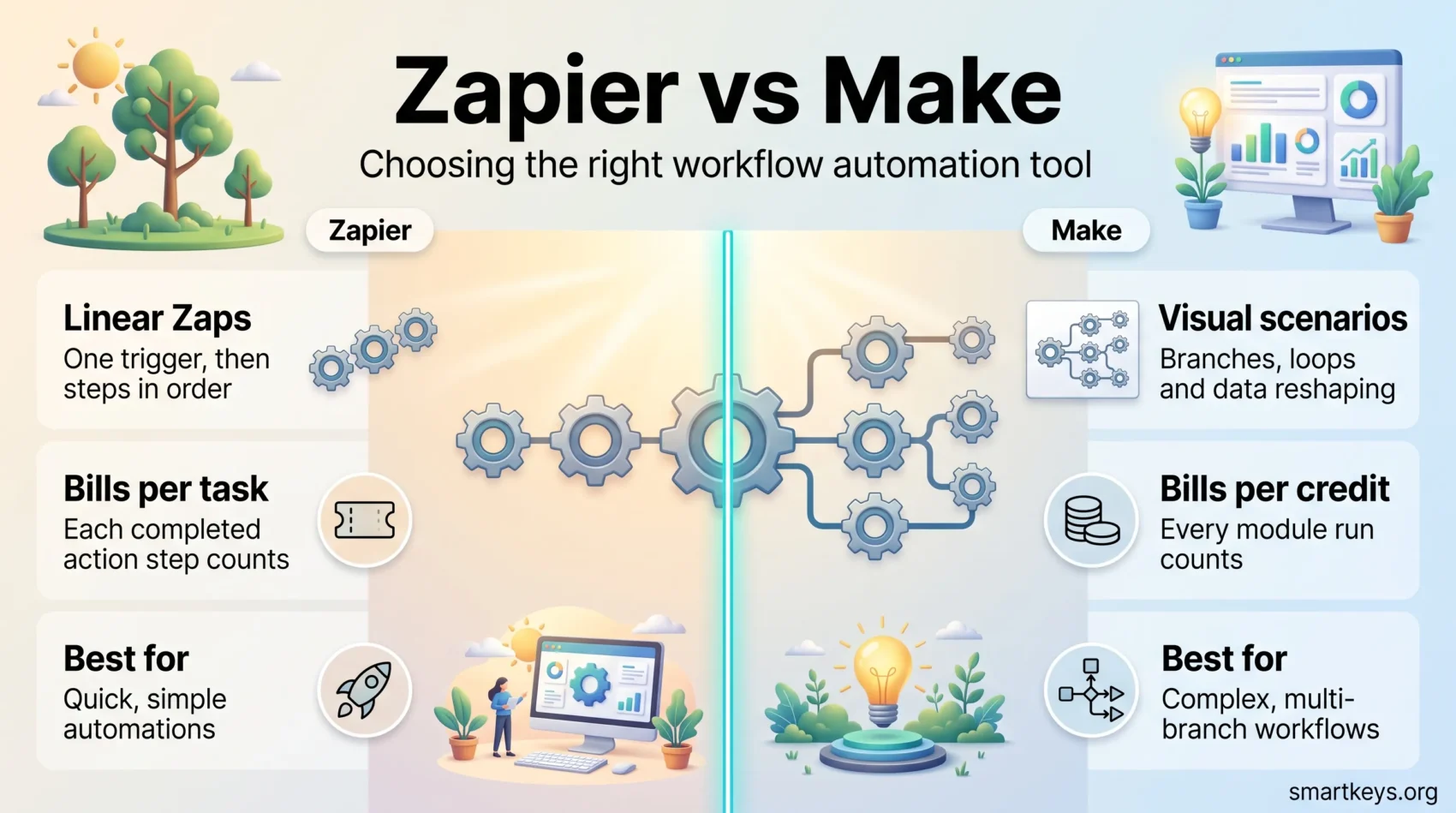
Integromat no longer exists as a product. The company rebranded it to Make in 2022, moved customers onto a new platform and ended support for the old one in 2023. So the honest version of the “Zapier vs Integromat” question in 2026 is Zapier versus Make. Both are workflow automation tools: they watch for something happening in one app and then do something in another, without you writing code. This guide covers what each platform costs now, how their billing models differ, and which kind of work each one actually suits.
Key Takeaways
- Integromat became Make in 2022. If you are still searching for Integromat pricing, you are looking for Make.
- Zapier advertises more than 9,000 app connections. Make advertises more than 3,000 standard apps.
- Zapier counts tasks. Make counts credits, and every step inside a scenario spends one. That single difference decides which is cheaper for you.
- Zapier’s paid plans start at $19.99 per month. Make’s paid plans start at $12 per month.
- Zapier fits simple, linear automations. Make fits branching workflows and data reshaping.
- Both have a free plan, so you can run a real workflow before paying anything.
What Workflow Automation Tools Actually Do
A workflow automation tool sits between the apps you already use and moves information between them. You define a trigger, meaning the event that starts things off, and one or more actions that follow. A concrete example: someone fills in a form on your website, the tool creates a row in a spreadsheet, adds the person to your email list and posts a note in your team chat. Nobody copies anything by hand and nothing gets forgotten at five in the afternoon.
That is the whole promise. The value is not exotic technology; it is the twenty minutes a day you stop spending on copy and paste, and the mistakes that never happen because a machine does the transfer.

Zapier and Make solve the same problem from opposite directions. Zapier optimises for getting a simple automation live in ten minutes. Make optimises for building something complicated and keeping it maintainable. Neither approach is wrong, and the right answer depends on the work in front of you. If you are still deciding whether to automate a process at all, our guide to automating repetitive tasks is a better starting point than either tool’s marketing page.
Zapier at a Glance
Zapier is the older and larger of the two. You build workflows called Zaps: one trigger, then a list of actions that run top to bottom. The editor is a form, not a canvas. You pick an app, pick an event, map a few fields and turn the Zap on.

Its main asset is coverage. Zapier advertises more than 9,000 app connections, which in practice means the niche tool your team adopted last year is probably already supported. That matters more than it sounds: an automation platform that does not connect to your CRM or your invoicing app is useless to you regardless of how elegant its editor is.
Zapier also supports multi-step Zaps, filters that stop a run when a condition is not met, paths that send a run down different branches, and scheduled Zaps. For anything the pre-built actions cannot do, “Code by Zapier” lets you drop in a short JavaScript or Python snippet.
Make at a Glance (Formerly Integromat)
Make builds automations as scenarios on a visual canvas. Each app is a circular module, and you draw lines between them. Because you can see the whole flow, branches and loops stay readable at a glance in a way a long vertical list does not.
Make advertises more than 3,000 standard apps, plus generic HTTP and REST modules for services that have no dedicated connector. That last point matters: if a vendor publishes an API, you can usually reach it from Make even without an official integration.
The platform’s real strength is data manipulation. Iterators split a bundle of records into individual items, aggregators combine them back together, and built-in functions reformat text, dates and numbers along the way. A run can be inspected step by step afterwards, showing exactly what data entered and left each module. Anyone who has debugged a silent automation failure will recognise how much time that saves.
Key Features of Zapier
Zapier’s feature set is built around getting non-technical people to a working automation quickly.
- Broad app coverage: more than 9,000 connections, including most mainstream business software.
- Multi-step Zaps: chain several actions behind a single trigger.
- Filters and paths: stop a run, or send it down a different branch, based on conditions.
- Templates: pre-built Zaps for common combinations, so you start from something that already works.
- Run history: a log of every run, with the data that passed through, for troubleshooting.
- Code steps: JavaScript or Python for the cases no standard action covers.

Key Features of Make
Make’s feature set assumes you will eventually need something more than a straight line.
- Visual scenario builder: the whole workflow, including branches, on one canvas.
- Routers: split one run into several parallel paths with different conditions.
- Iterators and aggregators: break a list into single items, process each, then reassemble the results.
- HTTP and REST modules: call any documented API, with or without an official connector.
- Step-by-step execution log: inspect the exact data at every module after a run.
- Scheduling and error handlers: control when a scenario runs and what happens when a step fails.
Zapier vs Make: Feature Comparison
Three things separate these platforms in daily use: how many apps they reach, how the editor feels, and how much complexity they tolerate.
Integration Coverage
Zapier wins on raw numbers, with more than 9,000 connections against Make’s 3,000 plus. But numbers alone are the wrong test. Check the specific apps you use. If both platforms support all of them, coverage stops being a deciding factor and the other two criteria take over. If one platform is missing a tool at the centre of your business, that settles it.
Interface and Learning Curve
Zapier’s step-by-step form is faster to learn. Most people build their first working Zap in one sitting. Make’s canvas takes longer to click with, because you have to understand modules, connections and the way data flows between them before anything makes sense. The payoff arrives on the fifth workflow rather than the first, when a Zapier automation with several paths has become hard to read and the equivalent Make scenario still looks like a diagram.
Automation Complexity
For a two-step or three-step job, both platforms do the same thing and the choice hardly matters. The gap opens on workflows that loop over lists, reshape data between systems or call an API directly. Make handles those natively. In Zapier they are possible but usually mean a code step or several chained Zaps. If your integrations look more like the ones described in our overview of iPaaS platforms for business integration, you are already in Make territory.
Pricing Comparison: Zapier vs Make
Pricing is where these two differ most, and where the sticker price misleads people.
Zapier Pricing
Zapier’s free plan allows 100 tasks per month. The Professional plan starts at $19.99 per month, the Team plan at $69 per month, and Enterprise pricing is quoted on request. Both paid tiers are sold in task tiers that run from 750 tasks a month up to 2 million, so the entry price is the floor rather than what a busy account pays. Yearly billing is discounted against monthly. If you exceed your allowance, Zapier notifies you and you can either enable pay-per-task billing or move to a larger tier. (Source: Zapier pricing page, September 2026.)
Make Pricing
Make’s free plan includes 1,000 credits per month. Core costs $12 per month, Pro $21 per month and Teams $38 per month, each starting at 10,000 credits, with larger credit bundles available on the same tiers. Enterprise is quoted individually. (Source: Make pricing page, September 2026.)
The Part That Decides Your Bill
Compare the units, not the prices. Zapier counts a task each time an action step completes successfully; the trigger itself is free. Make counts a credit for every module that runs, including steps that only reformat or filter data.
So a simple two-step automation is cheap on both. A workflow that fetches 50 records, loops through them and updates each one burns credits fast on Make, while Zapier’s task count depends on how many actions you actually run. Take one real workflow you plan to build, count the steps and multiply by your monthly volume on both models. That five minute exercise tells you more than any pricing table, including this one.
Pros and Cons of Zapier
Zapier’s strengths are coverage and speed to first result. The interface is welcoming to people who have never automated anything, the template library removes the blank page problem, and the sheer number of connectors means you rarely hit a dead end.

The drawbacks show up later. Costs climb as volume grows, since the entry price only covers the smallest task tier. The free plan’s 100 tasks a month is enough to test an idea, not to run one. And complex logic gets awkward: once a workflow needs loops or heavy data reshaping, you are working against the tool rather than with it.
Pros and Cons of Make
Make is the stronger tool for complicated work. Routers, iterators and direct API calls let you build things that would need a developer elsewhere, and the visual canvas keeps a twenty step scenario legible. Per unit of work, it is usually the cheaper of the two.

The cost is the learning curve. New users have to absorb several concepts before the first scenario works, and the smaller template library means more building from scratch. Fewer connectors also means a higher chance of falling back on the HTTP module, which works well but expects you to read API documentation. If nobody on your team wants to do that, Make’s advantage shrinks.
Which One Fits Your Work
Zapier suits marketing, sales and admin automations that are wide rather than deep: post to social channels on a schedule, route a form submission into your CRM, notify a channel when a deal closes, add a new customer to an email sequence. Teams that also live in Salesforce CRM, Pipedrive or Mailchimp will find every connector they need and templates for most of what they want.

Make suits operations work: reconciling orders between an online store and an accounting system, generating invoices from line items that have to be grouped first, syncing records between two databases with different field structures, or pulling data from an API that no platform has a connector for. Agencies building automations for clients tend to end up here for the same reason.
Plenty of teams run both, using Zapier for the long tail of small connections and Make for the handful of workflows that carry real weight. That is a legitimate setup, not a failure to choose.
Conclusion
Pick Zapier if you want the widest app coverage and the shortest path from idea to running automation, and if your workflows are mostly linear. Pick Make if your automations involve branching, loops or data that needs reshaping, and if someone on the team is willing to spend a few hours learning the canvas.
Prices start at $19.99 per month for Zapier and $12 per month for Make, but neither figure predicts your bill. The billing units do. Sketch one workflow, count the steps, and check it against both models before you commit. Both free plans are good enough to build the real thing and watch it run, which is a better test than any comparison article, this one included.
For the wider picture on connecting business systems, see our reviews of Workato and the head to head Workato vs Zapier comparison, or read up on hyperautomation in business. If you are building the apps as well as the connections, our guides to low-code business process automation, Bubble.io and AppSheet cover the next step. And if the goal is simply a tidier working day, start with digital workflows, task management or the current crop of productivity apps.
Found this useful?
Make SmartKeys a preferred source on Google, and our articles will surface more often in your Top Stories, AI Overviews, and AI Mode.
Add as Preferred Source




