

About 25% of all paid full days in the United States were worked from home in May 2026, according to Stanford’s Survey of Working Arrangements and Attitudes. That share has barely moved in three years. Remote work is no longer an experiment, and neither is the problem it created: the small, unplanned conversations that used to happen beside a coffee machine no longer happen by themselves.
A virtual water cooler is the fix most teams reach for. It is a chat channel, a drop-in video room, or a short recurring call that exists purely for casual conversation. No agenda, no minutes, no expectation that anyone speaks. Its only job is to give colleagues a reason to talk about something other than the task in front of them.
This guide covers what the evidence says about isolation at work, how to set a watercooler up, which tools are worth paying for, practical virtual water cooler ideas, and how to tell whether yours is working. A watercooler is only one piece of the picture; for the wider habits that hold a distributed team together, see our guide to remote company culture.
Key Takeaways
- A virtual watercooler is an always-open, optional space for casual chat, not another meeting on the calendar.
- Fully remote employees report loneliness at noticeably higher rates than on-site colleagues, so the social gap is measurable.
- Start with one clearly named channel, a short pinned note, and a first prompt posted by you.
- Free tools cover most teams: a Slack or Microsoft Teams channel plus Donut’s free tier is enough to begin.
- Track three numbers (weekly posters, posts per week, repeat attendance) and change the format if they fall.
- Casual channels support connection. They do not replace fair promotion, clear goals, or a manageable workload.
What a virtual watercooler is and how it differs from a meeting
Picture the old office kitchen. Someone waits for the kettle, a colleague walks past, and ninety seconds later they have swapped weekend plans and solved a small problem neither had scheduled time for. None of that was on anyone’s calendar.
A virtual watercooler recreates that space online. The difference from a meeting is the point: a meeting has a purpose, an invite list and a finish time. A watercooler has none of those. People join, lurk, post a photo, or skip it entirely.
Three rules that separate it from work
- Open access: anyone can join, read quietly, or leave without explaining why.
- Light moderation: you set the tone and step in on unkind comments, but you do not run the conversation.
- An addition, not a replacement: it sits alongside your stand-ups and planning sessions instead of absorbing them.
That last rule matters more than it sounds. If you cancel a status meeting and replace it with a hangout everyone is expected to attend, you have renamed a meeting, not created a watercooler. If fewer meetings is the real goal, run a proper meeting audit first and move status updates into writing.
Why the social gap is worth closing
The case for casual conversation is usually made with vague language about culture. The measurable version is more useful.
Gallup found that one in five employees felt lonely for much of the previous day. Split by work arrangement, fully remote employees reported loneliness at 25%, hybrid workers at 21% and fully on-site workers at 16%. That is a nine point gap between the most and least connected groups.
Loneliness is not just unpleasant. It changes behaviour. Someone who feels like an outsider waits longer before asking for help, raises problems later, and is less likely to volunteer an unfinished idea. Those delays cost real time.
What a watercooler realistically improves
People ask for help sooner. It is easier to send “does anyone know how the billing export works” to a colleague whose dog you have seen than to a name in a directory.
Small ideas surface earlier. Someone mentions a workaround in passing, a colleague recognises the same problem, and a fix appears without a project being opened for it.
New joiners land faster. A casual channel gives a new hire somewhere to be visible in week one without having to perform. It works alongside a structured remote onboarding programme, not instead of one.
None of this replaces the substance of good remote management. Clear expectations and regular one-to-ones remain the bigger levers, which is why remote employee engagement and remote leadership skills deserve at least as much attention as the social channel.
How to set up your virtual water cooler in five steps
You can have this running before lunch. Keep the setup small: an over-engineered launch is the most common way these channels die.
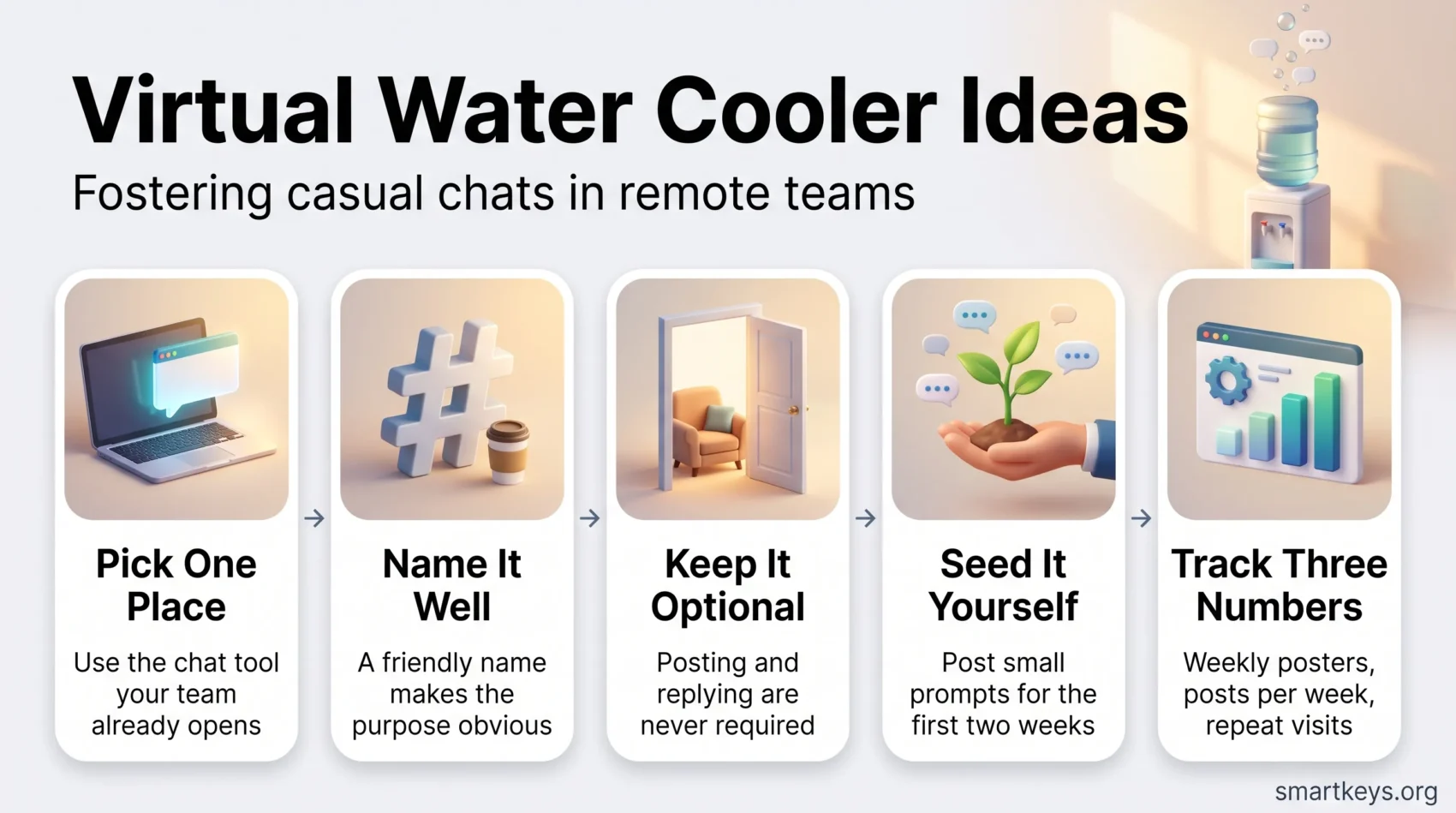
Step 1: Pick one place, and only one
Use the tool your team already opens every morning: Slack or Microsoft Teams for chat, with Zoom, Google Meet or Teams for video. If you are still choosing, our comparisons of Slack and Microsoft Teams and of Zoom and Microsoft Teams cover the plans and limits. Resist launching a channel, a video room and a weekly call at once.
Step 2: Name it so the purpose is obvious
Call it #water-cooler, #coffee-break or #random. A vague name like #general invites work questions, and once work questions arrive the casual tone is gone. If your team has a documented digital HQ structure, add the channel to that map.
Step 3: Pin a four-line note
Pin the expectations once: this is a social space, posting is optional, replies are optional, keep it workplace friendly. Four lines is enough. A long charter signals a work process, which defeats the purpose.
Step 4: Seed it yourself for two weeks
An empty channel stays empty. Post first, and post something small: your desk view, a question about coffee orders, a photo from a walk. Do it a few times a week for a fortnight, and ask two or three colleagues privately to reply so nobody has to break the silence in public.
Step 5: Add one optional touchpoint
Once the channel has a pulse, offer a 15 minute drop-in call once or twice a week, with cameras optional and early exits fine. If your team spans regions, rotate the slot so the same people are not always joining at an awkward hour, and keep a shared global holiday calendar so you never schedule on someone’s public holiday.
Tools worth using, and what they cost
You do not need to buy anything to start. A channel in the tool you already pay for costs nothing extra.
When a team grows past the point where one channel keeps everyone connected, pairing apps help. Donut is the best known: it sits inside Slack or Microsoft Teams and introduces randomly matched colleagues for a short chat. Its free plan covers one Slack channel each for intros, watercooler and celebrations, and introduces up to 24 users per round. Paid plans start at $74 per month billed annually, with a Premium tier at $119 per month. For a team of twenty, the free tier is usually enough.
For video drop-ins, background noise is what makes short calls feel like work. Noise suppression is now built into Zoom, Teams and Google Meet, and a dedicated tool such as Krisp adds a stronger filter across whichever app you use.
Chat or video: pick by purpose
Use chat for anything that can wait: photos, music recommendations, a joke, a small win. Nobody has to stop what they are doing, which is why chat carries most of the traffic in a healthy watercooler. It fits naturally with asynchronous communication tools if your team works across time zones. Use video when the point is energy: a demo of a side project, a celebration, a five minute show-and-tell.
One caution. A social channel adds notifications to a day that is already fragmented. Mute it by default and let people opt in, and review your wider instant messaging boundaries before adding another source of pings.
Ideas that keep the conversation going
Most watercooler channels fail in week three, when the novelty wears off and nobody has anything to post. Rituals fix that, because they remove the question of what to say.
- Question of the day: a small win this week, your go-to coffee order, the last thing you cooked.
- Photo prompts: desk view, view out of the window, a pet, a childhood photo.
- Light games: would-you-rather, two truths and a lie, a short trivia round.
A fixed slot gives people something to plan around: trivia on Tuesdays, a Friday coffee drop-in, a monthly ten minute show-and-tell. Seasonal moments work well because they need no explanation, such as a summer travel photo thread.
When a topic keeps coming up, give it its own room: #pets, #food, #books, #running. Do not create these in advance, because five empty themed channels look more abandoned than one quiet channel does. To go further than chat, structured remote team building activities and paired mentorship matching platforms build on the same foundation.
Etiquette that keeps it inclusive
A social channel can quietly exclude people, usually without anyone intending it. A few norms prevent most of that.
Keep it genuinely optional. If a manager praises people for posting, participation stops being voluntary. Praise nobody for posting and nobody for staying quiet.
Watch the timing. A live social call at 5pm in the headquarters time zone is a midnight invitation for a colleague eight hours ahead. Rotate slots and lean on written threads people can join whenever they log on, the same discipline teams already apply to follow-the-sun scheduling.
Mind the visibility gap. When a few colleagues share an office and the rest do not, in-person jokes spill into the channel. That is an everyday form of proximity bias, worth naming before it hardens.
Do not let it become a second inbox. If the channel starts carrying decisions, move those back into the working channels. Mixing the two is what makes people mute a social space permanently, and it feeds the always-on feeling that drives employee burnout.
How to tell whether it is working
You do not need an analytics project. Three numbers, checked monthly, tell you almost everything.
- Weekly active posters: how many different people posted at least once. A channel where three people post daily and nobody else joins is a group chat, not a team space.
- Posts per week: the raw volume. A steady low number is fine. A sharp drop is a signal.
- Repeat attendance: for live sessions, how many people came back after their first visit.
Add one qualitative check. Once a quarter, ask a single question in your one-to-ones: do you feel connected to the people you work with?
Then watch which topics get replies and invest there. If the numbers fall for two months running, change the format rather than sending a reminder. Reminders to be social rarely work; a new prompt, a different time slot or a different host usually does.
What a virtual watercooler cannot fix
It will not fix an unmanageable workload: people with no slack in their day do not stop to chat. It will not replace fair processes either, because if remote colleagues are passed over for promotion, a friendly channel makes the contrast worse. Nor does it fully substitute for meeting in person, which is why many distributed companies still budget for one or two gatherings a year.
Casual chat works best on top of solid habits: written updates, clear decisions, and formats such as silent meetings or good hybrid meeting etiquette that give everyone the same chance to be heard. For the wider picture, see our guides to building a remote company culture and remote work productivity. For more ideas on remote work experiences, see best practices for remote collaboration.
Conclusion
A virtual watercooler is a small intervention with a modest, real payoff. It will not transform your culture on its own, but it rebuilds the low-stakes contact that distance removes, and that contact is what makes people comfortable asking questions and sharing half-formed ideas.
Start narrow. Open one channel today, give it an obvious name, pin four lines of guidance, and post the first prompt yourself. Seed it for two weeks before you judge it, and add a short optional call only once the channel has a pulse of its own. Then watch three numbers, ask one honest question each quarter, and change the format when the numbers say to. Protect the rule that makes the whole thing work: it stays optional, and nothing happens to anyone who never posts.
Found this useful?
Make SmartKeys a preferred source on Google, and our articles will surface more often in your Top Stories, AI Overviews, and AI Mode.
Add as Preferred Source




