

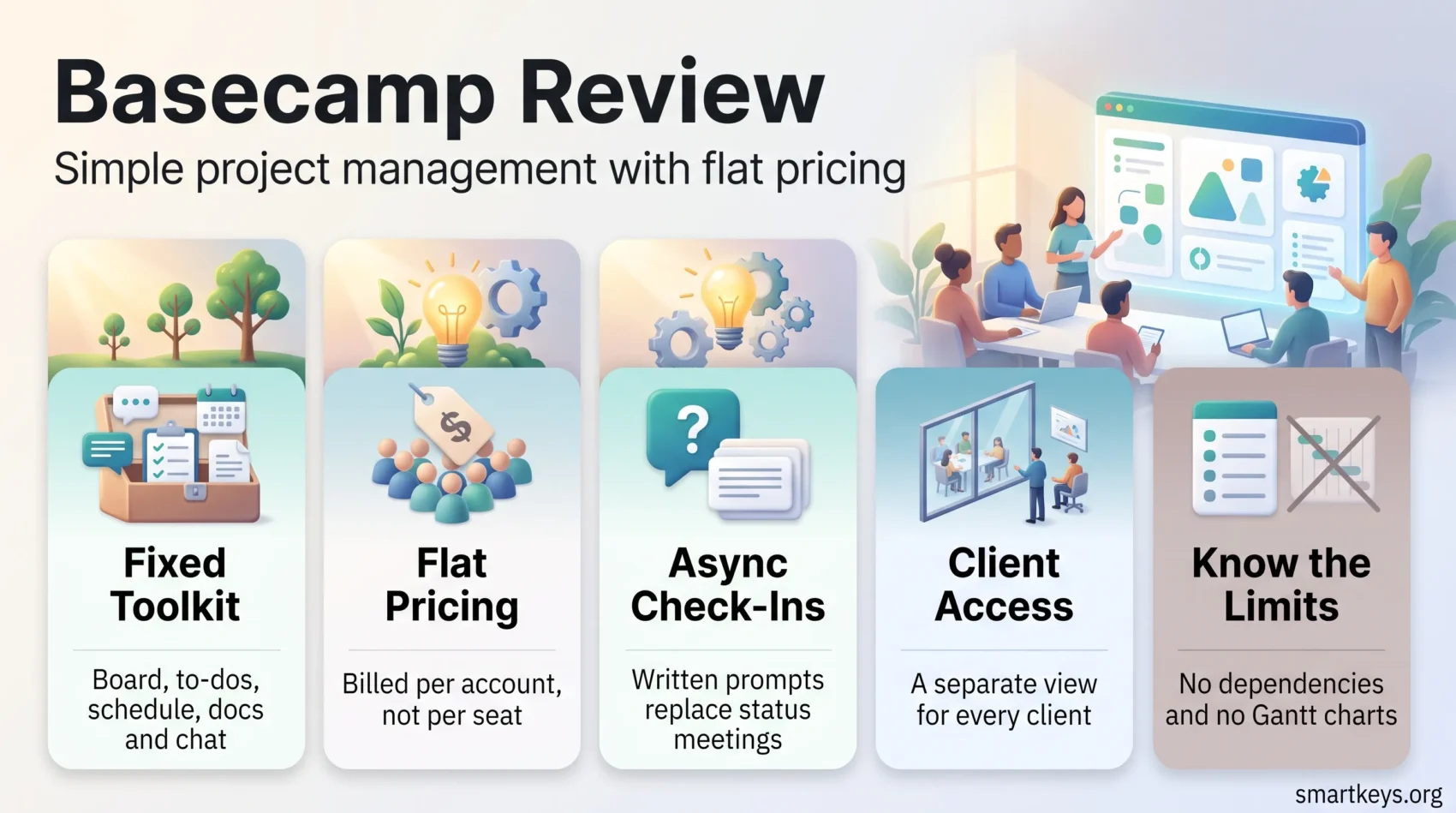
Basecamp has been around longer than almost every tool it competes with, and it still refuses to look like them. There are no Gantt charts, no dependency graphs and no sprint velocity dashboards. What you get instead is a small set of tools per project, a flat price, and a deliberate bet that most teams fail at coordination rather than at scheduling. In 2026 that bet has a new front end: 37signals shipped Basecamp 5, the biggest redesign in years, and restructured pricing into five tiers that start at zero. This review covers what the platform actually does, what each plan costs, where it falls short, and which teams it genuinely fits.
Key Takeaways
- Basecamp launched in 2004 and now runs on Basecamp 5, released in 2026.
- Pricing starts with a free tier and runs to $299 a month for unlimited projects.
- Paid plans are billed per account, not per seat, which suits larger teams.
- Native time tracking exists now through Timesheet, added in June 2024.
- Paid plans include a 30-day trial; the Unlimited edition offers 45 days.
- Capterra reviewers rate Basecamp 4.4 out of 5 across more than 14,000 reviews.
What Is Basecamp?
Basecamp is a cloud-based project management and team communication platform built by 37signals. Every project gets the same fixed set of tools: a message board, to-dos, a schedule, docs and file storage, group chat, and automatic check-in questions. Nothing needs configuring before you can use it, which is both the product’s main appeal and the reason power users outgrow it.
Overview of Basecamp as a Cloud-Based Tool
The platform runs entirely in the browser, with native apps for iOS, Android, Mac and Windows. Practical consequences of that architecture:
- Accessibility: projects open on any device with a connection, with no local install required.
- Real-time collaboration: chat, comments and pings update live, so discussion stays attached to the work it concerns.
- Client access: clients can be given a separate view of a project and never see internal chatter.
- Data protection: data is encrypted in transit and at rest, with regular backups handled by 37signals.
History and Evolution: From 2004 to Basecamp 5
Basecamp began in 2004 as an internal tool at a web design agency that needed a better way to keep client projects straight. Twenty-two years later the product philosophy has barely moved, even as the software has been rebuilt repeatedly. Basecamp 5, launched in 2026, is the current version. 37signals describes it as well over 100 significant improvements rather than a new concept, and that is a fair summary: the ideas are the same, the surface is much faster and denser.
Basecamp Features and Benefits
The feature list is deliberately short. What matters is how the pieces fit together, because Basecamp’s argument is that a team using four tools well beats a team configuring forty.
Core Tools for Project Management
Every project ships with the same toolkit:
- To-dos: assignable task lists with due dates, notes and, in Basecamp 5, subtasks.
- Card Table: a kanban-style board for work that moves through stages rather than sitting in a list.
- Message Board: threaded announcements that replace the internal email most teams drown in.
- Docs & Files: a single place for documents and attachments, versioned and commentable.
- Schedule: project dates and milestones, now viewable in a full-screen global calendar.
If your workflow is closer to a running list than a board, our guide on how to use to-do lists effectively pairs well with Basecamp’s task tools.
Collaboration and Communication Features
Communication is where Basecamp puts most of its weight:
- Campfire chat: lightweight group chat per project for the conversations that do not deserve a thread.
- Pings: direct messages between individuals or small groups.
- Automatic check-ins: recurring questions such as “What did you work on today?” that replace status meetings.
- Hill Charts: a visual way to show whether a task is still being figured out or simply being finished.
- The Lineup: a timeline view of which projects are running and when they end.
Automatic check-ins are the feature teams tend to underestimate. Replacing a recurring standup with a written prompt removes a meeting from every calendar, which is the same logic behind silent meetings for remote teams. If chat volume is the problem rather than meetings, a dedicated messaging platform such as Slack or Microsoft Teams will do more.
What Basecamp 5 Changed
The 2026 release focused on speed and navigation rather than new concepts. The changes worth knowing about:
- A rebuilt search with live filtering, which was the loudest complaint about earlier versions.
- Keyboard shortcuts throughout, plus a universal menu for jumping between projects.
- Subtasks and loose to-dos, so a task no longer has to belong to a list.
- My Notes and My Bar, personal spaces for scratch notes and pinned items.
- Voice notes in posts, docs, comments and chats.
- A refreshed API, a command-line interface, and support for AI agents.
Getting Started with Basecamp
Setup is genuinely fast, which is one of the few claims in this category that holds up under testing.
Account Setup and Trial Period
Creating an account takes a few minutes and no payment details. Paid plans come with a 30-day free trial; the Unlimited edition extends that to 45 days. The free tier requires no trial at all, since it simply keeps working: one active project, up to five users and 1 GB of storage. For a solo consultant with one client at a time, that is a usable permanent plan rather than a teaser.
Basecamp Dashboard Overview
After logging in you land on a home screen listing your projects and recent activity. Basecamp 5 made this page action-oriented rather than purely a directory, with a “New For You” sidebar collecting notifications, mentions and direct messages in one column. The learning curve is short enough that most teams skip formal onboarding entirely, which matters more than it sounds: tool adoption usually fails at week two, not week one. Teams that struggle with distributed onboarding will find useful patterns in our guide to running a virtual office in a hybrid workforce.
Basecamp Pricing in 2026
Pricing changed substantially and is now the strongest reason to look at Basecamp or to walk away from it. Every paid plan is billed per account with no per-user fees, which flips the usual maths.
The Five Plans
- Free: $0. One active project, up to 5 users, 1 GB storage.
- Freelancer: $25 a month. Up to 3 active projects, up to 20 users, 5 GB storage, time tracking, 24/7 support.
- Studio: $59 a month. Up to 10 active projects, unlimited users, 25 GB storage, project templates.
- Pro: $99 a month. Up to 25 active projects, unlimited users, 100 GB storage.
- Unlimited: $299 a month billed annually. Unlimited projects, 1 TB storage, priority support and personalised onboarding. An extra 5 TB costs $100 a month.
Note what the tiers actually meter: active projects and storage, not people. A 40-person agency on the Studio plan pays $59 a month in total. The same headcount on a per-seat tool at $12 per user costs $480. Figures are taken from Basecamp’s published pricing page and were current at the time of writing.
Flat Fee Versus Per-Seat Billing
The flat model rewards a specific shape of company: many people, few concurrent projects. It punishes the opposite. A five-person consultancy juggling 30 client projects gets pushed to the $299 Unlimited plan by project count alone, while a 200-person company running eight internal projects sits comfortably on Studio.
Before switching, count your active projects rather than your headcount. That single number decides your tier. If your team is small and project-heavy, a per-seat tool such as Asana or ClickUp will usually cost less.
Basecamp Pros and Cons
Advantages of Using Basecamp
- Genuinely easy to use: Capterra reviewers score ease of use at 4.3 out of 5, the platform’s highest sub-rating alongside customer service.
- Predictable billing: no per-seat creep, no surprise renewal when headcount grows.
- Strong client collaboration: the separate client view is better implemented here than in most competitors.
- Everything in one place: chat, tasks, files and decisions live in the same project rather than across four apps.
- Low administrative overhead: there is no workspace to design before work can start.
Limitations and Disadvantages
- No dependencies or Gantt charts: if a delay in one task must automatically shift others, Basecamp cannot model that. Tools like Jira or Wrike can.
- Thin reporting: Capterra rates features at 4.2, the lowest of its four sub-scores. Teams wanting workload or burndown analytics will need something else.
- Limited task metadata: tagging, custom fields and labels are minimal, which makes filtering across large projects harder.
- Project caps bite quickly: agencies with many small clients hit the tier limits well before they need the storage.
- Fewer integrations: Basecamp’s directory lists more than 100 third-party apps, but rivals such as Asana and Trello offer several times that number.
Who Basecamp Suits Best
Who Should Use Basecamp?
Basecamp fits design and marketing agencies working with external clients, non-profits with tight budgets and large volunteer rosters, and internal teams that want fewer tools rather than more capable ones. It also suits companies where non-technical staff make up most of the user base, since nothing has to be configured before someone can contribute.
It is a poor fit for software teams running sprints, for anyone who needs resource capacity planning, and for organisations whose reporting requirements start at the portfolio level. If your work is engineering-heavy, our Trello versus Jira comparison covers the more suitable options.
Best Practices for Remote Teams
- Use automatic check-ins to replace at least one recurring status meeting per week.
- Keep decisions on the message board, not in chat, so they remain findable months later.
- Give every client their own project with client access enabled rather than a shared internal one.
- Archive finished projects promptly; on capped plans, an unarchived project still counts against your tier.
- Agree in writing which tool handles which kind of message, since Basecamp offers three that overlap.
That last point matters more in distributed teams than in colocated ones, a theme we cover in more depth in our guide to asynchronous communication tools.
Basecamp Alternatives
Overview of the Main Options
Several project management platforms compete directly with Basecamp, each with a different centre of gravity:
- ClickUp: the widest feature set of the group, with custom fields, dashboards and automation. Powerful, and correspondingly more work to set up. See our ClickUp versus Asana comparison.
- Trello: board-first and very simple, best for small teams tracking visible pipelines. Compare it in our Monday.com versus Trello breakdown.
- Asana: stronger task structure and reporting than Basecamp, priced per seat.
- Notion: a flexible workspace rather than a project tool, covered in our Monday.com versus Notion comparison.
- Smartsheet: spreadsheet-style planning with dependencies, reviewed here.
How to Compare Them Fairly
Four questions separate these tools in practice. Do you need task dependencies, or just a shared list? Does your billing model favour flat fees or per-seat pricing? How much configuration are you willing to maintain twelve months from now? And which integrations are genuinely load-bearing for your stack? If document collaboration matters more than task tracking, a suite such as Google Workspace may cover more of the ground.
Getting More Out of Basecamp
Practical Tips
- Scope work in cycles: 37signals runs six-week cycles internally, and the tooling is shaped around that rhythm.
- Use Hill Charts honestly: they are only useful if people move the dot when work is stuck, not when it feels productive.
- Turn on Timesheet if you bill hourly: native time tracking removes the most common reason agencies bolt on a second tool.
- Batch your check-in questions: three good recurring prompts beat a daily wall of them. The same principle behind batch processing applies here.
- Protect focus time: a tool that reduces meetings only helps if the reclaimed hours are defended, as our guide to deep work explains.
Resources for Learning Basecamp
37signals publishes step-by-step help guides and video walkthroughs covering every tool in the product, and the company’s own writing on how it works internally doubles as documentation for the intended workflow. Both are free and worth an hour before you roll the tool out to a team.
Verdict
Basecamp in 2026 is a sharper product than it was two years ago. Basecamp 5 fixed the search and navigation complaints, native time tracking closed a long-standing gap, and the new pricing ladder means small teams are no longer priced out at the entry point.
What has not changed is the trade-off. Basecamp will not model dependencies, will not produce portfolio reporting, and will not let you customise your way to a bespoke workflow. If those absences read as missing features, buy something else. If they read as removed distractions, Basecamp is unusually good at what remains, and the flat pricing makes it cheaper the larger your team gets.
The honest test is a fortnight of real work during the trial, with one live project and the people who will actually use it. Teams weighing this against a per-seat platform should run the same two weeks on a rival before deciding.
Found this useful?
Make SmartKeys a preferred source on Google, and our articles will surface more often in your Top Stories, AI Overviews, and AI Mode.
Add as Preferred Source




