

Picking a place to keep your notes sounds trivial until you have five years of them. The choice between Evernote and OneNote comes up constantly, and in 2026 the two apps have drifted further apart than ever: Evernote is now a paid-first product with AI built into its top tier, while OneNote remains free and sits inside a Microsoft ecosystem that has absorbed Copilot. This comparison walks through pricing, structure, search, collaboration and privacy so you can tell which one actually matches how you work.
Key Takeaways
- Evernote’s free tier is now a trial in practice, capped at 50 notes, one notebook and one device.
- OneNote is free to use with a Microsoft account, which includes 5 GB of OneDrive storage.
- Evernote charges $8.25 per user per month (Starter) or $20.83 (Advanced, billed annually); OneNote’s paid path runs through Microsoft 365 at $9.99 per month.
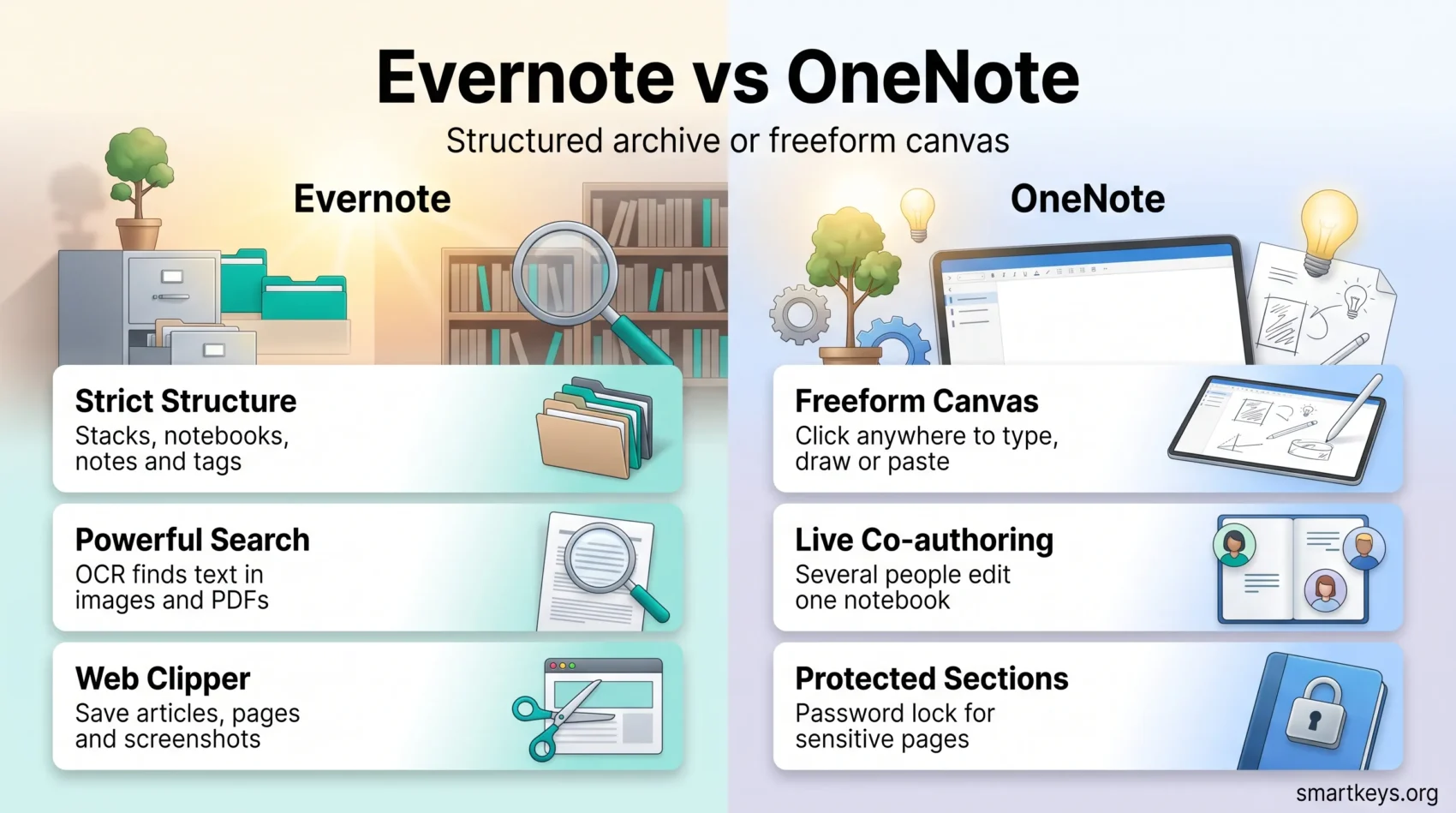
- Evernote enforces a strict hierarchy of stacks, notebooks and notes; OneNote gives you a freeform canvas.
- Both now ship AI: Evernote’s assistant on the Advanced plan, Copilot for Microsoft 365 subscribers.
Introduction to Note-Taking Apps
A note-taking app is the layer where half-formed ideas, meeting notes and reference material land before they become work. Get it right and your digital note-taking becomes a genuine asset. Get it wrong and you build a searchable landfill.
Evernote and OneNote both come from the early 2000s. OneNote shipped in 2003 as part of Microsoft Office; Evernote launched publicly in 2008 and, for years, defined the category. Both have been rebuilt several times since.
Their core philosophies still differ. Evernote imposes structure: stacks contain notebooks, notebooks contain notes, and tags cut across all of it. OneNote hands you a page you can click anywhere on and start typing, with notebooks, sections and pages as the loose scaffolding around it.
Neither approach is objectively better. Structured systems reward people who maintain them and punish people who do not. Freeform systems tolerate mess but rely on search to make that mess usable later. If you are building a broader second brain, that distinction matters more than any feature list.
Overview of Evernote
Evernote is still one of the best-known note-taking apps, aimed at students, professionals and small teams. Italian developer Bending Spoons acquired the company in 2022 and has since rebuilt the apps, tightened the free tier substantially and layered AI features onto the top plan.
History and Development
Evernote started as a straightforward capture tool: clip a web page, photograph a receipt, jot a note, find it later. Over time it added task management, calendar integration and a customisable home dashboard. The Bending Spoons era brought faster native apps and a much more aggressive pricing model, which is the single biggest change long-time users notice.
Key Features of Evernote
- Rich text formatting, tables and code blocks
- Web Clipper for saving articles, screenshots and full pages
- Optical character recognition, so text inside images and PDFs is searchable
- A customisable home dashboard with widgets for recent notes, tasks and a scratch pad
- Tasks and calendar integration inside notes
- Integrations with Google Calendar, Gmail, Slack, Microsoft Teams and Zapier
- Note templates for meetings, projects and personal planning
- AI Assistant, AI Transcribe, AI Edit and semantic search on the Advanced plan
If you already run automations between apps, Evernote slots into that stack cleanly — the same way tools compared in our Zapier vs Make comparison do.
User Experience and Interface
Evernote’s interface is dense but predictable. A left sidebar holds notebooks, tags, tasks and shortcuts; the home screen can be rearranged into widgets. Search is the strongest part of the experience: advanced operators, filters by notebook or tag, and OCR results all surface in one list. The trade-off is that the app expects you to file things, and filing is a habit that has to be maintained.
Overview of OneNote
Microsoft OneNote has shipped since 2003 and is free for anyone with a Microsoft account. It sits inside Word, Outlook and Teams the way a shared notebook sits on a team’s desk, which is a large part of its appeal for people already living in Microsoft 365.
History and Development
OneNote spent years split across multiple versions, which caused real confusion. Microsoft resolved this by consolidating on a single Windows app: OneNote for Windows 10 reached end of support on 14 October 2025, and users were directed to migrate to OneNote on Windows. If you are still opening the old app, that migration is overdue.
Key Features of OneNote
- Freeform pages: click anywhere and type, draw or paste
- Notebooks, sections and pages: a familiar three-level structure with tabs
- Mixed media: typed text, ink, audio recordings, images and embedded files on the same page
- Inking: pens, highlighters and handwriting that stays searchable
- Real-time co-authoring: several people editing one notebook at once
- Password-protected sections for sensitive material
- Copilot for Microsoft 365 Personal, Family and Premium subscribers, which can summarise pages and draft content
User Experience and Interface
The OneNote interface mirrors the Office ribbon, so anyone who uses Word will recognise it immediately. Pages behave like an infinite canvas rather than a document, which suits sketching, lecture notes and brainstorming. The downside is that a canvas with no rules can become a canvas with no findable content, and OneNote’s onboarding does little to nudge you toward good habits.
Evernote vs OneNote: A Comparative Analysis
Both apps serve students, professionals and business users, but they solve the problem from opposite directions.
Evernote is a retrieval engine. Its organisational model, tagging and OCR exist so that a note captured two years ago surfaces in a single search. That pays off if you capture a lot of reference material — clipped articles, scanned documents, receipts.
OneNote is a thinking surface. Its strength is capturing something quickly in whatever form it arrives, including handwriting on a tablet, and sharing that notebook with colleagues. For structured team work you will still reach for a dedicated tool; our Monday.com vs Trello comparison and ClickUp review cover that side.
Security is one concrete difference. OneNote lets you password-protect individual sections, which Evernote does not offer as a per-notebook control. If you keep client material or personal records in your notes, that single feature may decide the question.
The other concrete difference is cost. OneNote is free and stays useful when free. Evernote’s free tier is not designed for long-term use, which pushes the real comparison to “OneNote free” versus “Evernote paid”.
Pricing Structure in 2026: Evernote vs OneNote
Pricing is where the two apps diverge most sharply, and it is the area most often out of date in older comparisons.
Evernote’s Pricing Plans
Evernote publishes four tiers. The limits below come from Evernote’s own plan comparison:
- Free: 50 notes, 1 notebook, 1 device, 1 GB of storage and 200 attachments. No AI features.
- Starter: $8.25 per user per month billed annually ($99 per year). Raises limits to 1,000 notes, 20 notebooks, 3 devices and 5 GB of storage, and includes AI features.
- Advanced: $20.83 per user per month billed annually ($249.99 per year). Unlimited notes, notebooks and devices, unlimited storage, and full AI access including AI Assistant, semantic search, AI Transcribe and AI Edit.
- Enterprise: custom pricing through Evernote sales, with a 14-day trial.
The practical takeaway: the free plan is a trial. Fifty notes and one device will not carry a working note system, so budget for Starter at minimum if Evernote is your choice.
OneNote’s Pricing Options
OneNote itself is free. What you pay for is storage and the wider Microsoft 365 suite:
- Free Microsoft account: OneNote across web, desktop and mobile, plus 5 GB of OneDrive storage.
- Microsoft 365 Personal: $9.99 per month or $99.99 per year, including 1 TB of OneDrive storage and the desktop Office apps.
- Microsoft 365 Family: $12.99 per month or $129.99 per year, with up to 6 TB shared across six people.
Compared like for like, Evernote Starter ($99 per year) costs almost exactly the same as Microsoft 365 Personal ($99.99 per year) — except the Microsoft subscription also brings Word, Excel, Outlook, 1 TB of storage and Copilot. That is a hard comparison for Evernote to win on value alone.

Features Comparison: A Deep Dive
Price aside, the day-to-day experience comes down to four things: how notes are structured, what each app connects to, how teams share, and how well web capture works.
Note Formats and Organization
Both handle text, images, audio and attachments. Evernote enforces stacks, notebooks and notes, with tags as a cross-cutting layer — closer to a database than a binder. OneNote uses notebooks, sections and pages with visual tabs, and lets you place content anywhere on a page. Evernote suits reference libraries; OneNote suits course notes, sketches and anything you want to lay out spatially, much like a personal kanban board works for tasks.
Integration Capabilities
Evernote connects outward: Google Calendar, Gmail, Slack, Microsoft Teams, Zapier and a public API. OneNote connects inward: Outlook meeting details, Word documents, Teams channels and the rest of Microsoft 365. Which is better depends entirely on where the rest of your work already lives — the same calculation covered in our Zoom vs Microsoft Teams comparison and Slack review.
Collaboration Tools
OneNote’s co-authoring is the stronger feature here: several people can edit the same notebook simultaneously, with changes attributed by author. Evernote supports sharing notes and notebooks with view or edit permissions, which is fine for handing something over but weaker for sustained joint editing. For running meetings out of either app, a consistent meeting notes template matters more than the tool.
Web Clipping Functions
Evernote’s Web Clipper remains the benchmark: it saves simplified articles, full pages, bookmarks or screenshots, and lets you annotate before saving. OneNote’s Web Clipper captures pages competently but offers fewer capture modes and less annotation. If your workflow is heavily research-driven, this is one area where Evernote still clearly leads.
Productivity and Efficiency: How Each App Stacks Up
Evernote rewards a structured workflow. Extensive tagging, saved searches and OCR mean a well-maintained Evernote gets more useful the more you put in it. That fits people who treat notes as a long-term reference system rather than scratch space.
OneNote rewards speed of capture. There is no filing decision to make before you start typing, which lowers the friction of writing anything down at all. For brainstorming, lecture notes or handwritten annotation on a tablet, that freedom is the point.

Search is where the gap shows. Evernote offers advanced search syntax, filters and OCR across images and PDFs. OneNote searches typed text, ink and audio too, but with a simpler query model. In a small notebook the difference is invisible; across thousands of notes it is decisive.
AI has narrowed some of this. Evernote’s Advanced plan adds an AI assistant, semantic search and transcription. Microsoft includes Copilot with Microsoft 365 Personal, Family and Premium subscriptions, which can summarise a page or draft from your notes. Both are useful; neither replaces a system you actually maintain. If you want to see how AI features compare across the wider productivity market, our Notion AI vs Coda comparison and roundup of productivity apps are a good next step.
Security and Privacy Concerns
Notes tend to accumulate sensitive material — client details, passwords people should not have pasted, medical appointments. Both companies publish privacy policies and both process user data; the honest answer is that you should read the current policy of whichever app you pick rather than trust a summary.
What can be stated concretely is the feature difference. OneNote offers password-protected sections, so part of a notebook can be locked independently of your account login. Evernote does not provide an equivalent per-notebook lock. Neither app offers zero-knowledge end-to-end encryption of your entire account by default, so anything genuinely confidential belongs in a dedicated password manager or encrypted vault, not a note.
Which App Fits Which User
Rather than guess at aggregate sentiment, it helps to match the app to the job.
Choose Evernote if you clip a lot of web content, scan documents and need to find them years later; if OCR and advanced search are core to your work; or if you want a note app that also handles tasks and calendar without pulling in a separate task management tool. Budget for a paid plan from day one.
Choose OneNote if you already pay for Microsoft 365, work with colleagues in Teams and Outlook, write by hand on a tablet, or simply want a capable free notebook with no note limit. It is also the better pick when several people need to edit the same notebook at once.
Consider neither if what you actually need is a project tool. Notes are not a substitute for structured work tracking — compare options in our Asana vs Trello comparison or set up a goal tracking system instead. If a database-style workspace is closer to what you want, Airtable vs Notion covers that ground.
Pros and Cons of Evernote
Advantages of Using Evernote
- Best-in-class search: operators, filters and OCR across images and PDFs.
- Strong web capture: the Web Clipper handles articles, screenshots and annotations.
- Clear hierarchy: stacks, notebooks, notes and tags scale to large archives.
- Customisable home dashboard with widgets for tasks, recent notes and a scratch pad.
- Platform-neutral: works the same whether your organisation runs Google Workspace or Microsoft 365.
- AI features on the Advanced plan, including semantic search and transcription.
Disadvantages of Using Evernote
- The free plan is a trial: 50 notes, one notebook and one device.
- Cost: $99 per year for Starter buys a note app; the same money buys the whole Microsoft 365 suite.
- No per-notebook password protection, unlike OneNote’s protected sections.
- Weaker real-time collaboration than OneNote’s co-authoring.
- Repeated pricing changes under new ownership have unsettled long-time users.

Pros and Cons of OneNote
Advantages of Using OneNote
- Free with no note limit: a Microsoft account gets you the full app and 5 GB of OneDrive storage.
- Deep Microsoft 365 integration with Word, Outlook and Teams.
- Excellent inking: handwriting and drawing on tablets, with handwriting still searchable.
- Real-time co-authoring for shared notebooks.
- Password-protected sections for sensitive pages.
- Copilot included for Microsoft 365 Personal, Family and Premium subscribers.
Disadvantages of Using OneNote
- Freeform layout invites mess if you never impose your own structure.
- Simpler search than Evernote once your notebooks grow large.
- Version history has been confusing: OneNote for Windows 10 ended support in October 2025 and required migration.
- Weaker web clipping with fewer capture and annotation options.
- Best value is tied to Microsoft 365, which is a poor fit if your organisation runs Google Workspace.
Final Thoughts on Choosing the Right Note-Taking App
The decision is less about features than about two questions. First: which ecosystem does your work already live in? If the answer is Microsoft, OneNote wins on integration and on price, because you likely pay for it already. If the answer is Google Workspace or a mixed stack, Evernote’s neutrality is worth something.
Second: are you a filer or a piler? Evernote is built for filers and gives them a retrieval system that scales to tens of thousands of notes. OneNote is built for pilers and gives them a canvas that never asks where something should go. Forcing yourself into the wrong model is how note systems get abandoned.
If you are still undecided, the cheapest test is real usage. Run OneNote free for two weeks, then take Evernote’s trial and import the same material. Whichever one you keep opening without thinking about it is your answer. For a wider view of the same problem, our Evernote vs Google Keep comparison covers the lighter end of the market.
Conclusion
Evernote and OneNote both remain credible in 2026, but they now sell different things. Evernote sells retrieval — search, OCR, web capture and structure — at $99 to $249.99 per year. OneNote sells access: a free, capable notebook that becomes considerably more powerful if you already subscribe to Microsoft 365.
For most individual users who are not already paying Evernote, OneNote is the sensible default, and Microsoft 365 Personal is the upgrade path if you want more storage and Copilot. For researchers, consultants and anyone whose notes function as a searchable archive, Evernote’s search and clipping still justify the subscription.
Test both against your own material rather than a feature table. The right note-taking app is the one you will still be using in three years.
Found this useful?
Make SmartKeys a preferred source on Google, and our articles will surface more often in your Top Stories, AI Overviews, and AI Mode.
Add as Preferred SourceFAQ
What are the key differences between Evernote and OneNote?
The core difference is structure versus freedom. Evernote enforces a hierarchy of stacks, notebooks and notes with tags layered across them, and pairs that with powerful search and optical character recognition, so it works best as a long-term retrieval system. OneNote gives you a freeform canvas inside notebooks, sections and pages, where you can click anywhere and type, draw or paste. The second difference is commercial: OneNote is free with a Microsoft account, while Evernote’s free tier is capped at 50 notes and one device, so serious use requires a paid plan.
Are both Evernote and OneNote free to use?
OneNote is genuinely free: any Microsoft account gives you the full app across web, desktop and mobile, plus 5 GB of OneDrive storage. Evernote offers a free tier, but it is best understood as a trial. According to Evernote’s own plan comparison it is limited to 50 notes, one notebook, one device, 1 GB of storage and 200 attachments, with no AI features. Once you pass those limits you need a paid plan. If cost is the deciding factor, OneNote is the app that stays useful without a subscription.
What do Evernote and OneNote cost in 2026?
Evernote’s Starter plan is $8.25 per user per month billed annually, which works out to $99 per year, and the Advanced plan is $20.83 per user per month billed annually, or $249.99 per year. Enterprise pricing is quoted by Evernote’s sales team. OneNote itself costs nothing; the paid route is a Microsoft 365 subscription, priced by Microsoft at $9.99 per month or $99.99 per year for Personal, and $12.99 per month or $129.99 per year for Family. Note that Microsoft 365 Personal costs roughly the same as Evernote Starter but also includes Word, Excel, Outlook, 1 TB of storage and Copilot.
Which note-taking app is better for collaboration?
OneNote is the stronger choice for teams. Several people can co-author the same notebook at the same time, with edits attributed to individual authors, and shared notebooks sit naturally inside Teams and Outlook workflows. Evernote supports sharing individual notes and notebooks with view or edit permissions, which works well for handing material to a colleague but is weaker for sustained simultaneous editing. If your collaboration needs go beyond notes into task assignment and deadlines, a dedicated project tool will serve you better than either app.
Do Evernote and OneNote have AI features?
Both do, but they are gated differently. Evernote includes AI features from the Starter plan upward, with the fullest set on Advanced: an AI Assistant, semantic search, AI Transcribe and AI Edit. OneNote’s AI comes through Copilot, which Microsoft includes with Microsoft 365 Personal, Family and Premium subscriptions and which can summarise pages and help draft content. Neither set of features replaces a system you maintain yourself; they speed up drafting and retrieval rather than organising your notes for you.
Can I integrate other tools with Evernote and OneNote?
Yes, but they point in different directions. Evernote integrates outward with Google Calendar, Gmail, Slack, Microsoft Teams and Zapier, plus a public API, which makes it a reasonable choice in a mixed or Google-based stack. OneNote integrates inward with the Microsoft ecosystem: Outlook meeting details, Word documents, Teams channels and the rest of Microsoft 365. The practical question is not which app has more integrations, but which one connects to the tools your team already uses every day.
How do Evernote and OneNote handle privacy and security?
Both companies publish privacy policies and both process user data, so the sensible step is to read the current policy of whichever app you choose rather than rely on a summary. The concrete feature difference is that OneNote lets you password-protect individual sections, so part of a notebook stays locked independently of your account login, while Evernote has no equivalent per-notebook lock. Neither app applies zero-knowledge end-to-end encryption to your whole account by default, so genuinely confidential material belongs in a password manager or encrypted vault rather than a note.
Is OneNote for Windows 10 still supported?
No. Microsoft ended support for OneNote for Windows 10 on 14 October 2025 and directs users to OneNote on Windows, the app that ships with Microsoft 365. If you are still working in the old app, you should migrate: unsupported software stops receiving security updates, and your notebooks sync to the same OneDrive account either way, so the move is mostly a matter of installing the current app and signing in. Microsoft publishes a migration guide covering the process and the small feature differences between the two versions.





