

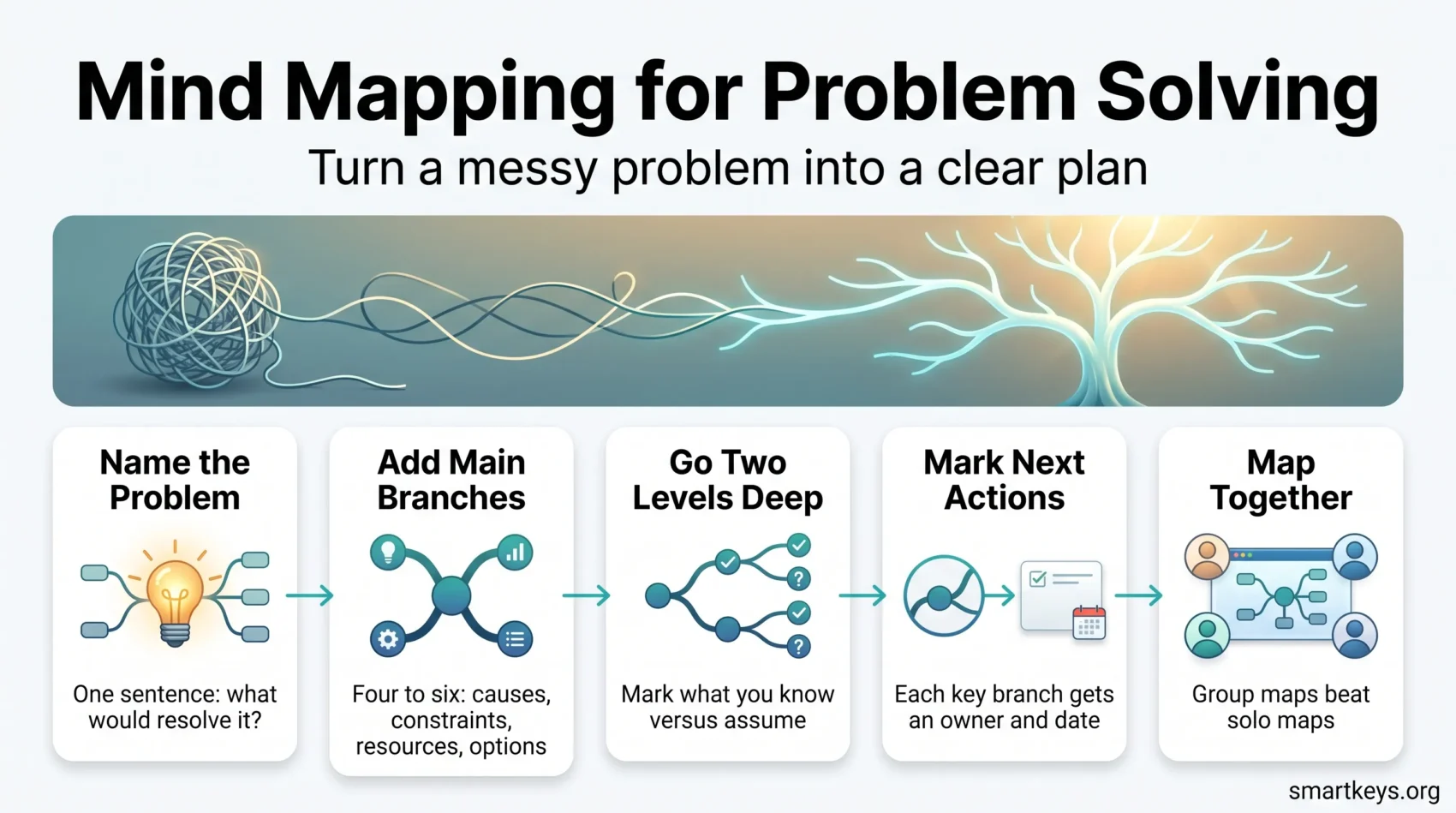
Stuck on a problem that keeps sliding around in your head? A mind map pins it down. Instead of a linear to-do list, you get one picture showing the problem, its causes, your constraints and your options at once. This guide covers what mind mapping does for problem solving (and what it doesn’t), a four-step method you can run in 15 minutes, how to carry a map into a real project, and what the major tools cost in 2026.
Key Takeaways
- A mind map moves a problem out of working memory onto a surface where you see the whole structure at once.
- The evidence favors mind mapping for learning and critical thinking, but its certainty is low. Expect a better thinking tool, not a measured productivity gain.
- Four steps: name the real problem, add 4-6 main branches, break those into sub-branches, then mark decisions and next actions.
- Build the map together. A 2025 meta-analysis put collaborative mapping ahead of solo mapping at g = 0.42.
- On a project, map the scope and hand the actions to your tracker. A map is a good way to see a plan and a poor way to run one.
- Free tiers cover most personal use. Paid plans start around $5 a month, mainly for private maps and better exports.
- Ignore the “visual learner” framing. Mind maps work because they externalize structure, not because of a learning style.
Why a mind map beats a list for messy problems
A list forces you to decide the order before you understand the problem. A mind map doesn’t. Write the problem down radially, one central node with branches spreading out, and three useful things happen:
- You offload working memory. Your brain holds only a handful of items at once, so once the pieces are on the page, that capacity goes back into thinking. It is the same reason a brain dump clears your head before a busy week.
- Relationships become visible. Two branches with the same root cause are obvious on a map and invisible in a bulleted list.
- The blank space invites more. An empty branch is a prompt. A finished paragraph isn’t.
That’s also why mind mapping helps when a problem feels overwhelming. You’re not solving it yet, you’re just making it finite. Something with edges is far less stressful than a vague dread at 2 a.m., and a map closes a lot of those nagging open loops in one sitting. If diagrams generally serve you better than prose, the wider case for visual thinking in task management is worth reading too.
What the research actually says
Mind mapping has picked up inflated claims over the years: “cut your work week from 20 hours to 6”, “82% of users solve problems better”. Those numbers come from vendor marketing, not studies. Here is what holds up.
Learning and recall. A meta-analysis in the Asia Pacific Education Review found that mind-mapping-based instruction outperformed traditional instruction on cognitive learning outcomes, with subject matter and education level acting as significant moderators.
Collaboration. The clearest finding is about who builds the map. A 2025 meta-analysis in Social Psychology of Education pooled 23 studies and 44 effect sizes and found collaborative concept mapping outperformed individual mapping, with a summary effect of g = 0.42. Activity structure and group size both moderated the result, so how you run the session matters as much as whether you run one.
The caveats matter, a lot. A 2026 systematic review in Frontiers in Medicine pooled 52 randomized trials with 3,312 participants in Chinese residency training. It reported large gains on theory, case analysis and procedural skill scores, then rated the certainty of that evidence as very low: 98% of the studies lacked allocation concealment and blinding, heterogeneity ran above 80%, and publication bias was detected. The authors called their findings “insufficient for strong practice recommendations”.
Practical read: expect better structure, better recall and better group discussions. Don’t expect a specific percentage improvement, and be suspicious of anyone who promises one.
One myth worth retiring: the claim that “65% of people are visual learners” and therefore need mind maps. The learning-styles model has been repeatedly tested and doesn’t hold up. Mind maps help because they put structure outside your head, and that works regardless of your supposed learning type.
Build a problem-solving mind map in four steps
Fifteen minutes and a blank page is enough. Paper works fine; software just makes editing easier.
1. Name the real problem
Write the central node last-thing-first: what would need to be true for this to be resolved? “Our onboarding is bad” is a symptom. “New users don’t reach their first success within a week” is a problem you can branch from. Keep it to one sentence; if you need two, you probably have two maps.
2. Add 4-6 main branches
Resist brainstorming solutions here. Branch by category instead:
- Causes: what is actually producing this?
- Constraints: budget, deadline, people, politics.
- Resources: what you already have.
- Options: possible moves, including doing nothing.
Four to six is the sweet spot. Fewer and you’re not decomposing; more and the map stops being scannable.
3. Break each branch into sub-branches
Go two levels deep, no further. For each sub-branch, note whether you know this or assume it. Marking assumptions is the step most people skip, and it’s usually where the real problem hides.
If a branch turns out to be a project rather than a detail, stop expanding it and handle it separately by breaking that goal into smaller steps. A map is for seeing the shape, not for holding an entire plan.
4. Mark decisions and next actions
A map that stops at “pretty diagram” wasted an afternoon. Close the loop:
- Circle the two or three branches that carry the most weight. If everything looks equally important, run the branches through the Eisenhower Matrix or the 80/20 rule before you decide.
- Mark every open question with a symbol you’ll recognize later.
- Convert each circled item into one concrete next action with an owner and a date.
Then move those actions into your task manager, calendar or ticket system. The map is the thinking; it isn’t the tracking. With more than a handful of competing branches, a scored task prioritization framework beats gut feel.
Mind mapping tools in 2026
The category has shifted since this article first ran. Free tiers are more capable, though most now cap the number of maps rather than the features. AI map generation, where a sentence of description returns a starting structure, has gone from novelty to standard. Prices below are the vendors’ published list prices as of September 2026 and change often, so check before buying.
- Coggle: the most generous free plan, with unlimited public diagrams, real-time collaboration and a cap of three private ones. Awesome is $5 a month for unlimited private diagrams; Organisation is $8 per member per month. Best if you want something simple in a browser tab.
- MindMeister: the gentlest learning curve and strong live co-editing, with unlimited collaborators even on the free plan, which stops at three maps. Personal is EUR 6.50 per user per month annually, Pro EUR 10.50, Business EUR 15.50. Pairs with MeisterTask for task tracking.
- Xmind: the deepest feature set, with logic charts, fishbone diagrams, org trees and solid offline support. Free covers 10 online maps. Pro is $4.92 a month, Premium $8.25, and only Premium adds real-time collaboration, unlimited maps and the larger AI credit allowance. Best when the map is a deliverable.
- Miro: not a mind mapper first, but the default if your team already lives on a shared whiteboard. Free allows three editable boards; Starter is $8 per member per month billed annually, Business $20. See the Miro and Lucidspark comparison if you are choosing a whiteboard instead.
- MindNode: still the nicest option for Apple-only users, with tight iCloud integration. It is subscription-only at $2.99 a month or $24.99 a year across all platforms.
If several people will edit the same map, the constraints match those of digital whiteboards for team collaboration: who can edit, how version history works, and whether guests need an account.
How to choose without overthinking it
Four questions settle it:
- Solo or team? Solo work rarely justifies a subscription, so start free.
- Do your maps need to stay private? This is where the free tiers stop, and the most common reason people pay.
- Artifact or scratchpad? Artifacts need real export options; scratchpads don’t.
- How sensitive is the content? Every cloud tool syncs your maps to its servers, which is worth a thought before you map strategy or personnel issues.
Paper or software?
Draw the first version by hand. It is faster, and the friction of redrawing keeps you from fussing over layout while you are still thinking. Switch to software the moment the map has to survive contact with other people: you can restructure branches without starting over, hang the relevant document, ticket or spec on the node it belongs to, and send one link instead of a photo of a whiteboard. If a map exists only so you can think for twenty minutes, paper is the better tool and always will be.
Using AI to start the map, not finish it
Most tools now generate a first-draft map from a text prompt. That’s useful for beating the blank page, and risky if you stop there.
An AI-generated map gives you the obvious decomposition of a problem: the branches anyone would think of. The value in mind mapping lies in the branches you add afterwards, the ones informed by what you know about your team, your customers and your constraints.
A workable pattern: let the model produce the skeleton, then delete at least a third of it and add your own. If nothing gets deleted, you didn’t think. That discipline is the same one that decides whether AI agent workflows pay off in daily operations.
Mapping with a team
This is where the evidence is strongest. Collaborative mapping beat individual mapping at g = 0.42 in the 2025 meta-analysis, and the same paper found that how the session is structured changes the result. Budget forty-five to sixty minutes, since the discussion is the point. A few things that make group sessions work:
- Agree on the central node first. Half of all unproductive sessions are two people solving different problems.
- Branch silently for five minutes. Everyone adds nodes at once, no discussion, which stops the loudest voice shaping the structure. It borrows from the logic of silent meetings for remote teams.
- Assign one person to prune. Group maps sprawl, and someone needs permission to merge duplicates and cut dead branches.
- Keep groups small. Group size was a significant moderator, and large sessions produce wide, shallow maps.
- Screenshot the map into the meeting notes. A map nobody revisits is a map that didn’t happen.
From map to project plan
A problem-solving map answers one question: what is actually going on here? A project needs a second layer, namely who does what, in which order, and what depends on what. Mind maps handle the first layer well and the second layer badly. Knowing where to hand off is most of the skill.
Start by mapping the scope rather than the schedule. Put the finished outcome in the centre and branch into deliverables, the people who care about them, the dependencies between them, and the things nobody has answered yet. Spotting a missing stakeholder at this stage costs you five minutes. Spotting one in week six costs you a sprint.
From there, four habits keep a project map usable:
- One next action per branch. Don’t write the whole task list under a branch, write only the single next thing that has to happen. The map stays readable, and it matches how work actually moves.
- Keep a symbol key. Pick a small, fixed set of marks, for example a question mark for an unknown, a star for a decision, a box for something already handed off. Consistency is what lets you read your own map a month later, or lets a colleague read it at all.
- Treat sprouting branches as a warning. A branch that keeps growing is usually scope creep announcing itself early. That is the moment to renegotiate the scope, not to keep drawing.
- Hand off, then revisit. Once branches have owners and dates, copy them into your project tool. The tracker becomes the source of truth and the map becomes the record of why the plan looks like this. Reopen it at milestones, not daily.
If you run the same kind of project repeatedly, such as a client onboarding or a product launch, save one good map as a template. The categories rarely change even when the content does, and starting from a half-filled structure removes the slowest part of the job.
One caution. A mind map is not a schedule and shouldn’t pretend to be one. It has no dates, no critical path and no way of showing that two branches compete for the same person in the same week. Use it to agree on the shape of the work, then let a Gantt chart, a board or a task list carry the timeline.
Where mind mapping doesn’t help
Worth saying plainly. Skip the map when:
- The problem is sequential. Deployment steps and approval chains belong in a checklist or flowchart, where order carries meaning.
- You already know the answer. Mapping a decision you’ve made is procrastination with good posture.
- The bottleneck is data. No amount of branching will tell you what a query would.
- It’s a two-option decision. A pros-and-cons list is faster and just as good.
- The group hasn’t agreed on the problem. A rushed session with no shared central node is worse than no map, because everyone leaves with a different picture of what was decided.
Pairing mind maps with other methods
Mind mapping slots neatly into workflows you may already use:
- With time blocking: map on Friday, schedule the resulting actions into next week’s calendar.
- With the Pomodoro Technique: one focused block to build the map, a break, then a second block to prune it. The gap does real work.
- With SWOT, five-whys or design thinking: use their stages as your branch labels instead of inventing categories.
- With a weekly review: one map of everything currently open, once a week, tends to surface the thing you’ve been avoiding.
- With a deep work block: build the map first, then use the uninterrupted time on the one branch the map identified as load-bearing.
Building a map asks for a stretch of uninterrupted thinking, which is harder than it sounds given what has happened to the average attention span at work. If procrastination is the real obstacle rather than complexity, these practical strategies address it more directly.
Conclusion
Mind mapping isn’t magic and it won’t reclaim fourteen hours of your week. The honest summary of the 2026 evidence is that the effect sizes look impressive and the study quality does not. What it reliably does is convert a vague, stressful problem into a visible structure with edges, and structure is what makes a problem solvable.
The method costs fifteen minutes: name the real problem, add four to six category branches, go two levels deep, then mark what you’ve decided and what happens next. Do it with the people affected rather than for them, and end with actions rather than a diagram. When the map turns into a project, move the actions into a tracker and keep the map as the reasoning behind them. Start with a free tool and a real problem you’re currently avoiding. That’s the whole test.
Found this useful?
Make SmartKeys a preferred source on Google, and our articles will surface more often in your Top Stories, AI Overviews, and AI Mode.
Add as Preferred Source




