Traveling for work is rewarding, but it quietly dismantles the systems that keep you productive at home: your desk, your routine, your uninterrupted focus blocks. With an unpredictable schedule and a new city outside the window, staying on task takes deliberate effort. The right travel productivity tips let you work while traveling without either the work or the trip suffering.
Business travel is firmly back. The Global Business Travel Association projects global business travel spending will reach a record $1.71 trillion across roughly 1.84 billion trips in 2026, so more professionals than ever are trying to do focused work from seat 14C and a hotel desk. To work effectively from your phone and laptop on the move, prepare your setup and your expectations before you leave: plan short, realistic work sessions, protect your connectivity, and draw a clear line between work hours and everything else.
Key Takeaways
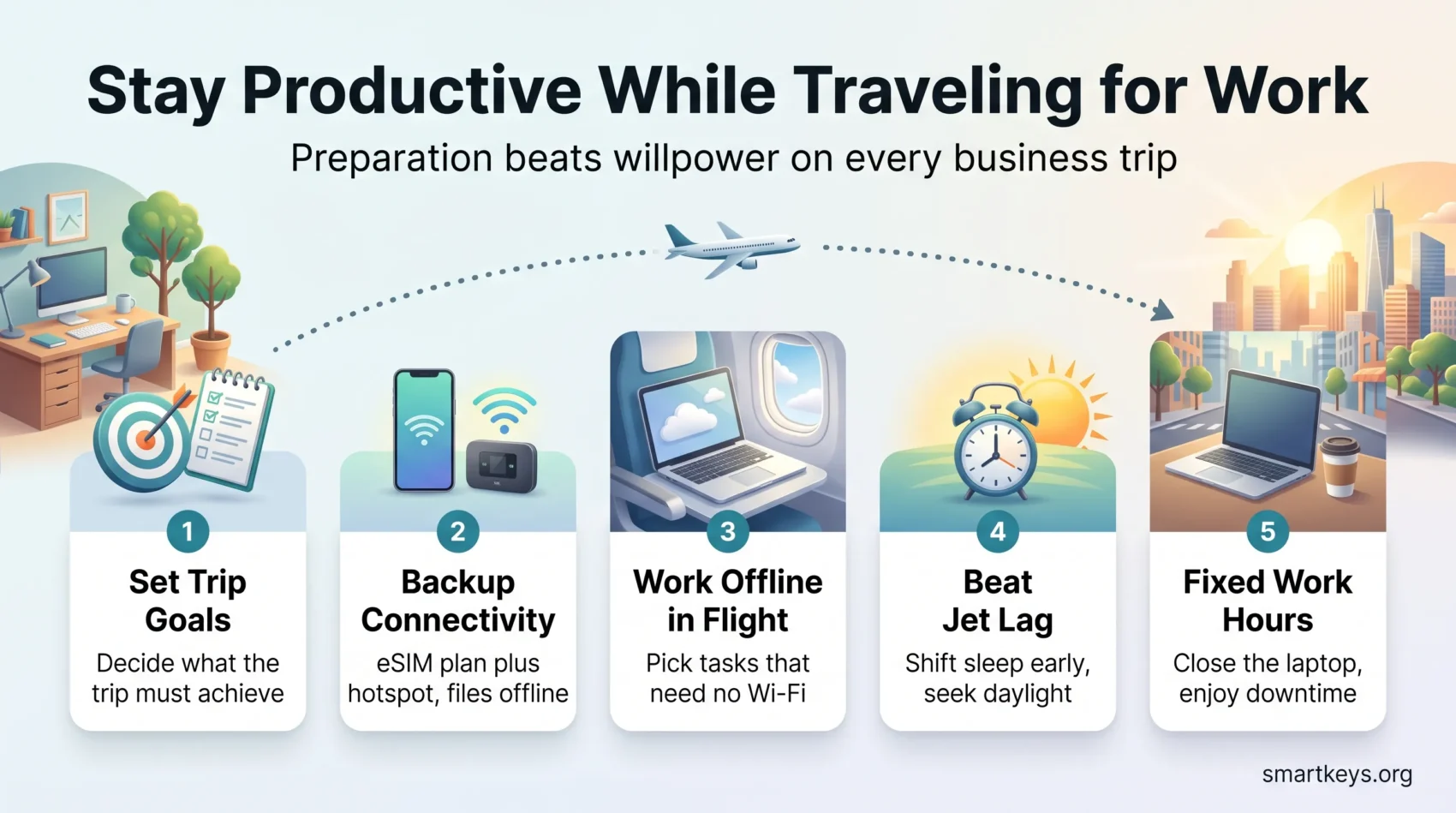
- Decide before departure what “done” looks like for the trip, then protect time for it.
- Keep a portable version of your daily routine so your body clock and your workflow stay stable.
- Carry redundant connectivity: an eSIM data plan (a digital SIM you buy and activate on your phone) plus a hotspot beats relying on hotel Wi-Fi.
- Plan flights around what you can do offline, not around what you hope the Wi-Fi allows.
- Shift your sleep schedule and light exposure toward the destination time zone before you land.
- Book accommodation with a real desk, reliable internet and quiet hours, not just a good rate.
- Set fixed work hours on the road so downtime stays guilt-free and you come home rested.
- Capture receipts and expenses the day they happen so reporting does not eat your first day back.
Understanding the Challenges of Traveling for Work
Work trips break the environmental cues your focus depends on. Unfamiliar rooms, shifting schedules and back-to-back meetings make it hard to drop into deep work, which is why time management strategies for travelers have to be simpler than the ones you use at home. A complicated system will not survive a delayed connection.
The most reliable fix is a structured, lightweight daily plan that front-loads the important work. Handle the one task that genuinely matters early, before meetings, traffic and time-zone math start eating the day. Everything else becomes a bonus rather than a source of stress.

Fatigue is the second challenge. Jet lag, poor sleep and irregular meals drain the mental energy that focused work requires, so wellness on the road is a productivity issue rather than a nice-to-have. Practical gear helps too: noise-cancelling headphones, a charged power bank and a second data connection remove a surprising share of daily friction.
Finally, plan around uncertainty. Draft documents, download files and prepare presentations before you leave, so a dead Wi-Fi network becomes an inconvenience instead of a lost day. Understanding where business travel is heading also helps you argue for trips that are genuinely worth taking.
Establishing a Daily Routine
A daily routine is the most reliable anchor you have while traveling. A schedule that echoes your normal one keeps you oriented when everything else changes. Set a fixed daily work block, plus rough times for meals, movement and sleep, and treat that block as seriously as an external meeting.
Start the day with a short, portable version of your productive morning routine. A few minutes of movement, water and a quick review of the day’s priorities is enough. A daily routine template makes this repeatable across hotels and time zones instead of something you rebuild each trip.

Connectivity deserves the same planning. Assume the venue Wi-Fi will disappoint you and carry two independent connections: a local or regional eSIM data plan on your phone plus tethering or a dedicated hotspot. Downloading the files you need for offline work is the third layer of that safety net.
It also helps to map out your priorities before you leave. Deciding in advance what the trip must deliver keeps you from filling the week with reactive work and calling it productivity.
Travel Productivity Tips for Planning Ahead
Most travel productivity problems are planning problems in disguise. A little pre-work and a small, well-chosen toolkit protect your travel work-life balance far better than trying to be disciplined in the moment.
Pre-Planning Your Schedule
Build the itinerary before you build the to-do list. Research travel times at your destination, block the meetings first, then place work sessions in the gaps that realistically remain. Leave buffers. Delays are normal, and a schedule with no slack turns one late flight into a ruined week. Solid calendar management is what makes those buffers survive contact with other people’s requests.
Plan your absence as carefully as your presence. Hand off or reschedule anything that truly needs you at a desk, and tell your team three things before you go: when you will be offline, which time zone you are in, and who covers urgent requests. That short message prevents most of the “quick question” interruptions that fragment a travel day.
Using Apps That Work on the Road
A short list of tools beats a long one. Task managers such as Asana or Todoist, a shared workspace like Google Workspace or Notion, and a single messaging channel cover almost everything a traveling professional needs. The productivity apps worth installing in 2026 are the ones that sync reliably and work offline. Setting up an AI meeting notes workflow is particularly useful on trips, since it captures decisions from back-to-back meetings while you are moving between them.
The trip itself needs a few tools of its own. An itinerary app such as TripIt collects booking confirmations from your inbox into one plan, and its paid Pro tier adds alerts for delays and gate changes. Your airline’s app is often just as fast for flight updates. In a city where you do not speak the language, offline maps and a translation app remove dozens of small frictions, from reading a menu to explaining an address to a driver.

Efficient Packing Strategies
Packing for work travel is easier when you stop improvising. Efficient packing tips save time and make sure the trip is not derailed by a missing adapter. A reusable travel packing checklist is the simplest fix.
Creating a Go-To Packing List
Write the list once, then reuse and refine it after each trip. A workable baseline includes:
- Clothing suited to the destination’s weather and dress code
- Versatile pieces that mix and match easily
- Wrinkle-resistant fabrics to avoid hunting for an iron
- Comfortable shoes you can actually walk a city in
- Medications and toiletries in travel-sized containers
- Key documents plus digital copies stored offline
Keeping the list in a notes app means you refine it over time instead of rebuilding it from memory at midnight. Simple checklists handle this kind of recurring, low-value decision well.
Packing for Remote Work
Your remote work essentials are what turn any room into a workspace:
- Laptop, a compact charger and a power bank
- An eSIM data plan or portable hotspot for backup connectivity
- Noise-cancelling headphones for flights, lobbies and open cafés
- A small pouch for cables, adapters and dongles
- A lightweight laptop stand or a few books to lift the screen to eye level
Packing cubes, rolled clothes and wearing your bulkiest layer on the plane free up space for the gear that matters. The goal is a bag you can work out of within five minutes of arriving.

Using Travel Time Wisely
Transit time is the most underused resource on any work trip. Treating flights, layovers and transfers as scheduled work blocks changes what a travel day is worth.
Maximizing Productivity on Flights
Onboard connectivity has improved sharply: several major carriers, including United, Qatar Airways and Emirates, are rolling out free Starlink satellite Wi-Fi across large parts of their fleets through 2026. Still, treat it as a bonus rather than a certainty. Decide before boarding which two or three tasks you will do. Pick work that survives without a connection: writing, reviewing, editing slides, clearing a downloaded reading list. Cabin hours are among the few genuinely uninterrupted blocks you get.
Using In-Between Time Effectively
Layovers, taxis and the twenty minutes before a meeting are ideal for small tasks you can finish in one go: approvals, replies, expense capture, a quick voice memo summarising what was just agreed. The same logic that makes a commute worth reclaiming applies to airports. Just as importantly, protect some of that time for rest and a message home. Travel productivity collapses fastest when you never actually stop.
Managing Time Zones and Jet Lag
Crossing time zones is the part of business travel most likely to wreck the work you flew out to do. Overcoming jet lag is mostly about giving your body clock consistent signals, and starting before you take off.
Techniques to Beat Jet Lag
- Shift your sleep schedule in the days before departure, moving bedtime toward the destination’s time.
- Stay hydrated during the flight; dehydration makes fatigue and disorientation worse.
- Favour lighter meals in the air and time them toward your destination’s eating pattern.
- Sleep on overnight flights when you can, and use an eye mask and headphones to make that realistic.
- Resist a long nap on arrival. Staying up until local bedtime resets your clock faster.
Adjusting to Local Time Quickly
- Adopt local meal and sleep times immediately, even if the first day feels rough.
- Get outside in daylight soon after arrival; natural light is the strongest cue your body clock has.
- Limit bright screens late in the evening so your wind-down actually works.
- If you use melatonin, treat it as a supplement to discuss with a clinician rather than a default.

None of this makes a long-haul trip effortless, but consistent light, sleep and meal timing shorten the adjustment considerably. Keep the plan flexible and let the first day be lighter than the rest.
Staying Organized While Traveling
Organization on the road is mostly about reducing the number of things you have to remember. Keep working files in cloud storage with an offline copy, and store travel documents (tickets, IDs, confirmations, insurance) in one clearly named folder rather than scattered across your inbox.
Email is where trips go sideways. Set an out-of-office that states when you will respond, batch replies into two fixed windows instead of checking constantly, and let the rest wait. Grouping meetings geographically cuts travel time between them and buys back hours you would otherwise spend in transit.
Expenses deserve the same discipline. Photograph receipts the moment you get them and log them the same day. Tools like Expensify or QuickBooks turn reporting into a few minutes rather than a lost afternoon. Platforms such as Navan combine booking, policy and expense capture in one place.
Security is the piece most travelers skip. Public airport and hotel networks are shared, so use your company VPN (a virtual private network that encrypts your connection) or your own mobile data for anything sensitive, keep devices locked and updated, and avoid working on confidential material in view of the person in the next seat. The basics of cybersecurity for remote work apply doubly when your office is a departure lounge.
Long trips also test your motivation, especially in the second week. These strategies for staying motivated help when your energy dips.
Prioritizing Wellness on the Road
Health is the input, and productivity is the output. On a compressed schedule, the fastest way to lose a working day is to skip sleep, eat badly and never move.
Maintaining a Healthy Lifestyle
Plan your health and wellness during travel the way you plan meetings. Choose meals that give steady energy, keep simple snacks like fruit and nuts in your bag so airport options are not your only choice, and drink water consistently. What you eat has a real effect on how well you concentrate.
Sleep matters most. Keep wake times as consistent as the itinerary allows, because rest is the foundation everything else sits on. Staying in touch with people at home also takes the edge off longer trips.
Finding Time for Exercise
Exercise while traveling works best when it is scheduled and small. A twenty-minute hotel workout, a morning walk or choosing to walk between two meetings all count, and the effect of movement on focus and mood shows up the same day. Thinking in terms of managing energy rather than only time makes it obvious why this belongs on the calendar.
Balancing Work and Downtime
Wellness and productivity both depend on one decision: when you stop working. Without a fixed end to the workday, hotel evenings quietly turn into extra office hours, and you return home more tired than when you left.
Set clear work hours for each day of the trip and share them with your team. Inside those hours, short timed focus sessions fit the fragmented travel day well, for example 25 minutes of work followed by a five-minute break. Outside them, close the laptop and protect your personal time as firmly as you would at home.
Use the downtime deliberately. A walk through a local neighborhood, a meal away from the hotel or an hour in a museum recharges you in a way that scrolling in your room does not. If you extend a trip with a personal day, block it in the calendar so it does not fill up with calls.
Setting Clear Goals for Each Trip
Clear travel goals are what separate a productive trip from an expensive one. Before you leave, write down what the trip must achieve: the deal advanced, the relationships built, the decisions made. Then let that define your schedule.
Split goals into daily and trip-wide objectives. Daily goals cover specific meetings and deliverables. Trip-wide goals cover the outcomes that justify the flight.
- Keep a short checklist so you can see whether each day moved the travel goals forward.
- Review the itinerary each morning and adjust for what changed overnight.
- Close the loop after the trip: capture notes, follow-ups and lessons while they are fresh.
That last step is the one most people skip, and it is where the compounding value of business travel actually lives.
Setting Up Technology for Remote Work
Technology is what makes a hotel room a viable office, provided you set it up before you need it.
Essential Tools and Resources for Productivity
A workable travel stack usually includes:
- A cloud workspace such as Google Workspace or Microsoft 365, with offline access switched on
- Video conferencing (Zoom, Teams or Meet) tested on your actual travel connection
- A task manager like Asana, Trello or Todoist so priorities survive the trip
- An eSIM data plan or mobile hotspot as your primary backup connection
- One messaging channel, such as Slack or Teams, rather than five places people can reach you
Configure and test all of it at home. Enabling offline mode, downloading the right files and confirming your VPN works from a mobile connection takes fifteen minutes and prevents the most common travel-day failures. If the hotel desk turns out to be unusable, a coworking day pass is often the quickest fix in larger cities.
If your role is increasingly location-independent, borrow the habits of people who work while traveling full time, along with the boundaries and routines that keep remote work sustainable.
Conclusion
Staying productive on the road comes down to preparation rather than willpower. Decide what the trip must achieve, carry a routine you can run anywhere, protect your connectivity, and treat sleep, food and movement as part of the work rather than a luxury.
The aim is not to squeeze work into every gap. It is to do the few things that matter well, then be present for the parts of travel that make it worth doing: the meetings that only work face to face, and the city you flew to. Applied consistently, these travel productivity tips make business trips feel less like lost weeks and more like accelerated ones.
Found this useful?
Make SmartKeys a preferred source on Google, and our articles will surface more often in your Top Stories, AI Overviews, and AI Mode.
Add as Preferred Source