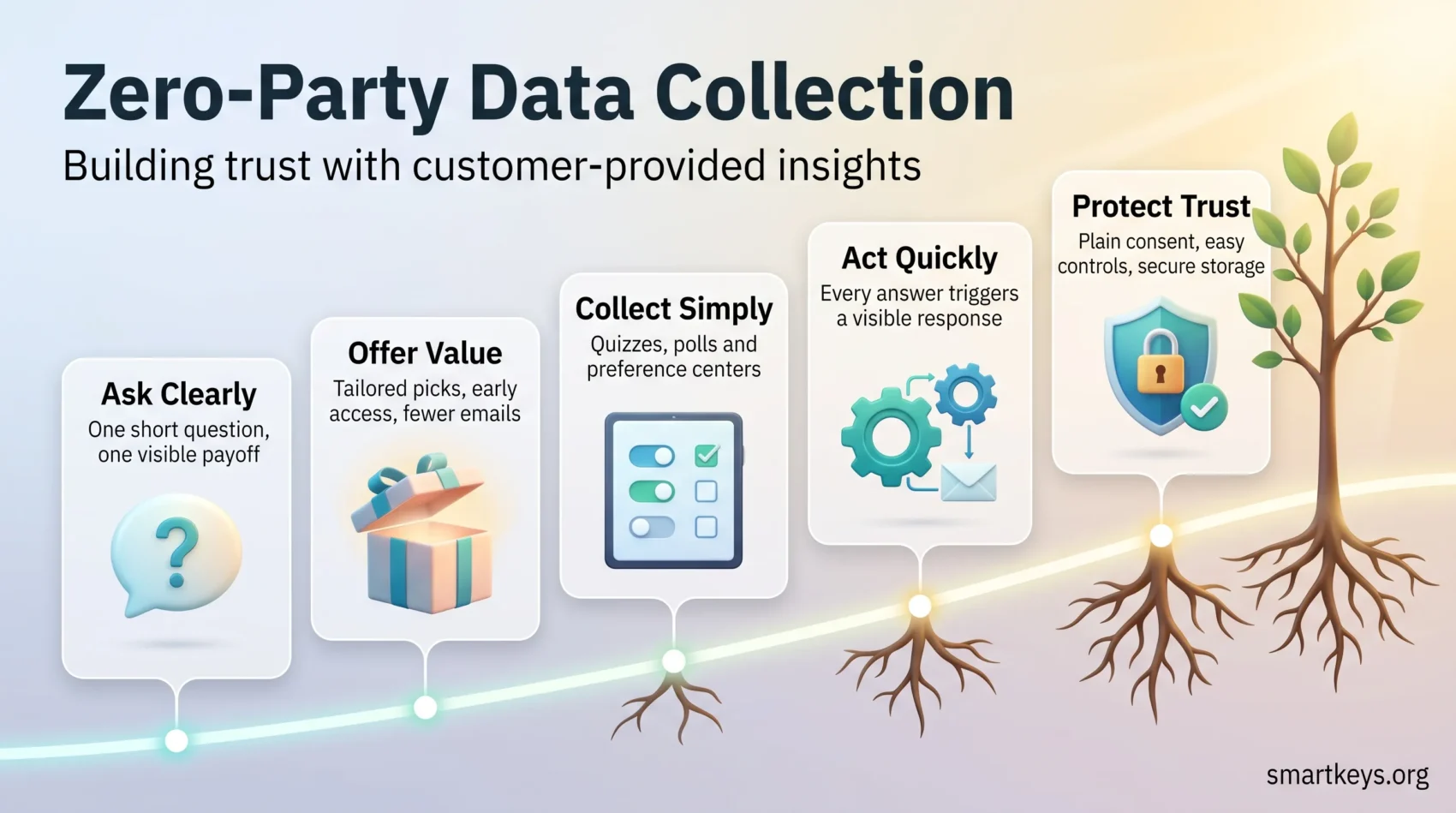
Your customers will tell you what they want, if you give them a reason to. Zero-party data is information people share on purpose: the topics they tick in a preference center, the answer they give in a quiz, the skin type they enter in a product finder. You do not infer it. They state it, and they know they stated it.
That distinction has become more valuable, not less. For years the pitch was that third-party cookies would vanish and volunteered information would fill the gap. The cookie deadline never arrived. What did arrive was a wider patchwork of consent laws and customers who are visibly tired of being profiled.
This guide covers the practical side of zero-party data collection: what counts as zero-party data, how it fits next to your other sources, which collection methods people actually finish, and how to measure whether the program pays for itself.
Key Takeaways
- People share preferences when the question is short and the benefit is obvious.
- Stated preferences beat inferred signals on accuracy, and they arrive with consent attached.
- Third-party cookies did not disappear, so build the case on trust and accuracy, not a deadline.
- Start small: a preference center and one well-placed quiz beat a long survey nobody finishes.
- Every question you ask should trigger something the customer can see.
Why zero-party data matters in 2026
The old argument was simple. Google would switch off third-party cookies, so marketers needed another source of audience information. That deadline kept moving, then went away entirely. Google shut down its Privacy Sandbox initiative in October 2025 and retired the Topics, Protected Audience and Attribution Reporting APIs. Third-party cookies are still supported in Chrome, allowed by default, with no published removal date.
The case for asking customers directly survived that reversal. Three forces still push in the same direction, and none of them depends on a browser announcement.
Browsers already removed a large share of the signal
Safari blocks third-party cookies through Intelligent Tracking Prevention, its built-in system for limiting cross-site tracking. Firefox isolates them with Total Cookie Protection. Chrome kept them, but its users can switch them off in settings. The result is uneven coverage: your tracking-based audience looks complete in the dashboard, yet it quietly excludes a large group of your customers.
Consent rules keep expanding
Twenty US states had comprehensive consumer privacy laws in force during 2026, with Indiana, Kentucky and Rhode Island joining on 1 January, according to the MultiState privacy tracker. Europe adds the General Data Protection Regulation (GDPR), the EU rulebook that requires a clear legal basis for using personal information. An answer a customer typed into your form, for a purpose you named on the same screen, is about as defensible as personal information gets. Our guide to data privacy trends in 2026 covers the wider rulebook.
Inferred data is often simply wrong
Behavioral guessing fails in ordinary ways. Someone browses crib mattresses for a friend’s baby shower, gets tagged as an expecting parent, and receives nursery emails for the next year. One question (“who are you shopping for?”) would have prevented the whole sequence. Wrong guesses cost twice: wasted sends, and a customer who now thinks you are watching rather than listening.
Bottom line: ask clearly, offer something useful, and protect what you are given. That keeps personalization working without relying on signals you no longer control.
What zero-party data actually is
Forrester introduced the term to describe information a customer intentionally and proactively shares with a brand. In practice that means preference center selections, stated purchase intentions, and personal context such as skin type, shoe size, dietary preference, or how someone wants to be addressed.
The line between zero-party and first-party data is about intent, not ownership. If a shopper clicks three pairs of running shoes, that is first-party behavior: you observed it. If the same shopper answers “I run trails, twice a week” in a product finder, that is zero-party: they told you, on purpose, expecting you to use it.
The collection tactics are deliberately simple. Short quizzes, single-question polls and onboarding questionnaires capture explicit answers rather than inferred ones.
- Typical examples: preference center selections, stated budget or size, shopping occasion, topic interests.
- Where it fits: onboarding, the first email, a product finder, the thank-you page after a purchase.
- Action tip: map every answer to an activation, so no question is asked without a visible consequence.
How zero-, first-, second- and third-party data compare
Not all audience information is equal. Some is volunteered, some observed, some bought, and each carries a different accuracy profile and trust cost.
Strengths, limits and trust implications
Volunteered answers offer high accuracy and clear consent, because the customer told you directly. They require a value exchange, and what people say does not always match what they do. Treat a stated preference as intent, not as a prediction.
First-party behavior covers visits, purchases and time on page. It gives you recency and scale, but it explains what happened without explaining why. A first-party data strategy and a zero-party program work best together rather than as alternatives.
Second-party data is another company’s first-party information, shared through a partnership. Use it when the provenance is documented and the original consent covers your use.
Third-party data delivers reach, but it is non-exclusive, hard to audit for accuracy, and its consent chain is usually opaque.
When to combine stated preferences with behavior
- Use explicit preferences to define segments and choose the core offer.
- Layer first-party behavior to refine timing and channel. Behavioral analytics turns a stated interest into a well-timed message.
- Reserve second-party sources for narrow targeting where you can verify where the information came from.
- Avoid building core personalization on third-party lists you cannot check.
Practical rule: let customer answers set intent, and let observed signals decide the moment.
The business benefits: relevance, accuracy and a defensible position
Clear customer choices let you build offers that feel useful rather than uncanny. When people tell you what matters, you match products and messages to stated intent.
Recommendations that actually fit
A skincare brand that asks “oily, dry or combination?” can recommend three products instead of thirty. A publisher that asks which two topics you care about can cut its newsletter to the part you read. Both are small asks with a visible payoff, which is why people complete them. The same logic drives e-commerce personalization and AI personalization in customer experience.
Cleaner profiles and less wasted spend
Accurate information lowers waste. Fewer irrelevant sends means fewer unsubscribes and less budget spent reaching people who were never going to buy. Stated preferences also give your reporting something firm to segment on. If you are formalizing that measurement layer, the analytics maturity model is a useful checkpoint.
A compliance position you can defend
Consent-based collection is easier to document than inference. You can show the exact screen, the wording, and the purpose you stated at the time. That is the difference between a privacy review that takes an afternoon and one that takes a quarter. A privacy compliance framework makes this repeatable, and data governance keeps the records usable.
Designing your zero-party data strategy
Start with outcomes, not questions. Every preference you collect should map to something you will actually do.
1. Define the objective. Decide what the program is for: better recommendations, fewer returns, higher repeat purchase, or product feedback. Write it down before drafting a single question.
2. Tie each question to an action. If an answer will not change an email, a recommendation or a product decision, do not ask it. Unused questions are the fastest way to lose completion rates.
3. Pick the moment. Ask where friction is lowest: onboarding, the post-purchase page, or a loyalty sign-up. Asking during checkout usually costs you the sale.
4. Make the exchange explicit. Say what the customer gets back: a shorter email cadence, early access, a fitted recommendation. Vague benefits produce vague answers.
5. Plan the plumbing first. Decide where answers will be stored, which system owns the profile, and who can read it. Retrofitting this is the most common reason good programs stall.
- Link every question to a downstream action.
- State the value exchange in plain words on the same screen.
- Integrate collection into your core systems from day one.
- Keep pacing respectful and provide obvious controls.
Zero-party data collection methods customers actually complete
Short, helpful interactions produce the most honest answers. Keep prompts brief and make the payoff visible in the same interaction.
Quizzes, polls and one-question surveys
A single question in an onboarding flow or an email outperforms a ten-field form. Adaptive questions help too: let the second question depend on the first answer, so it feels like a conversation. SurveyMonkey and the lighter tools in our Alchemer and Google Forms comparison both handle embedded collection.
Preference centers, onboarding questionnaires and registration forms
A preference center lets customers set frequency, channels and topics themselves. It is the least glamorous tool here and usually the most valuable, because it turns an unsubscribe into an adjustment. Onboarding forms should ask only what you will use in the first week.
Post-purchase feedback, reviews and loyalty programs
The moment after a purchase is one of the few times customers expect to be asked something. Loyalty members go further: they join knowing that sharing more brings better rewards, which is why they carry the richest profiles. Our guide to customer loyalty in the digital age covers how to structure that trade fairly.
Contests, social polls and product finders
Social polls are cheap and low-commitment. Product finder quizzes do double duty: the customer gets a recommendation, you get a stated need. Both work best when the result appears immediately, not by email three days later.
- Design tip: one question, one visible payoff.
- Control: a preference center that lets customers set what they share.
- Follow-up: post-purchase reviews and loyalty prompts to enrich profiles over time.
Turning answers into action across channels
An answer that changes nothing teaches customers not to answer again. Use explicit inputs to trigger emails, in-app messages and notifications that match what people said.
Personalized journeys and triggered messages
When a customer selects a preference, the follow-up should fire while the choice is still fresh. Small nudges beat a redesigned experience: a fitted recommendation, a shorter onboarding path, an education sequence at the pace they chose. Coordinating that across channels is the core of omnichannel marketing.
Segmentation for lifecycle marketing
Segment by stated goal, interest level or occasion rather than by demographic proxy. That lets you match message depth to the audience and cut fatigue, which is one of the quieter drivers behind customer retention.
Feeding product teams
Stated preferences expose gaps that behavior cannot. If a fifth of your quiz respondents pick an option you do not stock, that is a roadmap item, not a marketing insight. Route answers to product as well as to campaigns, and use data storytelling to make the pattern land with people who never open the dashboard.
Building a stack that collects and activates
A workable stack makes every answer usable within minutes, not quarters. Start modular: capture preferences, push them into one profile, act on that profile.
Preference center, survey tools, CDP and integrations
Choose a configurable preference center so customers control frequency, channels and topics without contacting support. Pair it with light survey tools that write answers directly into your profile store.
A customer data platform is the connective tissue. A CDP, the system that merges records from different tools into one customer profile, resolves identity and builds audiences. A customer engagement platform (CEP) then orchestrates the journeys. Our overview of customer data platforms explains where the boundary sits, and CRM trends for 2026 covers how these systems are converging.
- Map the tools: preference center, forms, surveys and quizzes feeding one unified profile.
- Build integrations so collection points stream through without lag or silent loss.
- Set access controls early, so the profile stays clean and auditable as more teams use it.
Email platforms matter too, since most activation still runs through them. Our Mailchimp and Klaviyo comparison looks at how each handles segmentation from custom fields.
Privacy, consent and trust: doing this properly
Transparent consent is not a chore bolted onto the form. It is the reason people answer at all.
Start with plain language. Pew Research Center found in its May 2023 survey that 61% of Americans think privacy policies do a poor job of explaining how companies use people’s data. If your explanation lives only in a policy document, most customers will never read it. Put one sentence next to the question instead.
Transparent consent, frequency controls and security basics
Say what you collect, why it helps the customer, and what they will receive as a result. Show the benefit in the same view as the ask.
Give people control over contact frequency. A visible preference page with simple toggles lets someone dial you down instead of leaving. That option often saves more subscribers than a win-back campaign.
Collect only what you will use, encrypt it, set a retention period, and limit who can read it.
Aligning with GDPR, US state laws and browser rules
With twenty US state privacy laws in force in 2026 and GDPR enforcement continuing in Europe, consented collection is the practical baseline. Map the legal requirement to the interface so compliance improves the experience instead of interrupting it. Companies operating across regions should also check data localization laws, since where answers are stored can matter as much as how they were collected. The same principles apply to employee data at work.
- Write consent copy in plain words and link it to the preference center.
- Offer obvious opt-outs and easy preference updates.
- Limit retention and audit access to reduce exposure.
“Respectful controls and visible benefits invite people to share data on their terms.”
Result: lower legal risk and marketing that stays useful. Treating privacy as part of the product experience is what separates a customer-centric culture from a slogan.
What it looks like in practice
The figures below come from published Braze case studies for each brand.
Mission-driven updates: ShareTheMeal
ShareTheMeal, the fundraising app run by the UN World Food Programme, built an engagement loop around in-app surveys, tailored video messages and personalized push notifications. Braze reports a 114% lift in one-month retention and a 53% lift in sessions against a control group, with 137% higher six-month retention. The team ran more than 600 A/B tests to get there.
Entertainment recommendations: Max
Max ran a “What’s Your Hogwarts House” survey as an in-app message. The answer triggered an email for opted-in primary account holders and a push notification for everyone else. Braze reports a 3.36% lift in viewership of recommended titles, a 3.12% lift in session starts, and a click rate six times the benchmark. Modest in percentage terms, large in absolute terms at that scale.
Wellness journeys: Wellhub
Wellhub, the corporate wellbeing platform formerly known as Gympass, combined short in-app surveys with journey orchestration triggered by product actions such as searching for yoga or exploring a partner gym. Braze reports a 3x increase in sign-up volume, click rates of up to 70%, and 25% of net-new revenue associated with a new subscriber stream.
Retail: preference centers and post-purchase loops
Retailers combine several small asks rather than one large one. Sephora’s Beauty Insider program and MeUndies’ preference settings feed loyalty and email personalization. Product finder quizzes and review request emails do the same job: collect one useful attribute at a moment when the customer expects to be asked. Learn practical execution tips in our omnichannel strategies guide, and see how the same inputs shape conversational commerce.
- Takeaway: relevance built on stated preferences lifts retention, not just clicks.
- Method: every published result came from repeated testing, not one launch.
Measuring impact and improving the program
Track a small set of measures so you can prove value early, tied to business goals rather than survey vanity metrics.
Core KPIs to watch
Consent and completion rate show how well the ask converts. Track completion per question, not only per form, so you can find the one that drives people away.
Profile enrichment measures how many usable attributes you add per customer, and whether those attributes actually move people into higher-value segments.
Engagement and revenue connect collection to outcome: click rates on personalized sends, repeat purchase rate, and revenue from journeys triggered by stated preferences.
Decay is the one most teams forget. Preferences go stale, so track how old your average stated attribute is and re-ask on a sensible cycle.
Test and learn
Iterate on incentive, question order and phrasing to raise completion without lowering answer quality. Test on small samples first, and test across channels, since the same question performs very differently in email, in-app and on-site. Our overview of AI in marketing covers where automated testing helps and where it adds noise.
- Set targets for consent and completion before launch.
- Measure enrichment by segment value, not by field count.
- Test incentives and channel mix, and re-ask before answers go stale.
Conclusion
Consent and a clear value exchange are now the working basis of customer relationships, not an add-on.
Zero-party data outlived the cookie deadline that was supposed to make it essential. It survived because the logic holds: when you ask plainly and give something useful back, customers tell you things no tracking script could infer.
Let stated preferences set intent and observed behavior set timing. Prioritize the few questions that change something, and activate quickly enough that the customer notices.
Then measure consent, completion, enrichment, engagement and revenue, and keep the controls visible. That is what turns a survey into a relationship. The wider shift is covered in our look at customer experience trends for 2026.
Found this useful?
Make SmartKeys a preferred source on Google, and our articles will surface more often in your Top Stories, AI Overviews, and AI Mode.
Add as Preferred Source