Syllaby is an AI video platform that turns keyword research into short social videos. You pick a topic, the tool writes a script in your tone, and an AI presenter reads it on camera. The finished clip is sized for TikTok, Instagram Reels, and YouTube Shorts.
This review covers what the platform does in 2026, what the plans cost, and where you still have to step in yourself: topic research, avatar-driven video, and one-click rendering in a normal week of publishing.
The main promise is speed. Instead of brainstorming, writing, filming, and editing in four tools, you do all four in one browser tab. Whether that is worth paying for depends on how often you publish.
Key Takeaways
- Syllaby covers the full chain from topic research to script, rendered video, and scheduled post.
- Paid plans start at $9 per month and run to $153 per month, plus a custom Enterprise tier.
- Everything runs on credits, so your real cost depends on how many videos you render.
- A free trial lets you test script quality before you pay.
- Expect to edit the output. The AI gets you most of the way, not all of it.
What You Will Learn in This Syllaby Review
By the end of this article you should know whether Syllaby belongs in your stack, or whether a simpler tool would do.
Idea research backed by search data. Syllaby shows keyword metrics next to each suggested topic: monthly search volume, cost per click (what advertisers pay for a click on that term), and how much competition the term already has. The point is simple. You decide what to film based on demand, not on a hunch.
Your goals, the tool’s promise, and fit for your workflow
A tool only helps if it matches how you already work. Ask yourself three questions before the trial.
- How many videos do you need per week? Below two or three, the credits on a cheap plan may sit unused.
- Do you want to appear on camera? If not, the faceless and avatar formats are the whole reason to look at this category.
- Who edits the final cut? If nobody has 20 minutes per video for a review pass, quality will slip.
If written content is your real gap, start with the wider picture in our guide to digital marketing trends.
“Syllaby leans on advertising basics and audience psychology to make scripts more strategic than a generic AI draft.”
Bottom line: automation is strongest at the boring parts, which are research, first drafts, and rendering. Judgment about tone, claims, and offers stays with you.
How Syllaby Works: From Content Ideas to One-Click Video
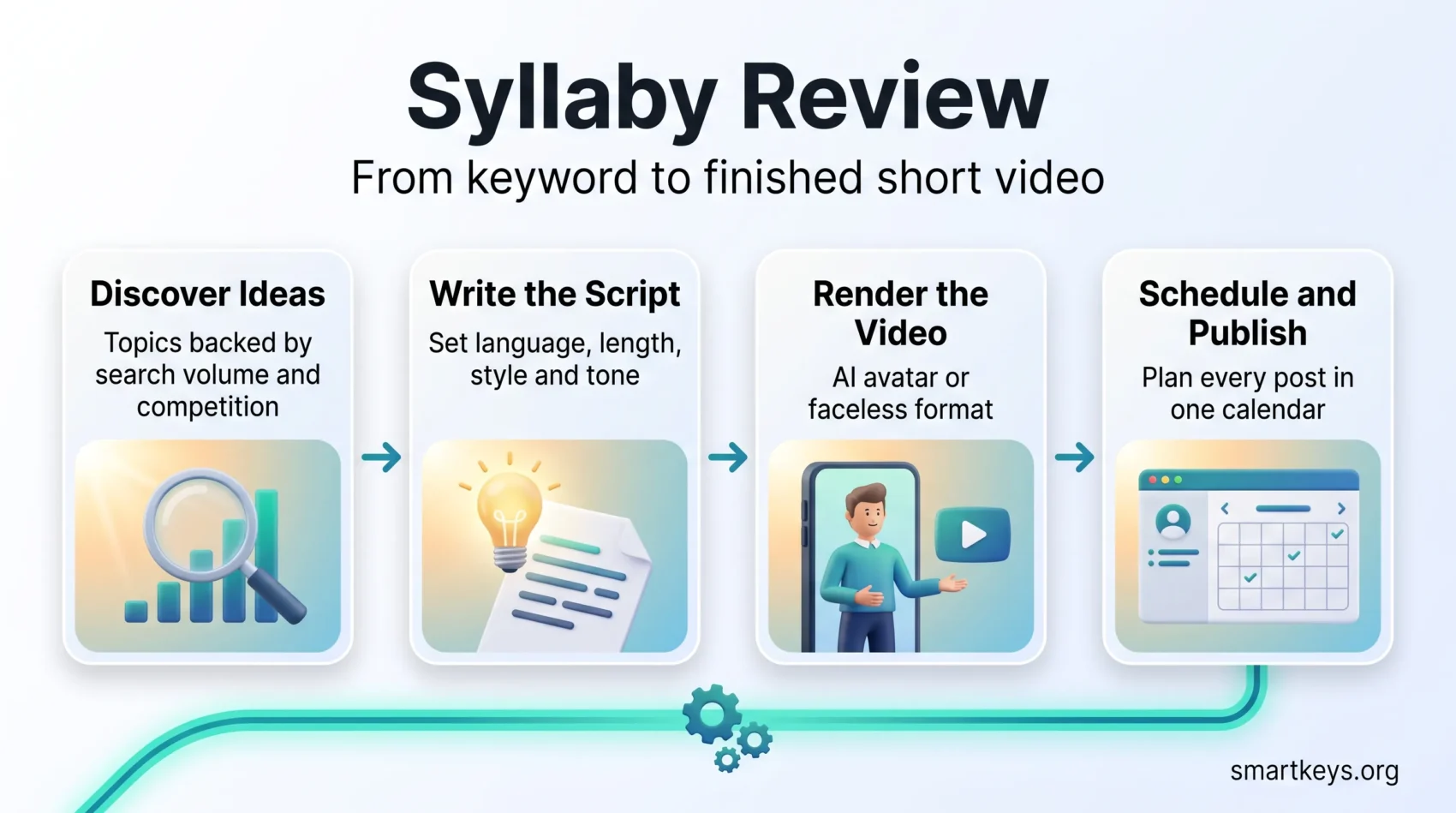
The workflow runs in three stages. Each hands its output to the next, which is what makes it feel fast compared with stitching separate apps together.
Stage one: discover and validate a topic
Open Discover Ideas and type a niche, for example “bookkeeping for freelancers”. Syllaby returns topic suggestions with search volume, cost per click, competition, and the number of results already ranking. A term with steady searches and thin competition is a better bet than a term everyone already covers.
Keyword history stores what you looked up before, so you are not repeating the same research every Monday. If you also care about being quoted by AI answer engines, our guide to generative engine optimization explains how that search behaviour differs from classic rankings.
Stage two: the AI script generator
Pick a topic and Syllaby drafts a script. You set the language, the target length, the style, and the tone before it writes. Short hooks for TikTok read differently from a slower opening for YouTube Shorts, and the generator handles that split for you.
Drafts are usable but generic out of the box. Feeding the tool a few of your own published scripts sharpens the pacing.
Stage three: production and editing
Choose an avatar, set the voice and accent, then render. Faceless formats stitch stock footage or images over a synthetic voice track instead of showing a presenter.
You can then fine-tune with drag-and-drop editing: add text, shapes, captions, and on-screen art without exporting anywhere. If you need broadcast-quality narration for something longer, a dedicated voice tool such as the one covered in our Murf AI review still gives you more control over emphasis and pauses.
“The workflow compresses the time from idea to finished clip while keeping the final edit in your hands.”
- Templates keep your hooks, captions, and calls to action consistent between videos.
- Publish connects your social accounts so you schedule from one dashboard instead of uploading each clip by hand.
Key Features That Set Syllaby Apart
Three things separate Syllaby from a general chatbot with a video export button. They are brand voice, avatar range, and the planning layer that sits around both.
Personalized brand voice and audience alignment
Syllaby lets you store tone instructions and reuse them across scripts, so the tenth video sounds like the first. This matters more than it sounds. Audiences recognise a voice long before they recognise a logo, which is the same reason brand storytelling works better than a feature list.
AI avatars and your own clone
You can choose a quick Lite Avatar for everyday clips or a fuller Studio Avatar when the video represents your company. There is also a Make Your Clone path, where you record footage of yourself to capture instructions and Syllaby builds a presenter that looks and sounds like you. Clone creation is priced separately from the standard plans.
If your team needs enterprise presenter avatars with learning-platform export and governance controls, our Synthesia review covers a platform built for that scale. For turning written material into audio rather than video, see our Speechify review.
Planning and analytics for steady output
A content calendar and a consistency tracker sit alongside the editor. The calendar shows what is scheduled; the tracker shows whether you are keeping your promised cadence. Combined with keyword data, this is how you stop guessing which topics to repeat.
- Reuse tone settings so your scripts land with the same audience every time.
- Test avatar options, or build a clone, to keep visuals cohesive across a channel.
- Plan, render, and schedule in one place instead of exporting between three apps.

Syllaby Review: Pricing, Free Trial, and Plan Options
Know what the trial gives you before you compare tiers.
Free trial: Syllaby offers a free trial so you can test idea discovery, script drafts, and rendering before paying. The company does not publish a fixed trial length or credit allowance on its pricing page, and both have changed over time, so check the exact terms at signup rather than trusting a number in any review.
Test Syllaby With Free CreditsPaid tiers and what they include
Syllaby publishes four standard plans plus a custom Enterprise tier, all built on credits (source: syllaby.io pricing page, August 2026).
- Starter, $9 per month: 100 credits, roughly seven faceless videos. A test plan, not a production plan.
- Basic, $29 per month (about $24.67 per month billed annually at $296 per year): 500 credits monthly, or 6,000 credits on the annual plan.
- Standard, $78 per month (about $66.33 per month billed annually at $796 per year): 1,500 credits monthly, or 18,000 credits annually.
- Premium, $153 per month (about $130.08 per month billed annually at $1,561 per year): 5,000 credits monthly, or 60,000 credits annually.
- Enterprise: custom pricing for high-volume teams.
Every AI action draws down the same credit balance: topic discovery, script generation, rendering, and thumbnails. Heavier video models cost more credits per second than lighter ones, so two teams on the same plan can get very different output. Syllaby lists all AI models, faceless and avatar video, the editor, thumbnails, stock media, the content calendar, full-resolution export, and unlimited video length as included on every plan.
- Practical value: estimate your monthly video count first, then pick the tier whose credits cover it with some headroom. Running out mid-campaign is the common complaint with credit systems.
- Business fit: full-resolution export matters as soon as you publish at scale. If you need product-focused video ads rather than social scripts, our Creatify review covers a platform built specifically for that, and our AdCreative.ai review looks at the static-ad side.
Monthly or annual: which makes sense?
Monthly billing gives you an exit if the tool does not fit. Annual billing lowers the effective monthly rate by roughly 15 percent and, on the Basic and Standard plans, comes with a larger credit pool than twelve monthly cycles would give you. Commit annually only after a full month of real publishing, not after one trial video.
“Run the trial on a real campaign, not a demo topic. Then pick the plan that matches your publishing rhythm.”
Note: some links here are affiliate links. We may earn a commission at no extra cost to you. Judge the tool by your own trial results.
Real-World Use Cases: Creators, Businesses, and Faceless Channels
The strongest use case is batching. You research ten topics on Monday, generate ten scripts, render them, and schedule the week in one sitting. That is a different workload from filming ten separate videos, and it is why batch processing pairs so well with this kind of tool.
Short-form social across TikTok, Reels, and Shorts
Each platform rewards a different opening. TikTok wants the hook in the first second; YouTube Shorts tolerates a beat of setup. Syllaby generates variants of one script per channel while keeping the core message identical.
Faceless channels are the clearest fit. An avatar or a stock-footage format lets a solo operator publish daily without ever appearing on camera, which removes the single biggest bottleneck for people who dislike filming.
The Publish page connects your accounts so clips go out on schedule. If social scheduling is your main pain point rather than production, a dedicated scheduler compared in our Buffer vs Hootsuite guide may serve you better than a video tool with a calendar attached.
- Small businesses use it for recurring explainer clips: opening hours, seasonal offers, common customer questions.
- Coaches and course creators turn lesson outlines into promotional shorts, then link back to a platform like the one in our LearnWorlds review.
- Agencies run several client channels from one dashboard, reusing templates per brand.
Video is only one channel. If your audience listens more than it watches, our Jellypod review covers the audio equivalent, and our overview of social media trends puts short-form video in context with the rest of the mix.
Pros, Cons, and How It Compares to Writing Scripts Yourself
Here is the honest split between what the tool does well and what it does not.
Where it saves time: research and first drafts. Search-backed topic discovery replaces an hour of guessing, and a usable script arrives in under a minute. One-click rendering and in-platform editing remove the export-import loop that eats time in traditional workflows.
Where you still do the work: tone, factual accuracy, and anything sensitive. Syllaby gets a script most of the way there, and your edits carry it the rest. Treat every number, name, and claim in a generated script as unverified until you check it. That review pass is not optional, and it is the step people skip when they are busy.
- Pro: one tool covers research, script, render, and schedule.
- Pro: faceless formats remove the need to film.
- Con: credit pricing makes monthly costs harder to predict than a flat seat price.
- Con: unedited output sounds like unedited output, and audiences notice.
Versus manual scripting and general chatbots: writing scripts by hand gives you full control and costs only your time. A general chatbot drafts text quickly but knows nothing about hook timing, rendering, or scheduling, and business-focused assistants like the one in our Cassidy AI review are built for internal workflows rather than short-form video. A specialised generator wins when volume is the constraint. For thumbnails and channel art, a design tool such as the one in our Canva review still gives you more layout control.
See a practical comparison if you want a deeper look at AI content tools and how their workflows differ.
Conclusion
Syllaby earns its place if you publish short video regularly and the bottleneck is production, not ideas. The workflow is coherent: keyword research feeds the script generator, the script feeds the renderer, and the renderer feeds the calendar. No single link in that chain is unique. Having all of them in one tab is what saves the hours.
Bottom line: run the free trial on a real topic from your niche, publish the result, and see whether the engagement justifies the credits. At one video a month you do not need this. At five a week the maths changes quickly.
Try Syllaby Risk-Free TodayFound this useful?
Make SmartKeys a preferred source on Google, and our articles will surface more often in your Top Stories, AI Overviews, and AI Mode.
Add as Preferred Source