Want to publish a podcast without a studio, a microphone or an edit suite? Jellypod turns documents and notes into finished episodes, then publishes them for you.
You choose the voices, clone a host if you want one recognisable presenter, and shape the episode with an outline and chapters before a word of script exists. Because you edit that script as text, each episode sounds like the one before it.
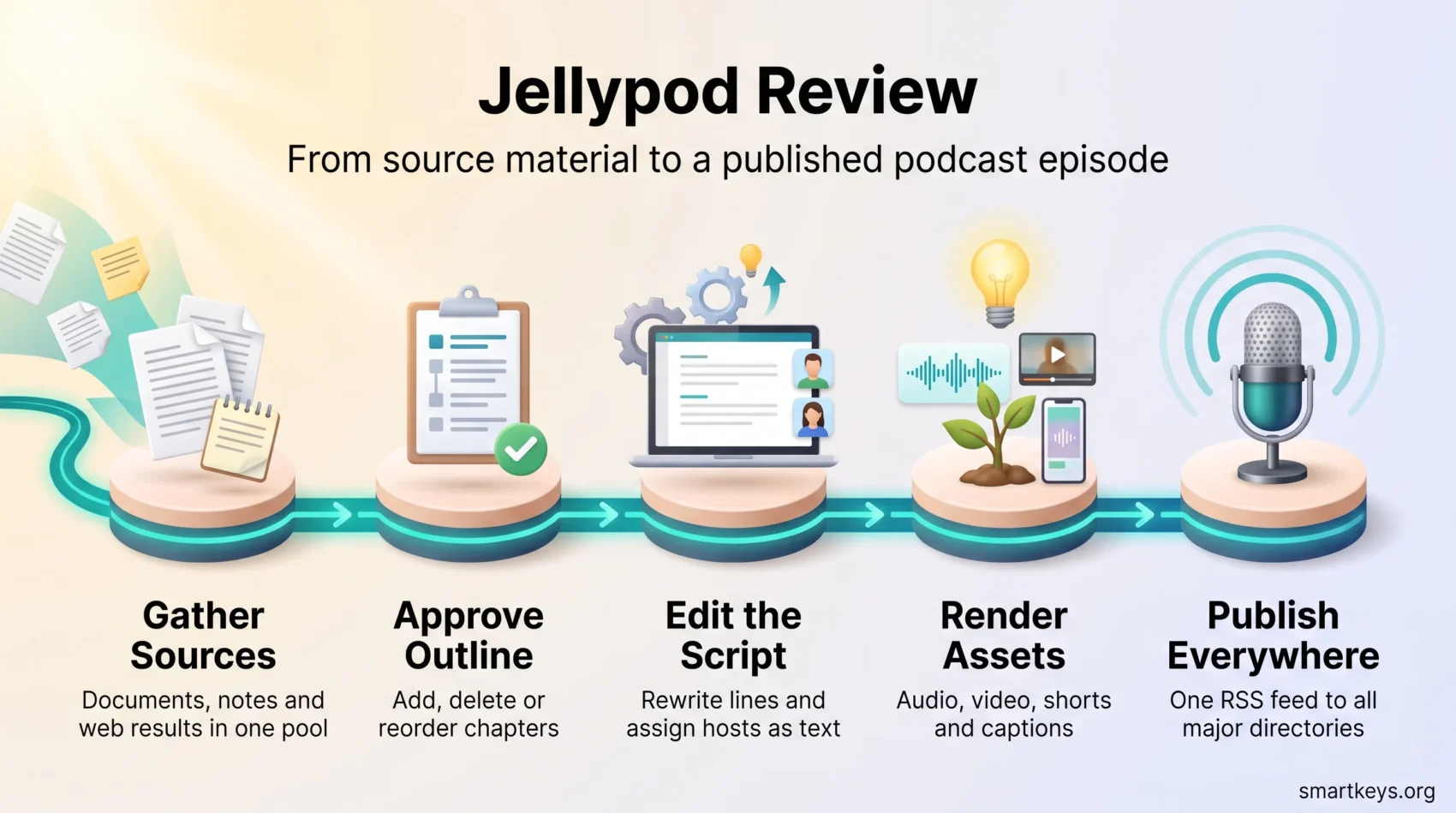
The workflow runs end to end: collect sources, approve an outline, edit the script, render, publish. Episodes reach Apple Podcasts, Spotify and YouTube through an RSS feed the tool builds for you, alongside a hosted show site and an embeddable player.
This review covers what Jellypod does well in 2026, what it still cannot do, what it costs, and when NotebookLM or Descript is the better pick.
Key Takeaways
- Jellypod moves you from raw source material to a published episode in one tool, with no audio editing skills.
- More than 100 voices, cloning in over 70 languages, and reusable personas keep a show sounding consistent.
- A built-in site, player, RSS feed and one-click publishing replace a separate podcast host.
- Pricing runs on monthly credits, from $33 per month on annual billing up to custom enterprise terms.
- NotebookLM still sounds more conversational, and Descript remains the better editor for shows you record yourself.
Why an AI-native podcast tool matters in 2026
Most teams abandon a podcast for the same reason: the production work never fits in the week. Recording, editing, writing show notes and uploading to a host adds up to hours per episode, and the show quietly dies after episode six.
Jellypod removes the recording step entirely. You bring material you already have, such as a product changelog, a research report or a set of customer interview notes, and the tool drafts a structured episode from it. The parts that normally need a specialist, audio editing and feed management, happen inside the product.
That suits a specific kind of show. If you publish a repeatable format on a schedule, say a weekly market roundup, the pipeline pays for itself. It is a poor fit for a show whose appeal is two people improvising for an hour.
The comparison people reach for is Google NotebookLM, which turns uploaded documents into a surprisingly natural two-host discussion. What it does not do is let you rewrite the script, assign lines, or publish to a feed. That gap is the space Jellypod occupies, and it fits the shift toward AI agent workflows that run a whole task end to end rather than one clever step.
“For a branded show, structural control matters more than demo-quality improvisation.”
Jellypod review: strengths, limits, and who it suits
Here is the split between what the tool does well today and where it falls short.
What works well
The approval chain is the strongest part. You see the sources, then the outline, then the script, and can change each before anything renders. Nothing reaches your audience that you did not read first.
The transcript editor is the second win. Rewriting a sentence is as easy as editing a document, and the audio follows your text. Teams used to documented digital workflows will recognise the pattern: a reviewable draft at every stage. Third, distribution is included rather than bolted on, so the MP3, the video, the shorts, the captions and the feed all come out of one render.
Where it falls short
The voices sound like professional narrators, not like friends talking. Listen to a NotebookLM Audio Overview next to a Jellypod episode and the difference is immediate: one improvises, the other performs a script.
Research depth is the other limit. NotebookLM holds a large body of documents and answers questions across them; Jellypod ships an episode from a focused set of sources. Different jobs.
Finally, an AI script states a wrong fact as confidently as a right one, so someone with subject knowledge must read the transcript before you publish. That is the cost of the whole category, not a Jellypod flaw.
Who it is for
- Marketing teams turning written content into audio, which pairs with AI marketing workflows.
- Small teams with no audio specialist and no appetite for hiring one.
- Companies running remote corporate training or short employee updates.
- Founders who want a recognisable voice on a schedule they can keep.
The end-to-end workflow, step by step
Everything starts on a research canvas, where uploads, web results and pasted text sit in one source pool.
Step 1: gather sources
You add the material the episode is built from: PDFs, slide decks, notes and recordings, plus web results and pasted URLs. Keeping the pool tight matters. Five strong sources produce a sharper episode than twenty loosely related ones.
Step 2: approve the outline and chapters
The tool proposes an outline broken into chapters, and you add, delete or reorder them. This is the cheapest place to fix an episode: changing a heading takes a second, changing a finished script takes ten minutes. The generated script then follows the structure you signed off.
Step 3: edit the script as text
The draft script appears as a plain transcript. Rewrite lines, tighten the intro, insert a call to action, and assign passages to specific hosts. No timelines, no waveforms. This is also where you catch anything the AI got wrong.
Step 4: render audio and promo assets
Rendering produces the episode audio plus a video version and captioned vertical shorts in a range of visual styles. Those clips connect the show to your wider social media strategy instead of leaving it stranded in a podcast app.
Step 5: publish
Publishing pushes the episode to your RSS feed, out to Apple Podcasts, Spotify and YouTube, and onto your hosted show site. Automations run this on a schedule, in the same spirit as the automation platforms teams use elsewhere.
The net effect: source folder to published episode in an afternoon rather than a week.
Build your first episodeVoices, hosts, and how much control you get
Voice selection and persona design decide how your show sounds, and this is where Jellypod spends most of its effort. You can pick from a large voice library or clone a founder or subject expert so every episode carries the same recognisable presence.

Voice library, accents and languages
Jellypod advertises more than 100 voices and accents drawn from several speech engines, and supports voice cloning in over 70 languages. For a company publishing in three or four markets, that means one approved script can become three or four localised episodes without booking new narration. Sample your target language first, because quality varies between languages.
Cloning and persona design
A clone gives you a fixed host. A persona adds the brief behind that voice: tone, role and point of view, such as analyst, storyteller or mentor. Together they keep episode 40 sounding like episode 1. Similar tooling runs through the AI media stack, from Synthesia for presenter video to Speechify for text-to-speech.
Naturalness against control
The trade is straightforward. You give up spontaneity and get predictability: steady pacing and audio that will not surprise your legal team. If you want conversation that sounds unscripted, this is the wrong tool. If you want a show that sounds the same every week, it is the right one.
- Assign lines to hosts to control pacing and stop hosts blurring together.
- Reuse personas across a series so the cast stays stable as the show scales.
- Get written consent before cloning any real person’s voice.
“Cloning suits founders and experts who want a consistent presence without booking studio time.”
Script control you can rely on
Because you edit the words, you control the phrasing, the pacing, and who says what.
Editing the transcript
The editor lets you change wording, break paragraphs and insert brand copy, so the audio matches your intent exactly. Reassigning lines between hosts tunes the rhythm and keeps calls to action on one clear voice.
Chapters and narrative flow
Chapter tools control the shape of the episode. Add, remove or reorder sections and the script follows. Because edits carry straight into the rendered audio, there is no export and re-import step and no surprise at publish time.
- You edit the exact words listeners hear, so disclaimers and offers are precise.
- Host assignment shapes pacing and keeps segments distinct.
- Chapter control keeps the narrative aligned with the brief you approved.
“The script you approve becomes the episode you publish.”
Distribution and growth: publish everywhere from day one
Having the site, the feed and the social assets in one place is what removes the launch friction. You get a hosted show website plus an embeddable player, and Business plans allow a custom domain.
The RSS feed is generated automatically, so you never hand-write feed specifications or chase directory requirements. From that feed, one click pushes episodes to Apple Podcasts, Spotify and YouTube.
Every render also gives you an MP3, an MP4, vertical shorts and captions. Captions matter more than they used to: transcript text is what search engines and AI answer engines actually read, which is central to generative engine optimization. Treat the clips as promo assets in your content marketing mix.
- Hosted website and embeddable player for easy streaming.
- Ungated share pages that remove friction on social and in email.
- One-click publishing to the major directories through RSS.
- MP3, MP4, shorts and captions with every episode.
- Scheduled automations for series that ship on a fixed day.
Automate your distribution“Episodes, assets and distribution in one tool saves the hours that usually kill a podcast.”
One caution: archive your MP3 files somewhere you control. An independent copy of the catalogue means you are never locked into one host, and it makes a future migration a copy job rather than a rescue mission.
Jellypod against NotebookLM and Descript
Your choice comes down to one question: research breadth, editing precision, or publishing speed?
Against NotebookLM: research versus publishing
Google NotebookLM is the stronger research companion. It holds a body of documents, answers questions across them, and produces Audio Overviews that genuinely sound like two people talking. Google states that free notebooks hold up to 50 sources each, and the feature now covers a wide range of languages. What it will not do is let you rewrite the script, decide who says which line, or publish to a feed. If your output is a show with an audience and a schedule, Jellypod is the production tool and NotebookLM is the reading step before it.
Against Descript: generating versus editing
Descript is for audio you recorded. Its transcript-based editor, Studio Sound cleanup and Underlord AI assistant shape real recordings into a polished mix. Jellypod does not edit recordings at all; it generates new episodes and publishes them. Many teams run both: Descript for the interview show, Jellypod for the weekly summary. The same split appears in AI video, where HeyGen and Creatify generate footage while conventional editors refine it.
A short decision guide
- Choose Jellypod when you need voice control, many languages and built-in publishing.
- Choose NotebookLM when research breadth and natural banter matter more than shipping a feed.
- Keep Descript when you record real interviews and need precise post-production.
- Look at Syllaby or Murf AI if short-form video or plain voiceover is the real job.
“Pick the tool that matches the workflow: research-first, edit-first, or publish-first.”
Verdict
Jellypod is a strong choice if your problem is shipping episodes on a schedule, not producing the most natural-sounding conversation online.
The approval chain from sources to outline to script gives you real editorial control, the transcript editor means anyone can review an episode, and built-in distribution removes the hosting step that usually stalls a launch. Cloning across more than 70 languages makes a multilingual show realistic for a small team.
The limits are equally clear. The voices perform rather than converse, credits cap your monthly volume, and every script needs a human fact-check before it goes out. If improvisation is the point of your show, keep Descript for live interviews and NotebookLM for research.
For a repeatable format produced by a small team, this is one of the few AI tools where the time saved shows up in the first week. Run the 7-day trial on a real episode, not a demo topic, and check current plan limits on the vendor’s pricing page, since credit allowances change. Set your voice and disclosure rules first, alongside your approach to data privacy and your brand storytelling standards.
Try Jellypod for freeFound this useful?
Make SmartKeys a preferred source on Google, and our articles will surface more often in your Top Stories, AI Overviews, and AI Mode.
Add as Preferred Source