Working alone is where most good plans quietly die. You block out the afternoon, you sit down, and forty minutes later you are answering email instead of doing the thing you blocked the afternoon for.
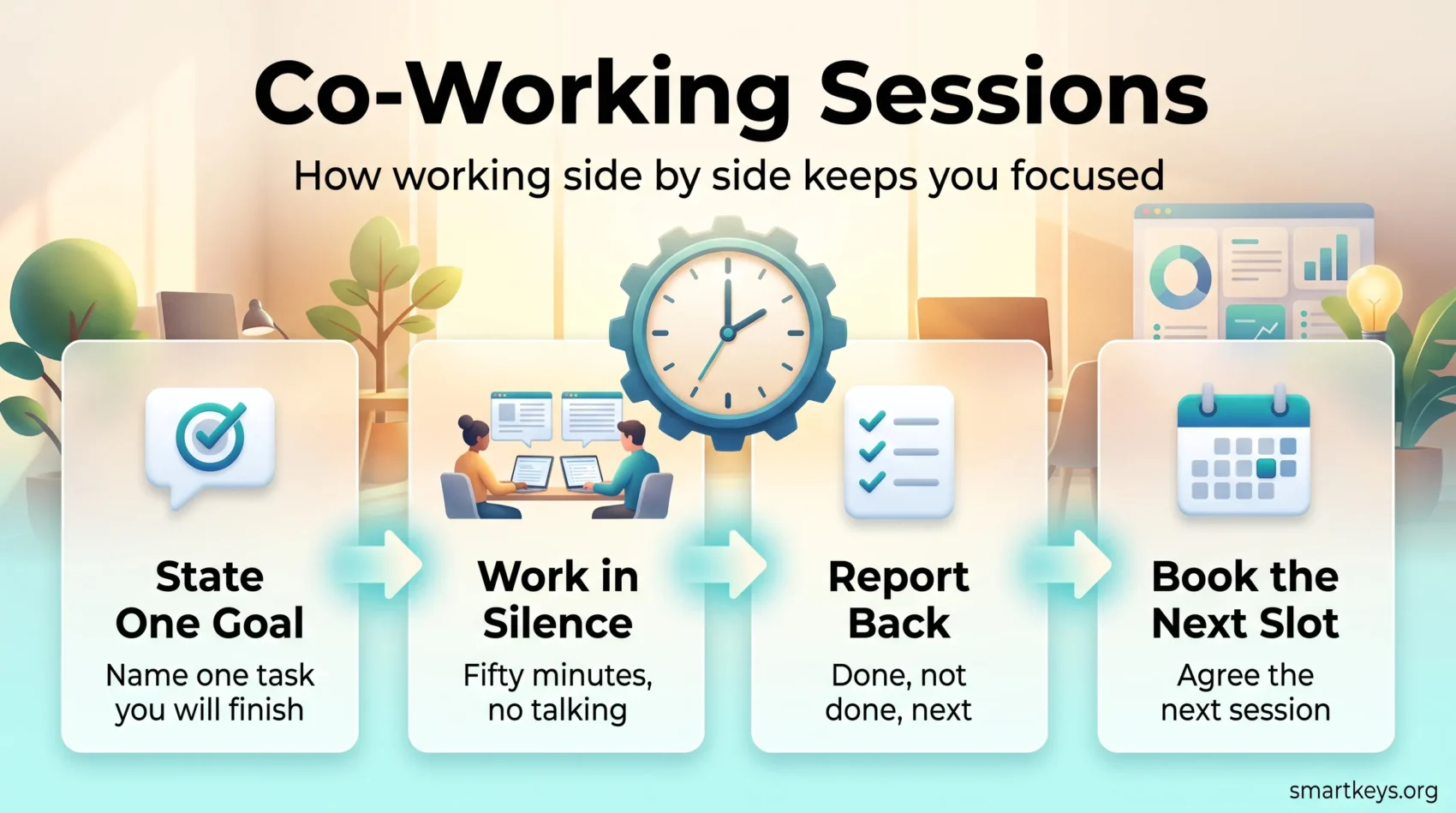
A co-working session fixes the part that usually breaks: starting, and staying started. You agree a time with one other person, you both say out loud what you will work on, you work in silence for a set block, and you report back at the end. Nobody supervises anybody. The other person is simply there, and for most people that turns out to be enough.
This guide covers what a co-working session is, what the evidence actually supports, how to run one so it does not drift into a chat, and what the online and in-person options cost in 2026.
Key Takeaways
- A co-working session is a scheduled block in which two or more people work on their own separate tasks side by side, online or in person.
- The mechanism is social rather than supervisory: naming your intention out loud and knowing someone will ask how it went makes starting easier.
- Survey research with neurodivergent adults links the practice to easier task initiation, lower anxiety and less isolation.
- A format that works: two minutes to state goals, 50 minutes of silent work, three minutes to report back.
- Online sessions can be free. A coworking day pass in the United States typically runs $25 to $50.
What a Co-Working Session Actually Is
A co-working session is a fixed block of time in which two or more people work on their own separate tasks at the same time. It is not a meeting. There is no shared agenda, no joint deliverable and, for most of the block, no talking. You bring your work, your partner brings theirs, and the only thing you share is the clock.
That distinction matters, because it is what keeps the format cheap to run. A meeting needs coordination. A co-working session needs one agreed start time. It is a close cousin of the weekly accountability partner check-in: instead of reporting progress once a week, you do the work in each other’s company.
Online sessions
Two people join a video call, each says what they intend to finish, then both mute and turn the call into background presence. Some people leave cameras on; some leave only the timer visible. Either works, as long as the middle stays quiet.
In-person sessions
The same structure, in the same room. You meet at a cafe, a library, a coworking space or someone’s kitchen table. In-person sessions add travel time but remove the temptation to quietly close the tab and do something else.
Body doubling: the same idea under a different name
You will often see co-working sessions described as body doubling, a term that comes out of the ADHD community. It means working in the presence of another person specifically to make a task easier to start. The two labels describe the same behaviour: co-working session is the neutral, workplace version; body doubling carries the original context of managing attention differences at work.
Why Working Beside Someone Helps You Start
The honest answer is that the effect is well documented in people’s descriptions of their own experience, and thin in controlled trials. That is worth knowing before you build a routine on it.
What the research supports
The clearest published work comes from an ACM SIGACCESS study by Tessa Eagle, Leya Breanna Baltaxe-Admony and Kathryn E. Ringland, presented in 2023. The researchers surveyed 220 adults, mostly neurodivergent, about how they use body doubling and why they think it works.
Four mechanisms came up repeatedly. Participants described feeling accountable to a person who could see whether they followed through. They described companionship that made an unpleasant task less isolating. They described easier emotional regulation, which mattered most for work that made them anxious. And some described simple mirroring: seeing someone else work made working feel normal.
Notice what is missing from that list. Nobody described being monitored, corrected or pushed. The partner is not a manager. Presence is doing the work.
The idea has older roots in social facilitation, the long-standing finding in social psychology that the mere presence of others changes performance. It tends to help on tasks you already know how to do, and can hurt on tasks that are new and difficult. That is a useful boundary: co-working sessions are better suited to the report you have been avoiding than to a skill you are learning for the first time.
Where the big numbers come from, and why to discount them
You will find dramatic figures attached to virtual co-working. Focusmate, one of the largest platforms, published results from a February 2024 survey of 834 of its own active members, in which 99% reported improved productivity and the average self-reported gain was 143%.
Treat that as marketing rather than evidence. It surveys people who already chose the product and kept using it, it relies on self-assessment, and it has not been peer reviewed. The direction is plausible. The size of the number is not something you should plan around.
What a co-working session does not fix
It will not fix a task you have not defined. “Work on the proposal” is not a session goal; “draft the pricing section of the proposal” is. It will not fix an overloaded week either, which is a prioritization problem rather than a focus problem. And it will not survive a partner who cancels twice in a row.
How to Run a Session That Works
Most failed sessions fail for the same reason: two people get on a call, start talking, and an hour later have had a nice conversation. The structure below exists to prevent exactly that.
Before: name one specific task each
Spend the first two minutes stating what you will finish, not what you will work on. A finishable goal gives you a clear end point and gives your partner something concrete to ask about later. If your task is too big to finish in one block, cut it into a smaller piece first.
Writing the intention down, even in a chat message, adds a second useful effect. Stating a plan in a specific, committed form makes people more likely to act on it, which is the same principle behind setting daily intentions.
During: pick a block length and protect the middle
Fifty minutes suits most knowledge work. Twenty-five minutes, the classic Pomodoro interval, suits admin, inbox clearing and anything you have been avoiding, because the finish line is close enough to be believable.
The middle of the block is silent. No status updates, no “quick question”, no reacting to each other’s screen. If you need to flag something, write it down and raise it in the debrief. A visible countdown helps here: a shared timer on screen, or a physical visual timer on the desk, removes the urge to check how long is left.
After: a two-minute report back
At the end, each person says what they finished, what they did not, and what they will pick up next. Keep it short and factual. The debrief is what turns the session into a habit, because it is the moment where following through feels good and not following through is mildly awkward.
A sample 60-minute session
- 0:00 to 0:02 Each person states one finishable goal.
- 0:02 to 0:52 Silent work. Cameras optional, microphones muted.
- 0:52 to 0:55 Report back: done, not done, next.
- 0:55 to 1:00 Agree the next session before you close the call.
Booking the next slot while you are still in this one is the single highest-return habit in the whole format. It is also the step most people skip.
Choosing a Partner Who Actually Shows Up
Reliability beats similarity. Your partner does not need to understand your work, share your field or match your seniority. They need to arrive at the agreed time.
A few things that make a pairing last:
- Compatible working hours. A three-hour time difference is workable. An eight-hour one means one of you is always compromising.
- Similar tolerance for chat. If one person wants ten minutes of catch-up and the other wants silence at minute one, the session becomes a negotiation every week.
- A standing slot. Same day, same time, recurring in both calendars. Sessions that get rescheduled each week stop happening within a month.
- An agreed cancellation rule. Something as simple as “tell me the night before” removes most of the resentment when life intervenes.
If nobody in your circle fits, the online platforms below will match you with a stranger, and strangers work surprisingly well. There is no friendship to protect, so there is less temptation to turn the block into a conversation. A more structured alternative, if you want ongoing feedback rather than silent company, is a small peer mastermind group, and a looser one is a standing accountability partnership that checks in weekly rather than working side by side.
Online Platforms and Tools
Virtual sessions have the obvious advantage: no commute, and a partner pool that is not limited to your city. The tooling can be as light as you want.
Matching platforms. Focusmate pairs you with another member for a scheduled block and handles the timer and the check-in prompts. Its free plan allows three sessions a week; the Plus plan is $8 per month billed annually, or $12 billed monthly, for unlimited sessions. Business plans are quoted on request. Several smaller services offer the same pattern, and the virtual coworking market now includes options built around specific communities.
Community rooms. Many Discord servers, Slack workspaces and professional communities run permanent voice channels for silent co-working. These are free, informal and unmatched: you drop in when you are ready rather than booking a slot. The trade-off is that nobody notices if you do not show up.
A plain video call. Zoom, Meet or Teams with one person you already know needs no extra tooling at all. For a recurring pair, this is usually the simplest option, and it keeps your session data inside whatever stack your employer already approved rather than adding another consumer account. If your team runs on a shared digital headquarters, the same channels can host a standing focus room.
Whichever route you take, the tool is doing very little work. It provides a start time and a face. Everything that matters is in the structure.
In-Person Sessions and What They Cost
In-person sessions solve a specific problem: a home setup where the distractions are physical rather than digital. If the interruptions come from your own tabs, a shared room will not save you, and you would get more from reducing the digital load or fixing the home office itself.

Day passes and desks
Prices vary sharply by city, so treat national figures as a starting point rather than a quote. As of mid-2026, Alliance Virtual Offices puts United States day passes at roughly $25 to $50, hot desk memberships at about $150 to $350 per month, and dedicated desks at about $250 to $450 per month, with premium markets such as New York, San Francisco and Boston sitting well above those ranges and secondary cities below them.
For a weekly session, a day pass is almost always the right purchase. A membership only pays off once you are in the building several times a week, at which point you are no longer buying a co-working session; you are buying an office. Our guide to coworking space costs and trends goes through that maths in more detail.
Free options are worth trying first. Public libraries, university spaces open to alumni, and quiet cafes at off-peak hours all work, provided you can hear each other for the two-minute check-in without annoying anyone.
What the space actually needs
The requirements for a co-working session are lower than the requirements for a full working day.

You need two seats next to each other, reliable internet, power within reach, and somewhere you can speak for two minutes at the start and end without disturbing other people. Everything else is comfort. Predictable noise matters more than low noise: a steady hum is easier to work through than a room that is silent until someone takes a call. That is the same trade-off that makes open-plan offices hard to work in.
If you book a room rather than a desk, book it for the whole block. Splitting a session across two locations kills the momentum you came for.
Where Co-Working Sessions Go Wrong
- The session becomes a catch-up. Fix: state goals in writing before the call rather than out loud during it, so the first two minutes cannot expand.
- The goal was too vague to finish. Fix: rewrite it as a single micro-goal with an obvious end point.
- The block is too long. Two hours sounds efficient and usually produces one good hour. Start at 50 minutes and only extend once you finish three blocks in a row.
- You keep switching between session work and everything else. Fix: close the other tabs before the timer starts. The cost of switching between tasks is what the session was meant to remove.
- The pair drifts apart. Fix: book the next slot inside the current session, every time.
- You use sessions for everything. They suit drafting, admin, review and anything you are avoiding. For genuinely hard, novel problems, a longer solo deep work block usually beats a shared one.
Two smaller habits make the routine more durable. Take a real break between blocks rather than rolling straight into the next one, because short breaks restore attention that a second hour of grinding will not. And protect the slot in your calendar the way you would protect any other no-meeting focus window.
Conclusion
A co-working session is one of the cheapest productivity habits available. It needs no subscription, no equipment and no training. It needs one other person and a fixed time.
Start small. Pick one task you have been putting off, find one person who can spare an hour this week, and run a single 50-minute block with a two-minute check-in at each end. If the block produces more than a normal hour at your desk, book the next one before you close the call.
The compounding comes from repetition, not intensity. Two sessions a week, kept for a quarter, will move more work than a heroic weekend.
Found this useful?
Make SmartKeys a preferred source on Google, and our articles will surface more often in your Top Stories, AI Overviews, and AI Mode.
Add as Preferred Source