Tools
Tools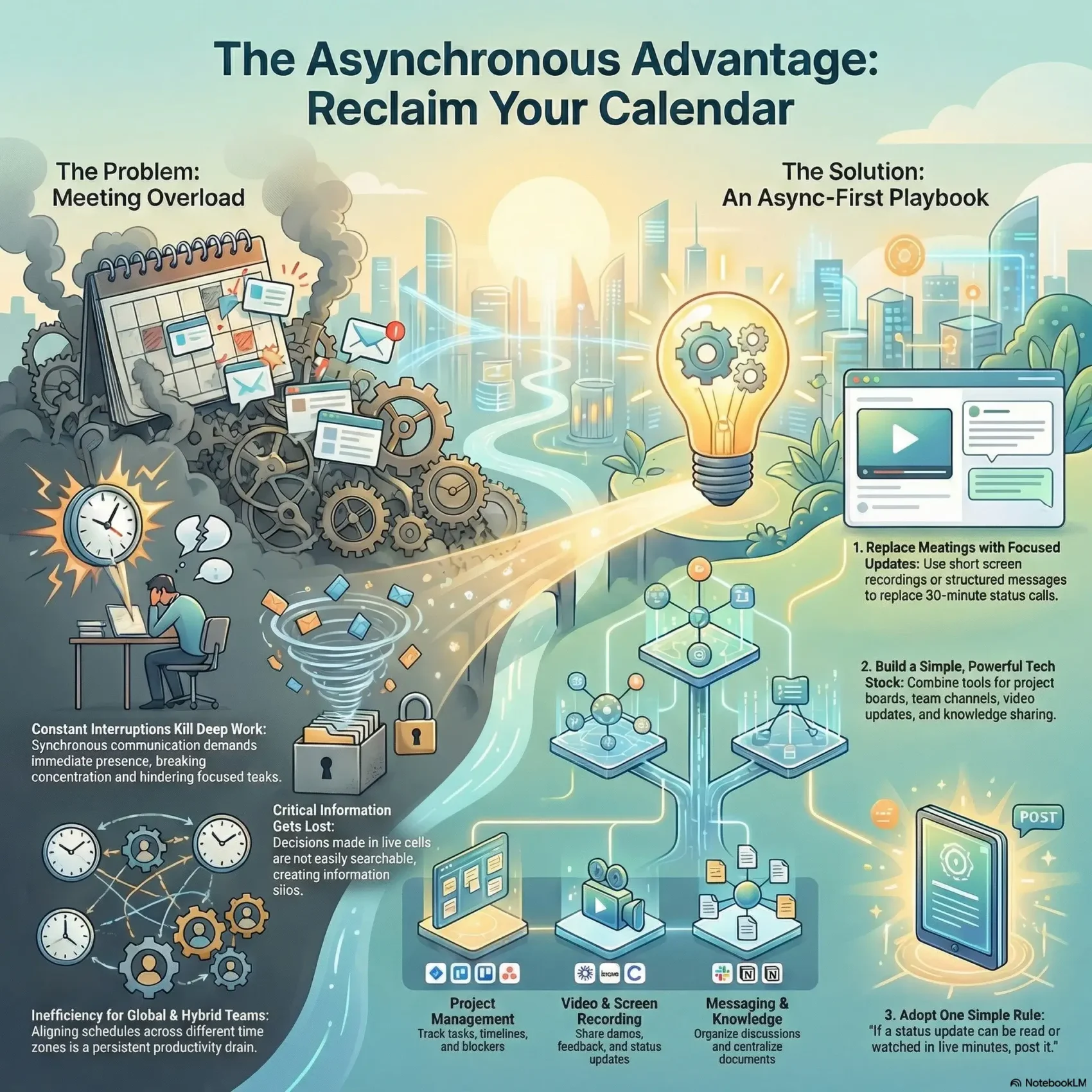
Last Updated on February 1, 2026
You can cut back on routine live meetings and keep your team aligned by using smart, recorded updates and clear threads. This approach replaces many 30–60 minute calls with short notes or a quick video that people watch when they have time.
Beyond schedule flexibility, this style builds a searchable record of decisions and information. Services like Claap offer short screen recordings, automatic transcripts, AI summaries, reactions, and organized workspaces so updates stay findable.
Expect practical guidance that shows when to choose real-time chat and when a brief recorded update is better. You’ll learn which formats help capture decisions, share progress, and keep a single place for updates your team can revisit.
Key Takeaways
- Short videos and threaded notes can replace many meetings without losing clarity.
- Recorded updates create persistent information and searchable transcripts.
- Pick formats by goal: quick alignment, deep work, or decision records.
- Look for features like auto-transcript, summaries, and organized spaces.
- You’ll gain practical steps to reduce meetings and improve team focus.
Why you’re here: reduce meetings, boost productivity
You want fewer calendar blocks and clearer handoffs so real work gets done. Hybrid teams need transparent, searchable systems so information doesn’t fall through the cracks. Spreadsheets alone don’t give visibility.
Platforms like Hive, Slack, and Trello centralize messages, notes, and task lists so members can check status without interrupting others. Hive offers Gantt, Kanban, Calendar, List, and Table views and integrates with 1,000+ services. Slack organizes channels and links to Trello, Drive, and Zoom. Trello gives teams boards, lists, and cards for quick updates.
- Move routine updates and approvals into channels, boards, and docs to free up meeting time.
- Use clear ownership for tasks and projects so team members always know who’s next.
- Adopt templates and integrations so updates flow automatically and nothing is copied by hand.
- Start this week with standups, status readouts, and simple approval flows that don’t need a live meeting.
“Make it easy for people to find answers on their own, and meetings become the exception, not the rule.”
Asynchronous communication tools
Shifting from instant replies to measured responses changes how work flows day to day. You’ll see fewer interruptions, clearer written context, and more time for focused work.
Async vs. sync: what changes when responses aren’t real-time
Synchronous work asks everyone to be present—calls, live meetings, or real-time chats. Delayed replies (email, forums, recorded updates) let people respond when they have context and time.
- Fewer interruptions and more deep work blocks.
- More thoughtful feedback that arrives with context.
- Decisions recorded so project updates remain searchable.
Core benefits for hybrid teams: flexibility, efficiency, documentation
Flexibility: Team members across time zones keep projects moving without waiting for everyone to come online.
Efficiency: Replace a 30-minute meeting with a short video or structured message you can easily share and reuse.
“Replace long meetings with brief, focused updates and keep a single record everyone can find.”
Look for features like threading, mentions, search, timestamps, and summaries. For a practical guide on collaborative workflows, see collaborative tools at SmartKeys.
How to choose the best asynchronous communication tool for your team
Choose a platform that maps directly to the work you do so features line up with your daily workflows.
First, list the use cases you need covered: status updates, approvals, brainstorming, and knowledge capture. Match each case to specific features like transcripts, boards, or templates. For example, Jira supports agile project management with Kanban and Scrum boards and dashboards—its pricing ranges from Free (up to 10 users) to Premium at $16/user/month.
Next, weigh transparency and auditability. Look for activity feeds, version history, and automated logs so decisions stay clear across teams. Claap adds recorded updates, AI summaries, and contextual comments; note its free plan limits uploads and Team is $10/user/month.
Check integrations and permissions. Miro, with 1,000+ templates and editable boards, lets you pull context into whiteboards. Gainsight offers dashboards and automated comms for customer-facing processes.
Practical checklist
- Map use cases to must-have features.
- Prioritize dashboards and boards for project visibility.
- Confirm audit logs, role-based permissions, and search.
- Test integrations and measure friction for a quick update or tag.
- Run a 2-week pilot with 2–3 shortlisted options.
“Pick a system that reduces friction—teams will adopt what makes their day easier.”
Key categories of asynchronous collaboration
Organize collaboration by category so each platform has a clear role in your workflow. That reduces context switching and helps members find information fast.
Project management platforms: tasks, boards, timelines
Project platforms like Asana, Trello, and Basecamp give you tasks, timelines, and boards. Use them to surface blockers without status meetings.
Messaging and channels: threads, mentions, search
Slack and Microsoft Teams provide channels, threads, and search so teams can route communication by topic and locate answers quickly.
Async video and screen recording: updates, demos, feedback
Loom, Claap, and Grain let you record demos and walkthroughs. Viewers can give feedback in context without hopping on a call.
Digital whiteboards and knowledge management
Miro and MURAL support ideation with templates and sticky notes. Notion, Google Drive, and Coda centralize docs and files in a searchable workspace.
- Meeting management systems add recordings, highlights, and AI summaries.
- Look for timestamps, version history, and activity feeds across categories.
- Pair boards for execution, channels for communication, and docs for knowledge.
“Choose categories intentionally so your stack scales with projects and members.”
Best asynchronous communication tools for reducing meetings today
This roundup highlights the best platforms that help you cut meeting time and keep everyone aligned. Below are concise notes on each option so you can pick what fits your workflow.
Claap
Short recordings + auto-transcript and AI summaries make status updates watchable and searchable. Free plan has 10 uploads; Team is $10/user/month.
Jira
Agile boards and dashboards help software teams manage sprints, track issues, and reduce daily check-ins. Free up to 10 users; paid plans scale from $8.15/user/month.
Figma
Design collaboration with shared prototypes, comments, and version history so designers iterate without live reviews.
Miro
Templates, sticky notes, mentions, and an activity feed let groups brainstorm and capture notes without gathering everyone at once.
- Loom for quick screen-plus-camera walkthroughs.
- Grain to turn meetings into searchable recordings and highlights.
- Notion as a central wiki for docs, files, and templates.
- Hive, Trello, Slack for boards, tasks, channels, and integrations that keep work flowing.
“Replace routine calls with short updates and keep a single record everyone can find.”
Deep-dive picks: where these tools shine
Match platforms to outcomes so each part of your workflow has a clear, reliable place to live. Below are focused picks that help you replace routine meetings with concise, searchable updates.
Replace status meetings with Claap or Loom
Use Claap for short video “claaps” with AI summaries and in-video reactions. Viewers can jump to key moments and reply on their schedule.
Loom records your screen + camera and shares a link instantly, making a single recording more efficient than repeated standups.
Run design reviews with Figma and Ashore
Figma supports simultaneous edits, comments, and version history so designers iterate without live reviews.
Ashore adds proofing dashboards, markup, and contextual approvals so you can give feedback precisely where it matters.
Brainstorm using Miro’s templates and comments
Miro’s 1,000+ templates and activity feed let teams add ideas, vote, and refine asynchronously.
Turn meetings into searchable assets with Grain
Record, highlight decisions, and tag topics with Grain so meeting content becomes a replayable reference.
- Keep updates short: one clear recording with next steps beats recurring live meetings.
- Use screen recording to show UI states or behavior so viewers can pause and reply in-thread.
- Create a feedback rubric (scope, risks, timeline) to make comments actionable across your collaboration stack.
“One short recording plus a clear summary often replaces a recurring meeting and improves follow-up.”
Tool-by-tool selection for common scenarios
Match each scenario to a focused stack so your team spends less time deciding where to post updates and more time moving work forward.
Software delivery
Combine Jira’s agile boards and dashboards with Slack channels or Yac threads for fast, contextual updates across time zones.
Link issues to messages so discussions sit beside the work item and team members don’t need daily standups to stay aligned.
Client approvals
Use Ashore for markup, reminders, and review flows. Add Bondle for version-controlled external sharing and an audit history that satisfies governance.
Knowledge-centric teams
Anchor documentation in Notion and pair it with Trello or Hive for boards, lists, and lightweight task execution.
This combo keeps a searchable record and a clear list of who owns tasks in each project.
Culture and visibility
Spin up Frameable Spaces to mimic office presence. It helps members check who’s around and what people are working on without a formal meeting.
“Standardize one recommended setup per scenario so teams don’t second-guess where to post, approve, or escalate.”
Implementation playbook: move from meetings to messages
Open with a simple rule: if a status update or decision can be read or watched in five minutes, post it instead of booking a meeting. That rule helps you cut noise and lets people catch up on their own time.
Define async-first norms: response windows, channels, and tagging
Set expected response windows by channel so people know when answers arrive. Publish a short list of channel conventions for status, questions, and escalations in your workspace.
Standardize templates for updates, decisions, and approvals
Create one-page templates for weekly updates, decision logs, and approval requests. Use headers for goal, owner, and due date so messages are scannable and clear.
Record and summarize: make meetings optional and catch-up friendly
Record sessions and share highlights with a short summary. Grain offers highlights, transcriptions, and summaries so teammates watch key moments instead of attending live.
Integrate your stack: connect boards, docs, and chats
Automate posting so a board update links to the related doc or ticket and the recording lands beside the task. Slack integrates with Trello and Notion to keep context synced across systems.
- Capture notes and decisions in one place right after discussions.
- Use recording highlights to point teammates to the exact moment they need.
- Run a 30-day pilot to replace a recurring meeting with short posts or clips and measure results.
“Coach managers to require clarity—goal, owner, due date—and to celebrate concise updates so the new habits stick.”
Measuring impact without real-time meetings
Quantify gains from fewer live meetings with clear metrics tied to project delivery and engagement. Start by turning guesses into numbers so you can prove the value of posts, recordings, and threaded updates.
- Time saved: Count canceled or converted meetings and estimate hours returned to your team. Use calendar logs to validate reclaimed blocks.
- Response and throughput: Measure response latency in channels and threads and use Jira or dashboards to track project throughput and cycle time.
- Auditability and engagement: Monitor search hits, version history, and views of recordings to confirm information is findable.
Audit transparency: searchability, version history, and engagement
Use Grain for searchable recordings and highlights. Slack gives robust search across messages and files. Bondle adds time-stamped audit history so you can show who did what and when.
What to watch and share
- Track views, reactions, and comments to see if content reaches the right members.
- Monitor reopen rates on tasks to spot gaps in clarity and improve templates or acceptance criteria.
- Use recording analytics to find replayed moments and refine future updates to front-load value.
Share a monthly async scorecard that shows hours saved, response times, and user adoption. Celebrate wins and identify where a short sync can unblock progress. This way, you keep management and members aligned on the metrics that matter.
“Measure outcomes, not activity: reclaimed time should translate into shipped work and clearer records.”
Conclusion
The clearest path to fewer meetings is a small, consistent stack you and your team trust. Pick one messaging hub (Slack), one board (Trello or Jira), one knowledge workspace (Notion), and one recorder (Loom or Claap). This mix makes status, reviews, and decisions easy to find.
Lean into asynchronous updates for routine work and reserve live time for complex debate or relationship building. Use an asynchronous communication tool with summaries and search so people can catch up fast and reference outcomes later.
Keep the stack simple, reinforce habits like clear owners and due dates, and measure results: meeting hours saved, time to decision, and throughput. Start small this week—convert one recurring meeting into an async update—and build momentum from sharing clear examples in your workspace.