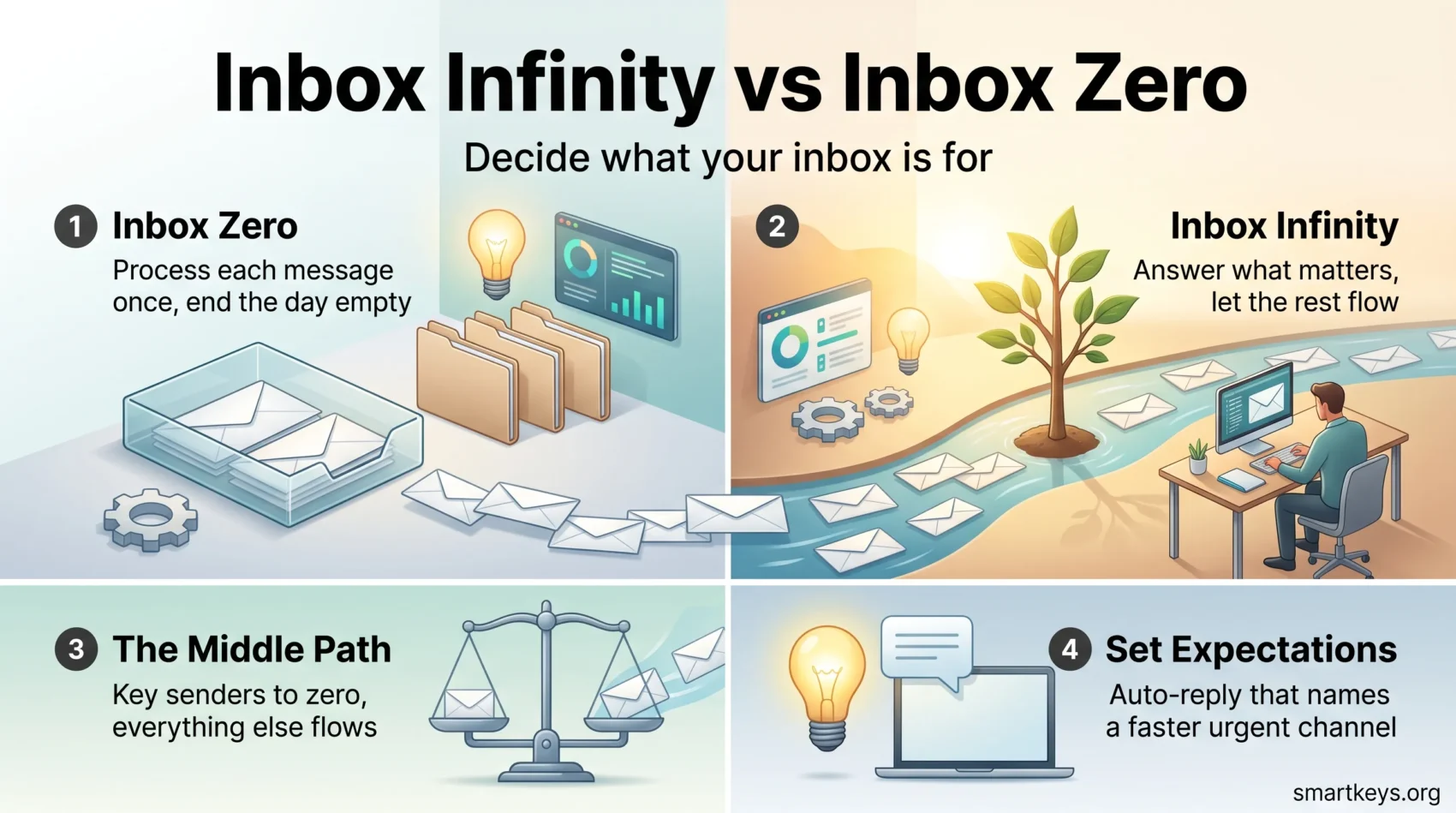
You do not need a perfect email system to do good work. You need one decision: what is your inbox for? Inbox Infinity gives one answer. You stop treating the unread count as a to-do list, you answer what matters, and you accept that some messages will never get a reply.
The sportswriter Spencer Hall made the case bluntly in Charlie Warzel’s newsletter Galaxy Brain. Most of what rattles your phone each day, he argues, is a “gamified non-event”, and marking those messages as read only books a future appointment to mark them read again. That is an opinion, not a study, but it names a feeling most people recognize.
The opposite answer is inbox zero, popularized by writer Merlin Mann in the mid-2000s. Process every message once, decide fast, leave the inbox empty.
This guide compares the two in plain terms: what each costs you, which roles suit which, and how to set one up that your colleagues can live with.
Key Takeaways
- Inbox Infinity accepts that not every message needs an answer, and protects your attention instead of your unread count.
- Inbox Zero trades processing time every day for a predictable, reliable response record.
- Microsoft measured 117 emails and 153 chat messages per worker per weekday in 2025, so volume, not weak discipline, broke the habit of clearing everything.
- Neither system works unless you tell people what to expect and give them a faster route for urgent things.
- Most people blend the two: zero-style processing for a short list of senders, infinity for everything else.
Why your inbox feels endless right now
The number at the top of your inbox rarely matches real urgency. It counts arrivals, not obligations.
The volume is documented. Microsoft’s 2025 Work Trend Index, which analyzed anonymized activity across Microsoft 365, found the average worker receives 117 emails a day, most skimmed in under 60 seconds, plus 153 Teams messages every weekday. Mass emails to 20 or more recipients grew 7% in a year while one-to-one threads fell 5%. The same report found people are interrupted roughly every two minutes during the working day.
That reframes the problem. Your inbox is not filling up because you lack willpower. It is filling up with mail that was never addressed to you personally.
Two things follow. An inbox receiving 117 messages a day cannot be cleared to zero without losing a serious part of the morning. And the unread badge stops being useful once most arrivals are announcements. A number that rises whether or not anything happened is a poor thing to organize a day around.
- Marketing, notifications and automated receipts fill much of a normal inbox and need no reply.
- On a busy day you skip email, so tomorrow starts with yesterday’s pile on top.
- Deciding in advance what deserves a reply beats touching every item once.
If your inbox has grown past the point where triage feels possible, start by conquering the email backlog in one pass, then pick a system to stop it rebuilding. Realistic to-do lists keep your day driven by priorities rather than by the badge number, and it helps to know what constant switching does to your attention span.
Inbox Infinity and Inbox Zero: what each one claims
What Inbox Infinity is and where it came from
Inbox Infinity is the decision to let email accumulate and answer what you can. Writer Taylor Lorenz proposed it in The Atlantic in January 2019. Her advice was blunt: let the messages wash over you, respond to what you can, ignore the rest, and tell the people who matter that your replies may be slow or may not arrive.
That last part carries the method. Infinity without the warning is not a system. It is an unanswered inbox, and colleagues read it as rudeness.
What Inbox Zero is and why it was created
Inbox Zero came out of Merlin Mann’s productivity writing in the mid-2000s. The “zero” was never about an empty screen. Mann meant the attention the inbox occupies. You process each message once, decide what it is (delete, delegate, reply, defer or do) and move it out of sight, so email stops running in the back of your mind.
Done properly it works. Our walkthrough of how the Inbox Zero method works day to day covers the processing loop, the folders and the filters in detail.
Volume or attitude: what really separates them
The difference is not how much email you get. Someone with 40 messages a day can run infinity, and someone with 200 can run zero if they delete ruthlessly. What separates them is what you treat the inbox as: Zero sees a queue with an end, Infinity sees a feed you dip into. Zero puts the effort up front on sorting; Infinity puts it later on searching and on managing expectations.
The trade-offs: time, attention and risk
How each system spends your day
Inbox Zero costs a fixed block each day, usually two or three sessions. In return nothing sits half-decided, and you know what you owe people because the inbox is the list.
Inbox Infinity hands those minutes back to the work only you can do. The cost arrives later: searching for a thread you never filed, and the occasional message you did not see. If your best hours go to writing, analysis or design, that trade is worth making. Protecting those hours with a formal focus time policy matters more than any inbox method, because deep work is what the time is for.
What the unread count actually measures
The badge measures arrivals, not whether anyone is waiting on you. Once you accept that, checking email becomes a scheduled activity rather than a reflex, which does more for focus than any folder structure. Turning off alerts helps as much as changing the system. Our guide to managing work notifications covers which ones to keep, and the same logic applies to chat: instant messaging boundaries decide whether those 153 daily messages interrupt you or wait for you.
Missed messages against mental load
Be honest about the risk. Infinity means you will occasionally miss something, and what that costs depends on your job. A missed newsletter costs nothing. A missed client question costs a relationship.
Inbox Zero lowers the miss rate but raises the running effort, and creates its own mental load: the sense that the inbox is not clean yet. Psychologists call these unfinished threads open loops, and they intrude whichever system you use. What quiets them is a specific plan for the message, not an empty screen.
How busy leaders handle email
Most executives made this choice long ago without naming it. They search rather than file, keep replies to two or three lines, and let an assistant or shared mailbox absorb routine traffic. The lesson is not “copy an executive”. It is that filing is optional, while setting expectations is not.
How to decide which one fits you
Signs Inbox Infinity fits your work
Infinity suits you if your value comes from concentrated output rather than fast turnaround, if more email arrives than any human could process, and if the people who genuinely need you have another route. Writers, engineers, researchers and most solo operators fit this group. It also suits anyone whose inbox has become a source of dread. Say so out loud, though, because setting boundaries only works when other people know where the line is.
Signals you need Inbox Zero habits
Stick with zero-style processing if replies are the job. Client service, sales, recruiting, support and anything with a promised response time depend on nothing slipping. Regulated work often needs a documented trail too. You are not choosing forever: running strict processing through a busy quarter, then loosening it, is reasonable.
The middle path most people end up with
Almost nobody runs either system in pure form. The workable version is a short list of senders you process to zero, and infinity for everything else.
Build it in three moves. Name the five to ten people whose email always gets a same-day answer. Filter everything automated out of the main view. Then move recurring back-and-forth off email entirely, using project tools and asynchronous communication tools so the thread lives where the work does.
Practical steps you can take this week
Setting up Inbox Infinity responsibly
Write an auto-reply that states the facts: when you read email, how long a reply usually takes, and the faster channel for urgent things. “I read email once a day and reply within two working days. If it cannot wait, message me on Slack” already sets the expectation.
Tell your team and key clients directly rather than letting the auto-reply break the news. Turn off every notification except the channels you promised to watch. Then learn five search operators in Gmail or Outlook, which replaces most of your filing.
Inbox Zero habits worth keeping either way
Even under infinity, a few processing habits pay for themselves. Read email in set windows: email batching has the biggest single effect on focus. Unsubscribe properly rather than deleting the same newsletter every week.
Save your common replies. Our library of email response templates and a good text expansion tool turn a five-minute reply into a fifteen-second one, and better email clarity cuts the follow-up questions that create half your volume. Judge the result by outcomes, not by the unread number. Our email workflow guide puts the pieces in order.
Conclusion
Treat email as a tool, not a queue that manages you.
At 117 messages a day, clearing the inbox every evening is not discipline, it is an unpaid second job. Inbox Infinity gives you permission to stop, provided you are honest with people about what that means for them.
Inbox Zero remains the better answer when reliability is the product. The boundary is also becoming a legal question rather than a personal preference: Australia extended its right to disconnect to small business employees in August 2025, and similar rules are spreading. Whichever you choose, the part that matters is telling people what to expect. For the rest of the clutter, learn how to declutter your digital workspace.
Found this useful?
Make SmartKeys a preferred source on Google, and our articles will surface more often in your Top Stories, AI Overviews, and AI Mode.
Add as Preferred Source