This guide shows you how to turn scattered inputs into useful output with a simple, app-agnostic system. You’ll learn how a trusted digital repository captures what you read, watch, and learn so you can find ideas and facts in seconds.
The method rests on four clear steps: Capture, Organize, Distill, Express. Each step helps you move from raw information to real work without wasting time or changing all your tools.
You’ll see why a structured approach reduces overload, boosts productivity, and scales with your life. By building reliable habits, you free mental space for creativity and higher-level thinking.
Key Takeaways
- You can use an app-agnostic system to store and reuse ideas quickly.
- The CODE steps—Capture, Organize, Distill, Express—turn inputs into results.
- Small daily actions compound into lasting productivity gains.
- The framework lowers stress and helps you find information in seconds.
- Start small now and grow a digital life that supports both personal and work projects.
Why Building a Second Brain Matters Right Now
You don’t need to remember everything — you need a reliable way to retrieve what matters. Our minds hold only a few thoughts at once, so treating your brain as a generator of ideas, not a storage box, changes how you work.
Today’s stream of emails, podcasts, articles, and messages overwhelms memory. By building second brain systems, you offload storage to a trusted digital repository. That lets you find anything in seconds and spend more time creating.
“When you stop hoarding facts and start designing retrieval, you free time for meaningful work.”
The payoff is clear: less rework, fewer lost insights you’ve learned, and more space for fresh ideas. This methodology supports continuous learning so your knowledge compounds over months and years.
- Hit memory limits? You’ll see why natural recall breaks down and how a system fixes that fast.
- Busy consuming? Connect fragments into usable output for both life and work.
- Want calm? Reduce mental clutter and reclaim time for higher-value thinking.
What Is a Second Brain and How It Works
A reliable external system captures your best ideas so you can spend time creating, not storing. In plain terms, this is a centralized digital repository that holds highlights, notes, and resources from articles, books, podcasts, and meetings.
The BASB methodology in plain English
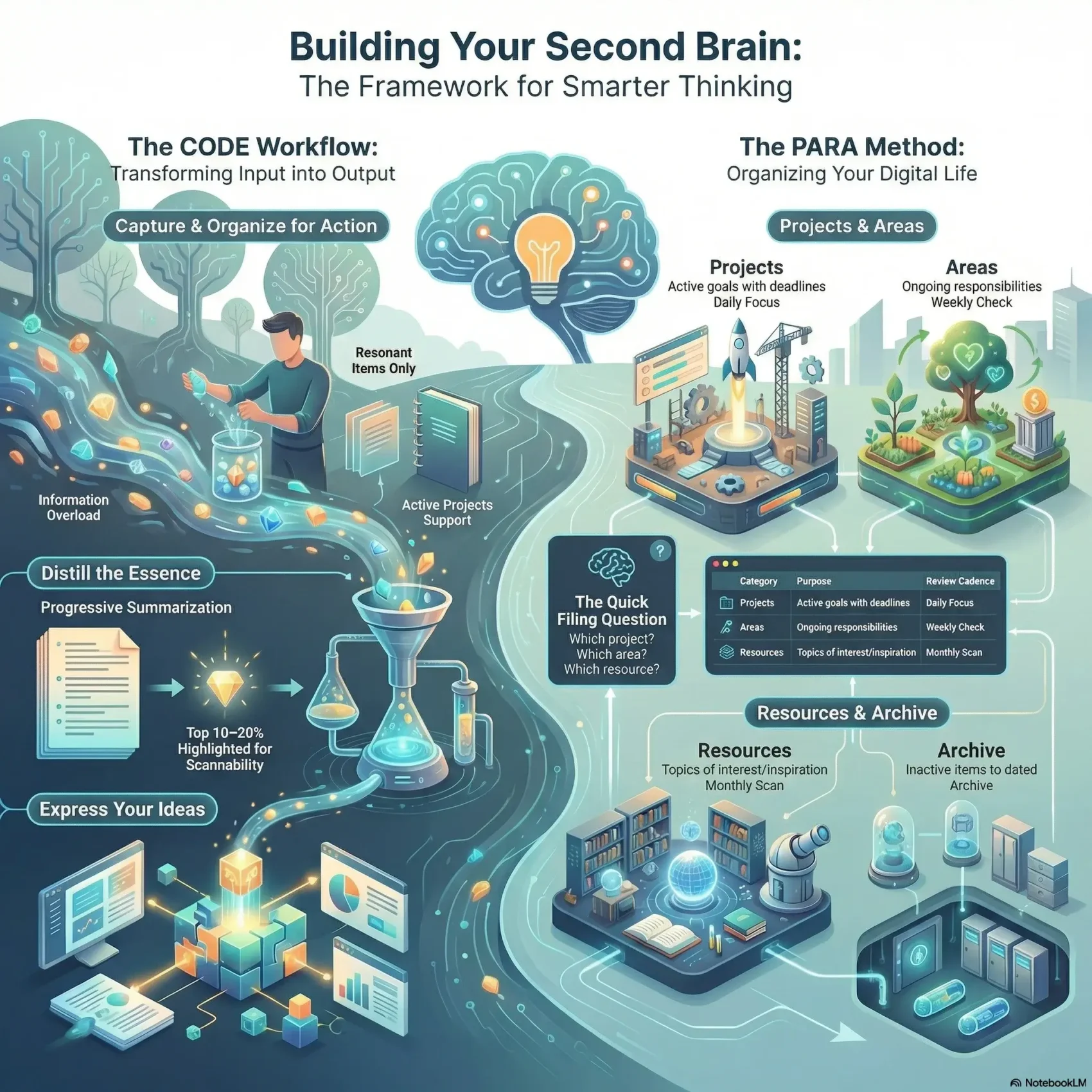
Building second brain is about a simple method: Capture inputs, keep them findable, distill the useful parts, and reuse them as outputs. The CODE steps—Capture, Organize, Distill, Express—act as the backbone of this system.
How a digital environment augments your memory and focus
Using a synced digital environment expands your ability to retrieve information across devices. That keeps your attention free for analysis and creation.
“Store once, retrieve anytime — your attention should be spent on thinking, not remembering.”
- Centralized storage makes connections across notes automatic and reveals useful patterns.
- The choice of app matters less than the method you follow to organize information around current work.
- This approach saves you time and scales with your life, from learning new skills to managing complex projects.

For a deeper look at how focused work fuels creativity, see deep work and creativity.
Inside the CODE Method: Capture, Organize, Distill, Express
Turn scattered notes into usable work by following a clear, repeatable process for saving and shaping ideas.
Capture: Save only what resonates and inspires action
Capture selectively: save passages that spark a next step. Use Readwise Reader, Pocket, Instapaper, web clippers, and transcription apps to grab highlights and voice transcripts.
Organize: Make information findable and actionable
Organize items with PARA so each file ties to a project or responsibility. That makes retrieval fast and keeps your work focused on outcomes.
Distill: Progressive summarization for faster recall
Distill with Progressive Summarization: highlight the top 10–20% and layer short summaries. Future you will grasp a note’s essence in seconds.
Express: Turn ideas into results on demand
Express by repurposing compact notes into emails, articles, decks, or designs. This step turns stored information into measurable output and saves you time.
“Better capture feeds better summaries, and better summaries speed up output.”
- Small actions each day build a durable habit.
- This platform-agnostic method converts information into concrete results.
- Each part of CODE compounds value across your projects and work.
Second brain organization with the PARA Method
Split your digital life into four purposeful areas so action comes faster. PARA turns scattered files into a practical filing system that keeps your next steps visible.
Projects: short-term goals that demand your attention
Projects are outcomes with deadlines. If a file supports a specific deliverable, it belongs here. This keeps work that drives results at the front.
Areas: ongoing responsibilities without due dates
Areas hold steady duties you maintain over time. Use them for roles like finance, health, or client care. They are the background commitments that need regular checks.
Resources: interesting and potentially useful topics
Resources act as your personal library. Save articles, templates, and ideas you might reuse. Treat this as inspiration, not immediate to-dos.
Archive: keep inactive items without cluttering your flow
Move legacy files into an Archive dated today to start fresh. Ask this question when you file: Which project? If none, which area? If none, which resource? If none apply, archive it.
“PARA makes momentum simple: what you need now stays visible, and everything else stays searchable.”
- You’ll map all digital information into Projects, Areas, Resources, and Archive so what’s actionable is easiest to find.
- Adopt the quick filing question set so organizing takes seconds, not hours.
- Items will move between buckets naturally as goals change, keeping your setup flexible and low-maintenance.
Set Up Your Digital Life: Tools, Inbox, and a Clean Slate
A clean inbox and a few simple tools cut friction and reclaim your time. Start by moving legacy files into an Archive folder dated today. That separates the past from what you’ll keep next and lets you focus on current work.
Create a single Inbox where new items land before you sort them. Use a quick capture flow—share → Inbox—so ideas, links, and receipts save in seconds across phone and desktop.
Start fresh: Archive legacy files and reduce friction
Archive old folders into one dated container. This small step frees mental space and shortens the time you spend searching.
Build an inbox to capture ideas in seconds
Keep one low-friction Inbox note or folder. Process it weekly, not constantly, to batch work and save time.
App-agnostic toolkit: Notes, read-later, clippers, transcripts
Assemble tools you already like: Evernote, Notion, Apple Notes, Readwise Reader, Pocket, web clippers, and transcription apps. Save any piece of information fast and sync across devices so nothing slips through the cracks.
- Batch filing: use the PARA method later to organize digital files without constant fiddling.
- Quick questions: when filing ask: project? area? resource? This keeps filing consistent.
“A simple, synced digital environment makes capture reliable and retrieval instant.”
With this setup you’ll spend less time filing and more time doing work that matters. Use the same method to build second brain that scales with your life.
Capturing Like a Curator: What to Keep and What to Skip
Capture with intent so your saved items become useful building blocks. Think of your capture flow as a short filter that protects your attention and saves only what helps you create later.
Use intuitive filters
Apply four quick checks before you hit save: useful, personal, surprising, inspiring.
- If it sparks a next step, keep it as an idea or short note.
- If it ties to your long-term interests, tag it for future reading.
- If it’s purely noise, let it go to save you time and focus.
Create a consistent capture habit
Route all highlights, read-later exports, social favorites, clippings, and audio transcripts to one central place. Use a single inbox in your note app so items don’t scatter across devices.
“Curate now, create later.”
Quick practice: save context (source, link, tags), ask two quick questions, and move on. This method keeps your repository lean and makes review fast when you need material for work, life, or future business projects.
Organize for Action: Weekly and Monthly Review Rhythms
Set a predictable cadence for review so your notes turn into action, not backlog. A steady routine helps you file fast, keep projects moving, and free mental space for real work.
Process your inbox in batches to stay light
Batch-process your Inbox once a week. In a single session, file 10–20 items into PARA in minutes. This keeps fresh information from piling up and saves you time across the week.
Weekly Areas check, monthly Resources scan
Give projects the daily focus they need. Check Areas weekly to maintain ongoing responsibilities. Scan Resources monthly to surface ideas worth promoting into active work.
- Weekly session: empty your Inbox so your system stays nimble.
- Attention model: daily for projects, weekly for areas, monthly for resources.
- Move items fast by asking, “Which project? Area? Resource?” to protect your time.
- Use reviews to track momentum toward goals and to spot stuck items.
- Treat resources as a discovery engine during monthly scans and promote what matters.
- Batch similar tasks to boost productivity and cut context switching.
- Keep the system trustworthy with predictable review intervals so you always know where to look next.
For tips on how to organize digital files and speed up reviews, use short checklists and a single, synced Inbox.
Distill to the Essence: Progressive Summarization in Practice
A simple layering method turns long captures into tiny, reusable insights. Start by saving the best excerpts. Later, highlight about 10–20% of those excerpts. Then add a short summary in your own words. Each pass makes complex information pop faster and saves you time.
Design notes for your future self
Give each note a clear title and context so you can re-enter it quickly. Add definitions, placeholders, and links. This helps your future self understand a piece information even years later.
Layer highlights and short summaries over time
Only distill when you need to use a note. That keeps work sustainable and cuts busywork. Keep highlights tight so scanning takes seconds.
“Pay it forward: design notes so the next time you open them, you know what matters.”
- Pay it forward: make notes readable at a glance.
- Layer: excerpts → highlights → short summaries.
- Save time: distill on demand, not as homework.
- Link and split: connect related notes and break big things into smaller pieces.
Express Your Ideas: From Notes to Outputs
Expression is where curated fragments become real work. When you treat notes as modular parts, creation becomes assembly rather than invention. This final step turns saved highlights and short summaries into writing, slides, scripts, and briefs you can use right away.
Repurpose notes as creative building blocks
Use small, reusable fragments to jump-start drafts. Snap together distilled excerpts, quotes, and templates to make publishable content faster. You’ll avoid the blank page and finish tasks with less friction.
This approach speeds up work on projects and business initiatives. Over time, your repository becomes a library of proven elements you can remix for reports, decks, and side projects.
Find anything in seconds and remember everything that matters
With a mature system you’ll find anything in seconds—stats, examples, and frameworks. That cuts the time between idea and output.
- You turn notes into drafts, slide decks, scripts, and briefs without starting from scratch.
- You compose faster by snapping together curated blocks you distilled earlier.
- You connect ideas across projects, life, and years to generate fresh angles for work and business.
- You remember everything that matters because the system surfaces what you need at the right time.
“Expression completes the loop: creating reveals what capture and distillation should focus on next.”
Conclusion
Conclusion
Start small, gain clarity. Pick one clean action today: archive old files, create a single Inbox, and file one note into PARA. This simple system helps you organize information and organize digital life so you save time and regain focus.
Use CODE and the PARA method as the core of your workflow. Over years this approach to building second brain and build second brain turns scattered inputs into useful outputs. Capture what matters, distill short summaries, and express work that advances your projects and goals.
Keep the routine gentle and consistent. The guide you now have is a practical way to track progress, protect focus, and turn knowledge into results with less effort.