Tools
Tools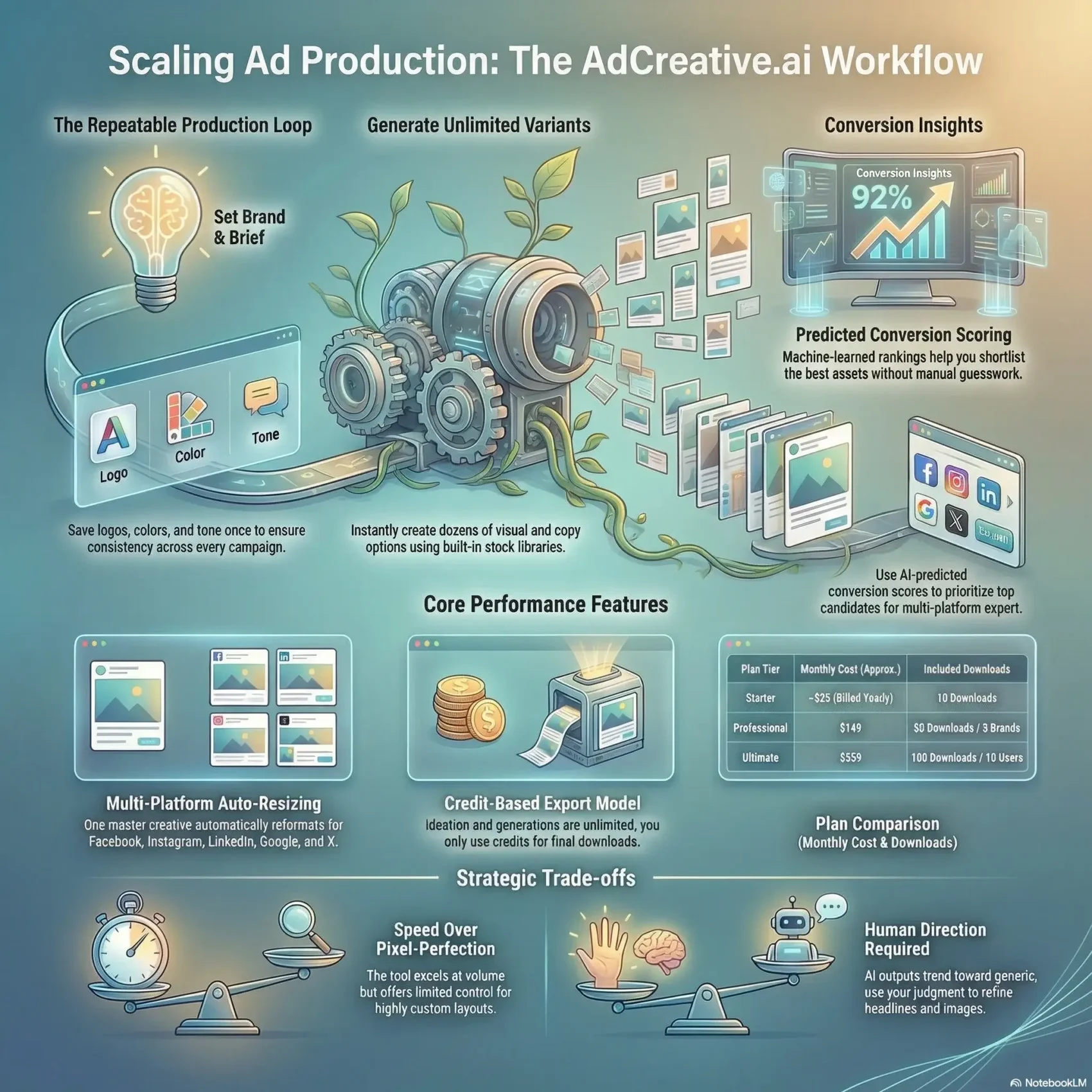
You need faster, smarter ad production when your calendar fills with campaigns and tests. This review shows how a creative tool speeds up your workflow by generating multiple visual and copy variants, each with a predicted performance score to guide what you launch first.
Set your brand once — logo, colors, tone, and audience — and the platform stores those basics so you save time on every new campaign. You choose formats, headlines, and images, then get ready-to-export creatives for Facebook, Instagram, LinkedIn, Google Display, Pinterest, and X.
The system auto-resizes outputs and keeps layouts mostly intact, which helps when you scale tests across platforms. You’ll learn where scores match real-world CTR lift, what limits to expect in layout control and collaboration, and how to budget with credit-based pricing tiers.
Key Takeaways
- The tool speeds up ad creation and saves you valuable time.
- Predicted scores help prioritize which ads to test first.
- Brand presets reduce repetitive setup for new campaigns.
- Auto-resizing eases multi-platform publishing of visuals.
- Expect trade-offs: faster output but less layout control.
- Pricing uses credits; plan monthly costs around download tiers.
AdCreative.ai Review
You can crank out dozens of ad visuals in minutes, but strong inputs still shape which ones actually win.
The platform speeds production for U.S. marketers and small brands while leaving creative judgment to you. Good headlines, sharp images, and a clear brand tone lift predicted performance and help you get real results.
Expert take: fast creative generation that still needs your direction
Experts find the tool excels at volume and speed. It produces many variants and gives conversion scores to help prioritize what to test.
That said, you must refine copy and choose images. Without guidance, outputs trend generic and need tweaks to reach top results.
Who should consider it and who shouldn’t
Buy if: you lack a designer, want quick multi-platform ads, or run campaigns across several brands with a small team.
Don’t buy if: your workflows need live co-editing, deep layout control, or highly custom compositions.
Target audience fit for U.S. marketers and brands
The target audience includes solo founders, small teams, and in-house marketers managing multiple profiles. It suits anyone who values speed and clear onboarding over pixel-perfect design control.
- Options like conversion scores and stock libraries speed iteration.
- Things you can do: sharpen your value prop, test headlines, and align tone to improve results.
- Predicted scores usually help triage what to launch first.

What AdCreative.ai is and how it works in real campaigns
Save your brand details up front and the platform fills in colors, logos, and audience settings automatically.
You create a project, pick an asset type (image ad, product video, etc.), name it, and choose standard sizes like post, story, or leaderboard.
Next, set your brand: company name, description, target audience, URL, logo, and color palette. Those brand profiles are saved for reuse so every new brief keeps consistent styling.
Guided creation flow
Pick a format and let the built-in text tool suggest headlines and supportive text in several tones.
You can upload product photos or choose stock images from iStock, Pexels, and Unsplash. Automatic layout handles basic cropping and placement so composition stays tidy across sizes.
From generate to selection
Generate multiple variations at once and get predicted conversion scores to help shortlist top candidates.
- Preview and sort by score, then edit text or swap an image before finalizing.
- Generations are unlimited inside the platform; downloads use credits.
- Branch into videos, batch ads, or virtual photoshoots without rebuilding your brand profile.
Result: a repeatable process—brief, generate, score, select, and ship—that speeds campaign production while keeping brand visuals and text consistent.
Core features that impact conversion and creative speed
A handful of features work together to cut production time and improve which ads you test first.
Creatives with conversion scoring and performance insights
Conversion scores give you a quick ranking so you can prioritize assets without guesswork. These machine-learned estimates often match what seasoned marketers pick.
Performance insights highlight patterns—color, copy, or layout—that move the needle so you test smarter, not harder.
Custom brand profiles for consistent visuals and tone
Save logos, palettes, and preferred copy tone in a single profile. That feature keeps every creative on-brand and speeds repeat campaigns.
Multi-platform auto-formatted output that preserves layouts
Export to major platforms and common sizes while keeping key design elements intact. You’ll spend less time reworking layouts as you rescale.
Built-in text generator and team sharing
The text tool drafts headlines, descriptions, and longer copy that match your brand voice.
Invite teammates for async reviews and approvals. Collaboration is organized, even without live co-editing.
- You’ll learn when to trust the score and when to use your judgment.
- Practical tip: keep visuals simple so layouts survive resizing across platforms.
Creative variants, scores, and how to approach CTR lift
Create many visual options fast and use simple scoring to focus the first wave of tests. This saves time and gets you to meaningful results sooner.
Image, product photo ads, videos, and batch variations
You can generate image and video variants quickly, including product photo ads with background removal and batch styles.
Batch runs let you produce dozens of variations that keep composition consistent across sizes. That gives you a clean pool to pick from.
Using predicted performance scores to prioritize what to test
Each creative receives a predicted performance score so you can shortlist the best candidates without testing everything.
“Top-ranked options often align with actual winners, helping you triage tests with confidence.”
Tip: Combine the score with your product context before you launch a live test.
A simple testing process to learn faster and lift CTR
Follow a tight loop: generate, shortlist, A/B test, iterate, and scale winners across more placements.
- Test 3–5 top variations and watch early signals.
- Iterate headlines and visuals for conversion gains.
- Validate winners across audiences and platforms to avoid false positives.
Keep tests scoped and fast so you spend more time scaling what works in your campaigns and less time guessing.
Platforms, placements, and sizes you can export to
One master creative can be stretched into exact-fit files for every major social and display channel. You pick placements up front and the tool outputs on-spec files so you don’t redo work later.
Facebook, Instagram, LinkedIn, Google Display, Pinterest, and X
Export-ready outputs include Facebook feed, carousel, and story. Instagram exports cover square posts, story, and reel formats.
LinkedIn supports single-image and sponsored content sizes. You also get Google Display banners, Pinterest pins, and X-ready assets.
Universal formats and standard aspect ratios
Universal format presets give you safe defaults when placements are undecided. Auto-resized assets typically keep layout hierarchy, saving production time across each platform.
- On-spec sizes: built-in options reduce guesswork for exact sizes.
- Turn one master visual into many: platform-specific variants with minimal rework.
- Legibility tips: keep text blocks large and test images at small sizes.
- Know the trade-offs: auto-formatting works well most of the time; a quick manual tweak is sometimes worth it.
Generate multi-platform ads now“You’ll be set up to launch ads across multiple channels without juggling separate production tools.”
Ease of use and onboarding experience
The setup focuses on essentials so you spend less time on menus and more on creating.
Quick start in minutes with a clean UI and beginner‑friendly guidance
You’ll be moving fast: add your logo, brand name, and colors, then start generating ads in just a few minutes.
The walkthrough is clear and non‑intimidating. It shows key steps, so you learn the core tool without getting lost.
Result: a gentle ramp for the target audience of small teams and solo marketers.
Where onboarding flattens and when you may need outside best practices
After the initial flow, guidance becomes static. You may need to bring your own campaign plan and proven methods to improve results.
There’s an option to structure your first test plan so you avoid spinning your wheels. Even without a designer, you can ship presentable creatives early and iterate fast.
- Support: email-driven only, no live chat or phone.
- Quick win: better inputs are the one thing that accelerates stronger outputs.
- Starter checklist: brand assets, headline drafts, a simple test plan, and audience targets.
Pricing, plans, credits, and what you actually pay per month
Budgeting here is simple: you pay for exports, not for every draft you make. Generations are unlimited, so ideation stays free while credits cover the final files you download.
How the download‑credit model works across unlimited generations
Each download consumes a credit. That keeps costs aligned with what you ship each month and helps you test without surprise charges.
Practical tip: count expected downloads per campaign and multiply by campaigns per month to forecast spend.
Plan options from Starter to Enterprise, with brand and user limits
Common tiers: Starter (~$25/month billed yearly) with 10 downloads; Professional $149/month for 50 downloads and up to three brands; Ultimate $359/month for 100 downloads and 10 users; Enterprise is custom.
The Semrush AppCenter plan runs $109/month with 100 credits and five brands, plus $50 add-ons for 100 extra credits and five more brands.
Free trial, billing considerations, and support expectations
Mainline plans usually include a 7-day free trial; the Semrush app offers a 3-day free trial. Use the trial to validate options and brand limits before you commit.
- Monitor downloads to avoid unexpected renewals.
- Consider add-ons when campaigns spike and you need more credits or brands.
- Some users report billing and support delays, so review terms and track invoices.
Claim your free trial credits“Map downloads to your launch calendar so monthly costs match real output.”
Pros, cons, and limitations from hands‑on testing
You’ll notice the biggest wins come from speed, predictable sizing, and quick performance nudges.
What it does best
Fast generation lets you produce many export‑ready ads in minutes. Auto‑resized outputs hold up across Meta, LinkedIn, Display, Pinterest, and X so you waste less time reformatting.
Reusable brand profiles, stock libraries, and batch exports save routine work. Conversion scores often match winners and help you prioritize tests faster.
Where it falls short
You get limited fine‑grain control of layouts and few options for highly custom design tweaks. That can make some outputs feel generic unless you tighten inputs.
Real‑time collaboration is missing; team workflows depend on async comments and email. Support is email‑only and some users report billing delays.
How to use insights and guardrails
Insights can benchmark CTR by category, but they don’t replace your judgment. Use scores as nudges, not guarantees, and QA every top pick before launch.
- Sharpen brand guidelines to avoid generic results.
- Plan approval steps for your team to avoid version chaos.
- Test scores quickly, then validate winners in live A/Bs.
“Treat the tool’s features as accelerators — not the final creative authority.”
If you want a quick way to scale creatives and value speed over pixel‑perfect control, this tool will deliver strong results. For a full breakdown and checklist, see our linked guide.
Conclusion
Summary review: When speed matters, a steady process helps you turn concepts into multi‑platform ads without needing a full creative team.
You get reusable brand presets and quick generation that accelerate tests for U.S. marketers running many campaigns. Predicted scores point you to top picks so you test fewer options and learn faster.
Budgeting is simple: credits pay per download, so choose a plan that matches your expected exports per month. This keeps brainstorming free and final files costed to what you ship.
Try the free trial to confirm workflow fit, then roll out a tight loop: generate, shortlist by scores, A/B test winners, and scale ads across placements.
Create your first ad campaign