Tools
Tools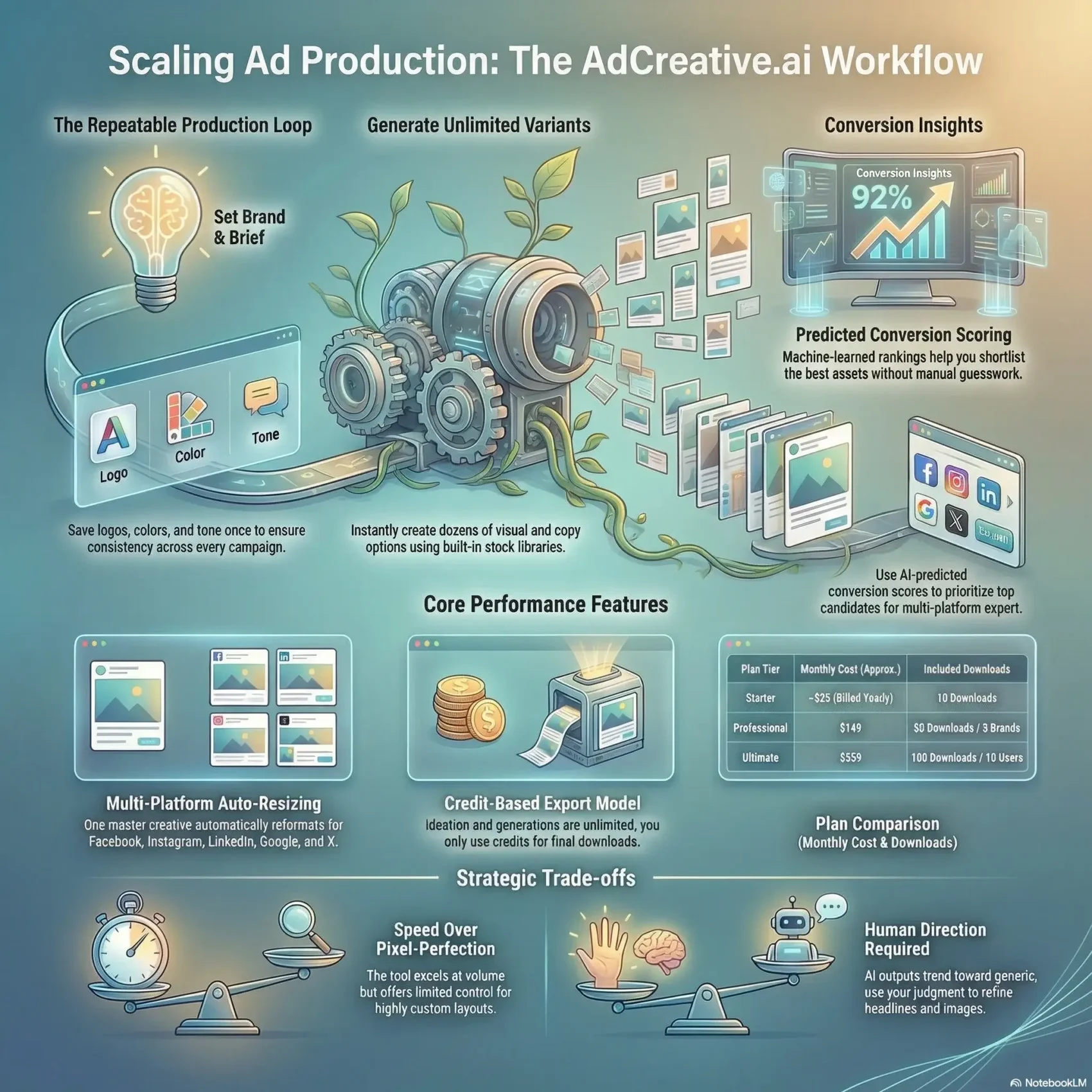
Last Updated on August 10, 2026
Last reviewed: August 2026. Plans, credit allowances and feature gating were re-checked against the vendor’s current pricing page and independent 2026 sources. AdCreative.ai changes its tiers often — always confirm the live price before you subscribe.
You need faster, smarter ad production when your calendar fills with campaigns and tests. This AdCreative.ai review shows how the platform generates multiple visual and copy variants, each with a predicted performance score that tells you what to launch first.
Set your brand once — logo, colors, tone, and audience — and the platform stores those basics so you save time on every new campaign. You choose formats, headlines, and images, then export ready-to-run creatives for Facebook, Instagram, LinkedIn, Google Display, Pinterest, and X.
The system auto-resizes outputs and keeps layouts mostly intact, which helps when you scale tests across placements. Below you’ll find where the scores match real CTR lift, what the 2026 pricing actually costs, which features sit behind higher tiers, and where the tool falls short.
Key Takeaways
- Speed is the product. Static ad variants go from brief to export-ready file in minutes.
- Scores are a triage tool, not a guarantee — use them to rank what you A/B test first.
- Brand profiles remove repetitive setup across campaigns and clients.
- Credits are spent on downloads, not generations, and they do not roll over.
- Video, batch creatives and Creative Scoring AI sit behind the Professional tier — the Starter plan is essentially image-only.
- Trade-off: fast output, limited fine-grain layout control and no live co-editing.
AdCreative.ai review 2026: the short verdict
“If your bottleneck is creative volume rather than creative depth, this tool pays for itself. If you need bespoke design, it will frustrate you.”
You can produce dozens of ad visuals in an afternoon — but the quality of your inputs still decides which ones win.
The platform speeds up production for U.S. marketers and small brands while leaving creative judgment to you. Sharp headlines, a strong product image, and a clear brand tone lift the predicted scores and the real results behind them.
Expert take: fast generation that still needs your direction
The tool excels at volume and speed. It produces many variants and attaches conversion scores so you can prioritize what to test.
That said, you have to refine copy and choose images deliberately. Left on autopilot, outputs trend generic and need a pass before they’re worth spending budget on.
Who should buy it — and who shouldn’t
Buy if: you have no in-house designer, run continuous Meta and Google tests, or manage several brand profiles with a small team.
Skip it if: your workflow depends on live co-editing, granular layout control, highly custom compositions, or video as your primary output format.
Target audience fit for U.S. marketers and brands
The sweet spot is solo founders, DTC e-commerce brands, in-house growth teams, and small agencies juggling multiple client profiles. It suits anyone who values speed and quick onboarding over pixel-perfect control.
- Conversion scores and a built-in stock library speed up iteration.
- Your job stays the same: sharpen the value prop, test headlines, align tone.
- Predicted scores are best used to triage the first wave of tests.

What changed in 2026
Two things matter if you last looked at this tool a year ago.
New ownership. AdCreative.ai (operating company ADYOUNEED SAS, Paris) was acquired by the Taipei-listed AI marketing group Appier in February 2025 for a reported $38.7 million. The product still sells as a standalone subscription, but the generative engine is also being folded into Appier’s wider ad and personalization stack. Practically, that removes the “will this startup still exist next year?” risk that hangs over most independent AI creative tools.
More formats, more gating. The roadmap since the acquisition has pushed into video and photoreal product imagery — product videos, storytelling ads, UGC-style formats, and fashion photoshoots. The catch: most of those sit on the Professional tier and above, so the entry plan is realistically a static-image product.
If video is the main thing you need, compare this against a purpose-built option first — our Creatify review covers product-video ads, and the Synthesia review covers avatar and training video.
What AdCreative.ai is and how it works in real campaigns
Save your brand details up front and the platform fills in colors, logos, and audience settings automatically.
You create a project, pick an asset type (image ad, product video, and so on), name it, and choose standard sizes like post, story, or leaderboard.
Next, set your brand: company name, description, target audience, URL, logo, and color palette. Brand profiles are saved for reuse, so every new brief keeps consistent styling.
Guided creation flow
Pick a format and let the built-in text tool suggest headlines and supporting copy in several tones.
You can upload product photos or pull from the included stock library (iStock by Getty, plus Pexels and Unsplash). Automatic layout handles cropping and placement so composition stays tidy across sizes.
From generate to selection
Generate multiple variations at once and get predicted conversion scores to shortlist the strongest candidates.
- Preview and sort by score, then edit text or swap an image before finalizing.
- Generations are unlimited; only downloads consume credits.
- Branch into videos, batch ads, or virtual photoshoots without rebuilding your brand profile.
Result: a repeatable loop — brief, generate, score, select, ship — that speeds up campaign production while keeping visuals and messaging consistent.
Core features that impact conversion and creative speed
A handful of features do the real work of cutting production time and improving what you test first.
Conversion scoring and creative insights
Conversion scores rank each asset so you can prioritize without guesswork. These machine-learned estimates frequently line up with what an experienced buyer would pick.
Creative Insights highlight patterns — color, copy, layout — that tend to move the needle, so you test smarter rather than harder. It’s a shortcut to the same conclusions that consumer-behavior research reaches the slow way: attention, contrast and clarity drive the first click.
Custom brand profiles for consistent visuals and tone
Save logos, palettes, and preferred copy tone in a single profile. That keeps every creative on-brand and makes repeat campaigns fast.
Multi-platform auto-formatting that preserves layouts
Export to major platforms and common sizes while keeping key design elements intact. You spend less time reworking layouts as you rescale.
Built-in text generator, integrations, and team sharing
The text tool drafts headlines, descriptions, and longer copy in your brand voice. Direct integrations push finished assets to Meta and Google Ads instead of routing everything through downloads and re-uploads.
Teammates can be invited for async reviews and approvals. Collaboration is organized — just not simultaneous.
- Learn when to trust the score and when to override it.
- Keep visuals simple so layouts survive resizing across placements.
Creative variants, scores, and how to approach CTR lift
Create many visual options fast, then use scoring to focus the first wave of tests. That gets you to a meaningful result sooner and with less budget burned.
Image ads, product photos, videos, and batch variations
You can generate image and video variants quickly, including product photo ads with background removal and batch styles.
Batch runs produce dozens of variations that keep composition consistent across sizes, giving you a clean pool to pick from. Note that Batch Creatives is a Professional-tier feature.
Using predicted scores to prioritize what to test
Each creative gets a predicted performance score so you can shortlist without testing everything.
“Top-ranked options often align with actual winners — which makes the score a triage tool, not a verdict.”
Tip: combine the score with your product context and offer before you launch a live test. A high-scoring creative for the wrong audience still loses money.
A simple testing process to learn faster and lift CTR
Run a tight loop: generate, shortlist, A/B test, iterate, scale winners across placements.
- Test 3–5 top variations and watch early signals.
- Iterate headlines and visuals for conversion gains.
- Validate winners across audiences and platforms to avoid false positives.
Keep tests scoped and fast so you spend more time scaling what works and less time guessing. Sharper audience definitions help here too — see our guide to a first-party data strategy for building segments that survive cookie deprecation.
Platforms, placements, and sizes you can export to
One master creative stretches into exact-fit files for every major social and display channel. You pick placements up front and the tool outputs on-spec files, so you don’t redo work later.
Facebook, Instagram, LinkedIn, Google Display, Pinterest, and X
Exports include Facebook feed, carousel, and story. Instagram covers square posts, stories, and reel formats.
LinkedIn supports single-image and sponsored content sizes. You also get Google Display banners, Pinterest pins, and X-ready assets — the same surfaces driving social commerce growth.
Universal formats and standard aspect ratios
Universal format presets give you safe defaults when placements are undecided. Auto-resized assets usually keep layout hierarchy intact, saving production time on every platform.
- On-spec sizes: built-in presets remove the guesswork.
- One master, many variants: platform-specific files with minimal rework.
- Legibility first: keep text blocks large and check every asset at thumbnail size — most impressions are on a phone.
- Know the trade-off: auto-formatting works most of the time; a quick manual tweak is occasionally worth it.
Ease of use and onboarding experience
Setup focuses on essentials, so you spend less time in menus and more time creating.
Quick start in minutes with a clean, beginner-friendly UI
Add your logo, brand name, and colors, then start generating ads within a few minutes.
The walkthrough is clear and non-intimidating. It shows the key steps without burying you in options.
Result: a gentle ramp for small teams and solo marketers.
Where onboarding flattens
After the initial flow, guidance becomes static. You’ll need to bring your own campaign plan and testing method to get results worth paying for.
Even without a designer, you can ship presentable creatives on day one and iterate from there.
- Support: email-driven — no live chat or phone line.
- Quick win: better inputs are the single biggest lever on output quality.
- Starter checklist: brand assets, three headline angles, a simple test plan, and defined audiences.
AdCreative.ai pricing in 2026: plans, credits, and real monthly cost
The model is simple: you pay for exports, not for drafts. Generations are unlimited, so ideation is free — credits cover the files you actually download.
How the download-credit model works
Each download consumes a credit, which keeps cost aligned with what you ship. Two details catch people out:
- Credits don’t roll over. They reset at the start of each billing cycle.
- Some premium generations cost more than one credit, so your effective cost per usable asset is higher than the sticker rate suggests.
Practical tip: count expected downloads per campaign, multiply by campaigns per month, then add 30% for rejects. That number — not the headline price — decides your tier.
Plan options from Starter to Enterprise
AdCreative.ai runs monthly, quarterly, and yearly billing, and the discount for committing annually is steep. Tier names, credit counts and brand limits have been reshuffled several times, so treat the table below as a snapshot verified in August 2026 rather than a contract:
| Plan | Monthly list price | Billed yearly (approx.) | Download credits | Brands / users |
|---|---|---|---|---|
| Starter | ~$39/mo | ~$20–29/mo | 10 | 1 brand, 1–2 users |
| Professional | ~$249/mo | ~$125–149/mo | 50–100 | 3–10 brands, up to 10 users |
| Ultimate | ~$599–999/mo | ~$500–599/mo | 200 | up to 25 brands, 20+ users |
| Enterprise | Custom — dedicated support, API access, unlimited seats | |||
The gating matters more than the price. Every tier includes unlimited generations, the Text Generator, ad-platform integrations, the iStock library, Creative Insights, and Competitor Insights. But Creative Scoring AI, Custom Templates, Batch Creatives, product videos and storytelling ads start at Professional. If you’re on Starter expecting video, you’ll hit that wall fast.
Free trial, refunds, and support expectations
The standard offer is a 7-day free trial with 10 credits and full feature access. A credit card is required, but you’re not charged until the trial ends. Refunds are generally offered within 7 days (monthly) or 30 days (yearly) — but only if the account is genuinely unused.
- Use all 10 trial credits on one real campaign, not on random tests.
- Monitor download counts so renewals don’t surprise you.
- Some users report billing and support delays, so keep your invoices and cancellation confirmations.
Claim your free trial credits“Map downloads to your launch calendar so monthly cost matches real output.”
Pros, cons, and limitations from hands-on testing
The biggest wins come from speed, predictable sizing, and quick performance nudges.
What it does best
Fast generation produces many export-ready ads in minutes. Auto-resized outputs hold up across Meta, LinkedIn, Display, Pinterest, and X, so you waste less time reformatting.
Reusable brand profiles, the included stock library, and batch exports remove routine work. Conversion scores frequently match winners and help you sequence tests. Push-to-platform integrations close the design-to-launch loop.
Where it falls short
Layout control is limited and custom design tweaks are few, which makes some outputs feel templated unless you tighten your inputs.
Real-time collaboration is missing; team workflows run on async comments and email. Support is email-only. The video features, while improving, still trail dedicated video tools — and the credit system gets expensive when your usable-output rate is low.
How to use the insights and set guardrails
Insights can benchmark CTR by category, but they don’t replace judgment. Treat scores as nudges, not guarantees, and QA every top pick before launch.
- Tighten brand guidelines to avoid generic results.
- Define approval steps so versions don’t multiply out of control.
- Validate scored winners in live A/B tests before scaling spend.
“Treat the tool as an accelerator — not the final creative authority.”
Alternatives worth comparing
No single tool covers static ads, video, and copy equally well. Before you commit to a yearly plan, weigh these:
- Video-first campaigns: Creatify turns a product URL into ready-to-post video ads, and Synthesia handles avatar-led video at scale.
- Social content pipeline: Syllaby works further upstream, generating topic research and scripts before anything gets designed.
- Agencies needing CRM plus creative: a consolidated stack like GoHighLevel may cover more of the client workflow.
- General design work: Canva and Adobe Express are cheaper and more flexible, but neither offers predictive creative scoring.
Conclusion
Verdict: when speed matters, AdCreative.ai turns concepts into multi-platform ads without needing a full creative team — and the Appier acquisition makes it a safer long-term bet than most AI creative startups.
You get reusable brand presets and quick generation that accelerate testing across many campaigns. Predicted scores narrow the field so you test fewer options and learn faster.
Budgeting is straightforward: credits pay per download, so pick the tier that matches your expected exports — and check whether the features you need are gated above Starter before you subscribe.
Run the free trial against one real campaign, then commit to the loop: generate, shortlist by score, A/B test, scale the winners.
Create your first ad campaign