Tools
Tools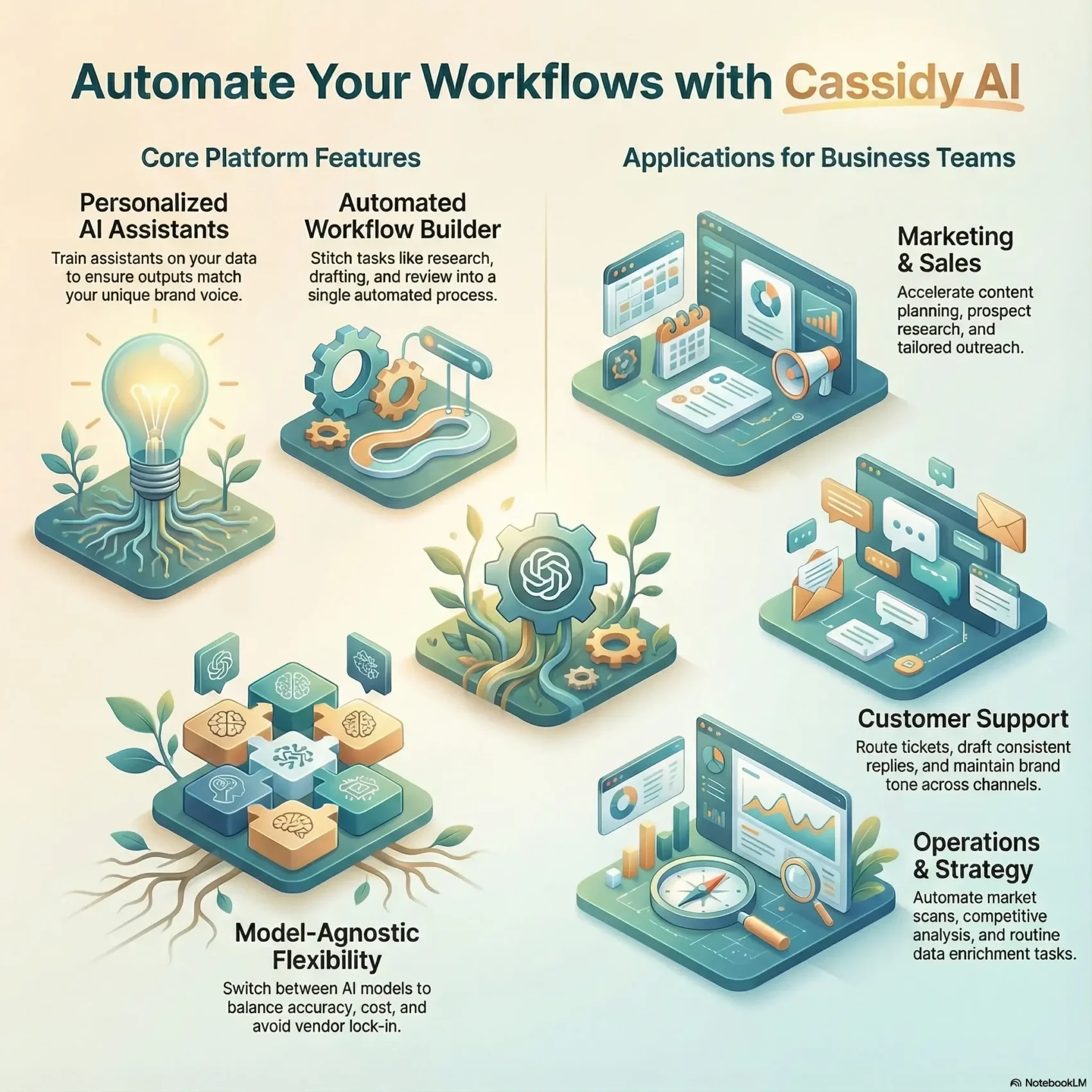
Last Updated on January 24, 2026
Expect to learn how personalized assistants use your business data and brand standards to deliver context-aware outputs. See why a model-agnostic approach protects your stack as technology evolves.
We’ll preview a Chrome extension that cuts tab switching for LinkedIn and inbox triage, a workflow builder that automates multi-step processes, and integrations that link to Slack and other tools.
Security, pricing, and support are covered briefly so you can judge fit fast, including a 14-day Pro free trial and custom plan options for teams that need tighter compliance and API access.
Start Your 14-Day Free TrialKey Takeaways
- Learn where the product sits across core categories and business workflows.
- Understand feature and performance trade-offs for marketing and operations.
- See how automation and workflow builders free you for higher-value work.
- Note integrations and API access for end-to-end solutions.
- Quick look at security, pricing, and who benefits most.
- Find deeper context on agent and support capabilities via AI assistants.
What Cassidy AI Is and Who It’s For in the United States Today
Think of it as a set of tailored digital helpers that plug into your workflows to speed routine work. The platform pairs personalized assistants with workflow automation so your business can move faster without changing core processes.
AI agents, workflows, and customer support use cases at a glance
Plain-English definition: personalized assistants plus a workflow builder that attach to your existing tools and processes. That makes automation practical for teams of all sizes.
Marketing and sales: your marketing team can accelerate content planning and production while keeping the brand voice intact. Sales teams use the same stack for prospect research, lead scoring, and tailored outreach so the team focuses on pipeline growth.
Customer support and operations: support groups route and categorize tickets, draft responses, and keep consistent tone across channels. Operations and strategy teams automate market scans, competitive analysis, and routine enrichment tasks.
- Offload research, drafting, QA checks, and follow-ups.
- Stitch intake, analysis, draft, review, and handoff into a single workflow.
- Tune agents to your customer data, compliance needs, and brand rules.
Quick fit check: whether you’re a lean startup or an established organization, the approach maps to common tasks and scales with team maturity.
See Cassidy AI in Your WorkflowCassidy AI Review: Features, Capabilities, and Customization
The following outlines the platform’s practical capabilities so you can judge fit quickly. It focuses on how assistants, models, workflows, and integrations work together to deliver consistent outputs and real efficiency gains.
Personalized assistants and brand voice alignment
You train assistants on your own data so outputs match your brand voice, tone, and compliance needs. Customization settings let you lock style rules, preferred vocabulary, and response formats.
Model-agnostic flexibility for accuracy and longevity
A model-agnostic approach lets you switch among models to balance accuracy, cost, and resilience. That flexibility reduces vendor lock-in and helps maintain steady performance as models evolve.
Workflow builder for background automation
The workflow builder automates multi-step processes — research to draft to review — so routine work runs quietly in the background. That frees you to focus on decisions, not repeatable tasks.
Chrome extension for research and inbox productivity
The Chrome extension speeds LinkedIn outreach and inbox triage by removing tab switching. Note that a browser-first design can be limiting if your org restricts Chrome.
Integrations and API access
Out-of-the-box integration with Slack and API access make it straightforward to connect various tools and bespoke ops. Integration options help you stitch assistants into existing pipelines and data sources.
“Train your assistants on reliable data, monitor performance across models, and iterate to improve accuracy.”
- Features: personalized assistants, workflow automation, and extensible integrations.
- Capabilities: voice controls, model selection, and background processing for efficiency.
- Limitations: depends on data quality; model variety can feel overwhelming; Chrome-first tools may not fit all environments.
Pricing, Security, and Support You Can Rely On
Before you buy, confirm how pricing, data safeguards, and support match your team’s needs and compliance rules.
Free trial details and customized plans for teams and businesses
You’ll start with a 14-day Pro free trial so you can validate fit and measure impact on workload. Customized plans scale with company size and governance needs.
Robust security and data handling during training and operations
Security is handled across training and runtime. Data protection, access controls, and audit logs are designed for compliance-minded teams.
Onboarding, resources, and customer support for smooth adoption
Onboarding includes step-by-step tutorials and role-based training to speed adoption. You get documentation, learning resources, and support channels as you scale.
“Confirm pricing, test the free trial, and review security practices before integrating an automation tool into your stack.”
- Start with the 14-day free trial to gather internal feedback.
- Pick a pricing tier that matches team size and business needs.
- Verify security during training and operations before full rollout.
- Use provided resources and training to ramp users and admins fast.
- Confirm integration points, API access, and how updates are managed.
Performance in Real Workflows: Research, Summaries, and Content Operations
Discover practical steps for turning search data into strategy briefs, development tasks, and published content that ranks.
Automated content SOP: you start by auditing underperforming pages via Google Search Console. Send URLs to the platform, which scrapes the top 100 SERP results and flags gaps. Use those insights to build a strategy brief that maps keywords, micro-intents, and personas.
Automated content SOP: from strategy briefs to publication and optimization
Development briefs generate title options, tone, topics, and personalization rules. Drafts follow SEO best practices and include meta descriptions, CTAs, FAQs, and snippet recommendations. Add human review and SME checks; use verification tools to improve accuracy.
Sales and support: lead qualification, ticket categorization, and response speed
Apply the same workflows to sales and customer support. Automate lead research, personalize outreach, and run lead qualification so reps focus on the best opportunities. For support, auto-categorize tickets and draft consistent replies to cut response time.
“Measure impact by tracking cycle time, rankings, CTR, and accuracy at the team level.”
- Customize workflows by content format and assign steps to your team.
- Schedule recurring updates to refresh content with new data and algorithm changes.
- Train teams with role-based SOPs so processes scale reliably.

Conclusion
Wrap up your evaluation with a practical plan to pilot features that deliver quick wins for content and operations.
You’ll know which tools to pilot first: personalized assistants, workflow automation, and the Chrome extension for research and outreach. Start small to prove value for marketing, sales, and customer support.
Prepare your data and governance, enroll teams with focused training, and connect via Slack and API integrations so processes flow across various tools. Track efficiency with a simple dashboard for output speed, accuracy, and pipeline or support gains.
Start a 14-day Pro free trial, validate impact on priority tasks, and scope pricing and updates to fit your business needs. These steps turn early insights into repeatable solutions and clear ROI for leadership.
Start Your 14-Day Free Trial