Tools
Tools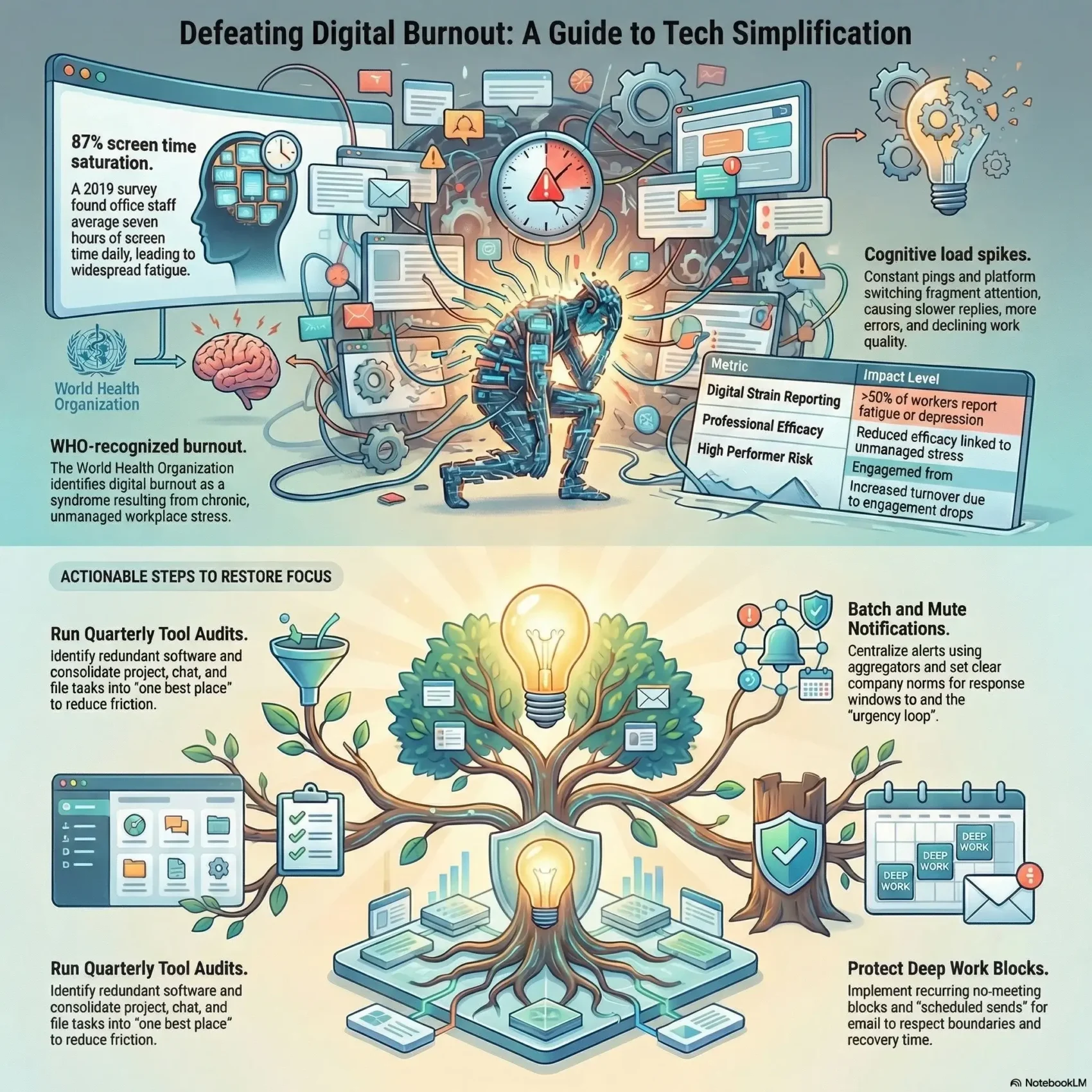
You face constant pings, too many platforms, and a creeping sense of exhaustion. The World Health Organization now recognizes digital burnout as an occupational phenomenon tied to chronic workplace stress. A 2019 survey of 1,057 U.S. office staff found most people spent about seven hours a day on screens and over half reported fatigue or depression from digital strain.
In this article, you will get a clear roadmap to spot signs of fatigue and learn why this trend is accelerating today. We link real symptoms—energy loss, sleep disruption, anxiety—to everyday platform sprawl.
Expect practical steps that help your team reclaim time, cut stress, and restore focus without sacrificing results. You’ll also find guidance on smarter tool choices and a link to automation ideas for repetitive tasks at repetitive tasks automation.
Key Takeaways
- Digital burnout is recognized by WHO and affects employee mental health.
- Long daily screen time often leads to fatigue and reduced efficiency.
- Simplifying tools can restore focus and save your team time.
- Practical steps can reduce stress while keeping business results strong.
- Automation and clearer tool choices support people-first outcomes.
Why work tech overload is spiking right now
Right now, constant connectivity is changing how you spend every day. The World Health Organization now frames burnout as a syndrome from chronic workplace stress, with signs like energy depletion and reduced efficacy. This is a system issue, not a personal failing.
Always-on tools — email, Slack, and project apps — keep you reachable in moments. In 2019, 87% of American office workers logged about seven hours on screens, and more than half reported fatigue or depression from digital strain. Long hours at a computer plus endless alerts raise stress and chip away at health.
New platforms arrive faster than teams can learn them. That creates access hurdles, switching costs, and unclear priorities. Media and breaking news add emotional load, especially today when cycles are rapid and intense.
The modern reality: pings, platforms, and pressure
- You’re in an always-on environment where companies expect quick responses, making it hard to protect personal time.
- Long hours and nonstop notifications drive stress and erode recovery, even when intentions are good.
- More tools can mean less clarity, higher learning demands, and continual context switching for people and teams.
How to tell your team is overwhelmed by technology
Look for clear signs that your team is stretched thin by constant digital demands. Small behavior changes often mark a growing problem. Spotting them early protects people and preserves output.
Chronic stress and burnout signals that drain productivity
Irritability, reduced focus, and rising cynicism are classic signals. These patterns point to persistent stress and emerging burnout.
When employees add hours day after day just to keep pace, that is a red flag for everyone’s health and mental health.
Sleep disruption, anxiety, and mood shifts
Screens and late deadlines can shift mood and cut sleep. Anxiety and low energy reduce quality of life and the quality of deliverables.
Workers may report headaches, eye strain, or low motivation but not link these to device habits or always-on norms.
Information fatigue from nonstop tools and updates
People stop processing key messages when there is too much information. Missed handoffs, more errors, and slower replies show the problem.
- Declining work quality and withdrawn behavior often signal deeper overload.
- Avoiding meetings or chats can mean interruptions have drained capacity.
- Higher error rates and missed cues show mental saturation over hours and days.
Root causes: too many tools, too little focus
When alerts multiply across apps, attention fractures and progress slows in ways you might not notice at first. Notification overload spans email, calendar, task lists, project alerts, social media, news, and group chat. Persistent pings fragment attention and increase context switching.
Platform sprawl and scattered notifications
You’re likely seeing multiple platforms and software that each add updates and learning curves. Scattered alerts on your computer and phone pull workers into reactive tasks and erode productivity.
Meeting-heavy days, inbox pressure, and blurred boundariesMeetings can multiply interruptions. Even useful syncs become disruptive when they fill the day and push deadlines into evenings.
Email volume creates urgency loops: every ping feels like a priority. That mindset blurs boundaries and makes it harder to recover between deep-focus times.
- Centralize notifications or try an aggregator like Shift to mute noncritical alerts.
- Tighten meeting scopes and document decisions so tasks and deadlines stay clear.
- Trim redundant technology and set one best place for files and status updates.
The cost of overload: people first, business next
When digital demands stack up, the real costs show up in people and the bottom line. More than half of surveyed office workers reported fatigue or depression tied to digital strain. The World Health Organization links unmanaged workplace stress to reduced professional efficacy.
That human toll becomes a business problem. Expect missed deadlines, more rework, and falling morale as employees juggle scattered platforms and nonstop email. Errors rise when information is lost across apps.
From mental health impacts to turnover, missed deadlines, and lower output
Here are the common signs and consequences companies should track:
- Mental health concerns climb and engagement drops, leading high performers to quietly leave their job.
- Missed deadlines and rework increase when teams lose track of the latest information across platforms.
- Productivity falls not only from sheer load but from attention drag caused by alerts, context switching, and longer hours at the computer.
- Unmanaged stress reduces efficacy — a fact that translates into slower delivery, poorer decisions, and less innovation for your company.
Protecting people protects the business. Start by measuring these signals and giving employees clearer time to recover.
Actionable ways to simplify your tech stack and reduce fatigue
A practical plan to simplify platforms and notifications can give people back real time each day. Start small with clear rules and visible leadership so changes stick.
Run audits and consolidate
Run a quarterly tools audit to find redundant software and name one best place for projects, chat, and files.
Tame notifications and batch responses
Use app-level controls and a notification aggregator to centralize alerts from Outlook, Slack, and social feeds.
Batch responses and review alerts on your schedule so interruptions cost fewer hours.
Fix meetings, reset email, and protect deep focus
- Default to fewer attendees and shorter syncs; add at least one no-meeting block each day.
- Set email norms: scheduled sends, clear response windows, and no after-hours pings.
- Protect deep work with timeboxing, Pomodoro sprints, and calendar guardrails before key deadlines.
“Small management moves beat endless app chasing — they save time, cut errors, and help people recover.”
Provide quick SOPs, on-screen guides, and short training nudges to help teams adopt better habits. Visible leadership that honors focus time encourages lasting change and higher productivity.
Designing for every worker: confidence, training, and inclusion
Building confidence across your team starts with small, respectful learning steps. It is a fact that people can learn at any age, even if it takes more years to master new methods.
Support self-efficacy with paced learning paths and peer mentors so workers can practice tools during the normal day.
Give employees clear playbooks and just-in-time help. Pairing mentors with short guides makes new software feel like part of the job, not a separate task.
Remove age bias with respectful rollouts
- Offer small-group sessions, office hours, and quick videos so access is obvious.
- Normalize a few extra hours for hands-on practice in the first week.
- Include a company example use case so training maps to real job needs.
“Self-efficacy shapes motivation: when people feel capable, they learn faster and stick with change.”
Management should invite feedback and measure adoption. Recognize years of experience as an asset; seasoned workers spot risks and help tune tools. Celebrate wins so learning becomes part of daily work and everyone benefits.
Conclusion
A small, practical shift can turn constant alerts into quiet focus and healthier days.
You have seen how unmanaged tech and technology choices magnify stress and burnout. The path forward is clear: audit tools, consolidate platforms, reset email and meetings, and protect focused time so deadlines stop slipping.
Companies that act now help people do their best work, reduce overload, and support lasting mental health. Share this article inside your team and pick one change to try this week.
Curate news and information, set boundaries, and ask for help if you feel strained. Leaders should model these habits so healthy norms spread fast.