Tools
Tools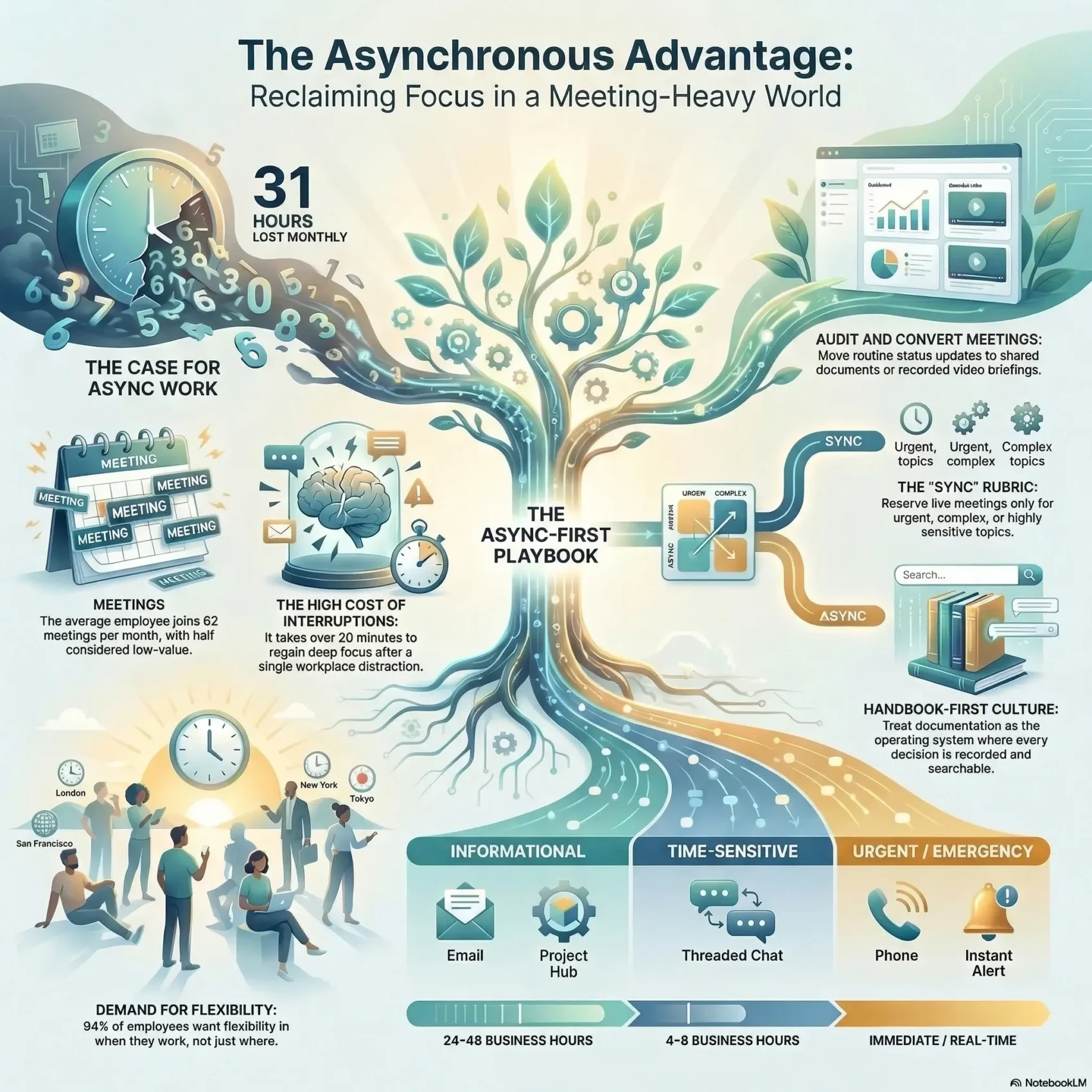
You can reclaim your schedule and protect deep focus by shifting how your team communicates. 94% of people want flexibility in when they work and 80% want flexibility in where they work. This intro shows what async means and why it replaces many status calls with clear written updates and recorded messages.
Interruptions matter: employees face up to 15 interruptions per hour, and it can take over 20 minutes to regain focus after a break. By using async tools—emails, collaborative docs, and recorded video—you cut needless meetings and give your team more uninterrupted time.
Async is not a fad. It gives autonomy, better documentation, and access to talent across time zones. You’ll also learn where live sync still helps, so your company keeps the right balance between clarity and connection.
Key Takeaways
- Async reduces frequent interruptions and protects focused time.
- Replace routine meetings with written updates to boost productivity.
- Use clear communication norms so employees stay aligned and informed.
- Async scales hiring across geographies for more talent and fewer scheduling clashes.
- Keep some live sessions for complex decisions; aim for fewer, better meetings.
Why asynchronous work matters right now
Too many calendar blocks steal your best thinking time. The average employee joins 62 meetings per month. Half are seen as low value, which costs roughly 31 hours monthly.
You’re searching for a practical way to cut meetings without losing collaboration. Shifting routine updates and non-urgent decisions to async channels reclaims calendar space and reduces fatigue.
Demand is clear: 52% of employees want their companies to go async-first. Hybrid schedules and global zones make real-time sync harder for teams and companies that need efficiency.
- Reclaim time: Move status updates to docs or recorded video.
- Protect focus: Fewer meetings means higher productivity and clearer ownership.
- Include more people: Written responses let quieter contributors participate thoughtfully.
Async doesn’t kill every meeting. It helps you keep only the high-impact meetings that need live input. Define urgency clearly and you’ll stop the “everything is ASAP” reflex.
What asynchronous work is and how it differs from remote work
When you choose the right medium, progress no longer depends on everyone’s calendar lining up.
Asynchronous work means moving projects forward without real-time interaction. Think email, docs, recorded video and clear handoffs. These channels let your team advance tasks, then return later to add context or decisions.
Synchronous communication covers meetings, live chat and calls. Those methods are best for fast, complex alignment or sensitive topics. Use them sparingly so they stay high-impact.
Async vs. synchronous communication: messages, email, and meetings
Choose email or docs for structured updates. Use short messages for light discussion. Reserve a meeting when rapid interaction or emotional nuance is required.
Where you work vs. how work gets done
Remote describes location; async describes cadence. You can be co-located and still adopt async methods to scale documentation and reduce interruptions.
“Do as much as you can, document everything, hand off ownership, then start something else.”
- Quick test: Is it urgent, complex, or sensitive? If not, default to async.
- Measure impact: Follow GitLab’s lead—track outcomes, not green-dot activity.
Core benefits of async work for your team
Making calendar space for focused effort starts with deliberate changes to how your team communicates. Shift routine updates off the calendar and you unlock real gains in output and morale.
Flexibility across different time zones and schedules
Flexibility lets members contribute without awkward late calls. You’ll hire and retain talent across time zones and give employees the option to work when they are most productive.
Focus and deep work with fewer interruptions
Interruptions cost you. Research shows people face up to 15 interruptions per hour and need over 20 minutes to refocus.
By replacing quick syncs with clear updates, you protect deep time and increase quality output.
Built-in documentation and knowledge retention
Async communication builds searchable information trails—decisions, context, and examples—that new hires and cross-functional partners can reference.
This durable record reduces repeated questions and speeds onboarding.
Inclusivity, autonomy, and reduced stress
You’ll create an inclusive culture where quieter voices and written contributors matter equally. Clear norms lower the pressure to reply instantly and reduce stress.
Teams gain autonomy: people self-manage handoffs and move projects forward without waiting for a meeting. For practical guidance on designing decentralized collaboration, see decentralized teams.
- Unlock flexibility for global contributors.
- Protect focus and improve decision quality.
- Build durable information that helps employees and partners.
“Async gives people space to think and the record to prove progress.”
Common pitfalls to watch for in async environments
When you switch to mostly written communication, new risks quietly surface. These can affect how your people feel, how clear messages become, and how fast urgent issues get resolved.
Disconnection and loneliness
Loneliness is real: 82% of employees report feeling isolated at work at times. You’ll counter this with intentional rituals like social prompts, buddy systems, and periodic live meetups.
Make time for informal check-ins and scheduled team gatherings so people don’t drift apart.
Miscommunication without nonverbal cues
Text-only messages strip tone and body language. Favor recorded video or structured updates for nuance and train people to write in low-context, precise ways.
Standardize summaries and decision notes to reduce rework and guessing about intent.
Speed and expectations for urgent issues
Async channels aren’t immediate by design. Define what’s urgent and when to escalate to a live meeting or call.
- Set response norms (for example, 24 business hours for non-urgent items).
- Consolidate channels to cut cognitive switching and reduce overload.
- Discourage off-hours pings and schedule send times to respect boundaries.
“Normalize asking clarifying questions instead of assuming; it saves time and prevents delays.”
Measure sentiment regularly and use examples of good vs. poor updates so employees see clear models. If you want practical design patterns for decentralized collaboration, see a guide on decentralized teams.
Designing your async-first communication norms
Mapping channels prevents your team from hunting for answers. Start by naming where questions belong, where status updates live, and which messages go into project spaces versus general chat.
Choosing channels for questions, updates, and project messages
Pick one source of truth for project files and decisions. Use project hubs for status and repositories for templates. Reserve chat for quick clarifications and emails for formal notices.
Response-time expectations and “what’s urgent” rules
Set simple SLAs: for example, 24 business hours for non-urgent replies and two hours for high-priority items during overlap time. Define an escalation path that moves true emergencies to a live meeting or call.
- Require agendas, pre-reads, and notes for every sync meeting so the live time is focused.
- Coach members to include context, desired decisions, and due dates in each message.
- Ask leaders to model fewer ad-hoc meetings and more written proposals.
“Clear norms let people act with confidence and keep project history searchable.”
Audit your meetings to reclaim time
A quick audit can reveal which meetings are habit and which move projects forward. Employees join about 62 meetings per month and say half are low value, which equals roughly 31 hours lost.
Convert status updates to async documents
Identify recurring calendar invites that are status readouts. Move those into living docs or concise emails with a clear owner and due date.
Standardize templates for updates so comparisons are fast and consistent. Record short summaries and store them with action items so people catch up in minutes.
Keep only high-impact, synchronous collaboration
Reserve live time for complex decisions, brainstorming, and blocker removal. Set one monthly live session for cross-team alignment and save deep dives for in-person or real-time sessions.
Use a meeting hygiene checklist: goal, attendees, agenda, pre-reads, facilitator, notetaker, and decisions. Encourage team members to decline invites without purpose and propose an async alternative.
Sample agendas, pre-reads, and recorded updates
Require agendas and pre-reads so participants arrive prepared. Shift information transfer to the document and use the live meeting for decisions only.
- Keep tools consolidated so artifacts live in one place and don’t vanish into inboxes.
- Record updates, add short summaries, and tag action owners for quick catch-ups.
- Show before/after calendar examples to highlight reclaimed time and focus gains.
“Avoid meetings that only re-state what should be written down; document first, meet to decide.”
Documentation as your operating system
A living handbook turns scattered decisions into searchable guidance your team can trust. Make policies, playbooks, and meeting outcomes the default source of truth so members can find answers without interrupting others.

Handbook-first culture and searchable information
Build a handbook-first approach where every policy and decision is recorded. When the company treats documentation as permanent, important context stays available for future members.
Link decisions to reasons, not just outcomes. That extra information helps new members ramp faster and reduces repetitive questions.
Templates for requests, updates, and decisions
Standard templates make messages consistent and scannable. Use short headings, a one-line summary, action items, and a clear owner in every update.
- Centralize content: store links, recordings, and examples in one searchable hub so work doesn’t sprawl across tools.
- Keep docs light and reviewable: versioned pages that are easy to edit encourage contributions and save time.
- Manage lifecycle: create, review, update, and archive so guidance stays current and accountability is clear.
“If it’s not in the system of record, it effectively doesn’t exist.”
Celebrate great documentation examples that prevented rework. Clear templates and a handbook-first culture change how your team communicates and lets your company scale knowledge with less friction.
Tools that make async collaboration effortless
The right mix of apps and platforms can turn scattered updates into steady progress.
Pick a primary project hub and knowledge base so plans, issues, and decisions live in one place. Google Drive, Dropbox Spaces, Qatalog, or a GitLab-style single system work well for that role.
Threaded messaging and async video
Favor threaded platforms like Twist and Stack Overflow for Teams to keep topics searchable. Use ZipMessage or Yac for short video walkthroughs and voice notes that replace long syncs.
Automation to replace nudges and check-ins
Automate routine tasks with Zapier, Airtable, or Status Hero. Automations send status rollups, trigger handoffs, and reduce manual follow-ups so your team spends time on tasks, not reminders.
- Standardize names, tags, and archiving so people find content fast.
- Capture live session highlights and store them in the hub for later reference.
- Give managers dashboards that show progress across projects without extra meetings.
“Choose tools that move decisions into searchable records, not scattered chat.”
Working across different time zones without friction
Coordinating teams across many hours and dates demands clear handoffs, not more meetings. Design updates so a teammate in another region can pick up the baton and move forward in one pass.
GitLab’s global footprint shows how removing barriers between time zones unlocks near 24/7 coverage. You’ll benefit from continuous progress, but you must plan for local realities like rolling blackouts and regional holidays.
- Handoff-ready updates: use templates, recorded context, and checklists so the next person knows what to do.
- Overlap guidelines: set limited overlap hours and reserve live syncs for only high-value decisions.
- Response windows: clarify expectations in business days and hours to avoid always-on pressure.
- On-call and escalation: define rotations that respect local hours and keep outcomes front of mind.
Keep a shared calendar of regional holidays and time changes. Encourage members to state their preferred hours. Blend async updates with occasional fairly scheduled retrospectives so the team stays connected and effective across different time zones.
Culture, trust, and leadership in async teams
Trust is the glue that lets teams trade instant replies for clearer outcomes. When leaders model patience and report on results, members stop equating presence with impact.
Measure impact, not hours. Use output-based metrics so managers assess deliverables and quality instead of logged hours. GitLab’s example—valuing outcomes over activity—gives people autonomy while keeping accountability clear.
Measuring impact, not hours
Shift your company culture to reward results. Set goals, define deliverables, and track outcomes. That lets team members focus on meaningful tasks instead of counting meeting hours.
Mental health, boundaries, and sustainable pace
Normalize delayed responses and respect personal time. Encourage regular async check-ins for well-being and workload balance so employees can speak up before burnout grows.
- Hire for autonomy and reliability to build trust.
- Model fewer ad-hoc meetings and clearer written guidance.
- Make company decisions transparent to reduce backchannel confusion.
“Psychological safety lets members ask for clarity and say no to low-value requests.”
How to implement asynchronous work step by step
Start by choosing clear decision filters that tell your team when a task can move forward without a live meeting. Use three simple criteria: how urgent, how sensitive, and how complex the topic is. Default to async for non-urgent updates and proposals.
Decide what should be done asynchronously vs. synchronously
Create a short rubric so team members know the right way to route questions and proposals. Mark items as do now, read-and-act, or meet. Reserve synchronous communication for complex or sensitive decisions.
Roll out processes, iteration, and multiple active tasks
Introduce templates, checklists, and ownership rules that make async the easiest path forward. Break each project into small, shippable steps so multiple tasks run in parallel and no one waits idle.
Train for writing clarity and low-context communication
Coach team members to include one-line summaries, desired decisions, action owners, and due dates in each message. Teach how to write so others can act without asking follow-up questions.
Real-world examples and role-based exceptions
Share sample updates, decision records, and handoffs so people can copy what works. Note exceptions: sales demos, incident response, and some brainstorming sessions still need live time. Consolidate tools and use email or a single project hub as the system of record.
- Measure outcomes: track cycle time, meeting hours saved, and on-time delivery.
- Set SLAs: define response windows and escalation paths for urgent items.
- Socialize wins: celebrate clear updates that were done asynchronously and sped a project forward.
“Make async the path of least resistance and reserve live time for real impact.”
Conclusion
The real gain comes when clarity, templates, and trust replace extra meetings with reliable handoffs.
You’ve seen how asynchronous work gives flexibility, focus, better documentation, and more inclusive collaboration across teams and time zones.
Start small: convert one recurring meeting into an async update and track the benefits. Use templates, a handbook-first approach, and a single source of truth to keep information searchable.
Measure impact, not presence. Reward outcomes, iterate your norms, and keep live sessions for high-impact decisions only.
Do this and your company will gain calmer calendars, stronger collaboration, and a scalable way for people and teams to do their best work.