Tools
Tools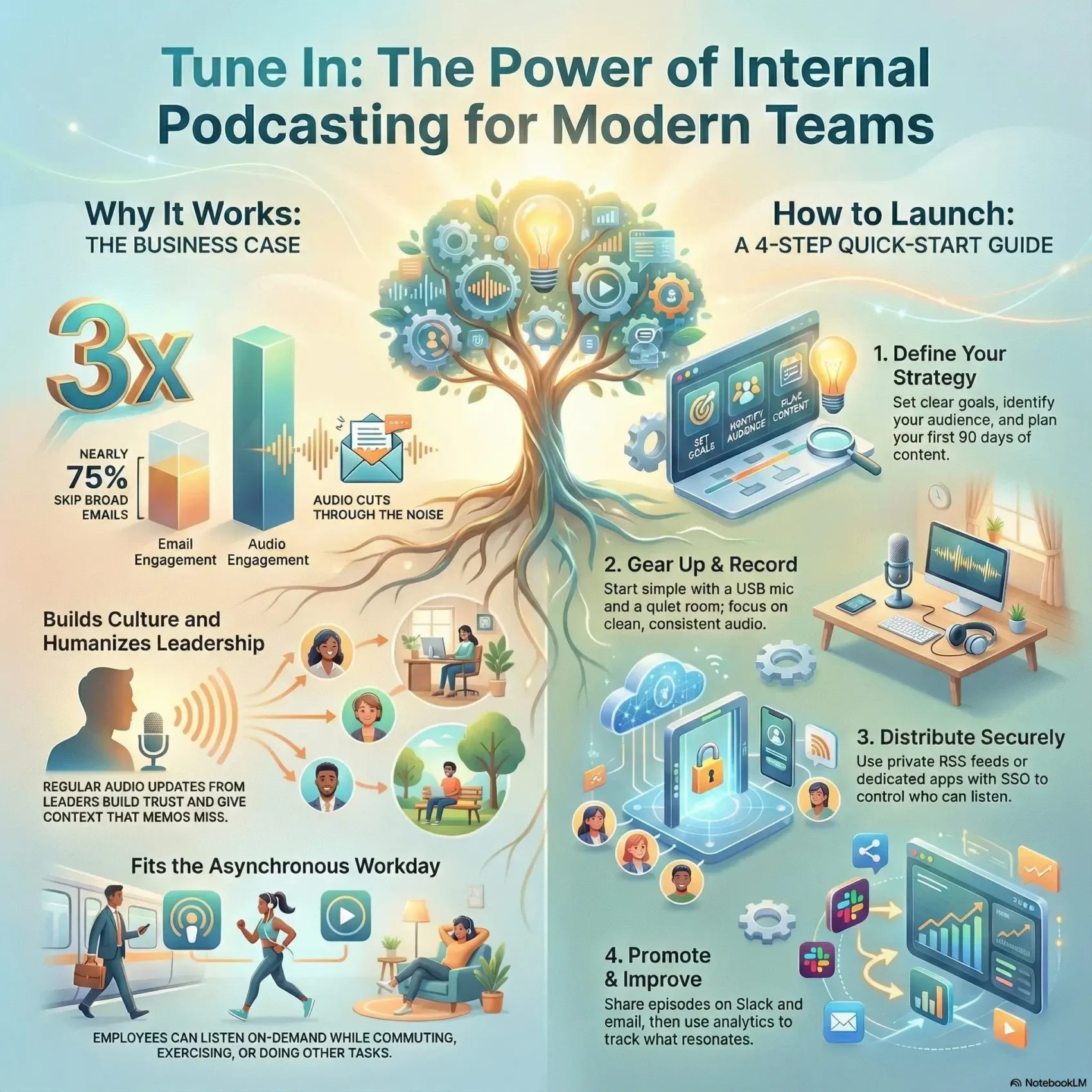
Last Updated on December 27, 2025
Audio updates give your company a steady, human voice that travels well across remote and hybrid work.
Podcast adoption has jumped: in 2025, 42% of Americans listened in the past month, up from 12% in 2013. That shift makes an internal podcast a practical channel for timely news and culture-building.
Reports show company shows often beat all-staff emails for attention. Nearly three-quarters of employees skip broad emails, while audio formats can get up to three times the engagement.
In this guide, you’ll learn what an internal podcast is, where it fits in your comms stack, and how to plan, produce, and distribute episodes securely. You’ll see examples from brands like American Airlines, Netflix, and Spotify so you can borrow proven formats.
Key Takeaways
- Audio updates offer on-demand engagement that fits busy schedules.
- Shows can outperform all-staff emails for reach and attention.
- You’ll get a step-by-step guide for planning and production.
- Secure hosting and SSO options help control access.
- Real company examples provide formats you can adapt.
What Internal Podcasting Is and Why It’s Surging Right Now
When people are spread across time zones, a recorded voice can unify messaging fast.
Definition: An internal podcast is a serialized show built mainly for your employees and partners. It can be private with access controls or public when transparency and recruiting matter.
These shows differ from public podcasts in focus. Public series target customers and markets. Your company-focused episodes center on priorities, policy updates, and culture.
Why audio fits remote and hybrid work
Audio works screenless and fits into busy days. People can listen while commuting, exercising, or doing heads-down tasks. That async nature helps teams across shifts and locations get the same information at roughly the same time.
- Access: private RSS feeds, SSO, or secure apps control who listens.
- Engagement: many employees prefer listening over meetings; shows can earn about 3x the attention of typical comms.
- Editorial flexibility: mix leadership Q&As, project highlights, and learning modules and choose per-episode public or private distribution.
Security and analytics matter: choose secure feeds or app-based delivery to track listens and protect sensitive content.
The Business Case: Benefits You Can Feel Across Your Company
When attention is scarce, a short audio update can cut through clutter and land your message. That one change shifts how people receive important information and it fits busy schedules.
Higher engagement than email and memos
Nearly three-quarters of employees skip broad emails. A focused episode can earn up to 3x the attention of standard comms. That higher engagement helps you land urgent updates and reduce follow-ups.
Culture building, transparency, and leadership access
Regular leadership voices—CEOs, VPs, and managers—humanize decisions. Short interviews and Q&As build trust and give context that static memos often miss.
Asynchronous learning and onboarding
Use a podcast series to welcome new hires, explain policies, and share benefits. Learning modules and compliance refreshers fit a quick commute or a walk. Transcripts and show notes boost accessibility and make content easy to revisit.
- Scales one clear message across the whole company.
- Analytics (completion, heat maps) show what resonates.
- Works across time zones without adding more meetings.
Use Cases That Work: From Onboarding to Change Management
Episodes that spotlight wins and learning give teams a simple way to stay aligned and celebrate progress. Use cases range from evergreen onboarding series to short change-management arcs that explain the why behind new directions.
Learning, thought leadership, and onboarding
Build a learning arc that scales. Create an onboarding playlist with evergreen content for new hires. Add thought leadership interviews with internal experts and outside guests to boost skills and ideas.
Project updates and cross-team wins
Publish short segments that showcase project wins and spotlight collaboration. These mini-episodes motivate people and reinforce priorities.
Change management and feedback loops
Run a mini-series to explain changes, timelines, and next steps. Pair episodes with a Q&A pipeline via Slack or intranet forms so you answer real questions and cut down on rumors.
- Map use cases: onboarding paths, policy explainers, L&D curricula, executive AMAs, and department spotlights.
- Rotate segments: field notes or voice-of-the-customer clips to surface frontline insights.
- Cadence tips: short weekly updates for momentum and occasional deep dives for complex topics.
For tips on listening and engagement that support this format, see active listening strategies. A thoughtful show structure is a practical way to drive clarity and lasting success across your company.
Plan Your Show: Goals, Audience, and Format That Fit Your Team
Start by deciding what success looks like for your show and which behaviors you want to change. Define outcomes—faster onboarding, higher completion on compliance, or clearer strategy awareness—and attach KPIs like completion rate, downloads, and feedback volume.
Match format to your listeners. Short, 5–10 minute updates work for frontline shifts. Deeper interviews of 20–30 minutes suit knowledge workers. Many company shows land between 20 and 60 minutes; weekly or biweekly cadence is a common starting point.
- Editorial calendar: build a 90-day plan with themes, hosts, guests, and recording dates.
- Scripting: use bullet outlines to keep pace tight while letting personality shine.
- Recurring segments: lock in bits like “Ask Leadership,” “Project Wins,” or “Customer Voice.”
Involve leaders regularly to boost trust and rotate employees to surface diverse perspectives. Use tools such as Riverside for producer access and shared workspaces so your producers can capture clean takes and streamline post-production. Set engagement goals, collect feedback, then iterate your content and cadence based on real results.
Build a Small but Mighty Production Team
Lean production keeps the focus on content and the listener experience. Start by naming a small crew who will own the show from idea to delivery. Clear roles make each episode faster to produce and easier to scale.
Host selection and coaching
Choose a host who is curious, concise, and comfortable on mic. Give coaching on pacing, active listening, and interview flow so hosts sound natural and confident.
“Practice with short mock interviews and review clips together to sharpen timing and tone.”
Editing, analytics, and promotion roles inside your company
Define core roles: a producer to run the show, an editor to polish audio, a marketer to promote episodes, and an analyst to track engagement and metrics.
- Identify bench hosts from across departments to keep voices diverse.
- Create a simple playbook for booking guests, prep questions, and collecting consent and bios.
- Train the team on recording tools, remote etiquette, and mic technique for consistent audio quality.
- Centralize assets—intros, music beds, and logos—in a shared workspace for faster turnaround.
Pro tip: Use tools like Riverside’s producer mode and shared workspaces so a producer can join sessions without being recorded while collaborating in real time.
Finally, build a promotion workflow with templated email, Slack, and intranet teasers. After each release, run a short retro to improve host performance, editing choices, and timing.
Set Up Your Recording Environment for Clean, Consistent Sound
Small changes to a room and mic placement deliver a big upgrade to your audio quality. You don’t need a studio—just a quiet space, basic equipment, and a simple routine.
Room choice, soundproofing, and mic technique
Pick a low-traffic room away from HVAC and street noise. Add rugs, curtains, and soft furnishings to cut reflections.
Optional acoustic foam panels help, but start with what you have. Monitor for background hums and run a quick test recording before guests arrive.
Position mics 4–6 inches from the mouth with a pop filter. Coach people to speak slightly off-axis to reduce plosives and keep distance steady.
In-person vs remote recording setups
For in-person sessions, seat guests to minimize mic bleed and use headphones so everyone hears levels in real time.
For remote interviews, pick a studio-quality platform that supports local recording and separate tracks. Riverside, for example, records locally, offers separate tracks, and supports up to 10 participants. Its producer mode lets a producer manage the session without being recorded.
“Do a quick checklist before every take: levels, room tone, and a backup recording.”
- Provide a remote kit guide: quiet space, headphones, stable mic placement, close noisy apps.
- Create a repeatable setup checklist so your team starts every session the same way.
- Have a troubleshooting flow: pause for latency, re-sync, and resume confidently.
Essential Equipment: Microphones, Headphones, and Nice-to-Haves
Good gear shortens setup time and keeps your show sounding consistent every episode. Start with simple choices that scale as your needs grow.
Good → Better → Best mic paths
Entry level: a Samson Q2U gives a dramatic upgrade over laptop mics and is USB/XLR ready.
Mid tier: pair a Shure SM58 with a Zoom H6 for flexible, road-ready recording and reliable tone.
Pro: choose a Shure SM7dB with a Zoom H6 or interface for broadcast-grade results when you need them.
Headphones, pop filters, mixers, and cameras
Use closed-back headphones for every host and guest to avoid bleed and catch issues early.
Add pop filters, boom arms, shock mounts, XLR/USB cables, and spare adapters to your accessory kit so sessions run smoothly.
- Nice-to-haves: simple mixers for live SFX, studio lights, and a camera like the Sony a5100 for video versions.
- Standardize kits: create loaner packs and document gain settings and mic distance for consistent sound.
- Platform note: Riverside supports up to 4K video and WAV at 48kHz for high-quality recording and file delivery.
Software Stack: Recording, Editing, and Collaboration Tools
Pick tools that let you capture studio-grade audio even when guests join from far-flung places. The right software reduces rework and keeps your show consistent.
Studio-quality remote recording platforms
Choose a studio-grade remote platform with local recording so internet issues don’t tank your quality. Look for separate tracks per speaker, local WAV backups, and support for multiple participants. Riverside, for example, records locally, supports up to 10 participants, and captures 4K video and 48kHz audio.
Editing workflows and text-based editors
Adopt text-based editing to speed up post-production. Edit the transcript to remove “ums” and pauses and let the media update automatically.
Brand and caption easily with templates for intros, music beds, and lower-thirds so every episode matches your style.
Shared workspaces and producer mode for smoother sessions
Use shared workspaces so hosts, producers, and editors can leave notes and track revisions. Producer mode helps a producer manage guests, monitor levels, and deploy live clips or music without being recorded.
- Record separate tracks for precise leveling and noise reduction.
- Leverage Magic Clips or Media Board to craft quick teasers for Slack and email.
- Ensure continuous cloud upload for backup during long multi-guest recordings.
For workflow tips that help you organize audio notes and episode assets, see audio notes organization. Good platforms and clear processes will keep your podcast production fast, reliable, and measurable with basic analytics.
Hosting, Platforms, and the RSS Feed Explained
Your choice of host shapes who hears episodes and how you measure impact. Pick a solution that balances security, analytics, and a smooth listen experience.
Private vs secure: what’s the difference?
Private feeds are unlisted and shareable. You can give links to teams and they plug the feed into their apps.
Secure feeds add authentication. They use tokens or SSO so only authorized staff can access episodes.
How RSS works for company shows
Your host generates an RSS that approved listeners subscribe to. When you publish, apps fetch new episodes automatically.
Popular platforms and when to use each
- Storyboard: app-based listening, deep analytics, and feedback tools for high adoption.
- Supporting Cast / Supercast: secure private RSS for protected content.
- Transistor: simple private feeds for smaller teams.
- Podbean, Simplecast: flexible privacy and SSO options.
- uStudio: enterprise app with advanced security and analytics.
SSO and admin considerations
Use SSO so you can deprovision access when roles change. Aim for a frictionless subscribe flow—fewer steps raise adoption.
“Document your security posture and analytics plan for stakeholders.” Track completion and listener-level signals to guide future episodes and scale multiple shows with centralized admin.
Distribution Made Easy: Getting Episodes to Your Employees
Getting episodes into employees’ players should feel like a single, simple step. Make subscribing easy and you’ll see faster adoption across the company.
Adding private feeds to common podcast players
To add a private RSS, copy the unique URL from your host and paste it into “Add by URL” in supported apps. The feed will auto-update when you publish new episodes.
Supported players include Apple Podcasts, Overcast, Pocket Casts, Castro, and Downcast on iOS. On Android, try Castbox, Pocket Casts, and Podcast Addict. Note that Spotify, Google Podcasts, and Stitcher don’t accept manual RSS links.
When a dedicated app makes sense
If you need deeper analytics and feedback, a dedicated platform helps. Tools like Storyboard provide app-based listening, listener comments, and rich metrics. Podbean and Podbean Enterprise support SSO for smoother sign-in.
“Provide a one-pager with screenshots to reduce friction and IT tickets.”
- Use SSO where available to cut password friction for employees.
- Create separate feeds for Sales, Engineering, and Leadership to keep content relevant.
- Promote subscribe links via email, Slack, intranet, and onboarding portals.
Track adoption by team and send quick getting-started nudges where needed. This is the easiest way to turn a good show into a widely heard company podcast.
Recording and Editing: From Raw Audio to a Polished Episode
Turn raw takes into a focused, listener-friendly episode with a clear structure and tidy edits. Use a simple run of show to map segments, timing, transitions, and CTAs so your host and guests know the flow and you keep the episode tight.

Run of show, intros/outros, and sound design choices
Build a run of show with timed segments and clear handoffs. Record branded intros and outros once and reuse them to save time and keep tone consistent.
Choose a light sound palette — subtle music beds, stingers, and sparing SFX that support clarity without stealing attention. Update seasonally to keep the show feeling fresh.
Editing for clarity, pace, and engagement
Edit to remove filler, tighten long answers, and fix misspeaks. Text-based editors let you delete lines right from the transcript so you work faster and listen less during post.
- Level voices: reduce background noise, apply light compression and EQ for a broadcast-friendly finish.
- Use tools wisely: Riverside’s built-in editor supports branding, captions, and Magic Clips for short promotional assets.
- Publish extras: add captions for video, show notes with links, and a predictable timeline so stakeholders know when the final cut arrives.
Promote Internally: Drive Awareness and Ongoing Engagement
Make the show impossible to miss by tying it into the channels your teams already use. Use a simple launch playbook so employees can subscribe fast and start listening.
Start with executive endorsement and clear instructions. Send a short email that links to a one‑page intranet hub. Post the same subscribe steps in Slack channels and mention the show briefly in team or all‑hands meetings.
Launch playbook: email, Slack, intranet, and meetings
- Create a dedicated intranet page with an embeddable player, FAQs, and an episode index so people can catch up at their own time.
- Draft a launch email with a 30‑second teaser clip and simple subscribe steps for common apps.
- Have leaders play a short trailer during meetings to give the show an immediate, human push.
Episode teasers, clips, and call-to-action ideas
Use Magic Clips or similar tools to pull short, shareable highlights from each episode. Post those clips in Slack, on digital signage, and inside your intranet page to boost reach.
“Repurpose short clips and pull quotes to keep momentum between releases.”
- Ask for questions and topic suggestions as a simple CTA so employees feel involved.
- Recognize guests and featured teams to encourage sharing and word of mouth.
- Track which channels drive the most plays and completions, then double down on the most effective mix.
Small incentives—like a listening milestone contest—can lift early adoption. Over time, repeatable promotion in email, Slack, and meetings will keep engagement steady and make the podcast an easy way for people to stay connected to your company.
Measure What Matters: Analytics, Feedback, and Iteration
Measure what lands and what slips away so you can focus your energy on the episodes that actually move people. Use simple, repeatable metrics to learn fast and improve your show week to week.
Key metrics to watch
Start with a small set of reliable numbers. Track downloads and unique listeners. Watch completion rates and episode heat maps to see where attention rises or drops.
- Downloads & unique listeners: raw reach per episode.
- Completion rate (benchmark ~60%): shows if your content holds attention.
- Heat maps: reveal exactly where people skip or re-listen.
Collecting feedback and iterating
Combine platform analytics with quick polls or built-in feedback tools. Storyboard, for example, offers listener-level analytics and feedback features you can use to learn which topics and formats resonate.
Segment results by department or region to tailor content and boost engagement. Watch early listens in the first 48 hours as a lead indicator of promotion effectiveness.
“Use data to refine timing, segment length, and hosts—then tell people what you changed.”
Share highlights with leadership and close the loop with your audience by announcing improvements based on their input. This keeps employees invested and turns raw information into ongoing improvements for your podcast and company communications.
internal podcasting Success Stories You Can Learn From
Real company shows prove audio can explain complex decisions with clarity and empathy. Below are short examples you can borrow to shape your own show.
American Airlines: leadership context
Tell Me Why answers employee questions and explains leadership choices. The brand pairs audio with internal video to add visual context and boost engagement.
Netflix: culture and recruiting
WeAreNetflix focuses on culture, feedback, and careers. The series doubles as a recruiting asset while giving people candid insight into company norms.
Deloitte, Spotify, and Trader Joe’s: varied goals
Deloitte’s The Green Room targets big-picture thinking and values alignment across a global workforce.
Life at Spotify showcases career paths and innovation to strengthen employer brand.
Trader Joe’s uses a public podcast to answer customer questions and spotlight products, which also fuels internal pride.
“Leadership Q&A segments, behind-the-scenes bits, and topic arcs keep momentum across seasons.”
- Formats to try: recurring leadership updates, employee stories, and short topic arcs.
- Distribution: use public feeds for transparency and portals or secure feeds for extra context.
- Action items: schedule regular leader Q&As, rotate frontline voices, and pair episodes with a one‑page summary of key information.
DIY vs Agency: Choosing the Right Path for Your Company Podcast
Choosing DIY or an agency affects how quickly you can launch and how polished each episode will sound. Start by mapping your budget, available time, and the skills your team already has.
DIY works well when you have capable hosts, an editor, and a producer. It keeps costs lower and gives you full creative control. You’ll still need equipment, a reliable toolset, and time to maintain a steady cadence.
Agencies add scale and speed. Firms like Quill and Lower Street offer concepting, scripting, full production, post, distribution, and promotion. They bring expertise, consistent quality, and equipment — useful when executive messages or brand reputation are on the line.
- Tipping points: executive stakes, complex storytelling, multi-show portfolios, or enterprise security needs.
- Total cost of ownership: include gear, software, training, and staff time — not just agency fees.
- Blend the approach: keep routine updates in-house and outsource launches or special series.
Run a short pilot to test workflows. If you hire an agency, negotiate clear SLAs and KPIs so the partnership aligns with your business goals and people expectations.
Conclusion
When you align format, distribution, and cadence, a show becomes a steady company signal. Use this guide to create internal podcast programming that reaches employees where they are and wins attention faster than broad email.
Start small: define one clear goal, record a pilot, and validate audio and flow. Pick a secure distribution path—private RSS or a dedicated app like Storyboard or Transistor—so you control access and analytics.
Standardize gear (Samson Q2U → Shure SM7 with Zoom H6) and a repeatable recording checklist so every episode sounds professional. Build a simple calendar, assign roles, and promote in the tools people already use.
Measure, iterate, and keep leaders in the mix. You’re ready to create internal podcast momentum fast; refine as you learn what truly resonates with your teams.