Tools
Tools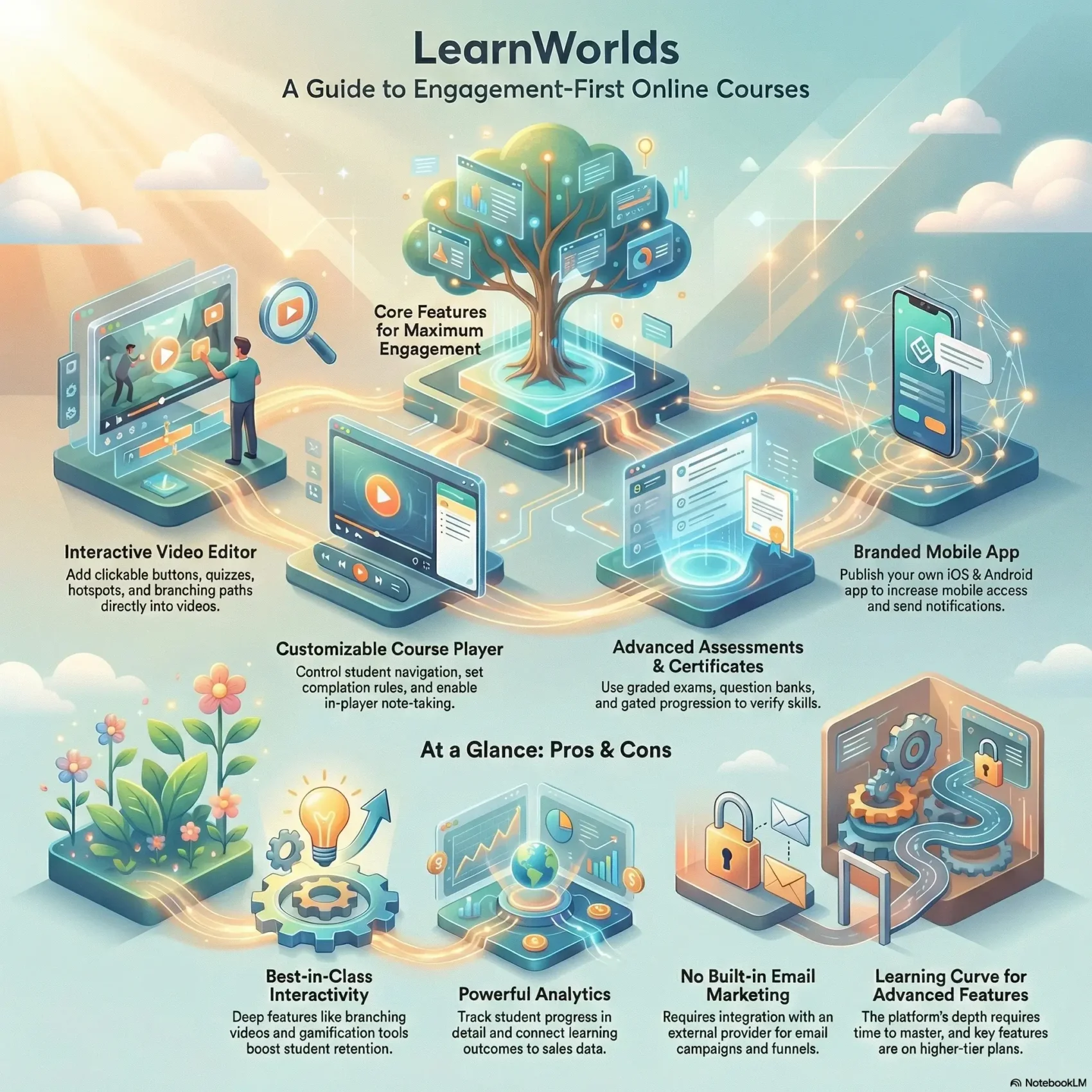
Last Updated on January 24, 2026
You want a clear picture of this course platform before you commit time or money. This short introduction shows what the platform does best right now and what to expect as you build your online course.
The site combines a drag-and-drop course builder, an interactive course player, and tools for assessments and analytics. You can structure content into sections and learning activities and publish pages on a unified website with funnels and popups.
Hands-on features like in-player notes, clickable hotspots, branching videos, and certificates aim to boost student engagement. The platform also connects to email providers, Zoom, Zapier, and popular video hosts so your workflow stays simple.
Pricing tiers start with an affordable starter plan per month and scale to options that add a branded app and advanced interactive tools. This review will guide your course creation path, explain which features matter most, and help you decide when to upgrade.
Key Takeaways
- Interactive delivery: The player and video tools raise engagement and learning outcomes.
- Course creation made clear: Builder, sections, and activities help you move from idea to launch.
- All-in-one site: Pages, funnels, and a blog keep your course and marketing in one place.
- Growth tools: Integrations, analytics, and automations simplify scaling and sales.
- Choose by need: Starter plans cut costs; higher tiers add apps and advanced features.
Why You’re Here: What This LearnWorlds Review Covers
You want a clear path to choose a course platform that fits your goals and budget. This section helps you map must-have features, nice-to-have options, and realistic timelines for launch.
What we cover:
- Where key tools live — course builder, player, interactive videos, assessments, and site page setup.
- How to match feature depth to your first course versus upgrades you can add later.
- How pricing and plan choices affect transaction fees and app access.
Quick guide: you’ll get practical tips for mapping content, preparing media, and testing the student learning experience during the 30-day free trial.
“Which features do you need on day one, and which can wait?”
By the end, you’ll know which questions to ask about timeline, engagement, and pricing so you can pick the best option for your course creation path.
Quick Verdict: Is LearnWorlds the Right Course Platform for You?
Creators who want dynamic, hands-on learning will find a strong set of features for building interactive courses.
Best fit: engagement-first creators, teams, and corporate learning centers. The platform shines with an interactive course player, branching videos, gamification, community tools, assessments, and deep reporting.
Try-before-you-buy: use the 30-day free trial to build a small pilot course and test the full student experience before you commit. That trial gives core features so you can validate workflows, assessments, and branding.
Start your free 30-day trial- Solo creators: fast edge on engagement with interactive video and gamified paths.
- Teams and schools: role-based access, automations, and structured workflows scale cleanly.
- Corporate centers: SCORM/HTML5, SSO, APIs, and white-label apps meet enterprise needs.
If you prefer a true all-in-one with built-in email, note this platform integrates rather than replaces your toolset. For most creators, the Pro Trainer plan hits a solid middle ground. Upgrade as your interactivity and reporting needs grow.
“If you want to design a dynamic learning experience and are ready to use deeper tools, this is a top choice.”

LearnWorlds Review: Platform Highlights That Stand Out
This platform stands out for tools that turn simple lessons into highly interactive learning moments. You can add clickable buttons, hotspots, quizzes, branching paths, transcripts, and overlays directly inside video lessons to raise retention.
Engagement-first approach
The course player is highly customizable. Change skins, control navigation, and set completion rules so learners follow the path you design.
All-in-one site builder
Drag-and-drop themes, funnels, popups, forms, and a blog let you build marketing pages without extra platforms. Use popups and funnels to convert visitors into sign-ups.
Mobile app and admin tools
The branded iOS/Android app is an option on the Learning Center plan, giving mobile access without custom development.
Reporting, question banks, and roles
Deep analytics track progress, segments, and sales. Question banks and flexible roles help you scale with instructors and affiliates.
- Top features: interactive videos, course player control, site tools, mobile app option, and analytics.
“These highlights make the platform a top choice when you want to elevate learner interaction.”
Course Creation Deep Dive: Sections, Learning Activities, and Templates
Organize your material into purposeful sections so every lesson has a defined role in the learner’s journey.
From idea to structure:
From idea to structure: sections vs. learning activities
You’ll map your course into sections and learning activities so each page and unit fits the bigger design.
Sections act like chapters. Activities are the specific tasks inside them — videos, PDFs, or assignments.
Interactive options to increase engagement
Choose from interactive video, ebooks, diaries, live sessions, graded exams, and text or video assignments.
Add certificates and pair them with assessments to gate progress and reward milestones.
Drip schedules, access types, and pricing that convert
Set access types—free, paid, private, draft, or coming soon—and add discounts to boost conversions.
Use drip schedules by date or enrollment timing so learners receive content at the right pace.
- Templates: Welcome Activity, Instructor Evaluation, and interactive Diary speed creation.
- Rich content: PDFs, audio, and Slideshare embeds support varied learning styles.
- Preview: Always preview activities in the course player before launch.
“Expect a lot of flexibility — it rewards thoughtful design and saves time with smart templates.”
Course Player Experience: How Your Students Actually Learn
A well-designed course player turns passive videos into guided learning moments. It controls navigation, shows where learners are, and offers tools that make content stick.
Skins, navigation control, and completion rules
You can pick skins and enable or disable elements like the progress bar, learners tab, and discussions. Choose free navigation or set sequential rules so students follow a path.
Completion rules force key steps before moving on. That helps you protect critical material and shape a predictable user flow.
Built-in note-taking, highlights, and social sharing
Students can highlight text, add notes, and share snippets to social channels. Those features boost retention and help drive word-of-mouth.
The sidebar lists sections and activities so learners always know what’s next. In-video prompts and action buttons keep learners on task without wasting time.
- Mix content: standard lessons and interactive activities create a dynamic course experience.
- Preview early: test the player while you build to spot friction before launch.
- Access control: set who sees what by plan or enrollment to protect premium material.
“A guided, supportive player respects learners’ time and makes your course feel purposeful.”
Interactive Videos: Build Branching, Hotspots, and Table of Contents
Interactive video tools let you turn passive clips into choices that guide each learner’s path. Use the editor to add interactivity where it matters so your content stays focused and purposeful.
Inside the video editor you can insert clickable buttons, info hotspots, and multiple-choice hotspot questions. These elements keep learners working inside the player instead of navigating away.
Clickable buttons, quizzes, and gamified paths
Add a single button to jump to resources or branch learners to a new topic. Use MCQ hotspots to check understanding and gate progress with gamified paths.
- You can add clickable buttons, hotspots, and quizzes right inside your video to maintain focus.
- Build branching paths so learners choose options and shape their own learning journey.
- Pick where interactivity belongs—don’t overload every clip.
Transcripts, timestamps, and overlays to improve retention
Generate interactive transcripts and create a table of contents with chapter markers and timestamps. Learners revisit sections faster and retain more when content is easy to scan.
Overlay videos with embeds or pop-ups to offer timely resources like PDFs or links. Save edits once and they push instantly to the course player so changes go live without extra steps.
Create your first interactive video“Use interactivity sparingly and strategically — it should enhance learning, not distract.”
Assessments, Certificates, and Question Banks
Clear assessment workflows help you confirm mastery and control who moves forward in a course. You get graded exams, file/video/audio assignments, and self-assessments to match different learning goals.
Grading, SCORM, and gated progression
Use the right format — from SCORM/HTML5 packages to simple text or video submissions. That flexibility makes it easy to include interactive widgets inside a course.
Set minimum passing scores and restrict access to the next section until learners pass. This enforces mastery and keeps your content sequence intact.
Review Center, Gradebook, and exports
The Review Center queues submissions for grading and feedback so instructors stay organized. The Gradebook shows course-wide results and supports exports for audits or stakeholder reports.
- Choose graded exams, file/video/audio submissions, or self-assessments.
- Enforce passing scores and gated progression between sections.
- Streamline grading with the Review Center and the Gradebook overview.
- Store reusable questions in Question Banks for consistent quality across courses.
- Issue certificates to motivate students and mark achievement.
“Assessments should verify skills, not just measure time spent.”
Website and Page Builder: From Home Page to Sales Funnels
Your course site should convert visitors into students, and the page builder puts conversion tools where you need them. Use the editor to quickly assemble a cohesive website with consistent fonts, colors, and buttons across every page.
Drag-and-drop simplicity makes creation fast. Pick from polished templates—about, pricing, contact, or thank-you—and swap in widgets like buttons, timers, sliders, and forms.
Drag-and-drop pages, templates, and theme-wide styling
Theme Explorer lets you apply site-wide styles so your website looks like one brand from homepage to checkout. You can change fonts and colors once and push them across every page.
Popups, forms, blog, and landing pages for conversions
The platform includes funnels, a popup builder, and a form creator to capture leads. Publish a blog to fuel SEO and nurture your audience between launches.
- Build fast: launch landing pages from templates to test offers quickly.
- Convert more: add popups, timers, and forms on key pages to capture emails.
- Brand control: use a custom domain on paid plans so your online course site looks professional.
Build your high-converting course site“Organize content clearly so visitors find the right course in fewer clicks.”
User Management, Marketing Tools, and Integrations
Define roles, set permissions, and let automations do repetitive work so you focus on content. A clear user model keeps admins, instructors, and affiliates working without overlap.
Roles are precise: assign admins, course creators, instructors, assistant instructors, reporters, seat managers, and affiliates with custom permissions. This reduces risk and speeds workflows.
Roles and automations for admins, instructors, and affiliates
Automations enroll users, send extra materials to those who fail, and trigger follow-ups. Use rules to grant access after payment or to re-engage struggling learners automatically.
Bundles, subscriptions, coupons, and lead capture
Package multiple courses into bundles, offer subscriptions or memberships, and drive sales with coupons. Capture leads on any page and route them into your email program or CRM.
Email, live sessions, analytics, and social proof integrations
Connect popular email platforms like Mailchimp or ActiveCampaign and run live sessions via Zoom or Webex. Track behavior with Google Analytics or Mixpanel, add a Facebook pixel for retargeting, and layer social proof with Fomo.
“Keep your website and marketing stack connected so funnel data flows cleanly from opt-in to enrollment.”
- Set precise roles so teams focus on the right tasks.
- Use automations to reduce manual enrollment and re-engagement work.
- Sync leads and course sales with your preferred email and analytics tools.
- Extend workflows with Zapier and embed Vimeo/Wistia videos for better delivery.
Analytics and Reporting: Progress, Segments, and Sales
Good reporting shows not just enrollments, but how much time learners actually spend on your content.
User progress, time-on-platform, and certificate tracking
The Reports Center tracks study time, completions, and issued certificates so you can spot who moves forward and who stalls.
See average scores, completed vs. incomplete items, and per-activity logs. Those views help you coach individual user journeys and celebrate wins.
Course insights, top courses, and scheduled reports
Course Insights show enrollments over time and highlight your top courses. Sales, orders, and revenue reports link learning outcomes to business results.
- Track time-on-platform, completions, and certificates to map progress.
- Compare users by segment to learn which cohorts engage best and where to improve.
- Review course insights to monitor enrollments and identify top courses quickly.
- Pull sales and revenue reports to connect education to cash flow.
- Use event and email logs to troubleshoot and protect the learner experience.
“Combine these reports into a feedback loop that tells you where to invest next.”
Mobile App and Learning Apps: Community, Gamification, and More
Give learners a native-feeling mobile app so they can study on the go and stay connected between sessions.
If you pick the learning center plan or above, you can publish a branded iOS/Android app without coding. Customize colors, icons, and launch it from your dashboard to the App Store and Google Play.
Core mobile features include push notifications for new video lessons, live sessions, and reminders that help increase completion rates for students.
Learning Apps that spark engagement
- Community: private social feeds and profiles to build peer connection.
- Gamification: badges, milestones, and leaderboards to reward participation.
- Daily News & Best Resources: RSS-driven updates and a searchable resource library.
- People Directory: let learners find instructors and peers quickly.
Decide if mobile is critical for your audience now or a later roadmap item. Keep app content aligned with your site and course experience for a seamless brand journey.
“Use app analytics and push cadence to refine what notices and content drive the best engagement.”
Pricing and Plans: Starter, Pro Trainer, Learning Center, and Corporate
Your monthly choice determines transaction fees, site pages, and whether you can publish an app.
Monthly pricing, transaction fees, and feature unlocks
Starter: $29/month ($24 billed annually). Includes a 3-page website, exams, ebook pages, one admin, and a $5 fee per course sale.
Pro Trainer: $99/month ($79 annually). No transaction fees, unlimited pages and courses, a customizable course player, live classes, subscriptions, and up to five admins.
Learning Center: $299/month ($249 annually). Adds interactive videos, advanced assessments, unlimited SCORM/HTML5, and Android/iOS app publishing with APIs and automations.
High Volume & Corporate: Custom pricing, daily backups, premium servers, unlimited admins, and a dedicated success manager.
Who should choose each plan
Starter is best when you want low-cost pricing to test ideas. The page limits and fees make scaling harder.
Pro Trainer fits most creators: no fees, stronger monetization options, and the tools to sell courses and subscriptions.
Learning Center is for teams that need interactive videos, app publishing, and enterprise integrations.
- Tip: Use the 30-day free trial to validate content and workflows before you commit.
- Revisit your plan as you grow — upgrades are straightforward when you outgrow a tier.
Compare plans & pricing“Match monthly cost to your roadmap: testing, scaling, or enterprise needs.”
Support and Onboarding: How Fast You Get Help
Fast, clear help shortens the time it takes to launch your course and reduces guesswork during setup. You’ll find friendly support inside the admin widget that answers common setup questions and points you to the right tools.
The platform pairs general customer support with technical teams for deeper issues like integrations or unexpected site behavior. Users report replies within hours and step-by-step guidance that speeds onboarding.
Engage support early — during your trial and first month — to validate best practices for email integrations, live sessions, and site settings. Start with documented guides, then escalate via the widget if you hit a wall.
- Quick help: in-admin support for setup and usage questions.
- Technical support: digs into integrations and site glitches.
- Proven responsiveness: praised on G2 and Product Hunt for fast feedback.
- Better launch time: quick answers shorten your path to a live website.
“Fast feedback shortens time to launch and smooths onboarding for teams and users alike.”
Who LearnWorlds Is Best For (and Who Should Skip It)
Pick this option when interactivity, assessments, and community tools are core to your course strategy. If you are a creator focused on engagement, the platform gives students branching videos, gamification, and strong assessment flows to boost retention.
Teams and organizations benefit from role-based permissions, automations, and deep reporting. These features make scaling easier and keep workflows tidy when multiple people manage content and learners.
Corporate training programs gain from SCORM/HTML5 support, APIs, and white-label options that many other platforms lack. That makes this a solid choice when compliance and integrations matter.
When to consider other options: if you need a course platform with built-in email and all marketing tools bundled, check alternatives that include native email campaigns. Also, if your offering is simple and non-interactive, a lighter platform may be cheaper and faster to launch.
- Try the 30-day trial to confirm the learning experience and workflows match your needs.
- Start on Pro Trainer if pricing and avoiding transaction fees matter as you scale.
“Think first about how your student will learn — pick the platform that supports that path.”
Pros and Cons Based on Hands-On Testing
After building sample lessons and testing the player, you’ll have a clear sense of where the platform wins and where it asks for extra setup.
Where it shines for engagement and interactivity
Best-in-class interactivity: The interactive video editor and branching options let you add hotspots and choices that keep learners active in a course.
The customizable course player and diverse activity types give you a lot of control over pacing and student flow.
Analytics and community: Deep reporting helps you optimize content and marketing with confidence. Community and gamification tools also boost motivation and repeat usage.
Trade-offs: email, complexity, and higher-tier features
There is no built-in email tool, so you must connect an external provider and test enrollment flows carefully.
The platform offers a lot of features, which means a short learning curve. Expect to spend time during setup to use the tool well.
Some top capabilities — like advanced interactive videos and mobile app publishing — are reserved for higher plans. Factor that into your budget and timeline.
- Pros: branching videos, hotspots, engaging course player, and many activity types.
- Pros: strong analytics that link learner behavior to sales and marketing outcomes.
- Pros: community and gamification tools that keep learners coming back.
- Cons: no native email; integrations required for campaigns and funnels.
- Cons: feature depth can feel like a lot initially; plan onboarding time.
- Cons: select advanced features are on higher tiers, raising costs for some use cases.
“If engagement is your main aim, this platform sits near the top; just plan for setup time and external tool connections.”
Conclusion
In short, choose a course platform that helps you build, test, and improve your online course fast. Pick tools that make publishing a page and tracking student progress simple.
The platform’s strength is its interactive player, video editor, assessments, and analytics. Those features raise engagement and give you data to improve the learner experience.
Start with a plan that fits your launch budget and use the 30-day trial to build a small pilot. Expect to connect your email tool, then focus on iterating based on real learner data.
Bottom line: this learnworlds review finds the platform easy to recommend for creators who value engagement and data-driven growth. Use the trial to confirm the experience before you commit.
Launch your online academy today